Grow by Skill-Lync: Free Lessons from 149 Courses and 5 Full Free Courses
Grow by Skill-Lync now has 470 free video lessons from 149 Skill-Lync courses in 16 domains, plus 5 complete courses free on YouTube. Counted from the site's own catalogue on 18 Nov 2026: every course by domain with links, what is free and what is paid, how certificates work, how to start, and how the free lessons fit with paid courses.
Grow by Skill-Lync, now at skill-lync.com/grow, has 470 free video lessons from 149 Skill-Lync courses in 16 domains, 217 h 29 min of video in all. It also lists 5 complete courses that are free on Skill-Lync's YouTube channel (43 h 38 min). Only the opening lessons of the 149 courses are free, three in most of them. The rest of each course is paid, and the free lessons do not come with a certificate. To start, open a course page and leave your details once. There is no payment.
The counts here come from the Skill-Lync site's own catalogue data, the same files that build the /grow pages, as of 18 Nov 2026 (the lesson catalogue was last edited on 16 Nov 2026). This article first appeared in January 2023 and described "50+ courses" on the old grow.skill-lync.com. That site now redirects to skill-lync.com/grow, so the article has been rewritten around the catalogue as it stands today.
In short (catalogue data, 18 Nov 2026)
- 149 courses with free lessons across 16 domains. Civil and structural has the most (31), then CAD and design (19) and medical technology (16).
- 470 free lessons, 217 h 29 min. That is 8.8% of the 2,469 hours of video in the full courses. 140 of the 149 courses give 3 free lessons, and the most generous gives 9.
- 5 full courses free on YouTube: CATIA V5, EV simulations in Ansys, digital electronics, Li-ion battery pack design and an EV crash course. Together they run 43 h 38 min over 232 chapters and had 38,26,753 views by 18 Nov 2026.
- Certificates: none for the free Grow lessons. The paid course includes one. For the YouTube courses, Skill-Lync asks you to request a certificate through a counsellor form.
- Cost of going further: each of the 149 linked paid courses lists ₹40,000 as its first plan in the site's course data (17 Nov 2026).
What is Grow by Skill-Lync today?
Grow by Skill-Lync is Skill-Lync's public catalogue of free lessons. It takes the first lessons of its recorded courses and makes them free to watch, and it lists the complete courses Skill-Lync has published on YouTube. Each course gets its own page at /grow/<course>. That page has the free lessons, the full outline of the paid course and a transcript for every free lesson.
The name goes back to January 2023, when Skill-Lync launched Grow as a separate site, grow.skill-lync.com. The original version of this article described what that site offered then: courses, a certificate per course, assessments, workshops, job postings and a referral scheme. None of those features is part of today's /grow catalogue, so their old claims are not repeated here. Two practical points from the current site:
- grow.skill-lync.com returns a permanent (301) redirect to skill-lync.com/grow (checked 18 Nov 2026).
- If you enrolled on the old Grow, the /grow page says your courses, progress and certificates are in the Skill-Lync learning platform. Log in at lms.skill-lync.com with the same email.
How many free courses does Grow by Skill-Lync have?
Grow has 149 courses with free lessons, plus 5 complete free courses on YouTube, which makes 154 course pages under /grow. To be precise about "free": the 5 YouTube courses are free from start to finish. Of the 149 Grow courses, only the opening lessons are free.
The 149 Grow courses fall into 16 domains:
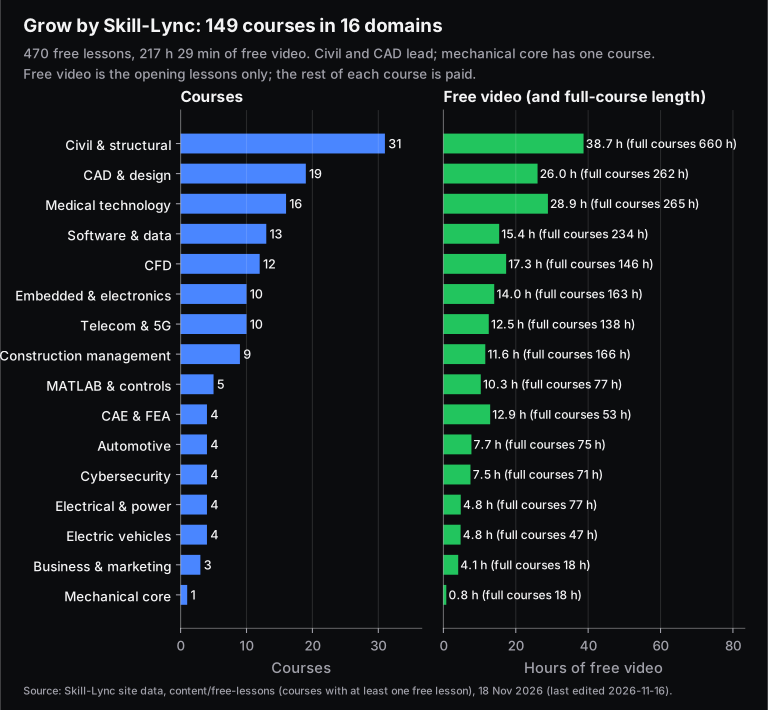
| Domain | Courses | Free lessons | Free video | Full courses (paid) |
|---|---|---|---|---|
| Civil & structural | 31 | 93 | 38 h 44 min | 1,533 lessons, 660 h |
| CAD & design | 19 | 58 | 26 h 1 min | 591 lessons, 262 h |
| Medical technology | 16 | 66 | 28 h 53 min | 635 lessons, 265 h |
| Software & data | 13 | 39 | 15 h 25 min | 618 lessons, 234 h |
| CFD | 12 | 38 | 17 h 20 min | 377 lessons, 146 h |
| Embedded & electronics | 10 | 30 | 14 h 3 min | 423 lessons, 163 h |
| Telecom & 5G | 10 | 30 | 12 h 32 min | 303 lessons, 138 h |
| Construction management | 9 | 27 | 11 h 35 min | 393 lessons, 166 h |
| MATLAB & controls | 5 | 15 | 10 h 20 min | 138 lessons, 77 h |
| Automotive | 4 | 12 | 7 h 45 min | 147 lessons, 75 h |
| CAE & FEA | 4 | 12 | 12 h 56 min | 60 lessons, 53 h |
| Cybersecurity | 4 | 12 | 7 h 29 min | 146 lessons, 71 h |
| Electric vehicles | 4 | 14 | 4 h 45 min | 168 lessons, 47 h |
| Electrical & power | 4 | 12 | 4 h 48 min | 225 lessons, 77 h |
| Business & marketing | 3 | 9 | 4 h 5 min | 42 lessons, 18 h |
| Mechanical core | 1 | 3 | 48 min | 50 lessons, 18 h |
| All domains | 149 | 470 | 217 h 29 min | 5,849 lessons, 2,469 h |
Three things stand out:
- Civil and CAD dominate. Civil and structural (31 courses) plus construction management (9) make up 40 of the 149 courses. Between them they cover building, bridge, metro and road design in STAAD.Pro, ETABS, Revit, Tekla and AutoCAD, plus scheduling in Primavera P6. CAD and design (19) is mostly automotive work in CATIA V5 and Siemens NX: body-in-white, sheet metal, wiring harness and lighting.
- "Mechanical core" is thin, but mechanical engineers have more than it looks. Only one course (thermodynamics) carries that label. CFD (12), CAE and FEA (4), automotive (4) and most of CAD and design are mechanical subjects too.
- Not everything is engineering. Business and marketing (3 courses: content marketing, digital marketing, SEO/SEM) and cybersecurity (4) are in the same catalogue.
What exactly is free, and what is paid?
Three things are free: the opening lessons of 149 courses on Grow, 5 whole courses on YouTube, and the transcripts and course outlines on every Grow page. The rest of each Grow course is paid: the later lessons, the projects and the certificate. Here is what you get from each, as the site describes it:
| Grow free lessons | Full courses on YouTube | Paid Skill-Lync course | |
|---|---|---|---|
| What you get | First lessons of a course (3 in 140 of 149 courses; up to 9), a transcript for each, and the full outline | The whole course, with a chapter guide and timestamps on its /grow/youtube page | Every lesson, plus the projects and assignments that come with enrolment |
| Cost | Free | Free | ₹40,000 first listed plan for each of the 149 linked courses (site data, 17 Nov 2026) |
| Sign-up | A one-time details form before the first lesson plays. No payment | None. You can also watch on YouTube | Through a counsellor. The site has no online checkout |
| Certificate | No | Request it through the counsellor form on the course page | Yes, with mentor-reviewed projects |
The free share is small, and it helps to see how small. Across the 149 courses, the full courses hold 5,849 lessons and 2,469 hours of video. The free lessons are 470 of those lessons and 217 h 29 min, about 8.8% of the video. Some courses also share opening sessions: CATIA for Medical Product Design, for example, starts with the Basics of CATIA V5 sessions. So the 470 free lessons are 416 distinct videos, about 198 hours of unique content. That is still a lot of free teaching, but it is a sampler of each course, not the whole course.
Do you get a certificate from Grow by Skill-Lync?
No, not for the free lessons. The /grow page says plainly that Grow does not offer free courses or free certificates. A certificate comes with the paid course, along with the remaining lessons and mentor-reviewed projects. The 5 YouTube courses are different. Their video descriptions carry a "claim your certificate" link, which now opens the course's /grow/youtube page, and that page asks you to leave your details so a counsellor can call you about a certificate. It does not promise an instant free certificate, so don't count on one.
Certificates you earned on the old grow.skill-lync.com are in your account at lms.skill-lync.com.
How do you start a free course on Grow?
Open skill-lync.com/grow, pick a course and press "Start free lesson 1". Before the first video plays, a short form asks for your details once. After that, every free lesson on Grow plays straight away in that browser. The steps:
- Filter by domain. The /grow page has domain chips (CFD, Civil & structural, Embedded & electronics and so on). Each card shows the number of free lessons, plus the full course's lesson count and length.
- Read the course page first. It lists the free lessons with their length, the full outline (locked lessons included) and a short FAQ.
- Fill the form once. It asks for your name, email, phone number with country code, branch, and whether you are a student, working professional or job seeker. The form says a Skill-Lync counsellor may call you about the full course.
- Watch with the transcript. Each lesson page has a speech-recognition transcript, lightly cleaned. You can skim or search it, but the video stays the reference for technical detail.
- For a whole course with no form, use the 5 YouTube courses below.
Which full courses are free on Skill-Lync's YouTube channel?
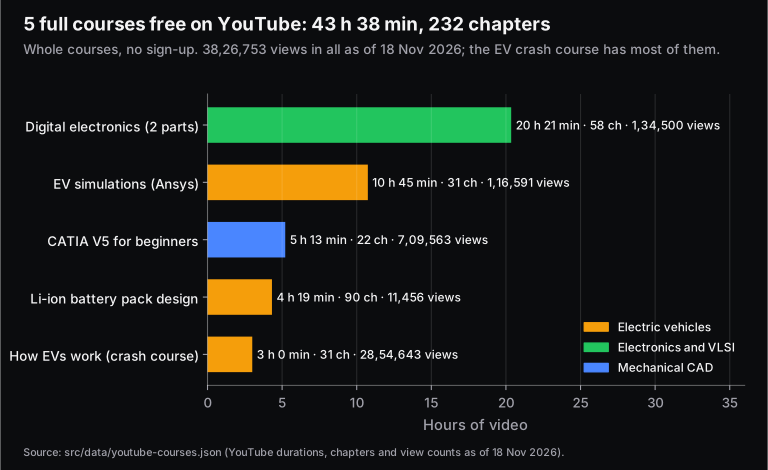
Five complete courses are free on YouTube, 43 h 38 min in all (six videos, since digital electronics comes in two parts). They cover CATIA V5 for beginners, EV simulations in Ansys, digital electronics, Li-ion battery pack design and how electric vehicles work. Each has a page under /grow/youtube with the video, a chapter guide with timestamps and suggestions for what to learn next.
| Full course (chapter guide) | Domain | Length | Chapters | Views (18 Nov 2026) |
|---|---|---|---|---|
| CATIA V5 Full Course for Beginners | Mechanical CAD | 5 h 13 min | 22 | 7,09,563 |
| Basics of Electric Vehicle Simulations using Ansys | Electric vehicles | 10 h 45 min | 31 | 1,16,591 |
| Basics of Digital Electronics (2 videos) | Electronics and VLSI | 20 h 21 min | 58 | 1,34,500 |
| Li-ion Battery Pack Design Considerations | Electric vehicles | 4 h 19 min | 90 | 11,456 |
| How Electric Vehicles Work: EV Crash Course | Electric vehicles | 3 h 0 min | 31 | 28,54,643 |
Some notes before you press play:
- The EV crash course is the popular one. It was published on 20 Dec 2022, and its 28,54,643 views are 74.6% of the five courses' total. It is animated, needs no maths or software, and suits anyone deciding whether to specialise in EVs.
- CATIA V5 for beginners (9 Aug 2024, 5 h 13 min) moves from sketcher to part design, drafting, assembly and surface design, with an exercise in each chapter. If you are learning CATIA for a job, our CATIA V5 training guide sets out what employers expect beyond the basics.
- Digital electronics (27 and 28 Sep 2024) is the longest at 20 h 21 min, recorded as live class sessions. YouTube's automatic captions for both parts are in Hindi, so expect Hindi narration with English technical terms. It pairs well with the free solved questions in the GATE EC digital circuits hub.
- Li-ion battery pack design (27 Dec 2024, 4 h 19 min) runs from cell selection to modules, welding, thermal design, IP sealing and the BMS. Its 90 chapters are YouTube's auto-generated ones, because the description has no timestamps.
- EV simulations using Ansys (4 Oct 2024, 10 h 45 min) covers four subsystems: battery thermal in Fluent, motor sizing in RMxprt, DC-DC converters, and external aerodynamics.
Which Grow course should you start with?
Start with the course that matches the job you want, not the one with the most free hours. The free lessons are only the opening of each course, so use them to judge the instructor, the level and the software before you commit time or money. A short guide by branch:
- Mechanical (design): start with Basics of CATIA V5 (3 free lessons, 57 min), or watch the full CATIA V5 course on YouTube. Then try a domain course such as Automotive Sheet Metal Design or GD&T (4 free lessons).
- Mechanical (simulation): try Introduction to GUI based CFD using ANSYS Fluent (3 h 4 min free) or Structural Analysis using Ansys Workbench.
- Civil: start with AutoCAD Essentials for Civil Engineers, then move to STAAD.Pro, ETABS or Revit, depending on whether you want to go into design or BIM.
- Electrical and EV: watch the free EV crash course first, then EV Fundamentals or Electric Motor Design using MATLAB and Ansys Maxwell. MATLAB Basics underpins most EV and controls work.
- Electronics: watch the digital electronics full course, then Fundamentals of Embedded Systems (3 h 28 min free) or Embedded Programming Essentials.
- Computer science and data: try Data Structures and Algorithms using Python, Everything about Database 2.0 or React.js.
Pair the lessons with practice. If you are preparing for placements, the free interview question banks and the solved GATE question hubs on this site go well with them.
Every course on Grow by Skill-Lync, by domain
Here are all 149 courses with free lessons. Each course name links to its Grow page. "Free video" is the length of the free lessons. "Full course" is the paid course's lesson count and recorded hours, as shown on the page. Data as of 18 Nov 2026. The site adds courses in batches, so check /grow for the current list.
Civil & structural (31 courses)
CAD & design (19 courses)
Medical technology (16 courses)
| Course (free lessons page) | Free lessons | Free video | Full course |
|---|---|---|---|
| Advanced Medical Image Processing | 3 | 1 h 3 min | 26 lessons, 8.7 h |
| Advanced Medical Image Processing in Clinical Applications | 6 | 2 h 26 min | 48 lessons, 21.4 h |
| Anatomy and Physiology | 6 | 2 h 47 min | 32 lessons, 11.8 h |
| Biomaterials | 3 | 1 h 32 min | 35 lessons, 13.4 h |
| Frontiers in Biomedical Engineering | 6 | 2 h 13 min | 57 lessons, 20.4 h |
| In Vitro Diagnostics | 3 | 1 h 41 min | 21 lessons, 9.2 h |
| Introduction to Medical Image Processing | 3 | 1 h 23 min | 22 lessons, 12.7 h |
| Manufacturing | 3 | 1 h 1 min | 61 lessons, 24.6 h |
| Medical Data Analytics & Visualization | 9 | 3 h 12 min | 123 lessons, 54.3 h |
| Medical Imaging and Radiology | 3 | 1 h 19 min | 15 lessons, 6.2 h |
| Medical Informatics | 3 | 1 h 6 min | 18 lessons, 6.7 h |
| Medical Instrumentation and Biomedical Signals | 3 | 1 h 6 min | 48 lessons, 18.6 h |
| Radiology | 3 | 1 h 19 min | 27 lessons, 11.2 h |
| Regulatory Process, Standards and Certifications for Medical Devices | 6 | 3 h 23 min | 51 lessons, 23.0 h |
| Regulatory processes for medical devices | 3 | 2 h 1 min | 27 lessons, 12.8 h |
| Standards, Certification and Accreditation | 3 | 1 h 22 min | 24 lessons, 10.1 h |
Software & data (13 courses)
| Course (free lessons page) | Free lessons | Free video | Full course |
|---|---|---|---|
| Angular Web Development for the Real World | 3 | 1 h 54 min | 53 lessons, 26.0 h |
| Azure Fundamentals | 3 | 1 h 14 min | 54 lessons, 20.8 h |
| Cloud Overview | 3 | 46 min | 27 lessons, 9.1 h |
| Data Analysis and Visualization with Tableau | 3 | 1 h 18 min | 48 lessons, 23.9 h |
| Data Structures and Algorithms using Python | 3 | 1 h 9 min | 81 lessons, 24.0 h |
| DevOps Fundamentals | 3 | 1 h 12 min | 24 lessons, 10.5 h |
| Effective Dashboards using Power BI | 3 | 35 min | 27 lessons, 7.4 h |
| Everything about Database 2.0 | 3 | 1 h 2 min | 62 lessons, 19.4 h |
| Introduction to Java Programming 2.0 | 3 | 18 min | 48 lessons, 12.0 h |
| Linear Algebra | 3 | 1 h 32 min | 43 lessons, 20.1 h |
| Microservices using Java, Spring & Docker | 3 | 51 min | 48 lessons, 18.1 h |
| React.js | 3 | 2 h 20 min | 45 lessons, 20.8 h |
| Statistics and Probability for Data Sciences | 3 | 1 h 15 min | 58 lessons, 21.6 h |
CFD (12 courses)
| Course (free lessons page) | Free lessons | Free video | Full course |
|---|---|---|---|
| Advanced Aerodynamic Simulations using CONVERGE | 4 | 55 min | 45 lessons, 13.1 h |
| Advanced CFD for IC Engine Applications using CONVERGE | 4 | 1 h 2 min | 41 lessons, 12.7 h |
| Advanced CFD Meshing using ANSA | 3 | 4 h 25 min | 5 lessons, 12.5 h |
| Advanced CFD using OpenFOAM | 3 | 1 h 12 min | 54 lessons, 18.5 h |
| CFD Simulation using SolidWorks | 3 | 50 min | 12 lessons, 3.8 h |
| Computational Combustion Using Python and Cantera | 3 | 25 min | 39 lessons, 9.4 h |
| Flow Simulation using SolidWorks | 3 | 50 min | 13 lessons, 3.8 h |
| HVAC Systems Flow Analysis using Converge | 3 | 1 h 7 min | 40 lessons, 12.2 h |
| Introduction to Aero-Thermal simulation using ANSYS Fluent | 3 | 1 h 18 min | 19 lessons, 6.7 h |
| Introduction to GUI based CFD using ANSYS Fluent | 3 | 3 h 4 min | 11 lessons, 15.9 h |
| Introduction to OpenFOAM Development | 3 | 54 min | 49 lessons, 18.3 h |
| Turbulence and RANS Modelling | 3 | 1 h 17 min | 49 lessons, 19.7 h |
Embedded & electronics (10 courses)
| Course (free lessons page) | Free lessons | Free video | Full course |
|---|---|---|---|
| Advanced PCB Design Using Altium | 3 | 34 min | 54 lessons, 16.9 h |
| Design of Power Converter with PCB Overview | 3 | 32 min | 72 lessons, 23.0 h |
| Developing IoT Applications | 3 | 41 min | 90 lessons, 20.7 h |
| Electronics System Design | 3 | 57 min | 34 lessons, 10.7 h |
| Embedded Programming Essentials | 3 | 1 h 42 min | 68 lessons, 34.8 h |
| Fundamentals of Embedded Systems | 3 | 3 h 28 min | 12 lessons, 13.1 h |
| Internet of Things (IoT) in Healthcare | 3 | 2 h 29 min | 17 lessons, 9.1 h |
| Linux Driver Development | 3 | 1 h 8 min | 38 lessons, 18.5 h |
| Linux System Programming | 3 | 1 h 18 min | 21 lessons, 7.4 h |
| Medical Embedded Systems | 3 | 1 h 16 min | 17 lessons, 8.5 h |
Telecom & 5G (10 courses)
| Course (free lessons page) | Free lessons | Free video | Full course |
|---|---|---|---|
| 5G Core | 3 | 1 h 30 min | 27 lessons, 12.8 h |
| 5G NR Protocol Stack | 3 | 1 h 2 min | 12 lessons, 4.4 h |
| 5G NR Radio Access Network | 3 | 1 h 2 min | 29 lessons, 10.3 h |
| 5G Testing | 3 | 1 h 21 min | 9 lessons, 4.2 h |
| C Programming for Telecom Engineers and C++ Overview | 3 | 1 h 21 min | 62 lessons, 28.5 h |
| Introduction to Cellular Communications 2G-3G | 3 | 1 h 0 min | 33 lessons, 13.2 h |
| Network Function Virtualization in 5G | 3 | 1 h 16 min | 37 lessons, 18.9 h |
| Network Planning for Cellular and WiFi Systems | 3 | 1 h 36 min | 52 lessons, 25.7 h |
| Overview of 4G Networks and evolutions to 5G | 3 | 1 h 23 min | 17 lessons, 7.2 h |
| Telco Cloud | 3 | 1 h 2 min | 25 lessons, 12.5 h |
Construction management (9 courses)
| Course (free lessons page) | Free lessons | Free video | Full course |
|---|---|---|---|
| Construction Planning using Primavera P6 | 3 | 57 min | 72 lessons, 21.8 h |
| Construction Project Management Fundamentals | 3 | 1 h 32 min | 48 lessons, 25.0 h |
| Contract and Subcontract Management | 3 | 1 h 16 min | 43 lessons, 19.3 h |
| Effective Dashboards using Power BI for Construction Management | 3 | 35 min | 27 lessons, 7.4 h |
| Excel Skills and Data Analysis for Construction Project Management | 3 | 1 h 18 min | 41 lessons, 19.4 h |
| Project Cost Control | 3 | 1 h 23 min | 38 lessons, 18.0 h |
| Project Management Using Primavera | 3 | 1 h 43 min | 45 lessons, 20.0 h |
| Project Planning and Scheduling | 3 | 1 h 33 min | 30 lessons, 15.0 h |
| Project Progress Measurement and Reporting | 3 | 1 h 18 min | 49 lessons, 19.6 h |
MATLAB & controls (5 courses)
| Course (free lessons page) | Free lessons | Free video | Full course |
|---|---|---|---|
| Introduction to Model-Based Development using MATLAB and Simulink | 3 | 5 h 38 min | 12 lessons, 28.1 h |
| Introduction to Physical Modeling using Simscape | 3 | 55 min | 13 lessons, 5.5 h |
| Matlab and Simulink Basics | 3 | 57 min | 49 lessons, 17.2 h |
| MATLAB Basics | 3 | 55 min | 27 lessons, 7.0 h |
| Software Verification and Validation and System Testing for Model-Based Development | 3 | 1 h 55 min | 37 lessons, 19.7 h |
Automotive (4 courses)
| Course (free lessons page) | Free lessons | Free video | Full course |
|---|---|---|---|
| Autonomous Vehicle Controls using MATLAB and Simulink | 3 | 57 min | 58 lessons, 24.1 h |
| IC Engine Calibration using GT-POWER and GT-SUITE | 3 | 4 h 52 min | 12 lessons, 18.7 h |
| Introduction to ROS/GitHub/Linux | 3 | 1 h 20 min | 43 lessons, 18.6 h |
| Suspension Design using ADAMS | 3 | 35 min | 34 lessons, 13.8 h |
CAE & FEA (4 courses)
| Course (free lessons page) | Free lessons | Free video | Full course |
|---|---|---|---|
| Additive manufacturing & 3D printing using Ansys SpaceClaim | 3 | 25 min | 31 lessons, 10.1 h |
| CAE Simulation using SolidWorks | 3 | 1 h 29 min | 9 lessons, 3.7 h |
| Crashworthiness Analysis using HyperMesh and Radioss | 3 | 7 h 43 min | 10 lessons, 25.4 h |
| Structural Analysis using Ansys Workbench | 3 | 3 h 19 min | 10 lessons, 13.6 h |
Cybersecurity (4 courses)
| Course (free lessons page) | Free lessons | Free video | Full course |
|---|---|---|---|
| Cryptography Basics & Implementation | 3 | 1 h 55 min | 22 lessons, 11.2 h |
| Enterprise Security | 3 | 2 h 46 min | 31 lessons, 16.4 h |
| Foundations of Cybersecurity | 3 | 1 h 24 min | 26 lessons, 13.6 h |
| The Ethical Hacking Course (TEHC) | 3 | 1 h 23 min | 67 lessons, 29.9 h |
Electric vehicles (4 courses)
| Course (free lessons page) | Free lessons | Free video | Full course |
|---|---|---|---|
| Control Theory PMSM | 3 | 1 h 12 min | 7 lessons, 2.2 h |
| Electric Motor Design using MATLAB and ANSYS Maxwell | 3 | 40 min | 34 lessons, 9.9 h |
| EV Fundamentals | 3 | 1 h 37 min | 55 lessons, 12.8 h |
| Simulation and Design of Power Converters for EV using MATLAB and Simulink | 5 | 1 h 17 min | 72 lessons, 22.2 h |
Electrical & power (4 courses)
| Course (free lessons page) | Free lessons | Free video | Full course |
|---|---|---|---|
| AC-DC Rectifiers, Harmonics and Related Standards | 3 | 20 min | 103 lessons, 23.0 h |
| Design Concepts of Power Electronic Converters for Industries | 3 | 1 h 36 min | 55 lessons, 24.8 h |
| Fundamentals of Electrical Systems and Electrical Architecture | 3 | 1 h 17 min | 16 lessons, 6.9 h |
| Introduction to Electric Power System | 3 | 1 h 35 min | 51 lessons, 22.4 h |
Business & marketing (3 courses)
| Course (free lessons page) | Free lessons | Free video | Full course |
|---|---|---|---|
| Content Marketing | 3 | 1 h 32 min | 9 lessons, 4.2 h |
| Digital Marketing 101 | 3 | 1 h 18 min | 16 lessons, 7.2 h |
| Search Engine Optimization & Search Engine Marketing | 3 | 1 h 15 min | 17 lessons, 6.1 h |
Mechanical core (1 course)
| Course (free lessons page) | Free lessons | Free video | Full course |
|---|---|---|---|
| Foundations of Thermodynamics and its Industrial Applications | 3 | 48 min | 50 lessons, 17.6 h |
How do free lessons fit with paid Skill-Lync courses?
The free lessons are a sample: on average the first 8.8% of a course's video. They show you how a course is taught and whether its level suits you. They do not replace the course. On the Grow pages, a paid course adds three things: the remaining lessons, projects reviewed by mentors, and a certificate. 116 of the 149 Grow courses also link to a longer programme in the same field, 115 of them a Post Graduate Program. The site describes these as adding industry projects, mentors and placement support.
Being honest about cost helps you decide. Each of the 149 linked paid courses lists ₹40,000 as its first plan in the site's course data. The postgraduate programmes linked from the YouTube course pages, such as the Post Graduate Program in CAD and the Post Graduate Program in Electric Vehicle Design & Development, list ₹2,75,000. Enrolment goes through a counsellor, not an online checkout.
When are free lessons enough? If you need a concept for a semester exam, an interview or GATE, the free lessons, the 5 full YouTube courses and steady practice can take you a long way. The paid route makes sense when you want graded projects for a portfolio, feedback from a mentor and a certificate to show an employer. If you are unsure, finish the free lessons of one course first. You will then know whether the teaching works for you, which is the most useful thing a free sample can tell you. The full list of paid options is on all Skill-Lync courses.
Frequently asked questions
Is Grow by Skill-Lync really free?
Yes. The free lessons cost nothing: you fill a short details form once and they play. The free part, though, is the opening of each course, usually 3 lessons. The rest of each course is paid. The 5 courses listed under "Full courses on YouTube" are free in full.
Does Grow by Skill-Lync have 50+ free courses?
Not in the sense the old article meant. As of 18 Nov 2026, Grow lists 149 courses with free opening lessons (470 lessons in all) and 5 complete free courses on YouTube. "50+ courses" described the 2023 grow.skill-lync.com site, which now redirects to skill-lync.com/grow.
Can I get a free certificate from Skill-Lync?
Not from the Grow free lessons; the /grow page says Grow does not offer free certificates. Paid courses include a certificate. The YouTube full-course pages let you request a certificate through a counsellor form, without promising one automatically.
Where are my old Grow courses and certificates?
In the Skill-Lync learning platform. Log in at lms.skill-lync.com with the email you used on Grow. The /grow page is now a public catalogue of free lessons, not a separate learning account.
Do the free lessons have English transcripts?
Each Grow lesson page has a transcript made by speech recognition and lightly cleaned. The digital electronics YouTube course is narrated in Hindi with English technical terms, going by YouTube's automatic captions.
Sources and further reading
- Skill-Lync, Grow by Skill-Lync catalogue, page and its data files (content/free-lessons, src/data/youtube-courses.json), counted 18 Nov 2026. The counting script is kept with this article's run files.
- Skill-Lync, Grow course pages, e.g. Basics of CATIA V5: free lessons, for what is free, the paid course and the certificate wording, 18 Nov 2026.
- Skill-Lync, full-course pages under /grow/youtube, for the chapter guides, publication dates, view counts and certificate wording, 18 Nov 2026.
- Skill Lync on YouTube: CATIA V5 Full Course, EV Crash Course, EV Simulations using Ansys, Digital Electronics part 1 and part 2, Li-ion Battery Pack Design, accessed 18 Nov 2026.
- Skill-Lync course data (paid-course plans and prices), snapshot of 17 Nov 2026, and the course pages linked above.
- Skill-Lync learning platform login, lms.skill-lync.com, accessed 18 Nov 2026.