Mechanical · Course

Basics of CATIA V5

A comprehensive course on Basics of Solid and Surfacing using CATIA-V5. This course is highly suited for beginners

Duration
4 weeks
Content
5 hours
Projects
2
Mode
Online
Overview

What you'll
be able to do.

  • The course has been designed in stages where it will help one understand and start with the design in CATIA.
  • It is designed such that it will enhance one’s hands-on experience over the Design Software and improve CAD knowledge.
  • The course is created in such a way that it will help gain knowledge on how to approach the design, how to understand the 2D drawings and developing a 3D model.
  • The course also includes how we can give input to the manufacturing team.
Tools you'll use
CATIA V5
Curriculum

5 modules,
built with industry.

Get the full syllabus ↓
  1. 01Basics of CATIA V55 modules
    1. SketchingW01

      ● What is CATIA?
      ● CATIA V5 User Interface
      ● Various Workbenches in CATIA V5
      ● CATIA V5 - Start New Part
      ● Sketcher Workbench -Toolbar
      ● Headset sketch tutorial
      ● Wheel Cover sketch tutorial
      ● Spanner sketch tutorial

    2. Part DesignW02
      • You will be learning how to create 3D models from sketches in CATIA by using the Part Design workbench.
      • We will learn how to use the various part design commands such as
        • Pad, pocket, mirror, reference plane, fillet, chamfer, shaft, shell, rib, etc. while working on 3 solid models.
    3. Advanced part design and DraftingW03
      • You will be covering tutorials on how to create complex 3D part models using the commands covered in the previous week.
      • Some additional commands such as boolean operators will also be covered while designing the models.
      • We will also learn how to create 2D drawings from the 3D model using the drafting workbench.
    4. Assembly designW04
      • You will learn how to use the assembly design workbench to create assemblies comprising multiple parts.
      • Two tutorials will be covered to explain the assembly workbench:
        • Bottom-up assembly of a screw jack
        • Top-down assembly of a caster wheel
      • Drafting for these assemblies will also be covered where we will see how to add an exploded view of assembly, BOM and balloons in the 2D drawings.
    5. Surface designW05
      • You will learn how to create surface models in CATIA using the generative shape design workbench.
      • You will learn how to use the various surface design commands such as
        • Extrude, trim, fillet, thick surface, split, sphere, etc. while working on 2 surface models.
Industry projects

2 projects
you'll ship.

Our projects are designed by experts in the industry to reflect industry standards. By working through our projects, Learners will gain a practical understanding of what they will take on at a larger-scale in the industry. In total, there are 2 Projects that are available in this program.

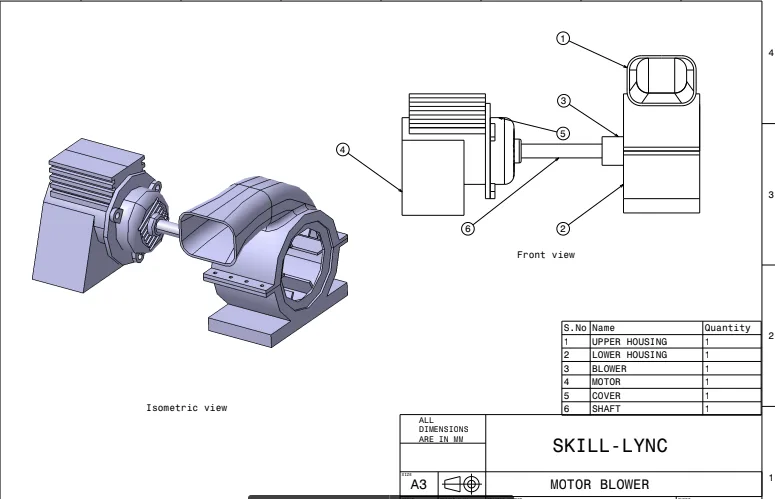
Motor Blower Assembly 

Motor Blower Assembly 

The Motor Blower Assembly is a part of Machine Design in which the different parts of the motor blower will be designed and assembled with the creation of production drawings.
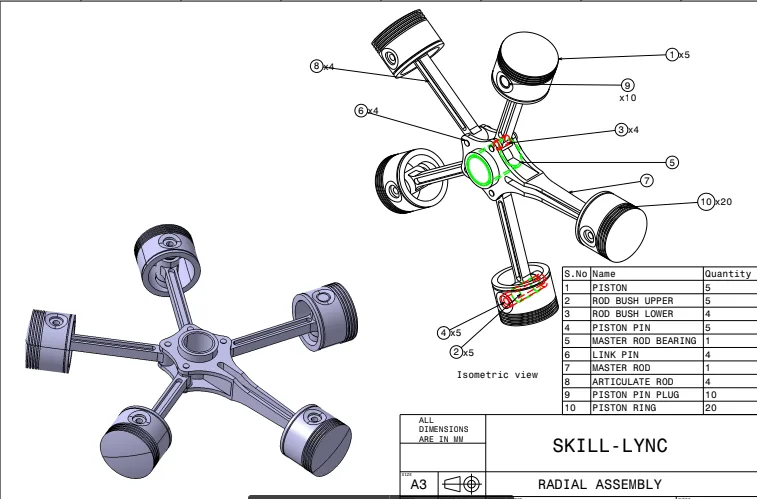
Radial Engine 

Radial Engine 

The Radial Engine Assembly is a part of Automotive Design. In this project, different parts of Radial Engine will be designed and assembled with creation of production drawings.

Fee

One fee.
Everything included.

Become job ready with our comprehensive industry focused curriculum for freshers & early career professionals

Premium
₹40,000
Inclusive of all charges
  • 1 Year Access
  • Personalized Page
  • Live Individual & Group Sessions
  • Personalized & Hands-On
  • Job-Oriented Industry Relevant Curriculum
Check eligibility →
FAQ

Questions,
answered.

Who can take up the CATIA V5 training courses?

Students and graduates of mechanical engineering, manufacturing engineering and related streams of engineering can take up the Basics of CATIA V5. If you are interested in designing and developing surface models then this course is for you.

Is this CATIA V5 tutorial an online program?

Yes, Basics of CATIA V5 is a 100% online course.

What is the duration of the Basics of CATIA V5 course?

This CATIA V5 online course is a 4-week course covering all the basic to advanced level concepts in developing 2D and 3D sketches using CATIA V5 software.

How much can a CATIA design engineer earn?

According to AmbitionBox, the average salary of a CATIA design engineer is ₹ 3.7 Lakhs per annum. However, it increases with your experience and expertise.

Is there any certificate for completing this CATIA V5 online course?

Yes, after completing the Basics of CATIA V5, you shall be given a course completion certificate. The top 5% of the scorers will be given a merit certificate alongside the course completion certificate.

Is there any technical support for the CATIA V5 training course?

Yes, you can clear your queries with email and forum support. If you have opted for the Pro or Premium course, you will additionally receive individual video support and group video support.

Next step

Not sure it's
the right fit?

A counsellor will walk you through the syllabus, projects and fee options — and tell you honestly if another course suits you better.

Get the syllabus + a call back

We'll email the full syllabus and call within one working day.

By submitting you agree to our Terms and Privacy Policy.

Call usEnquire

Talk to a career counsellor

Free 20-minute call. We'll map the right course to where you want to work.

By submitting you agree to our Terms and Privacy Policy.