Forward Kinematics of a Robotic arm
Aim:
To simulate the forward kinematics of a 2R Robotic Arm using Matlab tool.
Theory:
Robotic Arm:
Robotic Arm is made up of mechanical linkages, which is programable to work in the required manner. The links are joined in such a way that to create rotational and translatory motion. The behaviour of the robot changes accordingly resulting in a very flexible task achieving. Robotic Arm consists of shoulder, elbow and wrist like human arm.
Applications:
- Robots are used in different fields such as industrial, military, space exploration, and medical applications.
- Robots are also used in dangerous places and situations where humans can’t do where extreme temperatures or contaminated environments exist.
- Robotic arms are generally used in welding, sanitisation, painting, construction, package industries etc.
Schematic diagram:
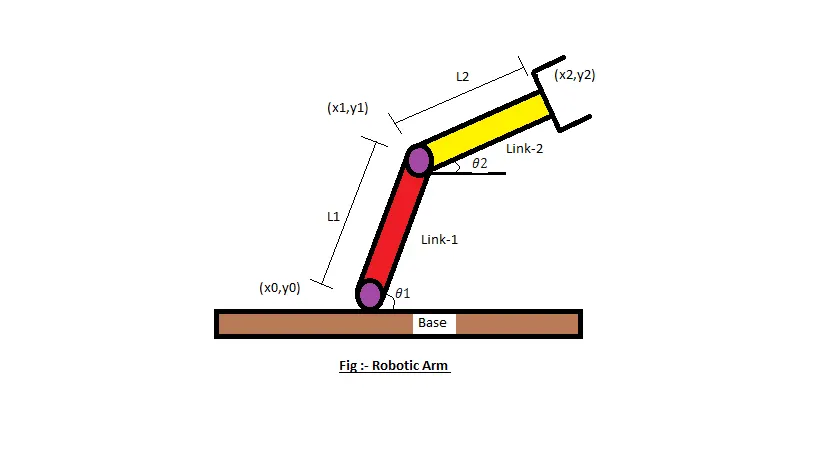
L1= length of link 1
L2= length of link 2
Theta1= angle made by the link 1 with horizontal
Theta 2= angle made by the link 2 with horizontal
The position of the end points of two links are calculated by using following equations:
Link 1
Starting point x0=0, y0=0
Ending point x1=x0+l1 cos (theta1), y1= y0+l1 sin (theta1)
Link 2
Ending point x2 =x1+l2*cos (THETA2)
y2 =y1+l2*sin (THETA2)
Matlab code:
% Forward kinametics of 2R Robotic Arm

clear all
close all
clc

%inputs
l1 = 1
l2 = 0.5
theta1 = linspace(0,90,10);
theta2 = linspace(0,90,10);
ct = 1
for i = 1:length(theta1)
    THETA1 = theta1(i);
    for j = 1:length(theta2)
        THETA2 = theta2(j);

        x0 = 0;
        y0 = 0;
        x1 =l1*cosd(THETA1);
        y1 =l1*sind(THETA2);
        x2 =x1+l2*cosd(THETA2);
        y2 =y1+l2*sind(THETA2);

 %plotting
 plot([x0 x1],[y0 y1],[x1 x2],[y1 y2],'linewidth',3);
 axis([-0.1 1.5 0 1.5])
 pause(0.3)
 M(ct) = getframe(gcf);
 ct = ct+1;
    end

end
movie(M)
videofile = VideoWriter('forward_kinematics.avi','Uncompressed AVI');
open(videofile)
writeVideo(videofile,M)
close(videofile)
Procedure:
Initially, I have defined the inputs i.e.; lengths of two links and angular displacements.
Matlab code is done for two links. A variable for frame counting ‘ct’ is initialized the value as 1. theta1 and theta2 arrays are initialized and the values of theta1 and theta2 arrays are stored in the variables THETA1 and THETA2 for each iteration of the loop. Two ‘for’ loops are defined for controlling values of theta1 and theta2. For each value of theta1, the positions of two links are found using each value of theta2.
The commands used in the code are
- ‘Plot’ command is used to plot the graph
- ‘movie’ command creates the movie of output animation.
- The ‘getframe(gcf)’ command is used inside the second ‘for’ loop to get the current frame and stored it as an image into the array ‘M’.
- The ‘VideoWriter’ command creates an empty video file by the name ‘forward_kinametics’ in .avi format and it is stored in the variable videofile.
- The ‘writevideo’ command insert the frames stored in the array ‘M’ into the videofile.
- Finally I have saved the code and run.
Output:
- Work sheet
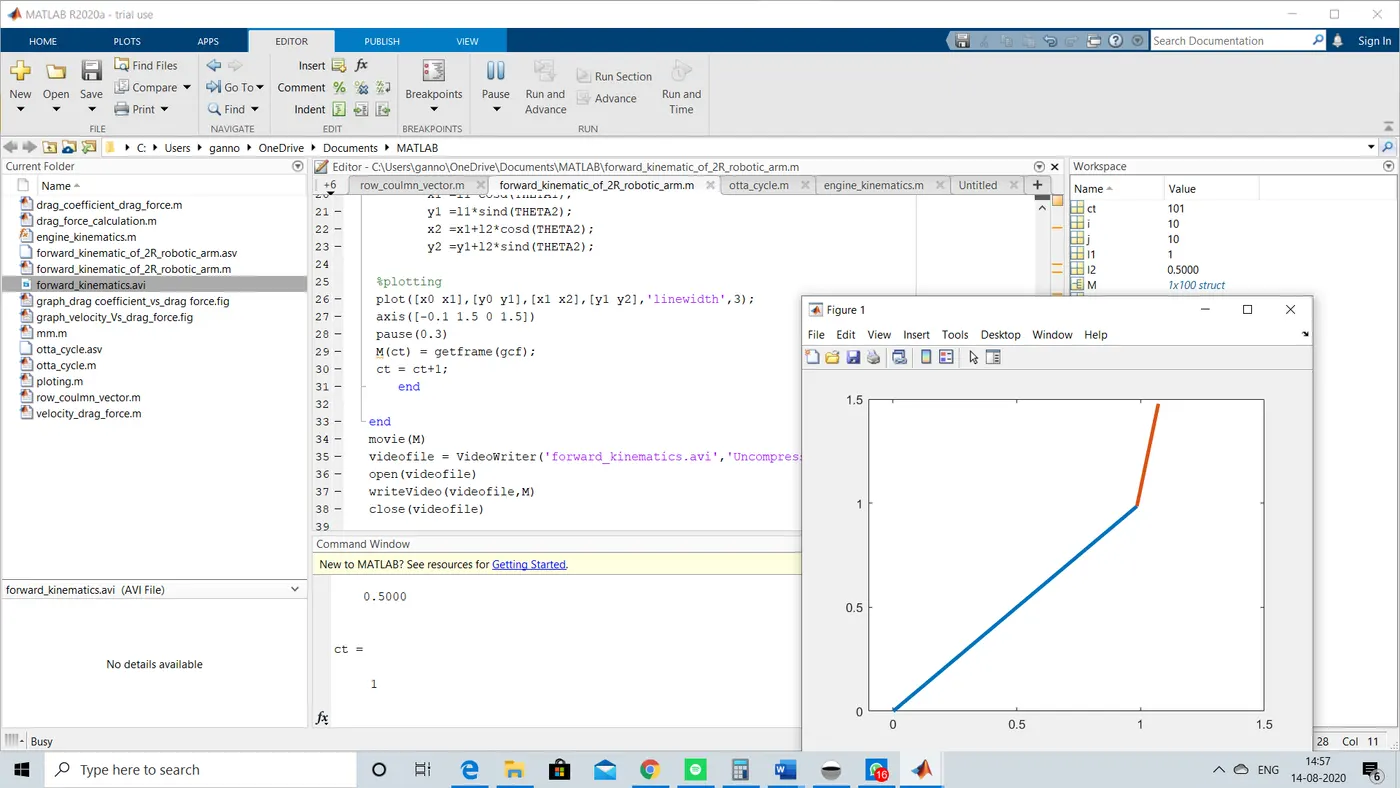
Result:
- Hence the simulation of the forward kinematics of a 2R Robotic Arm was done.
- The animation was made and the link is given below
https://drive.google.com/file/d/1_bD8t9-ULwCPMkApGmTNps9FcRXcAf7v/view?usp=sharing