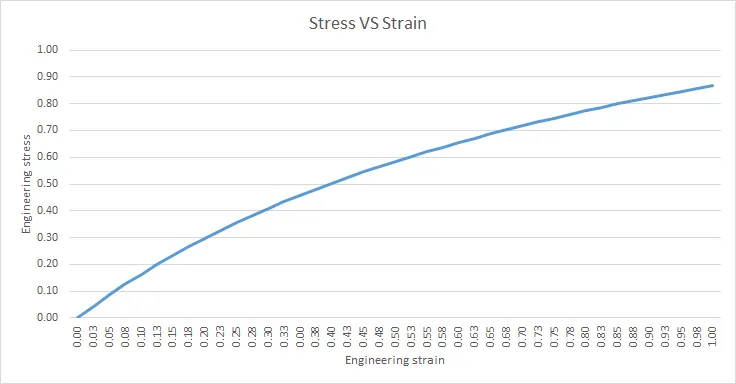
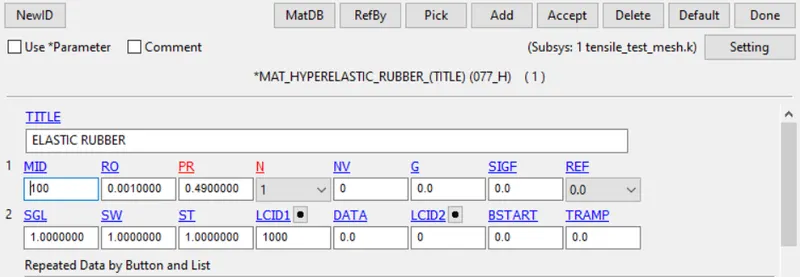
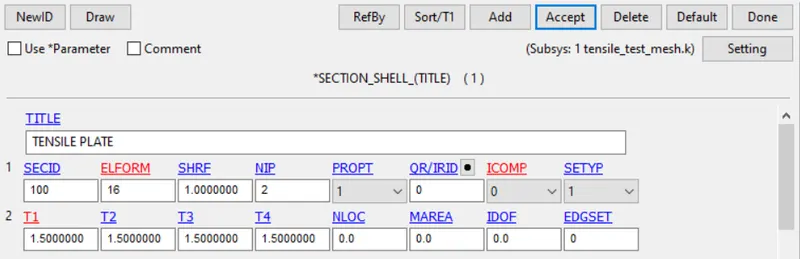
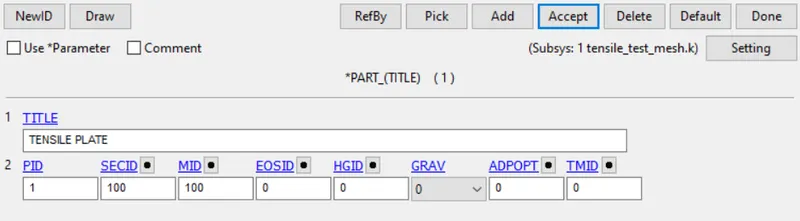
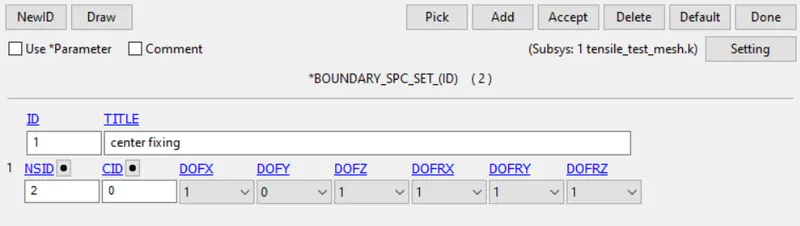
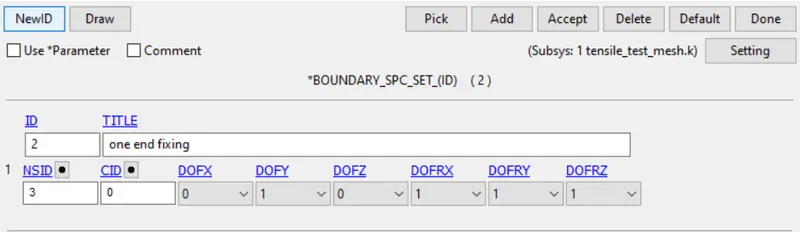
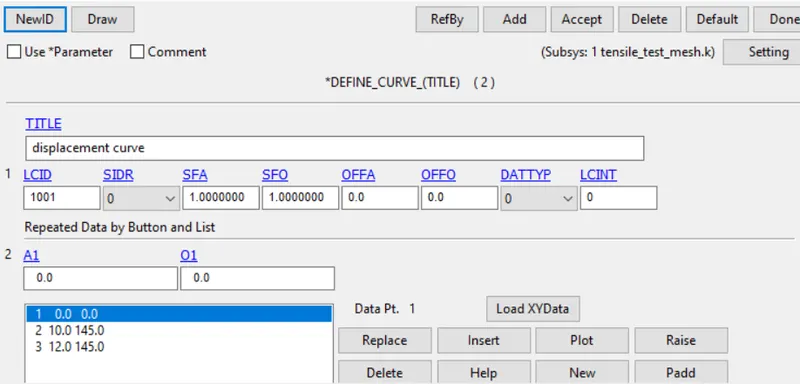
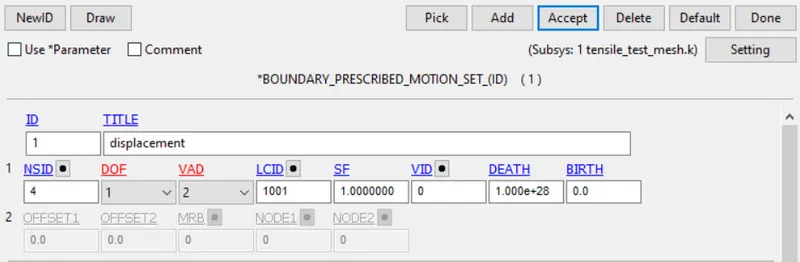
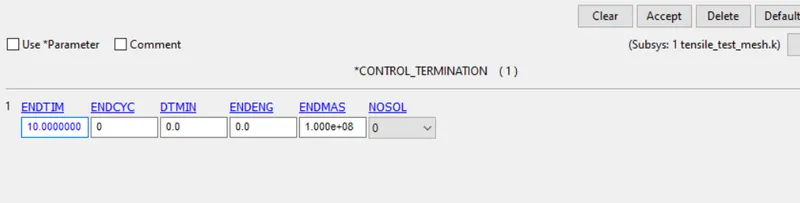
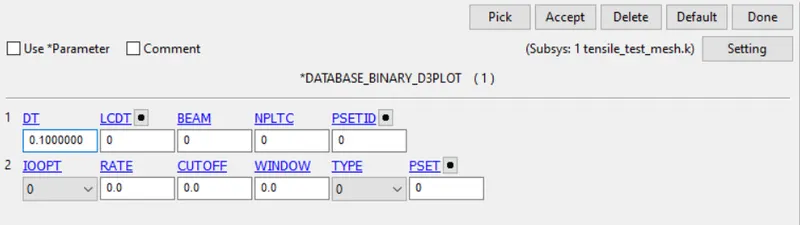
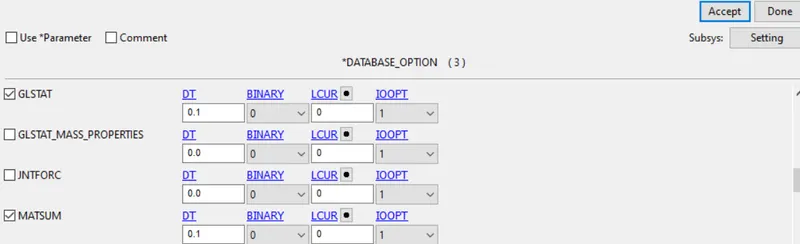
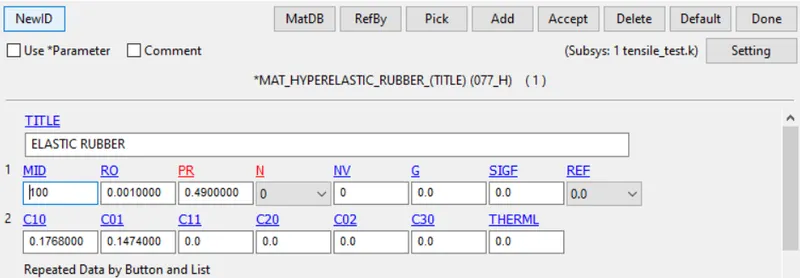
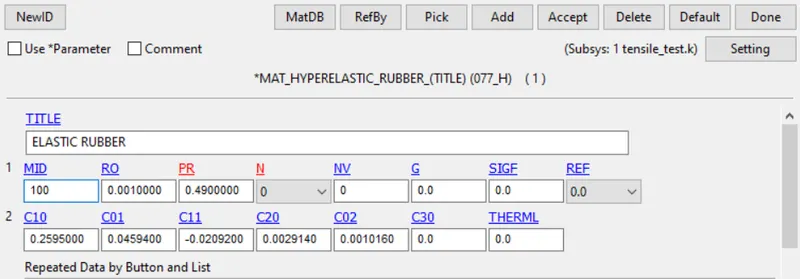
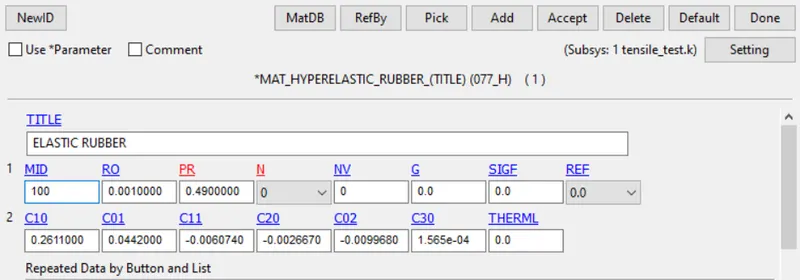
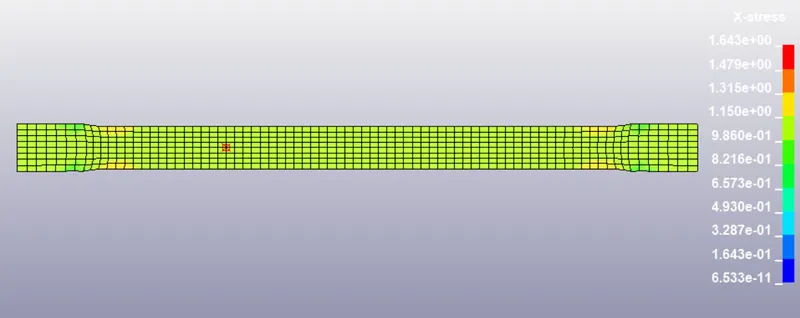
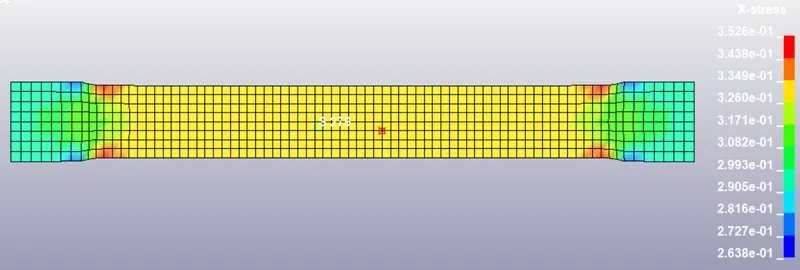
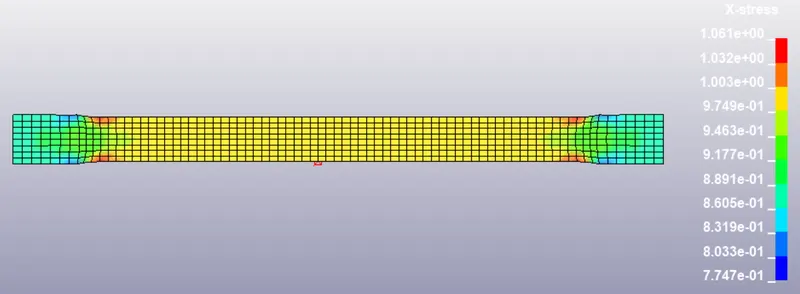
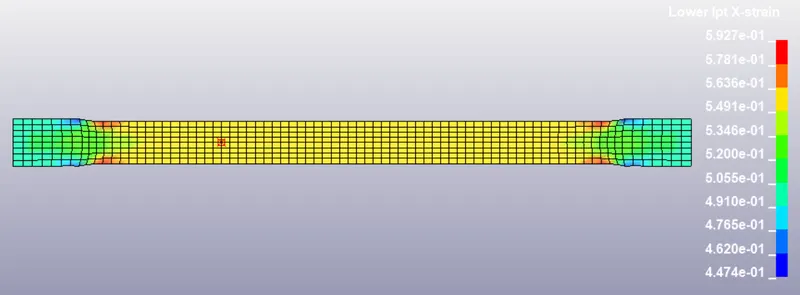
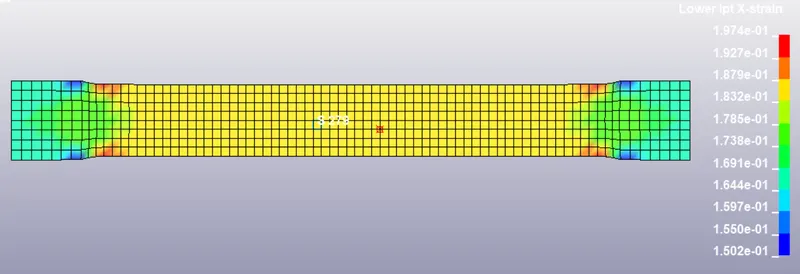
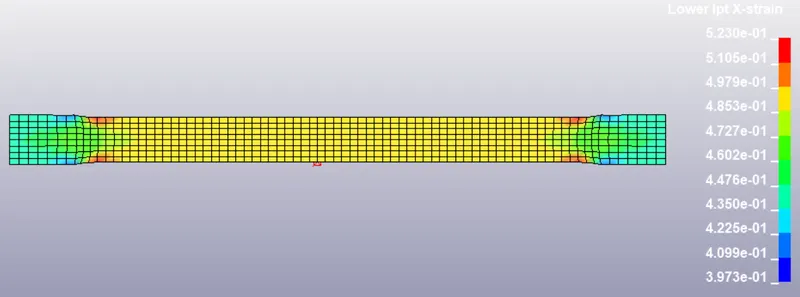
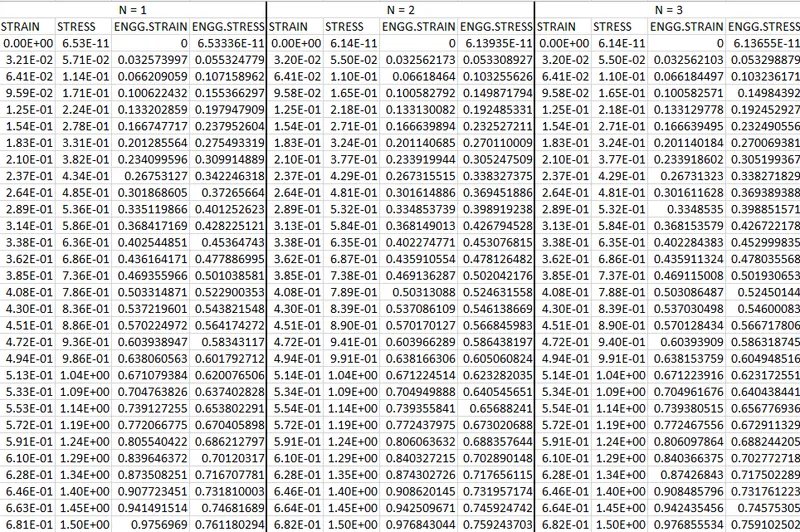
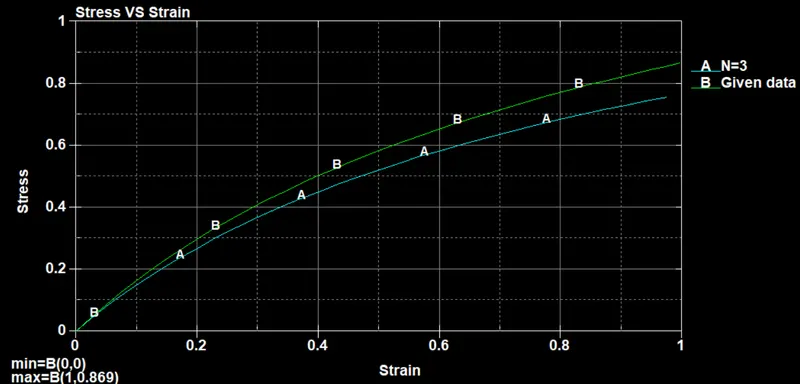
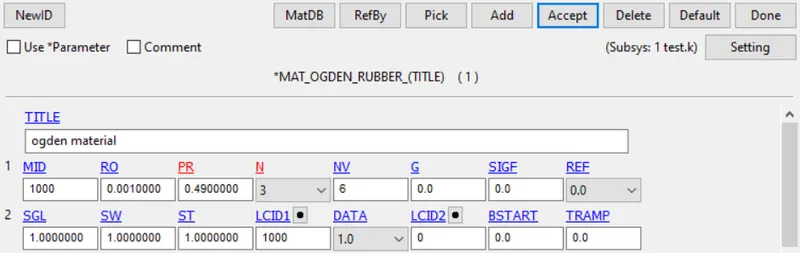
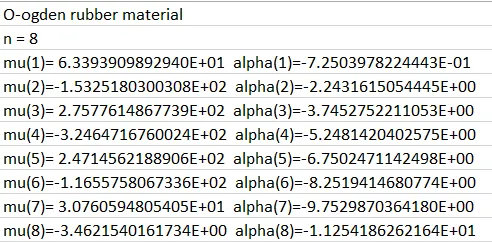
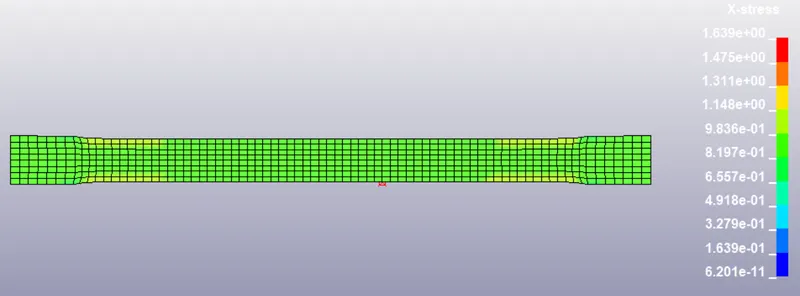
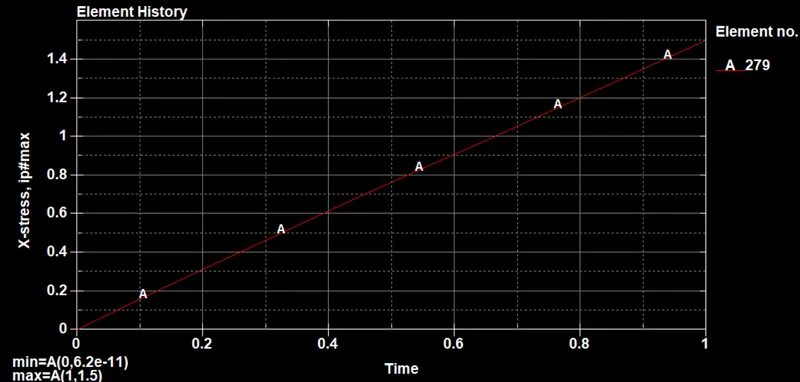
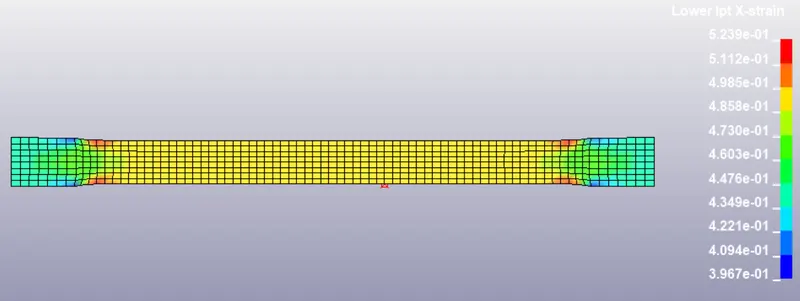
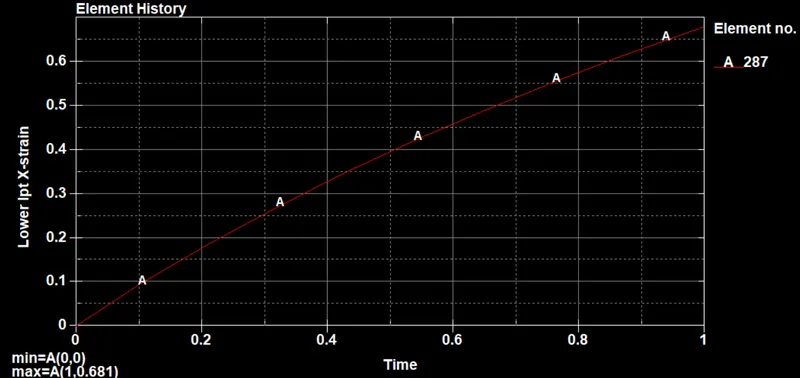
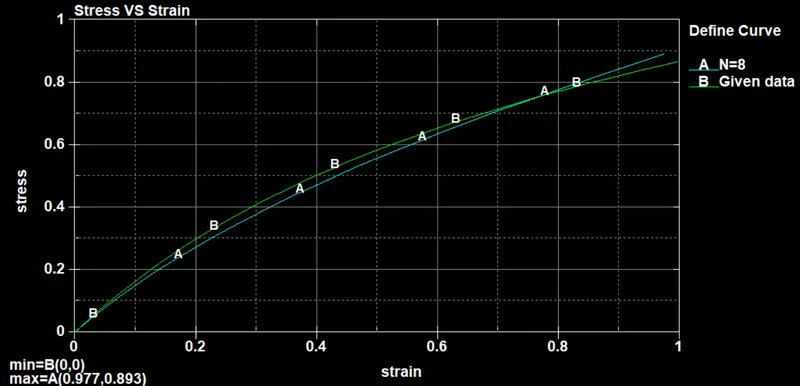
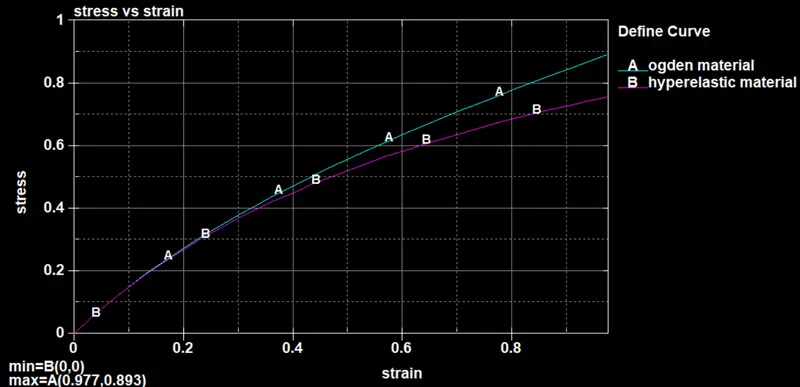
AIM:The main aim of this week challenge is to use the given stress-strain curve data and create a material modelof hyperelastic rubber and ogden rubber. Validate the create material model card by performing a tensile test on a Dogbone specimen and Finally compare the result of the simulation with the given data. PROCEDURE:…
Hariharen Sundar
updated on 15 Jul 2021
Project Details
Leave a comment
Thanks for choosing to leave a comment. Please keep in mind that all the comments are moderated as per our comment policy, and your email will not be published for privacy reasons. Please leave a personal & meaningful conversation.
Other comments...
Read more Projects by Hariharen Sundar (51)
Project - 2 - Meshing on the suspension Assembly
Aim: Mesh the given rear suspension accordingly with 2D & Volume meshing as per the given quality criteria. Connections to be deployed for the model. Replicate the model symmetrically after all the meshing and connections. Procedure:- • Geometry Clean-up.• Mid surface extraction & 2D meshing.• Volume Meshing.• Bolt & Seam…
22 Oct 2021 03:07 PM IST
Project 1 - 2D meshing on the instrumental Panel
AIM: The aim of this week challenge is to create a mid surface for the instrument panel and mesh the model so that it passes the given quality criteria. OBJECTIVES: -• Introduction to shell meshing or 2 D meshing.• Topological errors and geometry errors clean-up.• Extracting mid surface with a different method.• Meshing…
20 Oct 2021 03:15 PM IST
Week - 8 - Morphing
MORPHING: In general, morphing is a technique for transforming an object from its current shape to a target shape. In order to design and manufacture thenew products with less time and cost, the factories want to remodel based on the older products, which nakes the feature-preserved morphingparameterization technology…
17 Oct 2021 01:10 PM IST
Week 6 - Creating connection for Rear door
OBJECTIVE:To perform suitable connections between various parts/components in the rear door FE model provided, after creating and applying different PIDs to the aforementioned components that are part of the model. PROCEDURE: STEP 1: Now import the model into ANSA STEP 2: Firstly,it is important to differentiate…
10 Oct 2021 01:33 PM IST
Tool Test-2
.
04 Oct 2021 07:57 PM IST
Week- 5 - Solid meshing
AIM: The aim of this week challenge is to perform mesh on the surface of the given components with the given quality parameters and create a volume mesh with a good quality. PROCEDURE: STEPS: 1. Importing the CAD geometry in ANSA.2. Checking out the errors and assigning property id (pid) for each surface.3. Assigning quality…
02 Oct 2021 08:05 PM IST
Tool Test 1
.
01 Oct 2021 04:09 PM IST
Week - 4 - 2D meshing for Plastic components
AIM: The aim of this week challenge is to extract the mid surface of the given components and then mesh the component with given quality parameters and assign the thickness on a hood component. PROCEDURE: Step 1: Now open the input file in ANSA. Step 2: now click the property ID card to see the components seperately.…
30 Sep 2021 02:23 PM IST
Week 3 - 2D meshing for sheet metal
AIM: The aim of this week challenge is to extract the mid surface of the given components and then mesh the component with given quality parameters and assign the thickness on a hood component. PROCEDURE: Step 1: Now open the input file in ANSA. Step 2: now click the property ID card to see the components seperately.…
23 Sep 2021 09:05 AM IST
Week 11 Car Crash simulation
AIM: The main aim of this week challenge is to perform a explicit dynamic simulation of a car crashing into the wall.The analysis is performed for three cases for different thickness of body panel.Then compare the results of the stress,strain and deformation plots with a detailed explanation for the plots. PROCEDURE:…
13 Sep 2021 01:49 PM IST
Week 10 Bullet penetrating a Bucket Challenge
AIM: The main aim of this week challenge is to perform a explicit dynamic simulation of a bullet penetrating into a bucket.The analysis is performed for three cases for different material of aluminium,steel and titanium. Then compare the results of the stress,strain and deformation plots with a detailed explanation for…
08 Sep 2021 05:01 PM IST
Week 9 Tension and Torsion test challenge
AIM: The main aim of this week challenge is to perform a explicit dynamic simulation of tension and torsion test. The analysis is performed for two cases with tension and torsion load on the workpeice.Then compare the results of the stress,strain and deformation plots with a detailed explanation for the plots.…
04 Sep 2021 07:28 AM IST
Week 9 Machining with Planer Challenge
AIM: The main aim of this week challenge is to perform a explicit dynamic simulation of planar machining. The analysis is performed for two cases with different cutting velocity of the tool over the workpeice.Then compare the results of the stress,strain and deformation plots with a detailed explanation for the…
03 Sep 2021 04:29 PM IST
Week 8 Worm Gear Challenge
AIM: The main aim of this week challenge is to perform a transient structural analysis of worm gear. In this analysis need to cut the gear by half and then perform the analysis.Then compare the results of the stress,strain and deformation plots with a detailed explanation for the plots. PROCEDURE: step 1: Open the ansys…
31 Aug 2021 06:32 PM IST
Week 8 - Universal Joint
AIM: The main aim of this week challenge is to perform a transient structural analysis of universal joint. The analysis is performed for three cases with different material of structural steel,stainless steel and titanium alloy. From all the three cases compare the results of the stress,strain and deformation plots…
29 Aug 2021 06:02 PM IST
Week 7-Long Piston With Cam
AIM: The main aim of this week challenge is to perform a transient structural analysis of long piston with cam. The analysis is performed for three cases with Frictionless contact, Frictional contact with 0.1 and 0.2 as frictional co-effitient. From all the three cases compare the results of the stress,strain and…
24 Aug 2021 05:50 PM IST
Week 5 Bending of iPhone
AIM: The main aim of this week chalenge is to perform a bending simulation of iphone for two different cases.For both the cases compare the results of the stress,strain,life and factor plots and give a detailed explanation for the plots. PROCEDURE: step 1: Open the ansys workbench module and select the static structural…
20 Aug 2021 02:56 PM IST
Week 5 Sphere pressing on a plate
AIM: The main of this week challenge is to perform a sphere pressing on a plate analysis with non linear structural material for the plate.The plastic deformation of the plate should be captured and explained based on the plots. PROCEDURE: step 1: Open the ansys workbench module and select the static structural analysis.…
17 Aug 2021 07:12 PM IST
Week 4 -Wire Bending Challenge
AIM: The aim of this week challenge is to perform a wire bending operation of wire for three different material Copper Alloy (Non Linear), Aluminium Alloy (Non Linear) and Magnesium Alloy. This analysis is performed and their stress and strain plots are explained based on the result. PROCEDURE: step 1: Open the ansys workbench…
16 Aug 2021 07:05 PM IST
Week 4- Rolling operation
AIM: The aim of this week challenge is to perform a rolling operation of copper bar between two rolling wheels. This analysis is performed and their stress and strain plots are explained based on the result. PROCEDURE: step 1: Open the ansys workbench module and select the static structural analysis. step 2: right click…
13 Aug 2021 07:04 PM IST
Week 3 Verification of Weld Joints
AIM: The aim of this week challenge is to perform a weld joint test on the given model for different material for welds and explain the result for various stress and strain plots. PROCEDURE: CASE 1: step 1: Open the ansys workbench module and select the static structural analysis. step 2: Now open the engineering data…
11 Aug 2021 09:56 AM IST
Week 3 Sheet metal Bending challenge
AIM: The aim of this week challenge is to perform a sheet metal analysis where a sheet metal is bent between a punch and die. This analysis is performed for three different materials and also for different mesh size and friction coeffitient. Finally the stress and strain plots are explained based on the result. PROCEDURE:…
10 Aug 2021 05:56 PM IST
Week 2 Railwheel and Track
AIM: The aim of this week challenge is to perform a grid dependency test on track and rail for different earing loads and explain the result for various stress and strain plots. PROCEDURE: step 1: Open the ansys workbench module and select the static structural analysis. step 2: right click the geomentry tab and select…
07 Aug 2021 12:14 PM IST
Week 2 Bevel Gear Challenge
AIM: The aim of this week challenge is to perform a grid dependency test on bevel gears for various mesh sizes and explain the result for various stress and strain plots. PROCEDURE: GRID DEPENDENCY TEST: Whenever you are going to find a numerical solution through discretization of a governing differential equation then…
05 Aug 2021 04:25 PM IST
Week 1 Spur Gear Challenge
AIM: The aim of this week challenge is to perform a spur gear test for various material and explain the result for various stress and strain plots and also find the location of possible fracture. PROCEDURE: CASE 1: CAST IRON step 1: Open the ansys workbench module and select the static structural analysis. step 2: First…
03 Aug 2021 10:22 AM IST
Week 1 Stress Concentration on a Plate with hole
AIM: The main aim of this week challenge is to design a plate with holes in it as per the given dimension and give a detailed explanation about the stress and deformation plots. Based on the result give an explanation which is more suitable for analysis standpoint and manufacturing standpoint. PROCEDURE: PART 1: step 1:…
29 Jul 2021 12:47 PM IST
Bird Strike - Project - 2
AIM: The main aim of this week challenge is to perform a bird strike simulation on a air turbine starter.Now in this the nodes and element id should be renumbered to the given value and there must be only a single master file which includes all the sub file to run the simulation. PROCEDURE: 1.First import the bird strike…
23 Jul 2021 07:51 AM IST
week-11 Joint creation and Demonstration
AIM: The main aim of this week challenge is to create joints Using the *CONSTRAINED_JOINT keyword to demonstrate spherical, revolute, cylindrical, and translational joints between two rigid bodies and two deformable bodies and simulate the joint. PROCEDURE: 1. SPHERICAL JOINT:RIGID BODY STEP 1: First create two shperical…
18 Jul 2021 09:53 AM IST
Week - 10 Hyperelastic Material Models
AIM:The main aim of this week challenge is to use the given stress-strain curve data and create a material modelof hyperelastic rubber and ogden rubber. Validate the create material model card by performing a tensile test on a Dogbone specimen and Finally compare the result of the simulation with the given data. PROCEDURE:…
15 Jul 2021 12:13 PM IST
Week - 9 Material Modeling from Raw Data
AIM: The main aim of this week challenge is to use the true stress-strain curve given for graphite iron casting, create a material model for the Dogbone specimen. Validate the create material model card by performing a tensile test on a Dogbone specimen. Finally, the results are compared. PROCEDURE: You can see that the…
13 Jul 2021 03:11 PM IST
Week - 8 Mass Scaling
AIM: The main objective of this week is to make use of the mass scaling technique to reduce the run time of the total simulation and also do a implicit analysis on the model and compare the run time of the model. PROCEDURE: STEP 1: First import the model and run the simulation without doing any changes to it. Now note…
10 Jul 2021 05:22 PM IST
Week-7 Head Impact
AIM: The main aim of this week challenge is to perform a head impact challenge.Start the head impact with a simple model and develop the model and perform the impact test against rigid wall and hood.Compare the resut on all the cases and give an explanation about the change in stress and strain plot. PROCEDURE: CASE1:…
06 Jul 2021 02:23 PM IST
Week-6 Calculate the Stretch Ratio by comparing the ELFORM (-2,-1,1,2) with Ogden_Material Model.
AIM: The main aim of this week challenge is to perform tensile test on a cube.Run the simulation on four different element formulation and compare their engineering stress and stretch ratio. PROCEDURE: STEP 1: Open the LS-DYNA pre post and import the basic file containing the material property. STEP 2: Create a solid…
26 Jun 2021 03:42 PM IST
Week - 5 - Modelling Spotwelds
AIM:The main aim of this week challenge is to model spotwelds for the given model. The spotwelds should be modeled in two different ways 1. with beam elements 2. with solid elements The result for the two methods are then analysed and the appropriate failure modes are then calibrated. PROCEDURE: Modelling of spotwelds…
19 Jun 2021 06:49 PM IST
Week - 4 - Crash Box Simulation
AIM: The main aim of this week challenge is to perform a crash box simulation of different thickness and understand the logic between the two cases and plot the required outputs. PROCEDURE: STEP 1: Open the LS-DYNA pre post and import the basic file containing the nodes and element. STEP 2:Now create material and section…
15 Jun 2021 02:17 PM IST
Week - 3 Drop test Challenge
Aim: The main aim of this week challenge is to perform a drop test and to create a complete input file from the base file having only the basic mesh with nodes and element information. PROCEDURE: STEP 1: Open the LS-DYNA pre post and import the basic file containing the nodes and element. STEP 2: The file contains 3 parts…
12 Jun 2021 12:48 PM IST
Week - 2 - Explicit and Implicit Analysis
AIM: To understand the difference between explicit and implicit analysis by solving the given equation. PROCEDURE: EXPLICIT ANALYSIS: Explict analysis are mostly used when the analysis is time dependent.The time step in explicit analysis must be less than the Courant time step which is the time taken for the sound wave…
05 Jun 2021 02:46 PM IST
Week - 1 - Consistency of Units
AIM: The main aim of this week challenge is to know the consistency in units.Since Ls-Dyna does not have a default unit system we need to understand how to derive the value that you need to input for various material and property cards. PROCEDURE: The calculation done below is to convert the SI units to gm/mm/ms units.…
01 Jun 2021 03:47 PM IST
Assignment 7-Side Pole Crash Simulation Challenge
OBJECTIVE: The main objective of this analysis is to perform a side pole crash analysis with all the given condition satisfying and get the required output result as asked and brief in detail how the energies are plotted. PROCEDURE: STEP 1: First import the model into hypermesh. File --> import solverdeck --> select…
14 May 2021 09:40 AM IST
Assignment 6-Frontal Crash Simulation Challenge
OBJECTIVE: The main objective of this analysis is to perform a frontal crash analysis with all th givn condition satisfying and get the required output result as asked and brief in detail how the energies are plotted. PROCEDURE: STEP 1: First import the model into hypermesh. File --> import solverdeck --> select…
12 May 2021 03:39 PM IST
Assignment 5-RADIOSS Interfaces & Study of Effect of Notches Challenge
OBJECTIVE: The main objective of this week is to study the various contact and boundary condition.Tabulate the difference in each case along with the explanation. To create the mesh on the bumper assembly with the required element size. PROCEDURE: STEP I: Import the geomentry into the hypermesh workspace. STEP II: Delete…
01 May 2021 11:29 AM IST
Assignment 4-RADIOSS Material Laws Challenge
OBJECTIVE: To know about different material card in radioss and the difference in each material card.Also apply them in the given component and compare the result in tabulated format. compare the total number of cycles, Energy error, mass error and simulation time in different cases and describe them briefly. PROCEDURE:Import…
24 Apr 2021 09:10 AM IST
Assignment 3-2D Element Formulation Challenge
OBJECTIVE: To study the behaviour of the model before and after changing the element property and give a details comparison for that result. PROCEDURE: STEP 1: First import the starter file by FILE --> IMPORT --> SOLVER DECK and select the starter file to import into hyperworks. STEP 2: Now to change…
16 Apr 2021 09:09 PM IST
Assignment 2-RADIOSS Engine File Editing & 3D Meshing Challenge
OBJECTIVE 1: The objective of this week is to create a Teramesh for Housing component PROCEDURE: Step 1: Import the object that is in step file format. Step 2:Firstly, go to tool panel and click on delete option. now select all the solids in the component and click delete.Now the component will have only surfaces…
14 Apr 2021 05:38 AM IST
Assignment 1-2D Meshing Challenge
OBJECTIVE: The objective of this week is to clean up the geomentry, extract midsurface and create 2d mesh on the component satisfying the quality criteria and assign thickness accordingly to the component. PROCEDURE: COMPONENT - 2 Step 1: Import the model into hypermesh workspace. Step 2: click on the wireframe geomentry…
11 Apr 2021 10:55 AM IST
Week 12:Project-1-Meshing of Door Inner Panel Challenge
OBJECTIVE: The objective of this week is to create the midsurface of the component and mesh the component with the given quality criteria PROCEDURE: Step 1: Import the object into hypermesh workspace. Step 2: Firstly, go to tool panel and click on delete option. now select all the solids in the component and click delete.Now…
29 Mar 2021 02:13 PM IST
Week 12:Project 2-Meshing of Rear Wheel Holder challenge
OBJECTIVE: The objective of this week is to create the midsurface of the component and mesh the component and the mesh should satisfy the given quality criteria. PROCEDURE: Step 1: Import the object into hypermesh. Step 2: Firstly, go to tool panel and click on delete option. now select all the solids in the component…
19 Mar 2021 07:05 PM IST
Week 9-Creation of 1D Connectors Challenge
OBJECTIVE: Mesh the given model and create the required connectors and attach the various parts of the given model. PROCEDURE: Step 1 : import the geomentry into the hypermesh Step 2: After importing go to 2d tab and click automesh button. Step 3: Now with element size 5 and mesh the components individually.…
26 Feb 2021 06:25 AM IST
Week 8-3D Tetra Meshing Challenge
OBJECTIVE 1: The objective of this week is to create a Teramesh for Housing component PROCEDURE: Step 1: Import the object that is in step file format. Step 2: After importing now rename the components individually. Step 3:Firstly, go to tool panel and click on delete option. now select all the solids in the component…
22 Feb 2021 12:04 PM IST
Week 6- Challenge
OBJECTIVE: The objective of this week is to create the midsurface of 5 different components and mesh the components seperately. PROCEDURE: Step 1: Import the object that is in step file format. Step 2: After importing now rename the components individually. Step 3:Firstly, go to tool panel and click on delete option. now…
23 Jan 2021 11:36 AM IST
Week 4- Challenge
STEP 1: Need to import the model into the hypermesh workspace STEP 2: Go into the geomentry pane and select the midsurface tab and in the midsurface tab select the surface to create the midsurface, once created click the return tab. Rename it as midsurface STEP 3:After creating the midsurface, need to assign material and…
14 Dec 2020 06:18 PM IST