Week - 8 Mass Scaling
AIM: To use mass scaling to reduce the simulation time and ensure the stability of mass scaling. Compare the run time of implicit and explicit analysis.
Theory:
Time step:
Time step is the time required by the shock wave to propogate across a smallest distance of a element.
The time step size is given by:
Δt = L / c where L = Characteristic length of element
C = Speed of stress wave
C = √(E/ ρ) where, E = youngs modulus
Ρ = density of the material
MASS SCALING:
Mass scaling refers to a technique where non-physical mass is added to a structure in order to achieve a larger explicit time step.
Anytime you add nonphysical mass to increase the timestep in a dynamic analysis, you affect the results (think of F=m*a). Sometimes the effect is insignificant and, in those cases, adding nonphysical mass is justifiable. Examples of such cases may include the addition of mass to just a few small elements in a noncritical area or quasi-static simulations where the velocity is low and the kinetic energy is very small relative to the peak internal energy. In the end, it's up to the judgement of the analyst to gage the effect of mass scaling. You may have to reduce or eliminate mass scaling in a second run to gage the sensitivity of the results to the amount of mass added.
One can employ mass scaling in a selective manner by artificially increasing material density of the parts.
This manual form of mass scaling is done independently of the automatic mass scaling invoked with DT2MS in *CONTROL_TIMESTEP.
When DT2MS is input as a negative value, mass is added only to those elements whose timestep would otherwise be less than |DT2MS|.
By adding mass to these elements, their timestep becomes equal to |DT2MS|.
An infinite number of combinations of TSSFAC and DT2MS will give the same product, i.e., timestep but the added mass will be different for each of those combinations.
The trend is that the bigger |DT2MS| (and the smaller TSSFAC while TSSFAC*|DT2MS|= constant), the greater the added mass. In return, stability may improve as TSSFAC is reduced (just as in non-mass-scaled solutions).
If stability is a problem with the default TSSFAC of 0.9, try 0.8 or 0.7. If you reduce TSSFAC, you can increase |DT2MS| proportionally so that their product, and hence timestep, is unchanged.
The difference between using a positive or negative number forDT2MS in*CONTROL_TIMESTEP is as follows:
Negative: Mass is added to only those elements whose timestep would otherwise be less than TSSF*abs(DT2MS). When mass scaling is appropriate, I recommend this method.
Positive: Mass is added or taken away from elements so that the timestep of every element is the same. My opinion is there is no advantage to using this method over the negative DT2MS method and I find it harder to rationalize.
The parameter MS1ST in *CONTROL_TIMESTEP controls whether mass is added only once during initialization (MS1ST=1) or anytime as necessary to maintain the desired timestep specified via DT2MS (MS1ST=0).
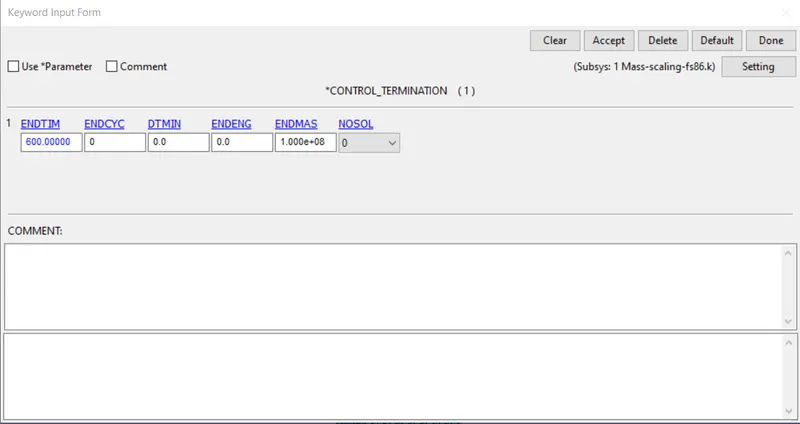
You can use ENDMAS in *CONTROL_TERMINATION to stop the calculation after a certain amount of mass has been added (active for automatic mass scaling only).
PROCEDURE:
Given model:
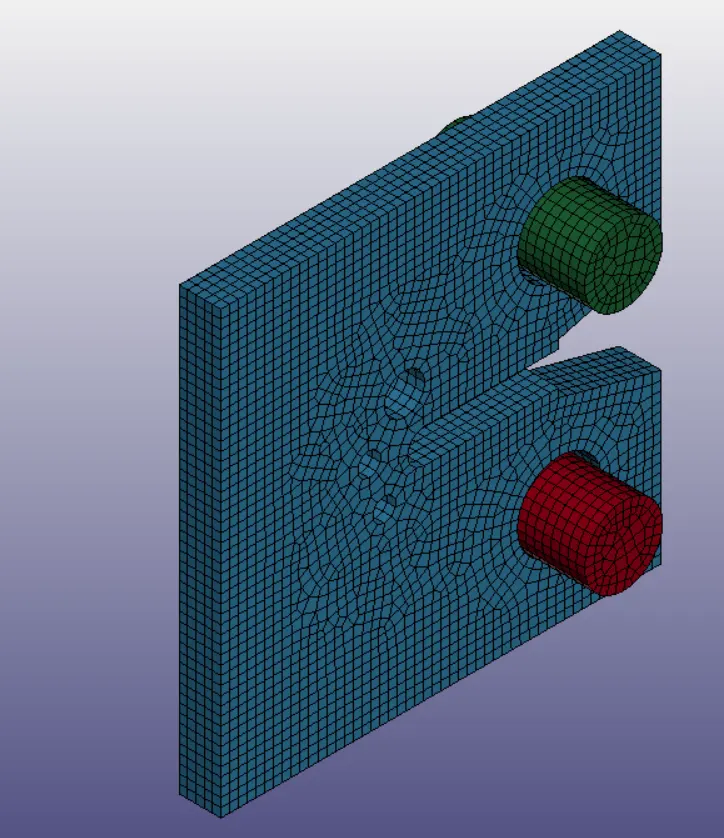
Unit system used:
Material card used is
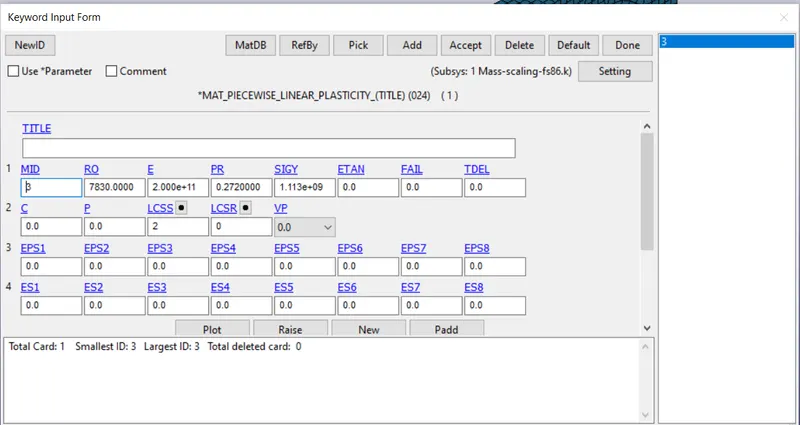
we can see the properties of the steel material.
Unit system used is : Kg-m-sec
Given Control_termination card:
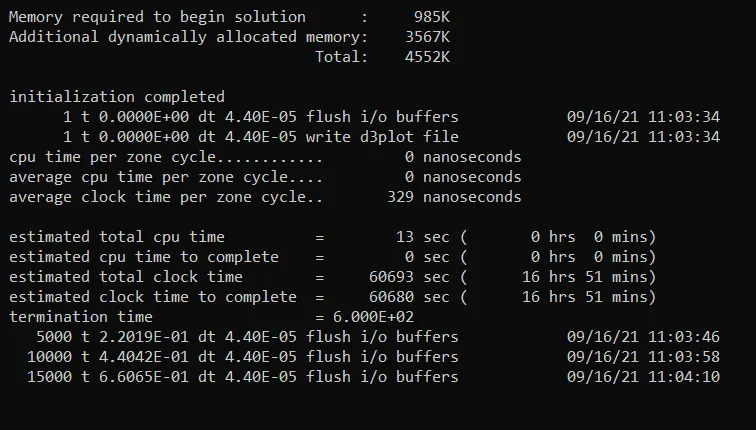
Case 1: Without mass scaling
The *Control_timestep card provided is deleted to view how much time does the model takes to run the simutation without any time step controlling.
Termination run time = 600 seconds.
The current time step value = 4.40E-05 seconds.
Total estimated simulation time = 60693 seconds = 16 hrs 51 mins.
CASE 2: With varying TSSFAC values in *Control_Timestep card
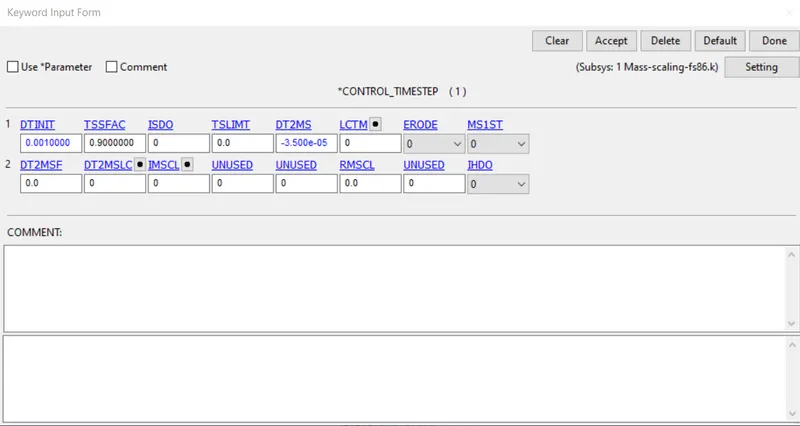
Given *Control_Timestep card
Termination run time = 600 seconds.
DT INIT is 0.001
TSSFAC is given as 0.9
DT2MS = -3.5 e-05
Current time step = 4.40E-05 seconds
TSSFAC does not affect the mass scaling, it only reduces the timestep.
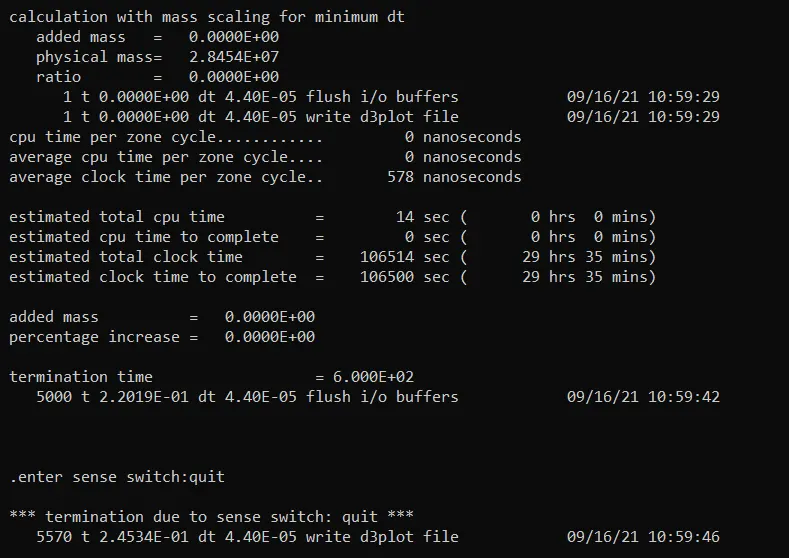
We can see added mass and ratio is zero due to no mass scaling as the time step is in the non-adjustable range.
Due to decrease in time step by TSSFAC, The total estimated run time is increases to 29 hrs 35 mins.
Total estimated run time is increased when compared to case 1.
To see the effect of TSSFAC, let us change the value of TSSfac to 0.8:
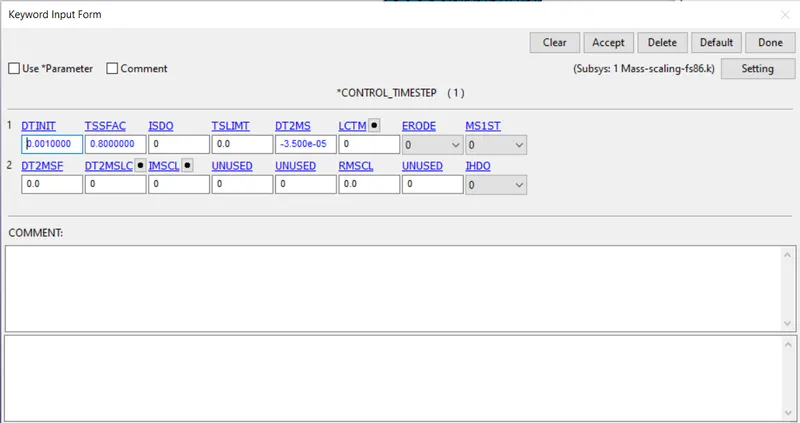
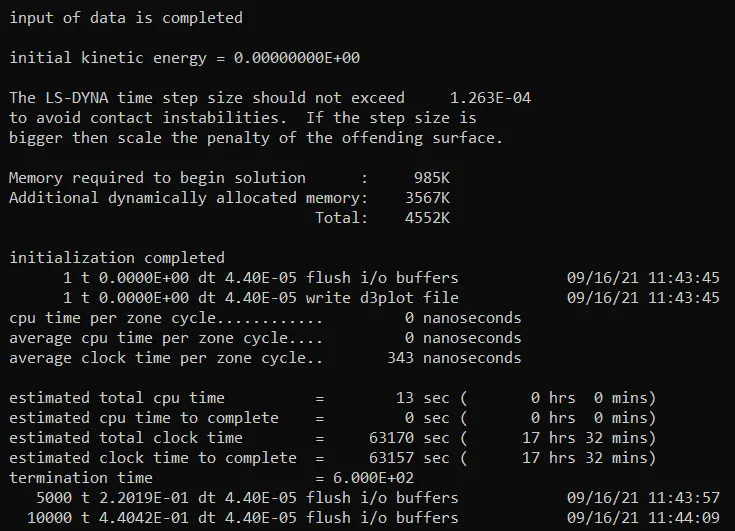
We can see the total time estimated to run the simulation is decreased to 17 hrs 32 mins.
There is no mass addition.
To see the effect of TSSFAC, let us change the value of TSSfac to 0.7:
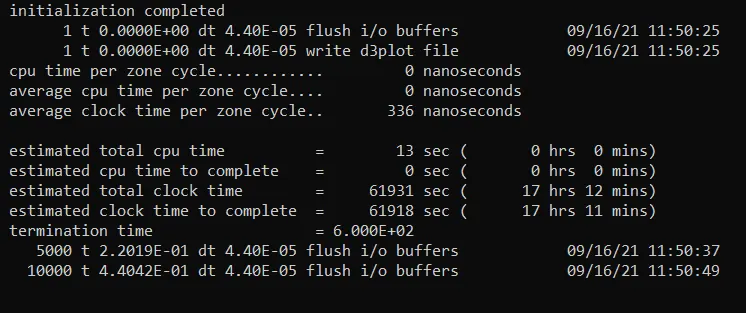
We can see the total time estimated to run the simulation is decreased to 17 hrs 12 mins.
There is no mass addition.
To see the effect of TSSFAC, let us change the value of TSSfac to 0.6:
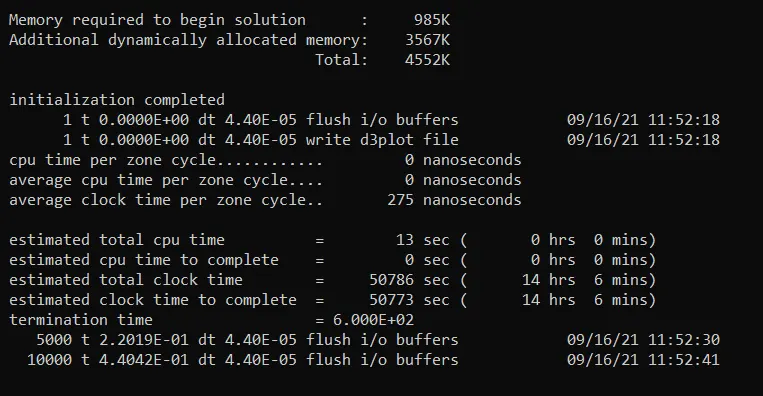
We can see the total time estimated to run the simulation is decreased to 14 hrs 6 mins.
There is no mass addition.
The graph is plotted with varying TSSFAC vs ESTIMATED TIME
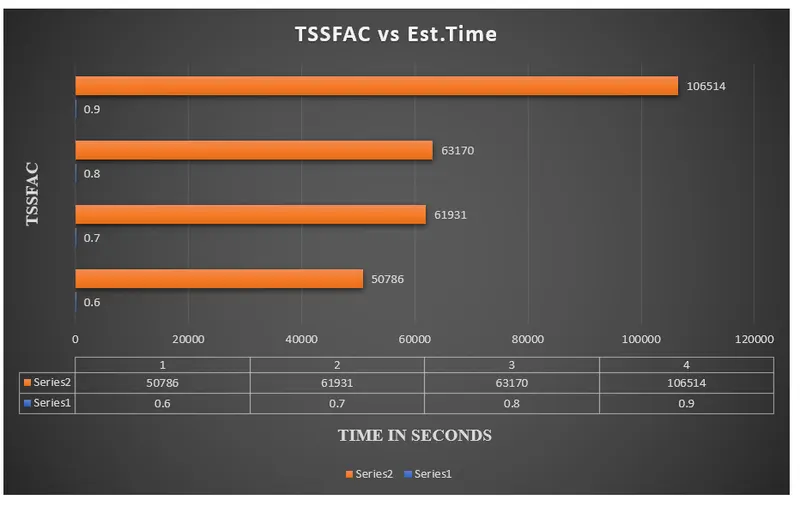
Simulation is faster as the value of TSSFAC is decreasing which may lead to instability.
LS-DYNA usually keep TSSFAC = 0.9 as default to maintain stability in the simulation.
CASE 3: With mass scaling (TSSFAC = 0.9)
Given *Control_Timestep card
Termination run time = 600 seconds.
DT INIT is 0.001
TSSFAC is given as 0.9
DT2MS = -3.5 e-05
Current time step = 4.40E-05 seconds
TSSFAC does not affect the mass scaling, it only reduces the timestep.
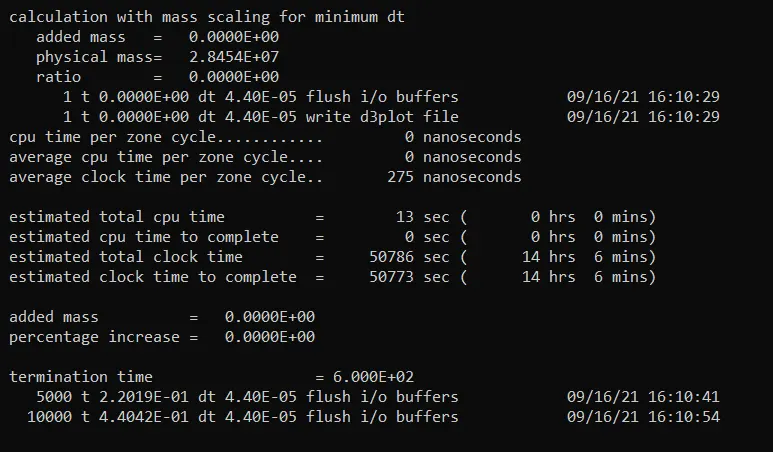
We can see the total time estimated to run the simulation is decreased to 14 hrs 6 mins.
We can see added mass and ratio is zero due to no mass scaling, as the time step is in the non-adjustable range.
We can add artificial mass to decrease the time for simulation, DT2MS can be increased upto 8% of physical mass.
we have to increase the value of DT2MS to see the effect
let, DT2MS = -8.5 e-05
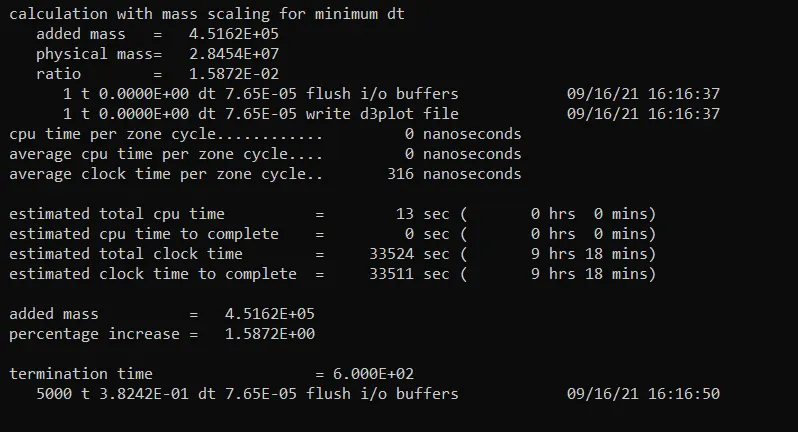
We can see the time estimated for the simulation = 33524 seconds = 9 hrs 18 mins
Added mass is 4.5162 E+05
Percentage increase in mass = 1.5872%
DT2MS can be increased upto 8% of physical mass, to decrease the time for simulation.
Let, DT2MS = -9 e-05
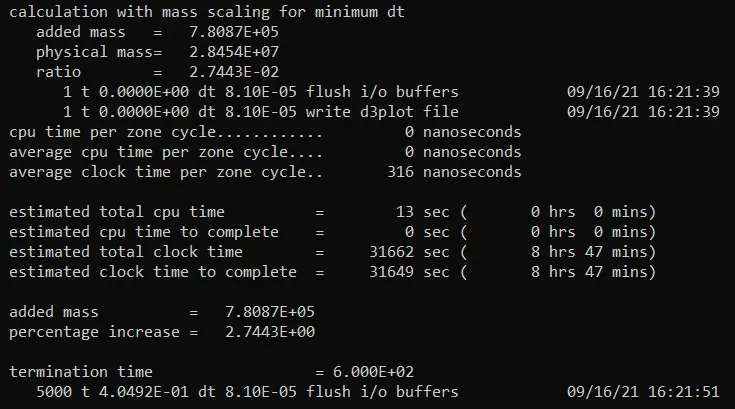
We can see the time estimated for the simulation = 31662 seconds = 8 hrs 47 mins
Added mass is 7.8087 E+05
Percentage increase in mass = 2.7443 %
DT2MS can be increased upto 8% of physical mass, to decrease the time for simulation.
Let, DT2MS = -9.8 e-05
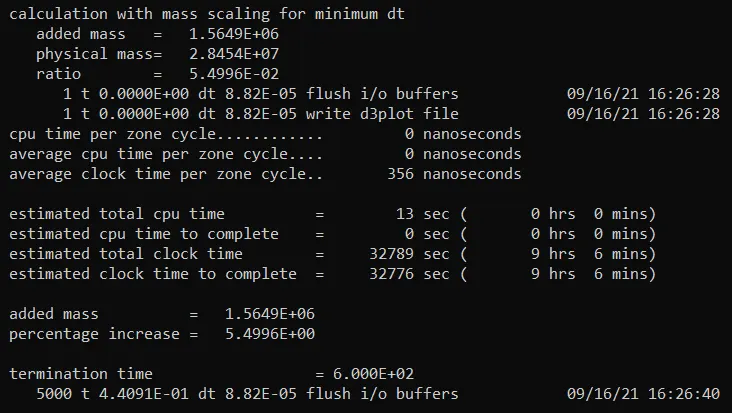
We can see the time estimated for the simulation = 32789 seconds = 9 hrs 6 mins
Added mass is 1.5649 E+06
Percentage increase in mass = 5.4996 %
DT2MS can be increased upto 8% of physical mass, to decrease the time for simulation.
Let, DT2MS = -1 e-04
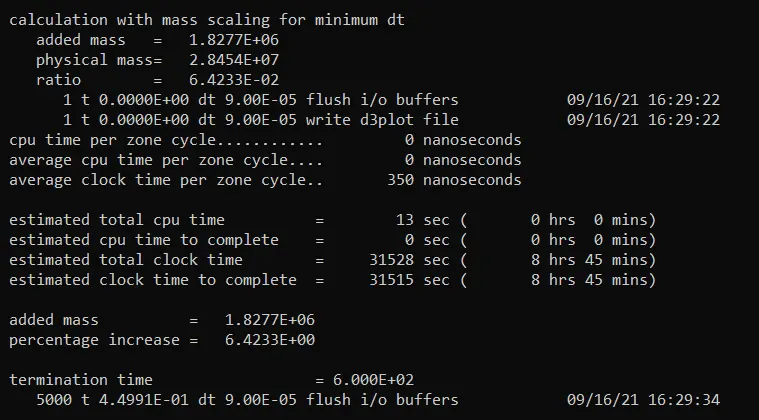
We can see the time estimated for the simulation = 31528 seconds = 8 hrs 45 mins
Added mass is 1.8277 E+06
Percentage increase in mass = 6.4233 %
DT2MS can be increased upto 8% of physical mass, to decrease the time for simulation.
Let, DT2MS = -1.02 e-04
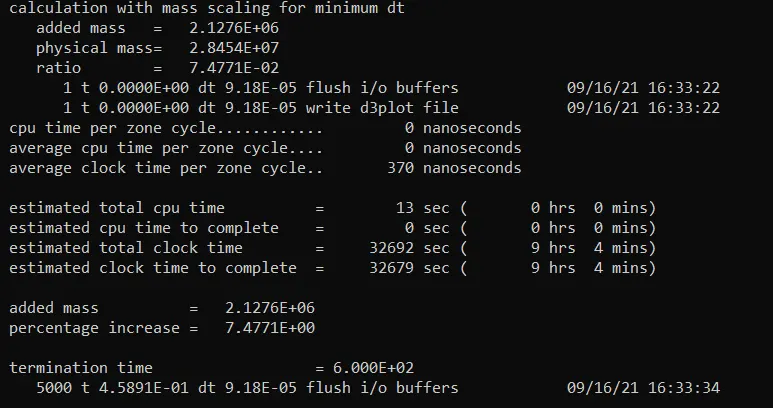
We can see the time estimated for the simulation = 32692 seconds = 9 hrs 4 mins
Added mass is 2.1276 E+06
Percentage increase in mass = 7.4771 %
DT2MS can be increased upto 8% of physical mass, to decrease the time for simulation.
Let, DT2MS = -1.025 e-04
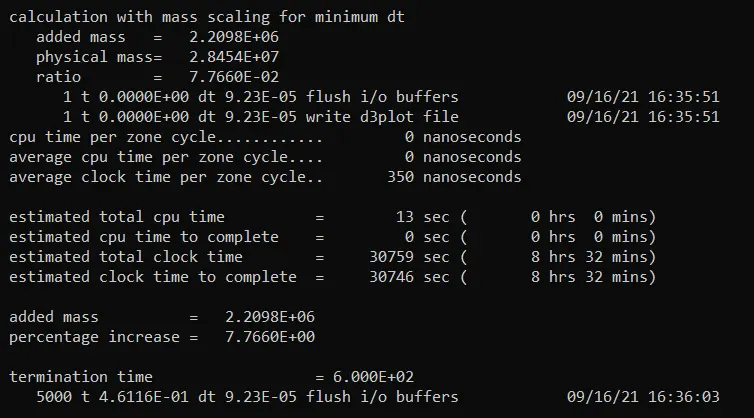
We can see the time estimated for the simulation = 30759 seconds = 8 hrs 32 mins
Added mass is 2.2098 E+06
Percentage increase in mass = 7.766 %
DT2MS can be increased upto 8% of physical mass, to decrease the time for simulation.
Let, DT2MS = -1.027 e-04
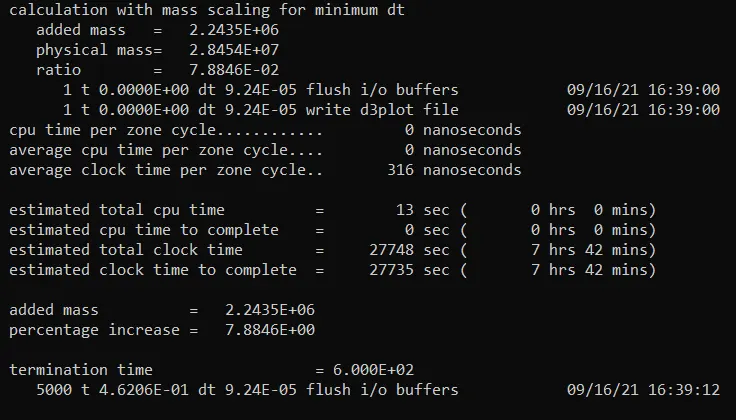
We can see the time estimated for the simulation = 27748 seconds = 7 hrs 42 mins
Added mass is 2.2435 E+06
Percentage increase in mass = 7.8846 %
DT2MS can be increased upto 8% of physical mass, to decrease the time for simulation.
Let, DT2MS = -1.028 e-04
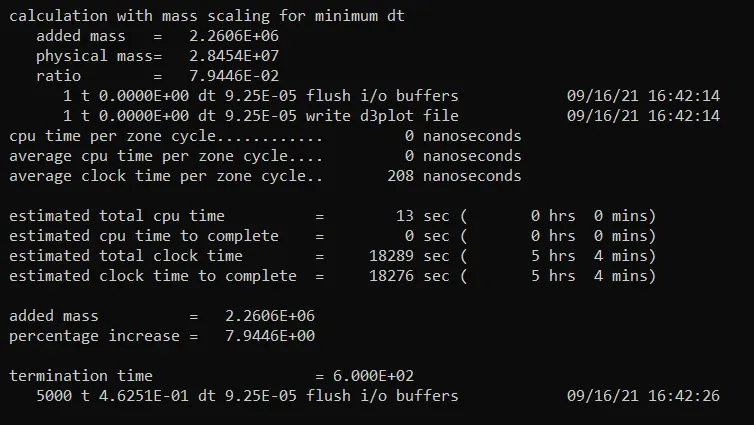
We can see the time estimated for the simulation = 18289 seconds = 5 hrs 4 mins
Added mass is 2.2606 E+06
Percentage increase in mass = 7.9446 %
DT2MS can be increased upto 8% of physical mass, to decrease the time for simulation. As percentage increase in mass is close to 8%, we should not add mass more as inertia effects will come into play.
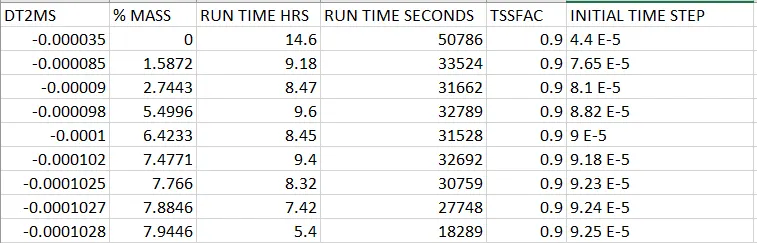
From the above table, we can see TSSFAC is maintained constant at 0.9. The values of DT2MS are increased to increase the value of time step there by decreasing the run time of the simulation.
We can see the increase in values of DT2MS from top to bottom, The % increase in mass is also increased, Run time is decreased and Initial time step is increased with increase in % mass.
From the below graph, we can see that the time taken for the simulation is decreasing by adding the virtual mass to the part for controlling the time step.
Due to added mass, The inertia effects the simulation results. Therefore, due to increase in mass, Inertia may need to be considered.
As TSSFAC value is decreasing there is a possibility of instability occurance due to decrease in the values of time-step to be maintained. Generally the default value used is 0.9.
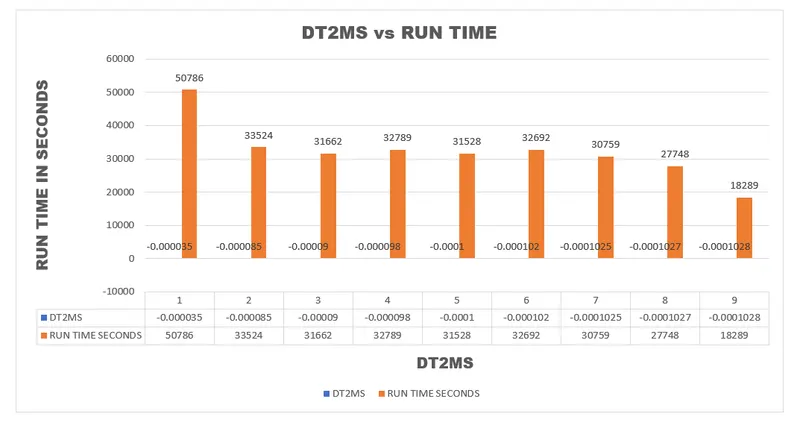
From the above graph, we can say at TSSFAC = 0.9 and at DT2MS = -0.0001028, The time taken for the simulation is optimum for the steady simulation.
The % of mass added at that DT2MS is 7.9446.
Mass scaling for implicit solution:
We have to define certain cards to switch into implicit problem
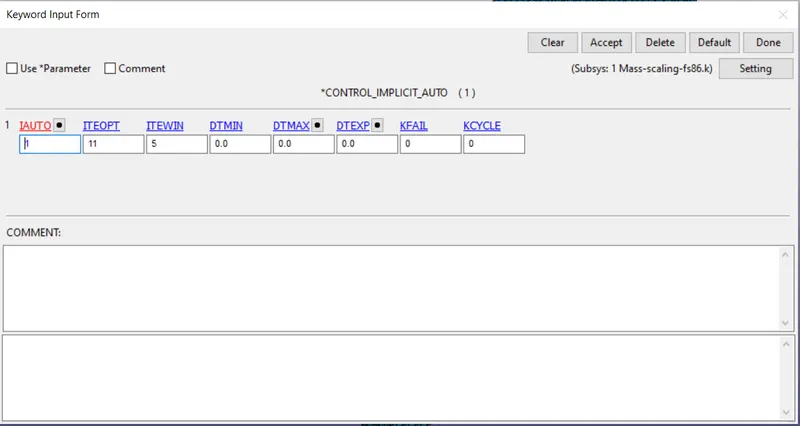
Control_Implicit_Auto is used for automatic time step control in the analysis.
We have to provide IAUTO = 1 to activate implicit card.
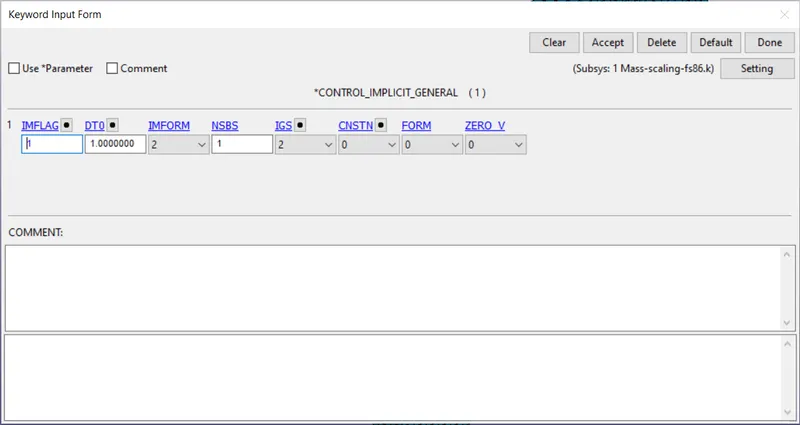
Control_Implicit_General card is used to activate implicit analysis and define the parameters to control time step.
IMFLAG is used for switching between implicit and explicit solver.
DT0 is the initial time step for the implicit analysis.
Control_Implicit_Solution is used for specifying the problem as non-linear problem.
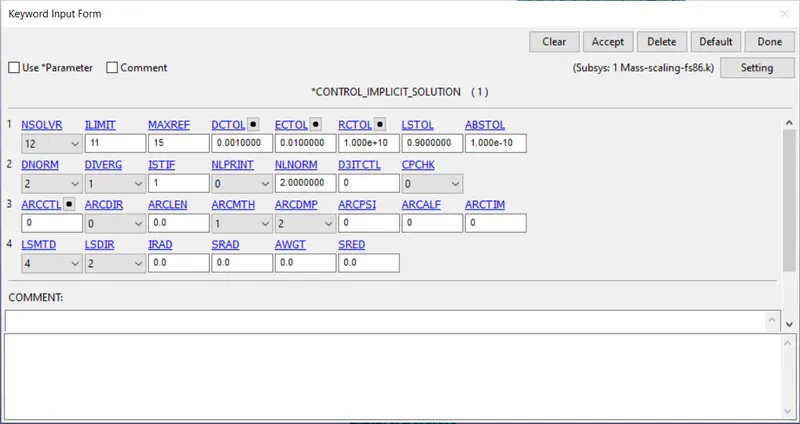
Control_Implicit_Solver is used for specifying the problem as implicit problem.
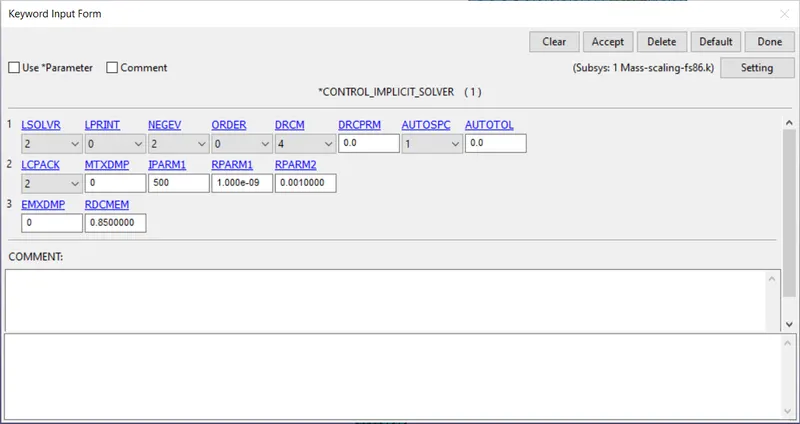
Termination time is given as 600 seconds.
STEP-1: By using the given Time step card with TSSFAC = 0.9, DT2MS = -3.5E-05.
Run the simulation
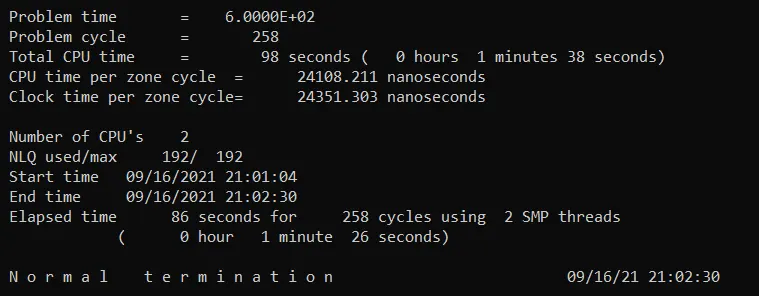
We can see the time taken for the simulation = 86 seconds
STEP 2:
From the explicit we can see at DT2MS = -1.028E-04 the increase in mass is 8% of the physical mass,as the artificial mass is considered the respective time step is also large which takes much less time to run the simulation.
By using the given Time step card with TSSFAC = 0.9, DT2MS = -1.028E-04
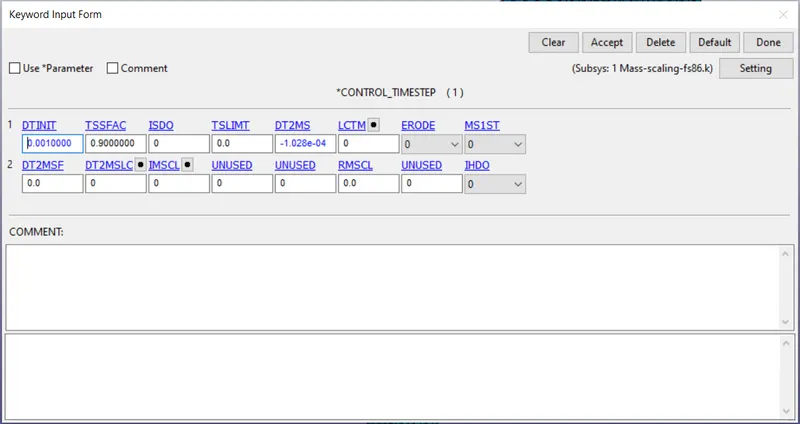
Run the simulation
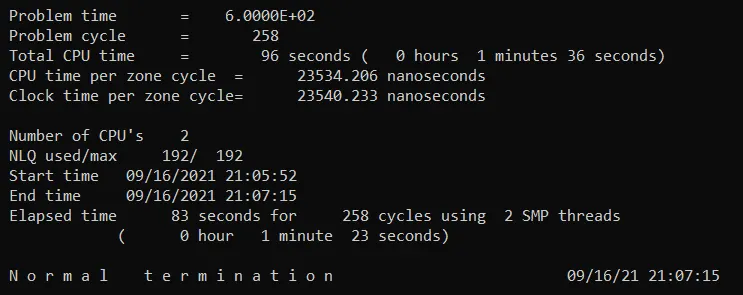
The time taken for the simulation = 83 seconds
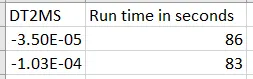
We can see that the time taken by the simulation not much varying when case 1 and case 2 are compared.
The DT2MS and TSSFAC is not much effecting the run time of the simulation.
From the Explicit graph, we can see the decrease in run time by increasing the time step, by adding the virtual mass when time step is reached below certain limit.
By changing the values of TSSFAC, we can see the drastic decrease in run time of the simulation by not adding any virtual mass but may cause instability due to much decrease in timestep values.
In implicit analysis, there is no much effect of TSSFAC and DT2MS in the run time of the simulation.
Conclusion:
- If time step control card is not used, the run time of the simulation is 16 hrs 51 mins.
- The objective of mass scaling is attained by using trial and error method. TSSFAC default value is used to maintain stability in simulation and DT2MS values are increased to increase the value of time step by maintaining the percentage increase in mass below 8% of physical mass.
- By explicit solving, the optimum value of DT2MS = -1.028e-04 at TSSFAC = 0.9 with lowest run time of 5.4 hours by maintaining the stability in the solution.
- In implicit analysis, there is no much effect of TSSFAC and DT2MS in the run time of the simulation.
- The scale factor does not affect the mass scaling but decreases the time step to be considered thereby decreasing the run time of the simulation.