Week 4-1D Element Creation Challenge
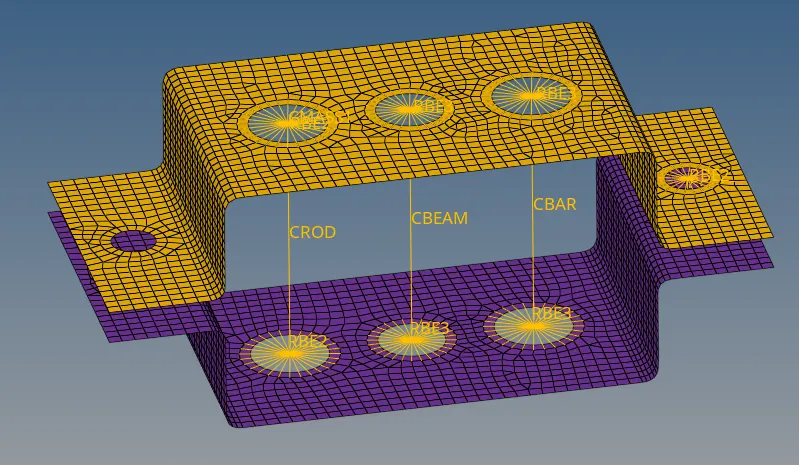
1) Mesh the Given component with the Size of 5 Units. Create 1D elements on the following component with given cross-section and DOF.
Procedure -
Import the CAD Model using Import geometry option in IGES format.
In geometry section using midsection tab create/extract the surface since the thickness is uniform.
Then assign the material and properties in the model browser to the created midsurface. we can delete the solids from the geometry here and hide the surfaces and keep only extracted midsurface.
Select appropriate Card and material in the model browser for properties.
Then meshing the component by using the automesh option in 2D.Here i have splited the surface at the fillets and created washer split to get good quality meshing.
Create RB2 elements using rigids in 1D module for the holes on the top and the bottom and restricting the DOF degree of freedom in XYZ. Similarly we can created RBE3 elements and provide degree of freedom for Rod, Bar and Beam.
Once RBE2 & RBE3 elements are created we provide mass and type of mass is CMASS. Then we move to Hyper beam.
Create Rod, Beam and Bar as per given dimension and create properties for these cross section and change the CARD to PROD, PBEAM & PBAR.
Created a spring element at RBE2 for flange holes. Please see the attached model.