Week 8 - Simulation of a backward facing step in OpenFOAM
objective- To simulate an incompressible-laminar-viscous flow through the backward facing step geometry without grading factor and with grading factor of .5 and .2 and to compare the mesh i.e with grading factor and withot grading factor.
Theroy-
1.open terminal in linux operating system.
2. type 'tut' and it takes to built tutorial files of opern foam and to view contents for that type ls.
3.type 'cd incompressible', and 'ls' which gioves incomressible directory file.
4. type ' cd icoFoam', then 'ls', to view in to icofoam directory file.
5. type 'cd cavity',then 'ls', to view contents.
6. copy cavity by typing 'cp -r cavity/ $FOAM_RUN/cavity_test' which copies cavity file and pastes in the run floder and rename using cavity_test to avciod rewriting.
7.type 'cd $FOAM_RUN', which takes in to directly in to run floder.
8. open the files using the command cd.
9.open the copied cavity file from the run folder .
10. where we have blockMeshDict file,controlDict file,Fv schemes. fv sloutionwhich need to edit according to our boundary condtion.
11. type gedit blockMeshDict',which has geometric and mesh characteristicts of the domain.
12. type 'gedit controlDict',which has time control featuresc like start time end time deltat
13. we have the blockMeshDict file has
/*--------------------------------*- C++ -*----------------------------------*\
  =========                 |
  \\      /  F ield         | OpenFOAM: The Open Source CFD Toolbox
   \\    /   O peration     | Website:  https://openfoam.org
    \\  /    A nd           | Version:  8
     \\/     M anipulation  |
\*---------------------------------------------------------------------------*/
FoamFile
{
    version     2.0;
    format      ascii;
    class       dictionary;
    object      blockMeshDict;
}
// * * * * * * * * * * * * * * * * * * * * * * * * * * * * * * * * * * * * * //


convertToMeters 0.001;

vertices
(
    (0 0 0) //0
    (80 0 0) //1
    (80 5 0) //2
    (0 5 0) //3
    (0 0 1) //4
    (80 0 1) //5
    (80 5 1) //6
    (0 5 1) //7

       (0 10 0) //8
   (80 10 0) //9
   (0 10 1) //10
   (80 10 1) //11
    (200 5 0) //12
    (200 10 0) //13
    (200 10 1) //14
    (200 5 1) //15
   (200 0 1) //16
    (200 0 0) //17
    (200 -10 0) //18
    (80 -10 1) //19
   (200 -10 1) //20
    (80 -10 0) //21
    );


blocks
(
    hex (0 1 2 3 4 5 6 7) (200 20 1) simpleGrading (1 1 1)
     hex (3 2 9 8 7 6 11 10) (200 20 1) simpleGrading (1 1 1)
    hex (2 12 13 9 6 15 14 11) (200 20 1) simpleGrading (1 1 1)
    hex (1 17 12 2 5 16 15 6) (200 20 1) simpleGrading (1 1 1)
     hex (21 18 17 1 19 20 16 5) (200 20 1) simpleGrading (1 1 1)

);

edges
(
);

boundary
(
    outlet
   {
      type patch;
      faces
      (

       (12 13 14 15)
       (17 12 15 16)
       (18 17 16 20)
        );
        }
        frontAndback
        {
           type empty;
           faces
           (
           (0 3 2 1)
           (3 8 9 2)
           (2 9 13 12 )
           (1 2 12 17)
           (21 1 17 18)
           (4 5 6 7)
           (7 6 11 10)
           (6 15 14 11)
           (5 16 15 6)
           (19 20 16 5)
           );
           }
           noslipwall
           {
              type wall;
              faces
              (
                 (10 11 9 8)
                 (11 14 13 9)
                 (4 0 1 5)
                  (21 19 5 1)
                 (19 21 18 20)
                 );
                 }
                 inlet
                 {
                    type patch;
                    faces
                    (


                      (0 4 7 3)
                      (3 7 10 8)
                      );
                      }


  );

mergePatchPairs
(
);

// ************************************************************************* //
first we create blocks by giving the vertixes of the block using the dimension of the blocks in the x y and z direction. second we have called 'hexa' defines type of meshig element used and next we have number of grid points is specified along x,y z and we have simplegrading factor which is ratio of the size of the end cell to the size of the starting cell here simplegrading (1,1,1) the size of the cell are equally spaced in all three direction.
next we specify the boundary condtion at inlet ,outlet,frontandback and at no slip the inlet and outlet are specifed as patches as they are considerd as the faces where fluid enters and leaves and front and bottom faces are considered as empty and top and bottom faces are considered as slip walls as the velocity will be zero.
in the icoFoam slover it writes out the results for each field u,p in to time directories.for this case the entries in the controlDict are shown below
/*--------------------------------*- C++ -*----------------------------------*\
  =========                 |
  \\      /  F ield         | OpenFOAM: The Open Source CFD Toolbox
   \\    /   O peration     | Website:  https://openfoam.org
    \\  /    A nd           | Version:  8
     \\/     M anipulation  |
\*---------------------------------------------------------------------------*/
FoamFile
{
    version     2.0;
    format      ascii;
    class       dictionary;
    location    "system";
    object      controlDict;
}
// * * * * * * * * * * * * * * * * * * * * * * * * * * * * * * * * * * * * * //

application     icoFoam;

startFrom       startTime;

startTime       0;

stopAt          endTime;

endTime         0.2;

deltaT          0.00001;

writeControl    timeStep;

writeInterval   20;

purgeWrite      0;

writeFormat     ascii;

writePrecision  6;

writeCompression off;

timeFormat      general;

timePrecision   6;

runTimeModifiable true;


// ************************************************************************* //
next we set boundary condtion i.e p and u for our faces we have p file as shown below
/*--------------------------------*- C++ -*----------------------------------*\
  =========                 |
  \\      /  F ield         | OpenFOAM: The Open Source CFD Toolbox
   \\    /   O peration     | Website:  https://openfoam.org
    \\  /    A nd           | Version:  8
     \\/     M anipulation  |
\*---------------------------------------------------------------------------*/
FoamFile
{
    version     2.0;
    format      ascii;
    class       volScalarField;
    object      p;
}
// * * * * * * * * * * * * * * * * * * * * * * * * * * * * * * * * * * * * * //

dimensions      [0 2 -2 0 0 0 0];

internalField   uniform 0;

boundaryField
{
    inlet
    {
        type            zeroGradient;
    }

    outlet
    {
        type            fixedValue;
        value           uniform 0;
    }

    noslipwall
    {
        type            zeroGradient;
    }

      frontAndBack
      {
        type              empty;
        }

}
// ************************************************************************* //
the first line specifies the dimensions of the field here kinematic pressure i,e m^2s^-2. the boundary consists of the inlet patch for which its given as zero gradient meaning normal gradient of pressure is zero for inlet face and for the outlet the unifrom value is given and for the frontandback faces its given empty as resprent the the front and back planes of the 2d cases therefore it ste has empty.
we have velocity file has
/*--------------------------------*- C++ -*----------------------------------*\
  =========                 |
  \\      /  F ield         | OpenFOAM: The Open Source CFD Toolbox
   \\    /   O peration     | Website:  https://openfoam.org
    \\  /    A nd           | Version:  8
     \\/     M anipulation  |
\*---------------------------------------------------------------------------*/
FoamFile
{
    version     2.0;
    format      ascii;
    class       volVectorField;
    object      U;
}
// * * * * * * * * * * * * * * * * * * * * * * * * * * * * * * * * * * * * * //

dimensions      [0 1 -1 0 0 0 0];

internalField   uniform (0 0 0);

boundaryField
{
    inlet
    {
        type            fixedValue;
        value           uniform (1 0 0);
    }

    outlet
    {
        type           zeroGradient;
    }

    noslipwall
    {
        type            noSlip;
    }

       frontAndBack
       {
         type             empty;
         }


}

// ************************************************************************* //
the first line resprents the dimensions for velocity which is m/sec hence m^1 and sec^-1 the internal field is initililased as unifrom zero which is expressed in three compoments i.e unifrom (0 0 0) the inlet wall moves at spped of 1 m/sec in the x direction hence fixed value condtion also but with unifrom(1 0 0) the other faces considred as walls hence unifrom value of ( 0 0 0).
after applying boundary condtio now we run our slover i.e icoFoam and i can be visulaised in the paraFoam
without grading factor
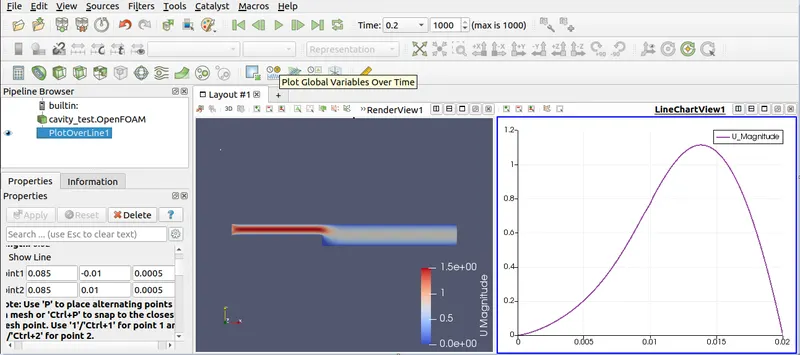
with 0.2 grading the blockMeshDict file will be
blocks
(
    hex (0 1 2 3 4 5 6 7) (200 20 1) simpleGrading (0.2 0.2 1)
     hex (3 2 9 8 7 6 11 10) (200 20 1) simpleGrading (0.2 0.2 1)
    hex (2 12 13 9 6 15 14 11) (200 20 1) simpleGrading (7 0.2 1)
    hex (1 17 12 2 5 16 15 6) (200 20 1) simpleGrading (7 0.2  1)
     hex (21 18 17 1 19 20 16 5) (200 20 1) simpleGrading (7 0.2 1)

);
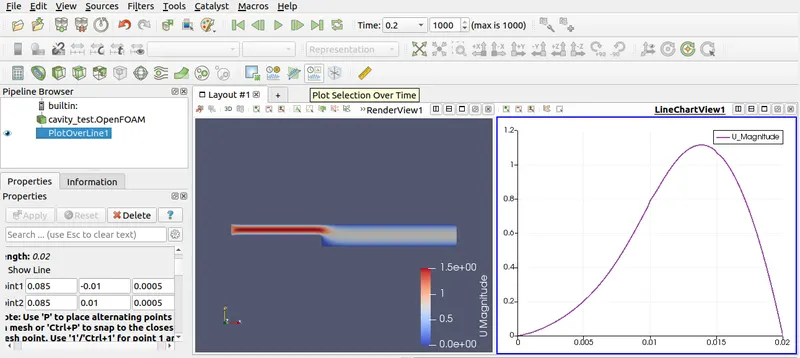
blocks
(
    hex (0 1 2 3 4 5 6 7) (200 20 1) simpleGrading (0.5 0.5  1)
     hex (3 2 9 8 7 6 11 10) (200 20 1) simpleGrading (0.5 0.5 1)
    hex (2 12 13 9 6 15 14 11) (200 20 1) simpleGrading (7 0.5 1)
    hex (1 17 12 2 5 16 15 6) (200 20 1) simpleGrading (7 0.5  1)
     hex (21 18 17 1 19 20 16 5) (200 20 1) simpleGrading (7 0.5 1)

);
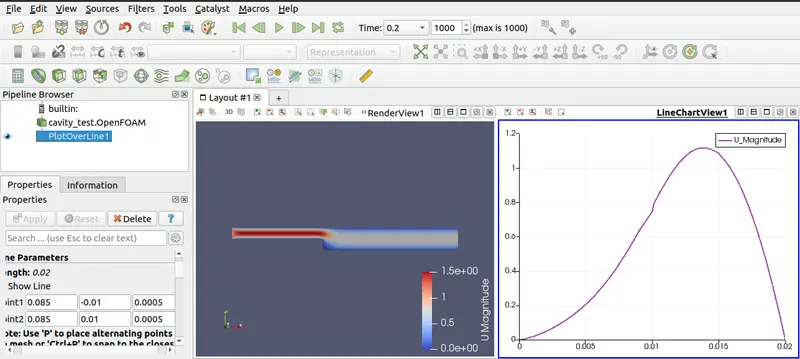
conclusion
as from above plot there is small amont of change in the velocity profiles but as grading size decreases we get fine mesh hence we have fine meshing at grading factor of 0.2.
ert