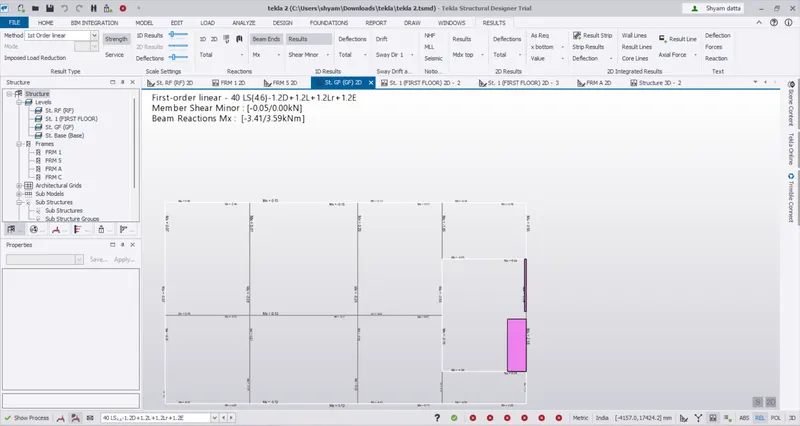
For seismic load ( IS 1893 ) We should check the deflection limit value for member that satisfy the criterior . For columnn the axial force is considered. Designing the model to fulfill its composition. Analysis…
Shyam Datta
updated on 03 Feb 2023
Project Details
Leave a comment
Thanks for choosing to leave a comment. Please keep in mind that all the comments are moderated as per our comment policy, and your email will not be published for privacy reasons. Please leave a personal & meaningful conversation.
Other comments...
Read more Projects by Shyam Datta (67)
Project 2
Since cutting pattern generation is not provided in RFEM latest version 6 . The procedure for it is stated below 1. Draw a line using line option and rotate the line in 360 degree using rotate option 2. Apply nodal supports for the…
03 Jun 2023 07:30 AM IST
Project 1
'
18 May 2023 09:00 AM IST
Project 2 - Review of Shear, Moment & Splice connections in StaadPro Connection Module
22 Mar 2023 10:06 AM IST
Project 1 - Review of Shear & Moment Connections in RAM Connection
20 Mar 2023 02:06 PM IST
Project 2_Analyze and Design the RC office building as per IS standard code in TEKLA STRUCTURAL DESIGNER
Dead Load Slab load = 200 mm Finishes = 0.05 x 24 =1.2 KN/ m3 Brickwall loading = 150 mm Floor height ( GF-FF) = 6 m Unit weight = 20 KN/m 3 Brickwall loading = 18 KN/m Floor height ( FF-RF) = 4 m Brickwall loading = 12 KN/m Live load …
09 Feb 2023 03:21 PM IST
To Generate report for Steel Industrial and RC structures using TSD
06 Feb 2023 10:20 AM IST
To Design slab and foundation for an RC residential building using TSD
Design of Slab Foundation It ensures the overall performance of model .
05 Feb 2023 12:32 PM IST
To Design RC column and beam for RC residential structure using TSD
For column maximum SF value is obtained from results and design as per required . For Beam maximum BM value is obtained from results and design as per required . Refer to IS 456 , SP 16 hand book for reinforcement details …
04 Feb 2023 12:11 PM IST
To Generate seismic loading based on IS code and to run the analysis using TSD
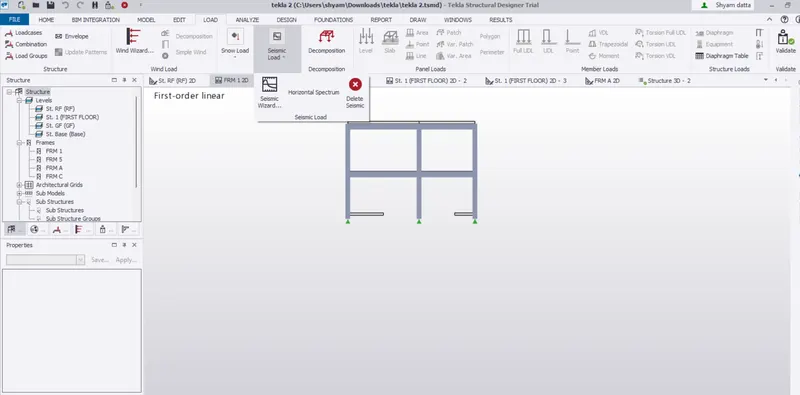
For seismic load ( IS 1893 ) We should check the deflection limit value for member that satisfy the criterior . For columnn the axial force is considered. Designing the model to fulfill its composition. Analysis…
03 Feb 2023 01:50 PM IST
To calculate the dead , live and wind load for RC residential structure and to apply them using TSD
1. Dead load slab load = 200 mm finishes = 0.05 x24 = 1.2 KN /m3 Brick wall loading = 150 mm floor height ( GF -FF) = 4 m unit weight = 20 KN/m 3 Brick wall loading = 12 KN /m floor height ( FF- RF) = 4 m Brick wall loading = 12 KN /m …
02 Feb 2023 08:38 AM IST
Project 1_Analyze and design a steel building to 10T CRANE as per IS standard code using TEKLA STRUCTURAL DESIGNER.
1. DEAD LOAD ( IS 875 PART 1) slab load = 200 mm finishes = 0.05 x24 = 1.2 KN /m3 Brick wall loading = 150 mm floor height ( GF -FF) = 5 m unit weight = 20 KN/m 3 Brick wall loading = 15 KN /m floor height ( FF- RF) = 7 m Brick wall loading = 21 KN /m …
02 Feb 2023 07:00 AM IST
To Model a RC residential structure using TSD
…
30 Jan 2023 03:44 PM IST
To Analysis and Design of Steel Structures using TSD
1. After results are obtained , for deflection when values are higher we need to consider by resizing the member sizes varying untill the deflection criteria is under permissible limit. ( 40 mm) . It checks under limit state of serviceability . Deflection limits as per IS 800 table 6 span to depth ratio for…
26 Jan 2023 01:46 PM IST
To calculate wind load for industrial steel structures and to apply it by using TSD
A. Basic wind speed = 39 m/s terrain category 2 As per IS 875 part 3 Length of building = 24 width of building = 18 m Height of building = 17.8 m Design wind speed Vz = Vb k1 k2 k3 k1 = 1 k2 = 1.06 For 17.8…
25 Jan 2023 05:02 AM IST
To calculate dead and live load for industrial steel structures and to apply them using TSD
A. Loadings Dead load Slab load = 200 mm Finishes (50 mm) = 0.05 m x 24 KN/m3 = 1.2 KN/m3 Brickwall with cement plaster thickness = 150 mm Unit weight = 20 KN/m3 Floor height ( GF to FF) = 5.200 m Brick wall loading = 15.6 KN/m FLoor…
20 Jan 2023 12:25 PM IST
To model beams and bracings for industrial steel structures using TSD
1. RAFTERS X BRACINGS
17 Jan 2023 09:25 AM IST
To model columns for industrial steel structure using TSD
1. Concrete column for base to GF Concrete column from Gf to roof Steel column from GF to Roof Primary Beam section Secondary beam section …
13 Jan 2023 10:22 AM IST
To plan a structural layout and to create grids using TSD
Project workspace provides certain information to model like loading & validation Scene content is used to filters some options that are certain in away Go to settings & see scene option and adjust accordingly…
10 Jan 2023 08:51 AM IST
Project 2 - MODELLING, ANALYSIS & DESIGN OF COMPOSITE STUCTURES IN COMFLOR & ETABS
…
23 Dec 2022 02:45 PM IST
Project 1 - MODELLING, ANALYSIS & DESIGN OF TALL BUILDINGS IN ETABS
A. …
12 Dec 2022 06:59 AM IST
Project 1
A. LOAD CALCULATION 0.120 m x 25 KN/m^3 = 3Kpa , FF & mech =3 Kpa , live load = 5 Kpa Total load = 11 Kpa Load on the beam = (11x 1.5 ) + 11x 1.5 = 33 KN /m^2 self weight of beam = 0.5x0.75 x25 = 9.375 KN/m total load on beam = 42.375…
15 Oct 2022 08:49 AM IST
Project 2
Isolated Footing Design (IS 456-2000) Footing No. Group ID Foundation Geometry - - Length Width Thickness 1 1 2.40m 2.40m 0.70m Footing No. Footing Reinforcement Pedestal Reinforcement - Bottom Reinforcement(Mz) Bottom Reinforcement(Mx) Top Reinforcement(Mz) Top Reinforcement(Mx) Main…
22 Sep 2022 03:45 PM IST
Week 3 Challenge
1.1.Dead load (IS 875 part-1) , Live load ( IS 875 part-2), Wind load (IS875 part-3), snow load (IS 875 part -4), Seismic load (IS 1893:2016) Ly/Lx>2 , the load distribution is along a particular direction for steel it is 78.5 kn/m3, for soil it is 18 kn/m3 Primary beams are beams connected to column transferring…
04 Sep 2022 11:56 AM IST
Week 2 Challenge
1. After creating geometry of column , go to properties , circle section define dimensions and add it then assign 2. open a new model file you will find two option English, meteric 3.for a bay frame , bay spacing between two column and beam is required 4. 5. Go to design, change current…
03 Sep 2022 09:29 AM IST
Week 1 Challenge
A. 1. 1. Open staad pro software , enter share option there its available , go to utilities , command file gives all details of the structure 2. The following are materials 3. yes, take a picture option is available in staad pro 4.you can create model by analytical, physical…
02 Sep 2022 06:07 PM IST
Project 2_Design & Analysis of a Hostel building at Guwahati, Assam
A. Open a new model providing settings as perIS 456-2000 story assignment as per given problem material properties Go to define , material properties Fe 500 used for flexural design, Fe 415 used for shear reinforcement column…
24 Aug 2022 08:53 AM IST
Foundation Design using SAFE
A. open a new model , as per IS code 456 Unfactored load = 2000/1.5=1333.3 KN dead load = 1333.3/2=666.7 KN live load = 1333.3/2=666.7 KN subgrade modulus for soil= safe bearing capacity x factor of safety / maximum settlement = 150x3/0.05= k= 9000 kN/m3 column…
21 Aug 2022 04:48 AM IST
Design of Shallow Foundation (Isolated Footings)
A. Gross soil pressure & Footing area unfactored load with surcharge + self weight of footing / allowable soil pressure = ( 2000/1.5x1.1)/150 = 9.78 m2 `sqrt9.78`= 3.12 m side footing , consider 3.2 m isolated footing net soil pressure & initial Footing depth = 2000x1000/(3.2x3.2), …
16 Aug 2022 01:42 PM IST
Structural Modelling using Etabs 2018
Open new model , custom story data then edit story . edit also grid data as in x, y direction from custom grid spacing. Go to define, material properties assign material M30 grade. Go to define, material properties assign steel grade fe415, fe 500 …
15 Aug 2022 05:44 AM IST
Analysis & Design of RCC shear walls in the model using ETABS
A. Longitudinal reinforcement: Shear reinforcement : Boundary zone width: As per IS 13920-2016 hw/lw =21000/1500=14>2 Minimum…
08 Aug 2022 07:07 AM IST
Reinforcement detailing of Columns from ETABS output
A. There is no shear reinforcement requirement to loading , this is minimum shear reinforcement required as per ductility stated as shear reinforcement along minor and major axis values are same in given two columns . …
07 Aug 2022 02:27 PM IST
Reinforcement Detailing of Beams from ETABS output
longitudinal reinforcenment details open etabs, run the analysis . Press concrete frame design option on the right side corner. shear reinforcement details Press concrete frame design option on the right side corner. Drop down the parameter list and choose display design info. set…
30 Jul 2022 05:38 PM IST
Project 1_Comparative study of different storey buildings for Seismic forces
Criteria Model Analysis result Conclusion Effect of stiffness on Time period Building-E ( 10 storey with varying column size) 1.731 s Building-F( 10 storey with varying column size) 1.735 s Effects of stiffness on time period Building-G( 25 storey with varying column size) 1.716 …
16 Jul 2022 11:44 AM IST
Modelling of 25 storey building with the specified properties using ETABS
open etabs , create a new model as per settings click ok enter required custom grids spacing , custom story data as per given question Go to define dialogue box , material propertiers create as concrete, rebar. Go for section properties ,frames create new properties for beams, column as per settings Go for…
14 Jul 2022 04:37 AM IST
Conceptual design of a building with columns and shear walls
1. Criteria a b c Restraint of floor shrinkage observation full restraints at all corners corners are left free but restraints along the edges non-uniform retraints conclusion option (a) will have high restraint to shrinkage , thus lead to cracks in floor its average it will not effectively…
12 Jul 2022 06:29 AM IST
Concept on positioning of Columns
1. Investigation of the frame plan with respect to symmetry in x- direction: if we split the plan horizontally half , it will look mirrored . so we conclude the given plan is symmetric in x- direction. Investigation of the frame plan with respect to symmetry in y- direction: if we split the plan vertically half…
10 Jul 2022 07:46 AM IST
Understanding the concepts on Degrees of Freedom
07 Jul 2022 09:54 AM IST
Calculation of Stiffness in Structural elements
There are 3 degree of freedom ( 2 rotation, 1 transverse) assume unit displacement u1=1 stiffness coefficient of column translation( 2 similar) = 2* 12 EI/h3 stiffness coefficient of beam rotation (2 ends)= EI/h2 unit displacement u2=1 stiffness coefficient of column rotation at right end = 6EI/h2 stiffness…
05 Jul 2022 06:24 AM IST
Identification of Cracks
1.(a) observation: concrete crushed and the reinforcement is exposed concrete spalled beyond the reinforcement which may be a sign of rupture beam top portion looks safe because of the flange advantage from slab the crack develops from bottom to top means rebar yeilding occurs in support bottom only. its form…
29 Jun 2022 11:09 AM IST
Usage of Navigation tool , Timeliner and Clash Detection test using Naviswork
Open a architectural file ,structural file then file export option enter nwc save it in nwc file name. 2.Open navis works mange software , file open the architectural file . go inside the building ,in view point tab…
27 Jun 2022 01:10 PM IST
Creating Conceptual mass in REVIT and Creation of Sinusoidal curve and a Parametric stadium using Dynamo
Open dynamo , type integer slider in the search box create 3 set of integer slider and adjust them as needed. Then search range, math.sin, code block and 2 set of point by coordinates. Give integer slider to range , range list to math.sin , from range and code block to point by coordinates . for curve in point,…
26 Jun 2022 11:46 AM IST
Preparing Schedule & Cost Estimation for a building using REVIT
1. open architectural file , floor plan view Section box -BX , select a object needed and type BX . Create similar -CS , select a object needed and type cs Thin line -TL Over…
25 Jun 2022 08:27 AM IST
Structural analysis of a buidling using Robot Structural Analysis
Heating ventilation and air conditioning . It is technology of indoor environmental comfort. Its goal is to provide thermal comfort and acceptable indoor air quality. Important part of structure Control the overall climate of the building , air conditioners, boilers etc. it enhances the productivity . it improves the air…
24 Jun 2022 12:31 PM IST
Creating Architectural and Structural model with 3D rendering using REVIT
Open a new architectural template and structural template and save it for multi unit residential apartment. Sketch a plan layout for architectural template by placing foundation level, ground level , first floor, second floor , third floor , fourth floor , fifth floor, roof , staircase, floors, elevator and parking space…
23 Jun 2022 04:40 AM IST
Usage of Collaborate tool in REVIT
Create a new file save it to architecture template , In manage tab go to project location enter specify coordinates as you locate to a point needed and edit in settings click ok. Type vg and see the site option expand and check in project base point and allocate it to as required. …
17 Jun 2022 08:25 AM IST
Introduction to National Building Code and Steps in a Construction project
A set of standards that are uniform to all structures. It protects the construction safety Modern construction methods Provides building standards . Group A: Residential buildings Group B: Educational buildings Group C: Assembly buildings Group D: Institutional buildings Group E: mercantile buildings…
16 Jun 2022 07:44 AM IST
3D Creation of Celing, Roof, Architectural plan, Structural plan, Sectional view, Elevation view and Camera specific view for a house plan using REVIT
Go to architecture tab enter ceiling dialogue box and in modify panel choose pick line option pick exterior /interior lines and tick ok . choose ground floor to first floor. 2.Go to architecture tab enter roof dialogue box and in modify panel choose pick line option pick exterior…
15 Jun 2022 08:45 AM IST
Creating Walls, Partition walls and Floors for a residential layout using REVIT
From layout plan go to architecture dialogue box select walls , go to properties them edit type check in structure click edit, choose a relevant category for walls click ok and apply. For material go to edit type check structure press edit choose relevant category press ok . For thickness go…
14 Jun 2022 06:31 AM IST
Creating Levels, Grids, Layout and model elements for a residential unit using REVIT
1. Bim is a visual representation of physical and functional characteristics of a facility from inception onwards. It serves as a shared information for collaboration through out the facility life cycle It has easy access of information , making process more expressive, comprehensive view of a project. Complete representation,…
12 Jun 2022 11:58 AM IST
Introduction to REVIT concepts
13. Collaboration is used for work sharing together. It allows cloud sharing, central model. it allows users to divide models into worksets, creating a mater project known as central project, it stores…
10 Jun 2022 01:34 PM IST
Project 2_Creating a 3D rendered model for a Residential Building in AutoCad
https://web.autocad.com/acad/me/sid/shares/drawings/9e497ede-a122-425d-ad5e-3a8ef8ce8fe7/editor AIM: Create a 3 dimensional model of the residential building with a rendered view. Introduction: Specify command line to draw the plan , elevation. specify…
07 Jun 2022 12:32 PM IST
Creating 3D Isometric view of various structural elements in AutoCAD
Specify command line to draw the plan Go to the settings and change to 3d modelling To plan drawing make a region and command boundary to create 3d Apply layer filter to the wall and door dimensions Take command extrude and measure as per given dimensions For window opening select an rectangle to the line…
03 Jun 2022 09:04 AM IST
Creating various 3D Models like Furniture, Footing, Girder, Column drop with panel and Gable Wall in AutoCad
specify command line adjust dimension according to ucs draw the 3d view and check in with extrude and 2d wire frame setting option ( hidden, shadded etc) to get 3d model. specify command line adjust dimension according to ucs draw the 3d view and check in with extrude and…
31 May 2022 09:13 AM IST
Creation of Multiple viewports, Scaling the drawing and setting in Template in AutoCad
Specify xref command,go to attach and open the file copy to new drawing Create a new view in view menu bar as section, elevation etc. In layout adjust page setup manager by right click on the layout tab as per given dimension On right click of layout tab you can rename the layout…
30 May 2022 10:54 AM IST
Creating Kitchen layout, Hatching of Architectural elements and sectional view of an Industrial Building in AutoCad
specify xref command , attach file from challenge 7. create a new file and save it copy and take a scrrenshot. use command line to draw the elevation plan as per challenge 7 create door, windows objects…
29 May 2022 04:22 PM IST
Creating Bar Bending schedule, Different Door types, and Creation of standard drawing templates using AutoCad
specify command line to draw rectangle to draw the design door use fillet command for corners of the dooruse trim option to remove extra lines.use block command for object creation and save as type name, pick point, select object , click okuse insert command to place the objects. …
27 May 2022 04:22 PM IST
Project 1 _Creating an Architectural plan for the provided plot size and develop relevant basic structural drawings
AIM: Design and Draft a layout of a residential building with the following details: a. Plot Size: 60’x20’(18.3m x6m) b. Orientation- Facing East c. Develop the following: 1. Architectural Drawing (Floor Plan, Elevations, and Sections) 2. Structural Drawing (Column, Bean, Footing Plan) …
25 May 2022 05:07 PM IST
Creating a Layout, Section and Elevation with dimensions using AutoCad
https://web.autocad.com/acad/me/sid/shares/drawings/9f9cb6cd-6213-4bd9-afea-0fe6ca0d5ef8/editor
23 May 2022 04:22 PM IST
Creating a Wardrobe detailed drawing, Floor Plan, Kitchen Layout and Column Detail using AutoCad
https://web.autocad.com/acad/me/sid/shares/drawings/11c11f9b-20c9-4afb-bb96-a19e025e982b/editor
21 May 2022 11:45 AM IST
Creation of Column Schedule and Drawing Template using AutoCad
https://web.autocad.com/acad/me/sid/shares/drawings/f75b91a4-2d2d-4dec-b868-8d413bc5c60b/editor Aim : To write down details as per given in question using command tool mtext and draw section using line and hatch. Introduction: Typing details using text command and sketch section using line…
18 May 2022 08:59 AM IST
Creating a Residence Layout, Seating plan, Toilet and Utility room plan using AutoCad
Aim : To create plan of residential building in autocad using various command tools. Introduction: sketching plan using command tools like fillet,extend, offset, applying layers, pictures, circle, trim , chamfer. …
16 May 2022 05:35 PM IST
Drafting of various geometries using Chamfer, Fillet tool in AutoCad
https://web.autocad.com/acad/me/sid/shares/drawings/50c657bf-ff0e-432e-b686-b5bd574acbda/editor
16 May 2022 11:20 AM IST
Creating a Floor plan, Footing detail and Isometric view using AutoCad
12 May 2022 10:26 AM IST
Creation of geometries by Coordinate system methods using AutoCad
Aim : To create the given geometric and trusses in auto cad using drawing tools. Geometrics p-1 and p-2 are drawn using all coordinate system. Introduction: Co-ordinate system is a system number of units, axis notation is denoted. Absolute coordinate system- All points are specified at a distance from the…
09 May 2022 02:13 PM IST
Sketch a G+1 residential plan according to Vaastu Shastra and Calculation of Loads as per IS code
A.Aim: To draw a G+1 residential plan using Vaastu shastra and calculation of load of the structure using IS code. Introduction: Vaastu shastra is ancient Indian science of architectural and acts as guidelines to design home in that way to enhance positive energy. Effects of sunrays, pull of earth magnetic…
04 May 2022 09:21 AM IST
Project on Concrete Mix Design for various grades of Concrete
A. Grade Designation: M35 Target mean strength of concrete f’ck=fck+1.65S Where, fck = Characteristics compressive strength at 28 days S= Standard Deviation (IS 10262:2009 , table 1) = 35+ 1.65*5= 43.25 N/mm2. From the below graph, w/c ratio = 0.33 2.Selection of water…
24 Apr 2022 04:58 PM IST