Creation of geometries by Coordinate system methods using AutoCad
- Aim : To create the given geometric and trusses in auto cad using drawing tools. Geometrics p-1 and p-2 are drawn using all coordinate system.
Introduction:
Co-ordinate system is a system number of units, axis notation is denoted.
- Absolute coordinate system- All points are specified at a distance from the origin(0,0).
- Relative coordinate system- it is defined as location of these coordinate by using first point of drawing is always absolute and then all other points are done using this type of coordinate. There are 2 types
Relative rectangle coordinate – It ordinates with reference to origin axis as x,y. The points are plotted as per the four quadrants.
Relative polar coordinates- It is determined by each distance and angle of units are need to be plotted. in this system command line is @distance unit< angle.
Direct distance entry method- It is easy one as obtained by drawing different units by placing cursor in auto cad and giving some value(length) to it in command line option.
Procedure:
Go to start menu ,select auto cad 2022
Click start drawing , in command line type in STARTUP(enter)
Enter a new value of startup 1
Go to application menu and select new
Select grid option, to set units
Enter values in command option to start drawing
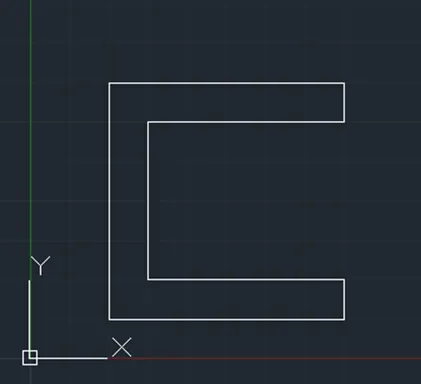
Using absolute coordinate system
Specify the line tool in command option
Specify the starting coordinate of point 1 as 2,1 in command line option
Specify the next coordinate of point 2 as 8,1 in command line option
Specify the next coordinate of point 3 as 8,2 in command line option
Specify the next coordinate of point 4 as 3,2 in command line option
Specify the next coordinate of point 5 as 3,6 in command line option
Specify the next coordinate of point 6 as 8,6 in command line option
Specify the next coordinate of point 7as 8,7 in command line option
Specify the next coordinate of point 8 as 2,7 in command line option
click close on command line
Using relative rectangular coordinate system
Specify the line tool in command option
Specify the starting coordinate of point 1 as 2,1 in command line option
Specify the next coordinate of point 2 as @6,0 in command line option
Specify the next coordinate of point 3 as @0,-1 in command line option
Specify the next coordinate of point 4 as @-5,0 in command line option
Specify the next coordinate of point 5 as @0,-4 in command line option
Specify the next coordinate of point 6 as @5,0 in command line option
Specify the next coordinate of point 7 as @0,-1 in command line option
Specify the next coordinate of point 8 as @-6,0 in command line option
click close on command line
Using relative polar coordinate system
Specify the line tool in command option
Specify the starting coordinate of point 1 as 2,1 in command line option
Specify the next coordinate of point 2 as @6<90 in command line option
Specify the next coordinate of point 3 as @6<0 in command line option
Specify the next coordinate of point 4 as @1<270 in command line option
Specify the next coordinate of point 5 as @5<180 in command line option
Specify the next coordinate of point 6 as @4<270 in command line option
Specify the next coordinate of point 7 as @5<0 in command line option
Specify the next coordinate of point 8 as @1<270 in command line option
Specify the next coordinate of point 9 as @6<180 in command line option
click close on command line
Using direct distance entry method
Specify the line tool in command option
Specify the starting coordinate of point 1 as 2,1 in command line option
Enter the length of point 2 as 6 in command line option towards +ve of x axis
Enter the length of point 3 as 1 in command line option towards +ve of y axis
Enter the length of point 4 as 5 in command line option towards -ve of x axis
Enter the length of point 5 as 4 in command line option towards +ve of y axis
Enter the length of point 6 as 5 in command line option towards +ve of x axis
Enter the length of point 7 as 1 in command line option towards +ve of y axis
Enter the length of point 8 as 6 in command line option towards -ve of x axis
click close on command line
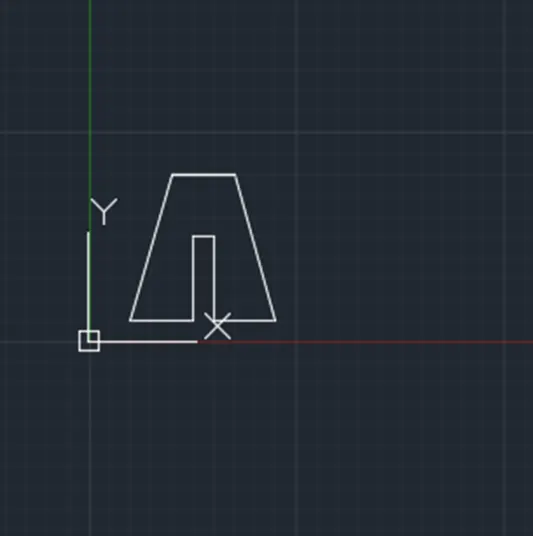
Using absolute coordinate system
Specify the line tool in command option
Specify the starting coordinate of point 1 as 2,1 in command line option
Specify the next coordinate of point 2 as 5,1 in command line option
Specify the next coordinate of point 3 as 5,5 in command line option
Specify the next coordinate of point 4 as 6,5 in command line option
Specify the next coordinate of point 5 as 6,1 in command line option
Specify the next coordinate of point 6 as 9,1 in command line option
Specify the next coordinate of point 7 as 7,8 in command line option
Specify the next coordinate of point 2 as 4,8 in command line option
click close on command line
Using relative rectangular coordinate system
Specify the line tool in command option
Specify the starting coordinate of point 1 as 2,1 in command line option
Specify the next coordinate of point 2 as @3,0 in command line option
Specify the next coordinate of point 3 as @0,4 in command line option
Specify the next coordinate of point 4 as @1,0 in command line option
Specify the next coordinate of point 5 as @0,-4 in command line option
Specify the next coordinate of point 6 as @3,0 in command line option
Specify the next coordinate of point 7 as @-2,7 in command line option
Specify the next coordinate of point 8 as @-3,0 in command line option
click close on command line
Using relative polar coordinate system
Specify the line tool in command option
Specify the starting coordinate of point 1 as 2,1 in command line option
Specify the next coordinate of point 2 as @3<0 in command line option
Specify the next coordinate of point 3 as @4<90 in command line option
Specify the next coordinate of point 4 as @1<0 in command line option
Specify the next coordinate of point 5 as @4<270in command line option
Specify the next coordinate of point 6 as @3<0 in command line option
Specify the next coordinate of point 7 as @7<110 in command line option
Specify the next coordinate of point 8 as @3<180 in command line option
Specify the next coordinate of point 9 as @7<200 in command line option
click close on command line
Using direct distance entry method
Specify the line tool in command option
Specify the starting coordinate of point 1 as 2,1 in command line option
Enter the length of point 2 as 3 in command line option towards +ve of x axis
Enter the length of point 3 as 4 in command line option towards +ve of y axis
Enter the length of point 4 as 1 in command line option towards +ve of x axis
Enter the length of point 5 as 4 in command line option towards -ve of y axis
Enter the length of point 6 as 6 in command line option towards +ve of x axis
Enter the length of point 7 as 7 in command line option towards +ve of y axis
Enter the length of point 8 as 3 in command line option towards -ve of x axis
click close on command line
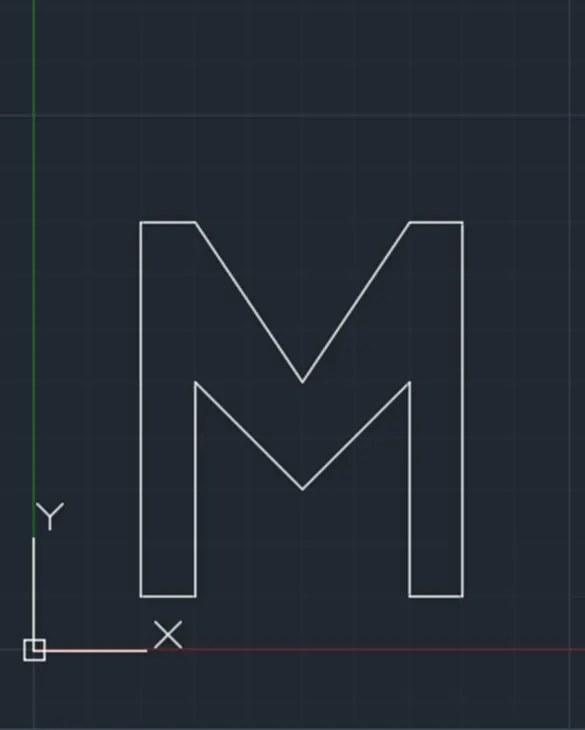
Using absolute coordinate system
Specify the line tool in command option
Specify the starting coordinate of point 1 as 2,1 in command line option
Specify the next coordinate of point 2 as 3,1 in command line option
Specify the next coordinate of point 3 as 3,5 in command line option
Specify the next coordinate of point 4 as 5,3 in command line option
Specify the next coordinate of point 5 as 7,5 in command line option
Specify the next coordinate of point 6 as 8,1 in command line option
Specify the next coordinate of point 7 as 8,8 in command line option
Specify the next coordinate of point 8 as 7,8 in command line option
Specify the next coordinate of point 9 as 5,5 in command line option
Specify the next coordinate of point 10 as 3,8 in command line option
Specify the next coordinate of point 2 as2,8 in command line option
click close on command line
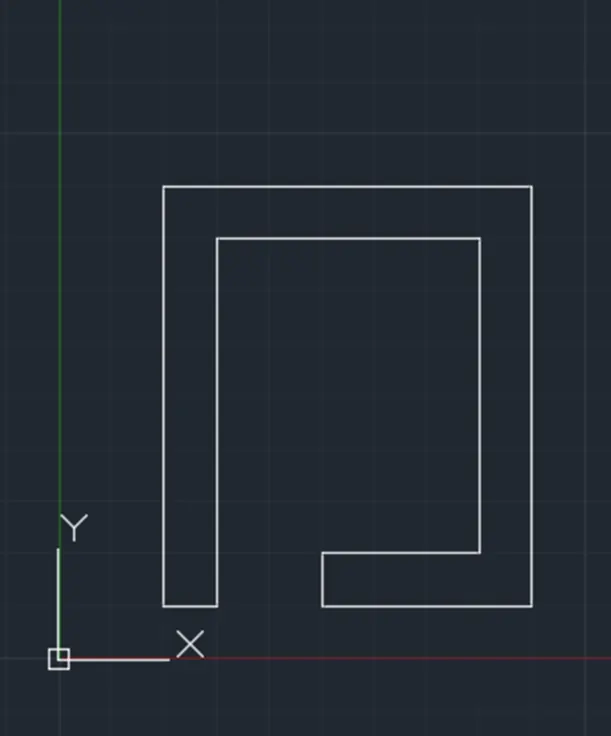
Using relative polar coordinate system
Specify the line tool in command option
Specify the starting coordinate of point 1 as 2,1 in command line option
Specify the next coordinate of point 2 as @8<90 in command line option
Specify the next coordinate of point 3 as @7<90 in command line option
Specify the next coordinate of point 4 as @8<270 in command line option
Specify the next coordinate of point 5 as @4<180 in command line option
Specify the next coordinate of point 6 as @1<90 in command line option
Specify the next coordinate of point 7 as @3<0 in command line option
Specify the next coordinate of point 8 as @6<90 in command line option
Specify the next coordinate of point 9 as @5<180 in command line option
Specify the next coordinate of point 10 as @7<270 in command line option
Specify the next coordinate of point 11 as @1<180 in command line option
click close on command line
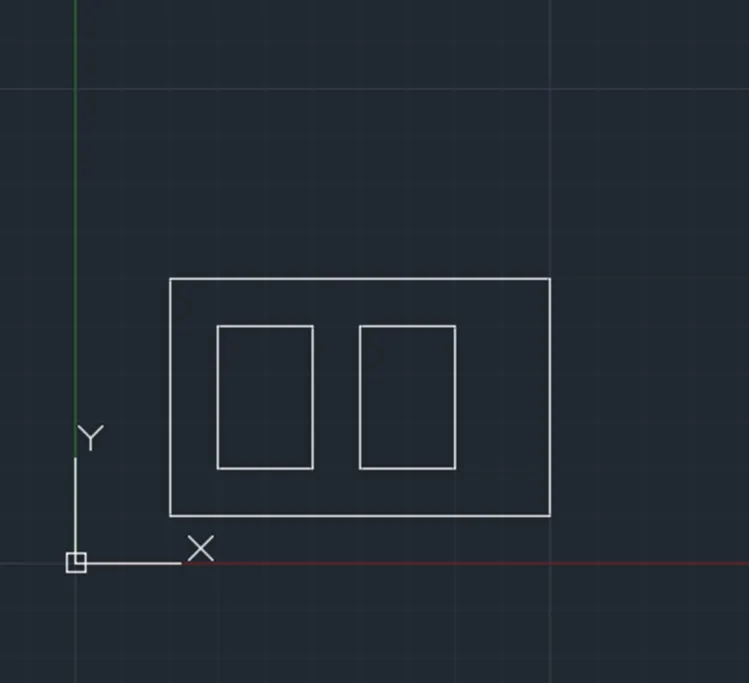
Using relative polar coordinate system
Specify the line tool in command option
Specify the starting coordinate of point 1 as 2,1 in command line option
Specify the next coordinate of point 2 as 10,1 in command line option
Specify the next coordinate of point 3 as 10,6 in command line option
Specify the next coordinate of point 4 as 1,5 in command line option
Specify the next coordinate of point 5 as 3,2 in command line option
Specify the next coordinate of point 6 as 5,5 in command line option
Specify the next coordinate of point 7 as 3,5 in command line option
Specify the next coordinate of point 8 as 6,2 in command line option
Specify the next coordinate of point 9 as 8,2 in command line option
Specify the next coordinate of point 10 as 8,5 in command line option
Specify the next coordinate of point 11 as 6,5 in command line option
click close on command line
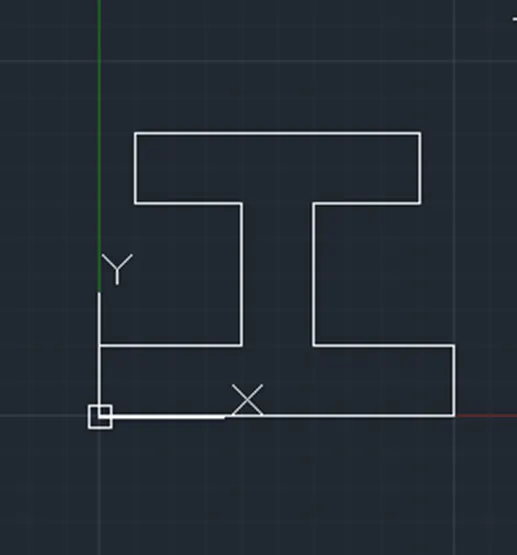
Using relative polar coordinate system
Specify the line tool in command option
Specify the starting coordinate of point 1 as 0,0 in command line option
Specify the next coordinate of point 2 as @10<360 in command line option
Specify the next coordinate of point 3 as @2<90 in command line option
Specify the next coordinate of point 4 as @4<180 in command line option
Specify the next coordinate of point 5 as @4<90 in command line option
Specify the next coordinate of point 6 as @3<360 in command line option
Specify the next coordinate of point 7 as @2<90 in command line option
Specify the next coordinate of point 8 as @8<180 in command line option
Specify the next coordinate of point 9 as @2<270 in command line option
Specify the next coordinate of point 10 as @3<360 in command line option
Specify the next coordinate of point 11 as @4<270 in command line option
Specify the next coordinate of point 12 as @4<180 in command line option
click close on command line
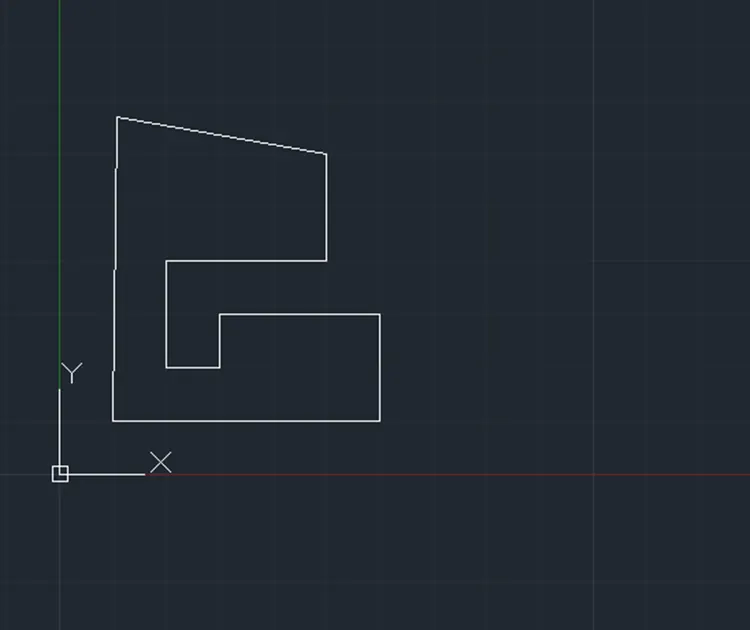
Using relative polar coordinate system
Specify the line tool in command option
Specify the starting coordinate of point 1 as 1,1 in command line option
Specify the next coordinate of point 2 as @5<360 in command line option
Specify the next coordinate of point 3 as @2<90 in command line option
Specify the next coordinate of point 4 as @3<180 in command line option
Specify the next coordinate of point 5 as @1<270 in command line option
Specify the next coordinate of point 6 as @1<180 in command line option
Specify the next coordinate of point 7 as @2<90 in command line option
Specify the next coordinate of point 8 as @5<360 in command line option
Specify the next coordinate of point 9 as @4<170 in command line option
click close on command line
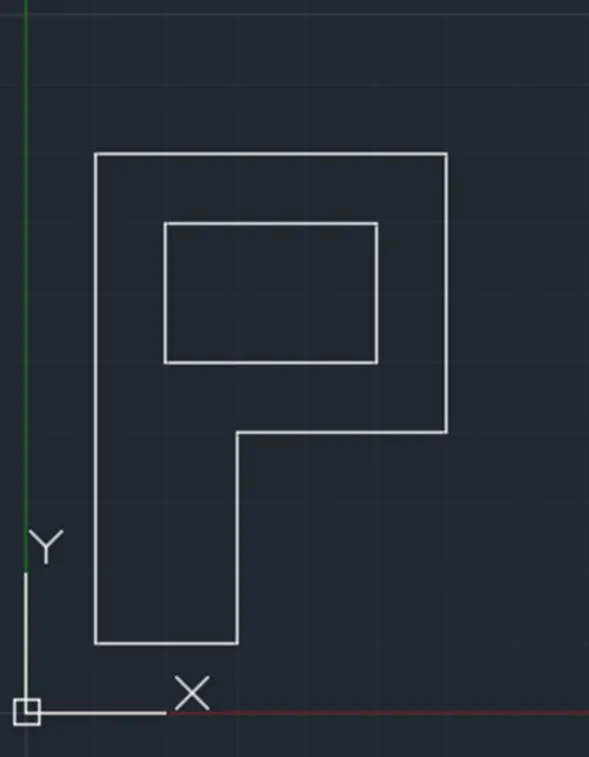
Using absolute coordinate system
Specify the line tool in command option
Specify the starting coordinate of point 1 as 2,1 in command line option
Specify the next coordinate of point 2 as 1,1 in command line option
Specify the next coordinate of point 3 as 3,1 in command line option
Specify the next coordinate of point 4 as 3,4 in command line option
Specify the next coordinate of point 5 as 6,4 in command line option
Specify the next coordinate of point 6 as 6,8 in command line option
Specify the next coordinate of point 7 as 1,8 in command line option
Specify the next coordinate of point 8 as 2,5 in command line option
Specify the next coordinate of point 9 as 5,5 in command line option
Specify the next coordinate of point 10 as 5,7 in command line option
Specify the next coordinate of point 11 as 2,7 in command line option
click close on command line
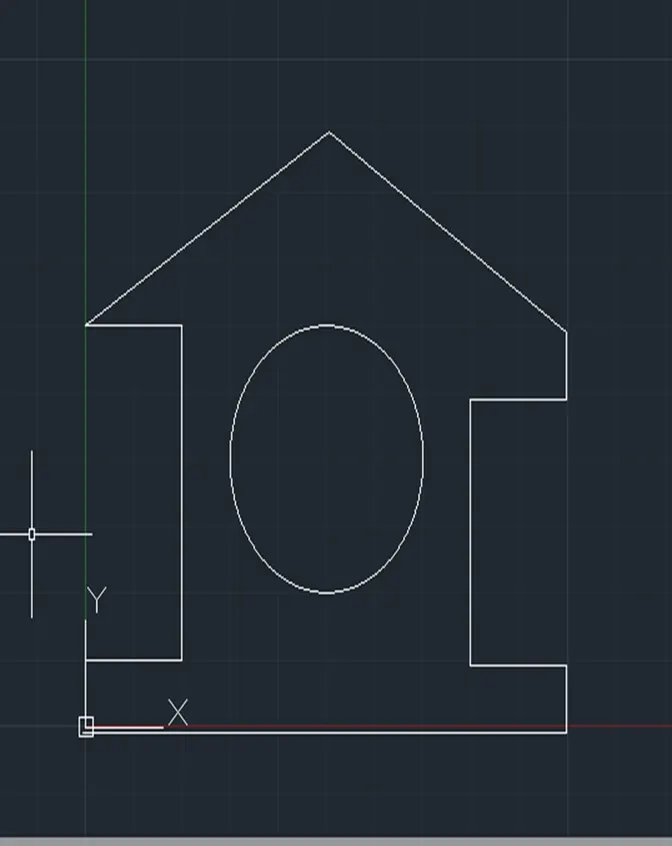
Using relative polar coordinate system
Specify the line tool in command option
Specify the starting coordinate of point 1 as 0,0 in command line option
Specify the next coordinate of point 2 as @10<0 in command line option
Specify the next coordinate of point 3 as @1<90 in command line option
Specify the next coordinate of point 4 as @2<180 in command line option
Specify the next coordinate of point 5 as @4<90 in command line option
Specify the next coordinate of point 6 as @2<0 in command line option
Specify the next coordinate of point 7 as @1<90 in command line option
Specify the next coordinate of point 8 as @5.831<120 in command line option
Specify the next coordinate of point 9 as @5.831<140 in command line option
Specify the next coordinate of point 10 as @2<0 in command line option
Specify the next coordinate of point 11 as @5<270 in command line option
Specify the next coordinate of point 12 as @2<180 in command line option
Specify the next coordinate of point 13 as @1<90 in command line option
click close on command line
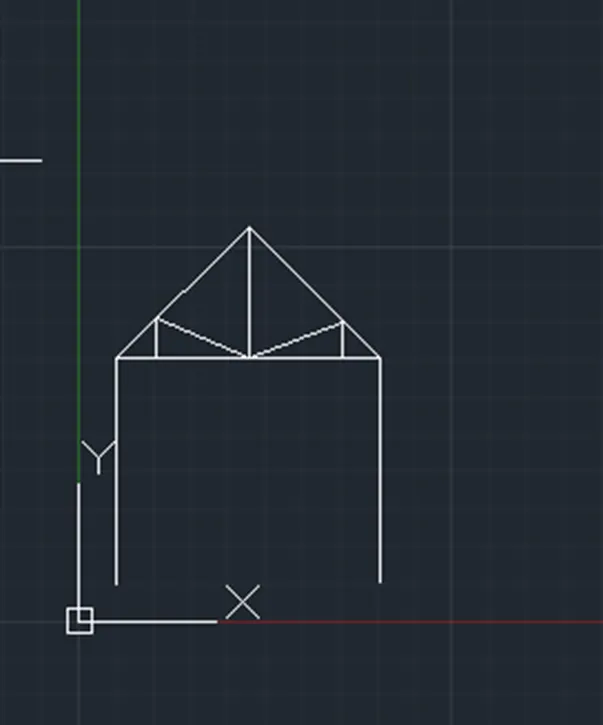
Using direct distance entry method
Specify the line tool in command option
Specify the starting coordinate of point 1 as 1,1 in command line option
Enter the length of point 2 as 6 in command line option towards +ve of y axis
Enter the length of point 3 as 7 in command line option towards +ve of x axis
Enter the length of point 4 as 6 in command line option towards -ve of x axis
Enter the length of point 3 as 5@45 in command line option towards +ve of y axis
Enter the length of point 5 as 5 @45 in command line option towards -ve of y axis
Enter the length of point 6 as 3.5 in command line option towards +ve of y axis
Enter the length of point 7 as 2.536 in command line option towards +ve of y axis
Enter the length of point 8 as 1@45 in command line option towards +ve of x axis
Enter the length of point 9 as 2.567 in command line option towards +ve of y axis
Enter the length of point 10 as 1@45 in command line option towards -ve of y axis
click close on command line
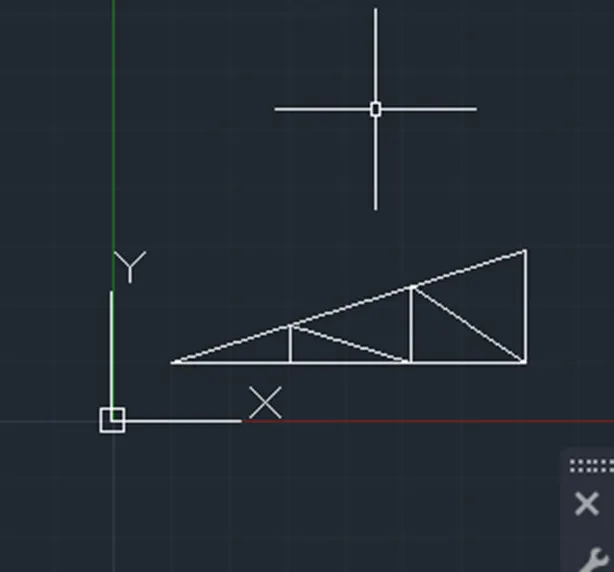
Using direct distance entry method
Specify the line tool in command option
Specify the starting coordinate of point 1 as 1,1 in command line option
Enter the length of point 2 as 6 in command line option towards +ve of x axis
Enter the length of point 3 as 2 in command line option towards +ve of y axis
Enter the length of point 4 as 6@ 45in command line option towards -ve of y axis
Enter the length of point 5 as 2 in command line option towards +ve of y axis
Enter the length of point 6 as 2 in command line option towards +ve of x axis
click close on command line