Week 2- 2R Robotic Arm Challenge
Aim:-
- Program in Matlab to simulate the forward kinematics of a 2R Robotic Arm.
Objectives :
- To study and understand the forward kinematic performance of a 2R robotic arm
- Simulation of forward kinematics of a 2R robotic arm using MATLAB
Introduction:-
A robotic arm is a robot manipulator, usually programmable, with similar functions to a human arm. The links of such a manipulator are connected by joints allowing either rotational motion (such as in an articulated robot) or translational (linear) displacement. The links of the manipulator can be considered to form a kinematic chain. The use of industrial robots is increasing in areas such as food, consumer goods, wood, plastics and electronics, but is still
mostly concentrated in the automotive industry.
Inputs:-
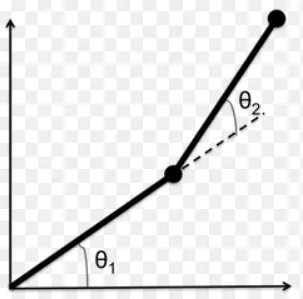
- For this program, we have assumed the length of link 1 and link 2 to 1.25 m and 0.75 m.
- In order to simulate the robotic arm, it is necessary to vary theta1 and theta2 to obtain the desired animation and it cannot be possible if we manually enter the respective data every time. So we have created a row vector from0 to 90 with 13 evenly spaced points between them.
- The coordinates of the base, i.e., is assumed to be at origin,(0,0)
Matlab code:-
clc
clear all
close all
% inputs
% length of link 1
 l1 = 1;
 % length of link 2
 l2 = 0.5;
 ct=1;
 % row vector from 0 to 90 with 13 evenly spaced points for theta1
 theta1 = linspace(0,90,13);
 % row vector from 0 to 90 with 13 evenly spaced points for theta2
 theta2 =linspace(0,90,13);

  for i = 1:length(theta1)
      THETA1 = theta1(i);
      for j = 1:length(theta2);
          THETA2 =theta2(j);
          % base of link1 is at origin
          x0 = 0;
          % base of link2 is at origin
          y0 = 0;

          % final coordinates of link1
          x1 = l1*cosd(THETA1);
          y1 = l1*sind(THETA1);

          % final coordinates of link2
          x2 = x1 + l2*cosd(THETA2);
          y2 = y1 + l2*sind(THETA2);

          % ploting line

          plot([x0 x1],[y0 y1],[x1 x2],[y1 y2],'linewidth',4)
         axis([-0.1 1.5 0 1.5])
         pause(0.03)
         M(ct) = getframe(gcf);
          ct = ct+1;
      end
  end
  % making a movie
  movie(M)
  videofile = VideoWriter('forword_kin.avi','Uncompressed AVI');
  open(videofile)
  writeVideo(videofile,M)
  close(videofile)
Video simulation link:
conclusion :
- The forward kinematics of a 2R robotic arm simulation has been done using MATLAB. The simulation helps us define the boundary area for the robotics arm movement so we can accordingly design the workspace and assign the job to the robot.