Week 8 - Simulation of a backward facing step in OpenFOAM
Aim: To simulate an incompressible-laminar-viscous flow through the backward facing step geometry using transient simulation.
desired output :
- Measure the velocity profile at 0.085 m from the inlet of the geometry for both case studies and compare. You can use the plot over line tool for this.
- Explain why Grading/Growth factor is essential for meshing.
we will perform 2 case studies as described below and compare the results.
Case 1 - Simulate the flow without using any grading factor (i.e., GF = 1)
Case 2 - Simulate the flow with grading factor of 0.2. The cells should be finer near the walls (includig the step wall).
Mesh specification
- Number of cells along the x direction (longer dimension) = 200;
- Number of cells along the longer y direction = 20;
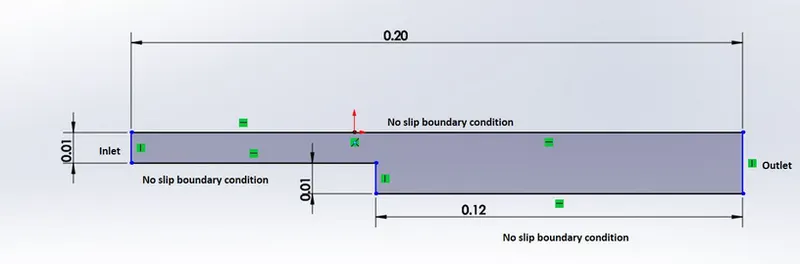
Fig.1
- The geometry shown above is the backward facing step and we need to simulate the transient state analysis of an incompressible laminar viscous flow .
- We have mentioned the the inlet ,outlet ,front and back faces of the geometry respectively in order to visualise the geometry properly.

Fig.2
- Here the block is divided into 5 subblocks i.e, it is discretized into smaller blocks and the vertices of the faces of blocks are defined for each block according to right hand thumb rule i.e, the normal coming out from each block is pointing outwards.
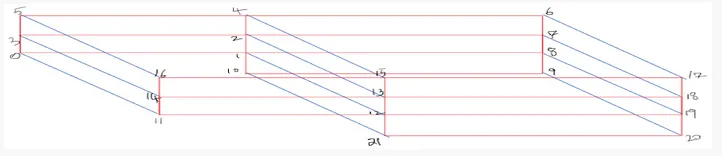
Fig.3 vertices
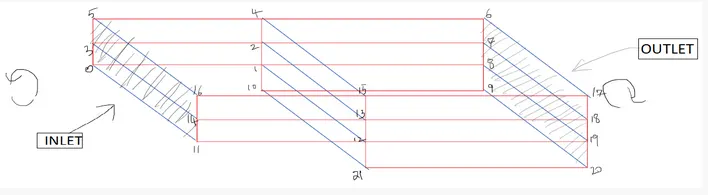
Fig.4 inlet and outlet face of fluid flow
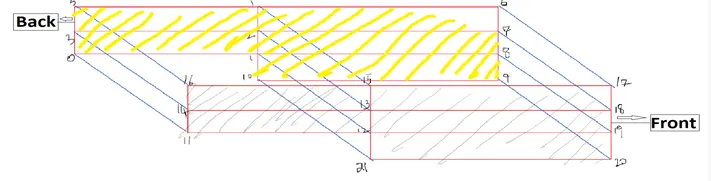
Fig.5 Back and Front face of the block
Solution
- In order to simulate an application we need to be in tutorial folder. To navigate tutorial folder ,type tut shortcut comand and then if we type ls command we will see that the folder contains the different solver to solve a particular case set up.
- To run the simulation ,we need to copy the tutorials e.g. cp -r cavity /$FOAM_RUN/malay_cavity ,to FOAM_RUN folder,this is the folder OpenFoam creates for us and this is where we are going to run all of our cases.
- keeping in mind that we will never run the cases directly inside the tutorial folder so that it will not mesh up with the official tutorial.
The general procedure is as follows:
- first look for a tutorial
- copy tutorial to run folder
- navigate to run folder

- first of all open the tutorial and finding out the respective solver to solve the problem i.e incompressible laminar viscous flow.
- here we can find the solver named incompressible inside tutorial folder to solve our problem.

- To navigate inside incompressible folder type cd incompressible/ and then we can find the folder icoFoam.
- then navigate inside the icoFoam folder ,we find cavity and elbow folder and we need to copy cavity folder and paste to a new folder i.e named malay_cavity.
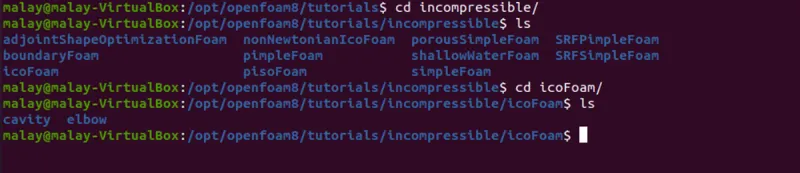

- when we type cd malay_cavity,we will see that it contains three folders named as 0, constant,system .
- The system folder contains numerical schemes and Open Foam uses advanced implementation of linear solvers i.e, Jacobi,gauss-siedal and sor ,and the set up for these solvers can be found in fvSolution(inside the system folder).

- Basically the system folder contains blockMeshDict,controlDict,fvSchemes and fvSolution folder respectively.
- blockMeshDict script file :to provide mesh specification and object or domain defination.
- For simulation time,we need to open and edit controlDict file.
- The script file is opened by typing gedit blockMeshDict,gedit controlDict and so on for other script files respectively.
blockMeshDict
/*--------------------------------*- C++ -*----------------------------------*\
  =========                 |
  \\      /  F ield         | OpenFOAM: The Open Source CFD Toolbox
   \\    /   O peration     | Website:  https://openfoam.org
    \\  /    A nd           | Version:  8
     \\/     M anipulation  |
\*---------------------------------------------------------------------------*/
FoamFile
{
    version     2.0;
    format      ascii;
    class       dictionary;
    object      blockMeshDict;
}
// * * * * * * * * * * * * * * * * * * * * * * * * * * * * * * * * * * * * * //

convertToMeters 1;

vertices
(
    (0 0 0) //0
    (0.08 0 0) //1
    (0.08 0.005 0)  //2
    (0 0.005 0)  //3
    (0.08 0.01 0) //4
    (0 0.01 0)   //5
    (0.2 0.01 0)  //6
    (0.2 0.005 0)  //7
    (0.2 0 0)  //8
    (0.2 -0.01 0)  //9
    (0.08 -0.01 0) //10
    (0 0 0.0001)  //11
    (0.08 0 0.0001)  //12
    (0.08 0.005 0.0001) //13
    (0 0.005 0.0001)   //14
    (0.08 0.01 0.0001)  //15
    (0 0.01 0.0001)   //16
    (0.2 0.01 0.0001)  //17
    (0.2 0.005 0.0001)  //18
    (0.2 0 0.0001)   //19
    (0.2 -0.01 0.0001)  //20
    (0.08 -0.01 0.0001)  //21

);

blocks
(
    hex (0 1 2 3 11 12 13 14) (80 5 1) simpleGrading (1 1 1)
    hex (3 2 4 5 14 13 15 16) (80 5 1) simpleGrading (1 1 1)
    hex (2 7 6 4 13 18 17 15) (120 5 1) simpleGrading (1 1 1)
    hex (1 8 7 2 12 19 18 13) (120 5 1) simpleGrading (1 1 1)
    hex (10 9 8 1 21 20 19 12) (120 10 1) simpleGrading (1 1 1)

);

edges
(
);

boundary
(
    inlet
    {
        type patch;
        faces
        (
            (0 11 14 3)
            (3 14 16 5)
        );
    }
    outlet
    {
        type patch;
        faces
        (
            (9 8 19 20)
            (8 7 18 19)
            (7 6 17 18)
        );
    }
    frontAndBack
    {
        type empty;
        faces
        (
            (16 14 13 15)
            (14 11 12 13)
            (15 13 18 17)
            (13 12 19 18)
            (12 21 20 19)
            (1 0 3 2)
            (2 3 5 4)
            (9 10 1 8)
            (8 1 2 7)
            (7 2 4 6)
        );
    }
    fixedWalls
    {
        type wall;
        faces
         (
           (4 5 16 15)
           (6 4 15 17)
           (10 9 20 21)
           (1 10 21 12)
           (0 1 12 11)
         );
    }
);

mergePatchPairs
(
);

// ************************************************************************* //
controlDict
/*--------------------------------*- C++ -*----------------------------------*\
  =========                 |
  \\      /  F ield         | OpenFOAM: The Open Source CFD Toolbox
   \\    /   O peration     | Website:  https://openfoam.org
    \\  /    A nd           | Version:  8
     \\/     M anipulation  |
\*---------------------------------------------------------------------------*/
FoamFile
{
    version     2.0;
    format      ascii;
    class       dictionary;
    location    "system";
    object      controlDict;
}
// * * * * * * * * * * * * * * * * * * * * * * * * * * * * * * * * * * * * * //

application     icoFoam;

startFrom       startTime;

startTime       0;

stopAt          endTime;

endTime         0.5;

deltaT          0.0001;

writeControl    timeStep;

writeInterval   20;

purgeWrite      0;

writeFormat     ascii;

writePrecision  6;

writeCompression off;

timeFormat      general;

timePrecision   6;

runTimeModifiable true;
fvSchemes
/*--------------------------------*- C++ -*----------------------------------*\
  =========                 |
  \\      /  F ield         | OpenFOAM: The Open Source CFD Toolbox
   \\    /   O peration     | Website:  https://openfoam.org
    \\  /    A nd           | Version:  8
     \\/     M anipulation  |
\*---------------------------------------------------------------------------*/
FoamFile
{
    version     2.0;
    format      ascii;
    class       dictionary;
    location    "system";
    object      fvSchemes;
}
// * * * * * * * * * * * * * * * * * * * * * * * * * * * * * * * * * * * * * //

ddtSchemes
{
    default         Euler;
}

gradSchemes
{
    default         Gauss linear;
    grad(p)         Gauss linear;
}

divSchemes
{
    default         none;
    div(phi,U)      Gauss linear;
}

laplacianSchemes
{
    default         Gauss linear orthogonal;
}

interpolationSchemes
{
    default         linear;
}

snGradSchemes
{
    default         orthogonal;
}
fvSolution
/*--------------------------------*- C++ -*----------------------------------*\
  =========                 |
  \\      /  F ield         | OpenFOAM: The Open Source CFD Toolbox
   \\    /   O peration     | Website:  https://openfoam.org
    \\  /    A nd           | Version:  8
     \\/     M anipulation  |
\*---------------------------------------------------------------------------*/
FoamFile
{
    version     2.0;
    format      ascii;
    class       dictionary;
    location    "system";
    object      fvSolution;
}
// * * * * * * * * * * * * * * * * * * * * * * * * * * * * * * * * * * * * * //

solvers
{
    p
    {
        solver          PCG;
        preconditioner  DIC;
        tolerance       1e-06;
        relTol          0.05;
    }

    pFinal
    {
        $p;
        relTol          0;
    }

    U
    {
        solver          smoothSolver;
        smoother        symGaussSeidel;
        tolerance       1e-05;
        relTol          0;
    }
}

PISO
{
    nCorrectors     2;
    nNonOrthogonalCorrectors 0;
    pRefCell        0;
    pRefValue       0;
}
- Mesh near the wall to be refined ,due to the formation of boundary layer close to the wall ,the velocity gradients are very large compared to free stream. So,it is necessary to capture the velocity gradient near the wall.
- When coarse mesh is used near the wall,the solution is damped whereas finer mesh near the wall and coarser mesh in the internal cell produces smooth solution.
- Grading of mesh results in considerably economic in computer memory and also saving computation time.
- Generally, a value different from 1 will add grading to the edge, that is it will cluster more cells towards one extreme of the block.
blockMeshDict
/*--------------------------------*- C++ -*----------------------------------*\
  =========                 |
  \\      /  F ield         | OpenFOAM: The Open Source CFD Toolbox
   \\    /   O peration     | Website:  https://openfoam.org
    \\  /    A nd           | Version:  8
     \\/     M anipulation  |
\*---------------------------------------------------------------------------*/
FoamFile
{
    version     2.0;
    format      ascii;
    class       dictionary;
    object      blockMeshDict;
}
// * * * * * * * * * * * * * * * * * * * * * * * * * * * * * * * * * * * * * //

convertToMeters 1;

vertices
(
    (0 0 0) //0
    (0.08 0 0) //1
    (0.08 0.005 0)  //2
    (0 0.005 0)  //3
    (0.08 0.01 0) //4
    (0 0.01 0)   //5
    (0.2 0.01 0)  //6
    (0.2 0.005 0)  //7
    (0.2 0 0)  //8
    (0.2 -0.01 0)  //9
    (0.08 -0.01 0) //10
    (0 0 0.0001)  //11
    (0.08 0 0.0001)  //12
    (0.08 0.005 0.0001) //13
    (0 0.005 0.0001)   //14
    (0.08 0.01 0.0001)  //15
    (0 0.01 0.0001)   //16
    (0.2 0.01 0.0001)  //17
    (0.2 0.005 0.0001)  //18
    (0.2 0 0.0001)   //19
    (0.2 -0.01 0.0001)  //20
    (0.08 -0.01 0.0001)  //21

);

blocks
(
    hex (0 1 2 3 11 12 13 14) (80 5 1) simpleGrading (0.2 5 1)
    hex (3 2 4 5 14 13 15 16) (80 5 1) simpleGrading (0.2 0.2 1)
    hex (2 7 6 4 13 18 17 15) (120 5 1) simpleGrading (5 0.2 1)
    hex (1 8 7 2 12 19 18 13) (120 5 1) simpleGrading (5 5 1)
    hex (10 9 8 1 21 20 19 12) (120 10 1) simpleGrading (5 5 1)

);

edges
(
);

boundary
(
    inlet
    {
        type patch;
        faces
        (
            (0 11 14 3)
            (3 14 16 5)
        );
    }
    outlet
    {
        type patch;
        faces
        (
            (9 8 19 20)
            (8 7 18 19)
            (7 6 17 18)
        );
    }
    frontAndBack
    {
        type empty;
        faces
        (
            (16 14 13 15)
            (14 11 12 13)
            (15 13 18 17)
            (13 12 19 18)
            (12 21 20 19)
            (1 0 3 2)
            (2 3 5 4)
            (9 10 1 8)
            (8 1 2 7)
            (7 2 4 6)
        );
    }
    fixedWalls
    {
        type wall;
        faces
         (
           (4 5 16 15)
           (6 4 15 17)
           (10 9 20 21)
           (1 10 21 12)
           (0 1 12 11)
         );
    }
);

mergePatchPairs
(
);
controlDict
/*--------------------------------*- C++ -*----------------------------------*\
  =========                 |
  \\      /  F ield         | OpenFOAM: The Open Source CFD Toolbox
   \\    /   O peration     | Website:  https://openfoam.org
    \\  /    A nd           | Version:  8
     \\/     M anipulation  |
\*---------------------------------------------------------------------------*/
FoamFile
{
    version     2.0;
    format      ascii;
    class       dictionary;
    location    "system";
    object      controlDict;
}
// * * * * * * * * * * * * * * * * * * * * * * * * * * * * * * * * * * * * * //

application     icoFoam;

startFrom       startTime;

startTime       0;

stopAt          endTime;

endTime         0.5;

deltaT          0.0001;

writeControl    timeStep;

writeInterval   20;

purgeWrite      0;

writeFormat     ascii;

writePrecision  6;

writeCompression off;

timeFormat      general;

timePrecision   6;

runTimeModifiable true;
fvschemes
/*--------------------------------*- C++ -*----------------------------------*\
  =========                 |
  \\      /  F ield         | OpenFOAM: The Open Source CFD Toolbox
   \\    /   O peration     | Website:  https://openfoam.org
    \\  /    A nd           | Version:  8
     \\/     M anipulation  |
\*---------------------------------------------------------------------------*/
FoamFile
{
    version     2.0;
    format      ascii;
    class       dictionary;
    location    "system";
    object      fvSchemes;
}
// * * * * * * * * * * * * * * * * * * * * * * * * * * * * * * * * * * * * * //

ddtSchemes
{
    default         Euler;
}

gradSchemes
{
    default         Gauss linear;
    grad(p)         Gauss linear;
}

divSchemes
{
    default         none;
    div(phi,U)      Gauss linear;
}

laplacianSchemes
{
    default         Gauss linear orthogonal;
}

interpolationSchemes
{
    default         linear;
}

snGradSchemes
{
    default         orthogonal;
}
fvSolution
/*--------------------------------*- C++ -*----------------------------------*\
  =========                 |
  \\      /  F ield         | OpenFOAM: The Open Source CFD Toolbox
   \\    /   O peration     | Website:  https://openfoam.org
    \\  /    A nd           | Version:  8
     \\/     M anipulation  |
\*---------------------------------------------------------------------------*/
FoamFile
{
    version     2.0;
    format      ascii;
    class       dictionary;
    location    "system";
    object      fvSolution;
}
// * * * * * * * * * * * * * * * * * * * * * * * * * * * * * * * * * * * * * //

solvers
{
    p
    {
        solver          PCG;
        preconditioner  DIC;
        tolerance       1e-06;
        relTol          0.05;
    }

    pFinal
    {
        $p;
        relTol          0;
    }

    U
    {
        solver          smoothSolver;
        smoother        symGaussSeidel;
        tolerance       1e-05;
        relTol          0;
    }
}

PISO
{
    nCorrectors     2;
    nNonOrthogonalCorrectors 0;
    pRefCell        0;
    pRefValue       0;
}
RESULTS
To view the post processing results Open Foam has paraview and for this we have to type paraFoam command.
Mesh of the model having simpleGrading 1
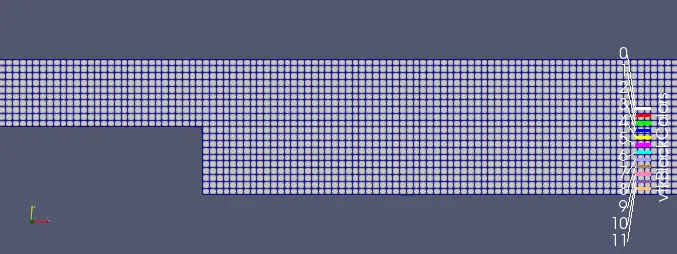
Fig.6
Velocity contour
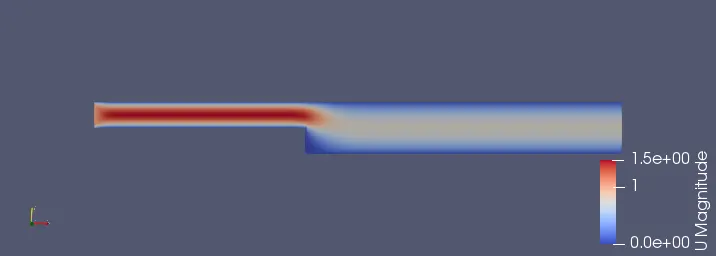
Fig.7
- From the figure it is clear that at the step region ,the velocity is maximum and then decreases towards downstream .It is clear from the pressure contour that at the step region the pressure gradient is less so that the velocity is going to increase somehow.
Pressure contour
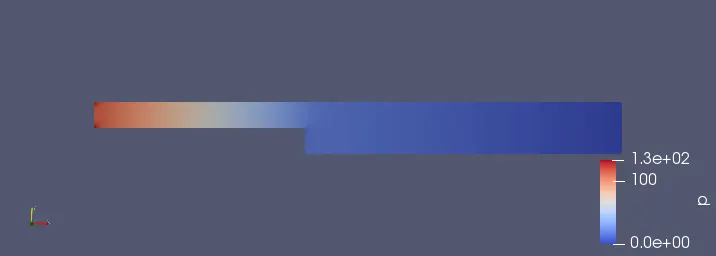
Fig.8
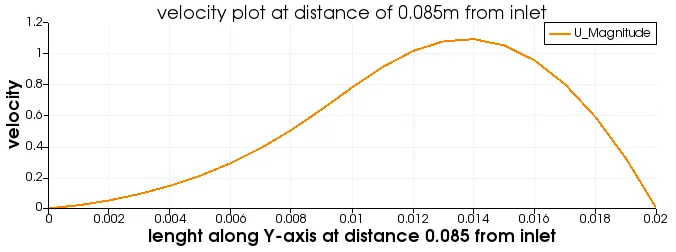
Fig.9
- for the velocity plot vs length along Y-axis at distance 0.085 from inlet, we are getting a smooth curve for simple grading(1 1 1).
- In this case the mesh size is uniform in all direction i.e in x,y z ,so we are getting the average results and smooth curve.
Mesh of the model having simpleGrading of 0.2
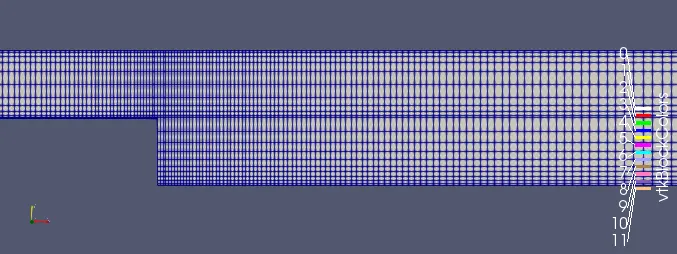
Fig.10
Velocity contour (simpleGrading 0.2)
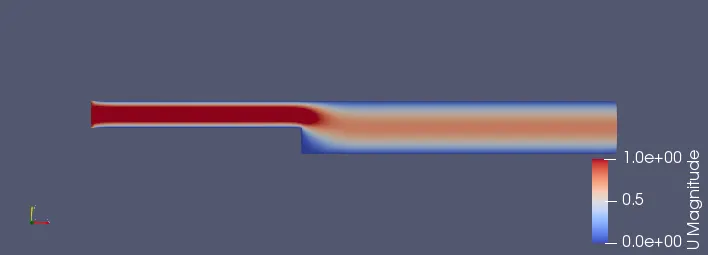
Fig.11
Pressure contour(simpleGrading 0.2)
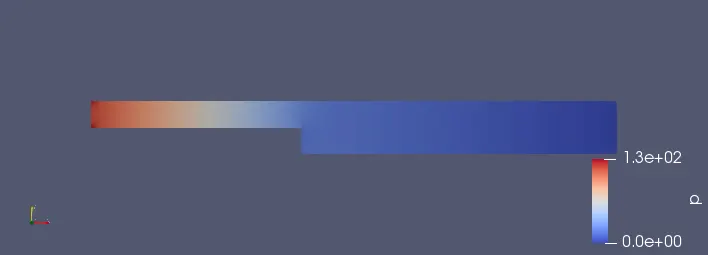
Fig.12
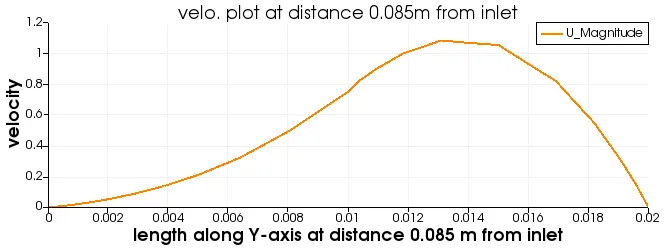
Fig.13
- In this graph we are taking grading factor of 0.2, so that we are able to visualize somehow better results ,because the finer meshes produces lesser reiduals as compared to coarser grids or mesh.
Conclusion
- we have successfully completed the simulation of incompressible-laminar-viscous flow through the backward facing step geometry by taking the grading factor 1 and 0.2 respectively.
- The post processing plots for velocity and pressure profiles and graphs are studied .