Week-3 Challenge: ADVISOR Tool
AIM:
Simulating using the ADVISOR tool
OBJECTIVE:
- For the EV_defaults_in file, if cargo mass is 500 kg with all other default conditions, can the vehicle travel for 45 km with FTP drive cycle? Conclude your observations.
- In the above case, change the battery capacity and repeat the simulation.
- Perform gradeability test with PRIUS_Jpn_defaults_in file
- Compare your results in a table and conclude.
Theory and literature :
ADVISOR, NREL’s ADvanced VehIcle SimulatOR, is a set of model, data, and script text files for use with Matlab and Simulink. It is designed for rapid analysis of the performance and fuel economy of conventional, electric, and hybrid vehicles. ADVISOR also provides a backbone for the detailed simulation and analysis of user-defined drivetrain components, a starting point of verified vehicle data and algorithms from which to take full advantage of the modeling flexibility of Simulink and analytic power of MATLAB.
Benefit from using ADVISOR :
- estimate the fuel economy of vehicles that have not yet been built
- learn about how conventional, hybrid or electric vehicles use (and lose) energy throughout their drivetrains.
- compare relative tailpipe emissions produced on a number of cycles
- evaluate an energy management strategy for your hybrid vehicle’s fuel converter
- optimize the gear ratios in your transmission to minimize fuel use or maximize performance, etc.
The models in ADVISOR are:
- mostly empirical, relying on drivetrain component input/output relationships measured in the laboratory, and
- quasi-static, using data collected in steady-state (for example, constant torque and speed) test and correcting them for transient effects such as the rotational inertia of drivetrain components.
ADVISOR was developed as an analysis tool, and not originally intended as a detailed design tool. Its component models are quasi-static, and cannot be used to predict phenomena with a time scale of less than a tenth of a second or so. Physical vibrations, electric field oscillations, and other dynamics cannot be captured using ADVISOR, however recent linkages with other tools such as Saber, Simplorer, and Sinda/Fluint allow a detailed study of these transients in those tools with the vehicle level impacts linked back into ADVISOR.
As an analysis tool, ADVISOR takes the required/desired speed as an input, and determines what drivetrain torques, speeds, and powers would be required to meet that vehicle speed. Because of this flow of information back through the drivetrain, from tire to axle to gearbox and so on, ADVISOR is what is called a backward-facing vehicle simulation.
ADVISOR is well suited to evaluate and, by iterative evaluation, design control logic and energy management strategies. By this, we mean something like “When the engine torque output is low and the battery state of charge is high, turn off the engine.” The control logic, with which ADVISOR can work, is about what you want the vehicle to do. The detailed control system, getting into details of how you would implement this control logic in hardware, is about how to make the vehicle do what you want and is not the original intention of ADVISOR’s application.
FTP drive cycle:
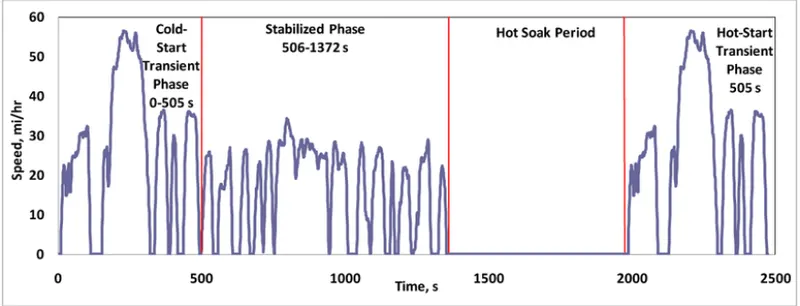
Speed-time profile of the Federal Test Procedure (FTP-75) driving cycle. The California Unified Cycle (UC), Figure 2, is a dynamometer driving schedule for light-duty vehicles developed by the California Air Resources Board (CARB). The UC test has a three-bag structure similar to the FTP, with bags representing a cold-start transient phase, a stabilized phase, and a hot-start transient phase, but is a more aggressive driving cycle. It has a higher average speed, higher acceleration rates, fewer stops per mile, and less idle time. The UC test also has a ten minute hot soak, between Bags 2 and 3.
Calculation and simulation :
Opening the ADVISOR tool :
- Open the MATLAB App. And open the advisor file location and open the ‘advisor.m’ file.
- Once the file is opened in the editor menu, enter “advisor” in the command window and then click enter.
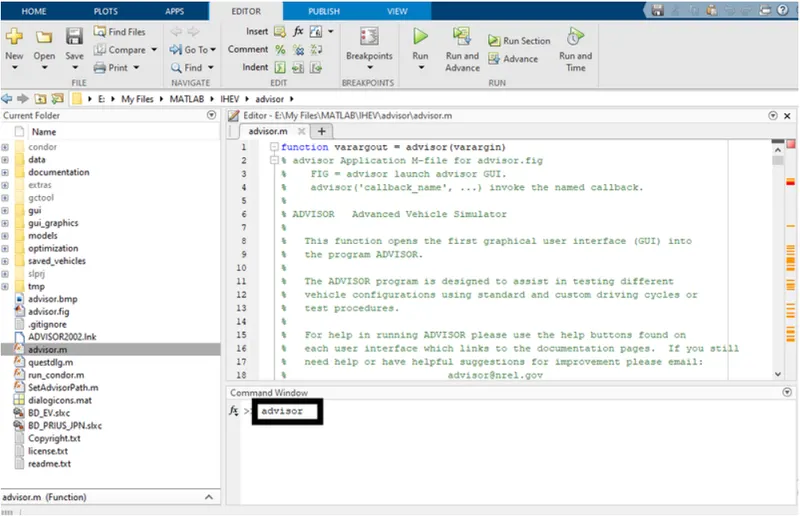
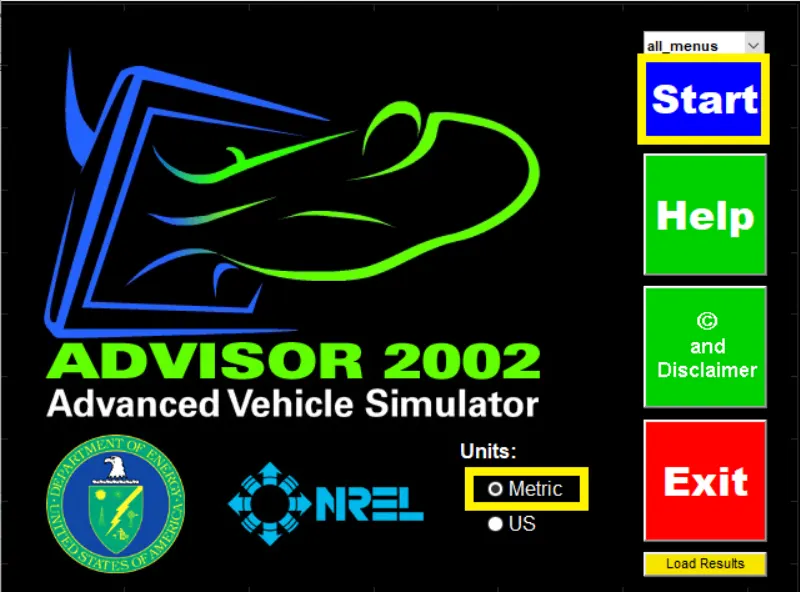
- After the advisor window opens, select the metric as the unit for the measurements and start.
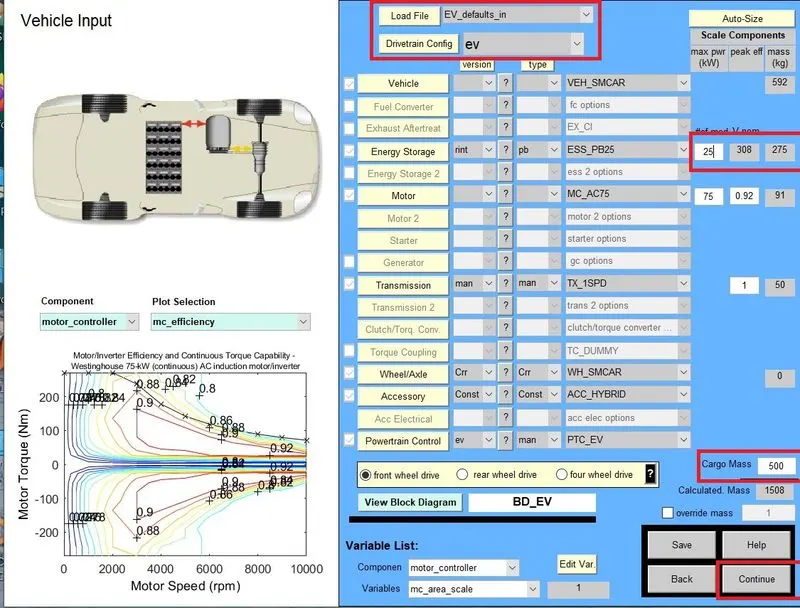
- Open the EV_defaults_in and add the cargo mass 500kg and see if the vehicle can run for 45km for the FTP CYCLE
First, loading EV_defaults_in from the drop-down menu and changing Parallel_default_in to EV_defaults_in from the Vehicle Input window.
- Now changing the cargo mass to 500 kg. A change in the total mass of the vehicle can be seen.
- Clicking on the continue button after that a new window simulation parameter will pop up.
- In Simulation Parameter window change drive cycle to CYC_FTP by selecting the drop-down menu.
- After that, we will see # of cycles from here we can set our drive cycle.
- After pressing the RUN button, the simulation will start and it will show results in a new window
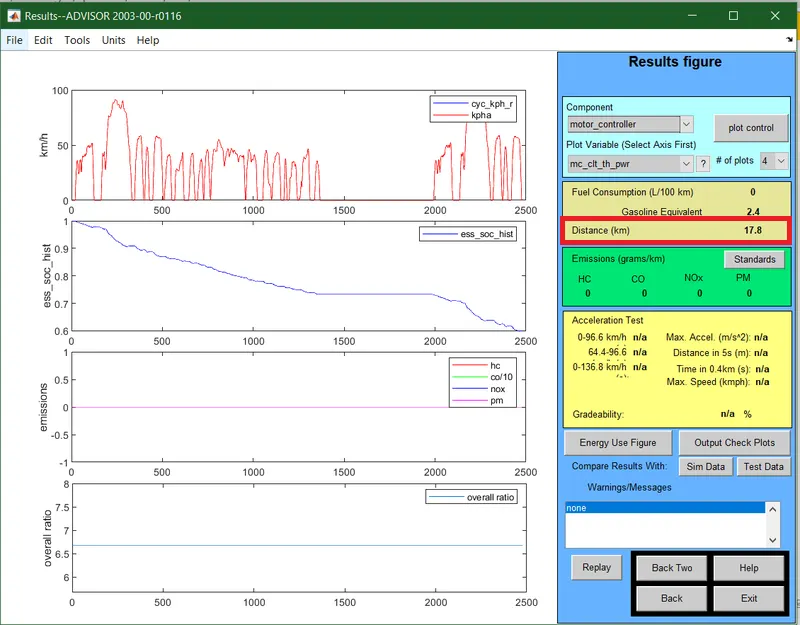
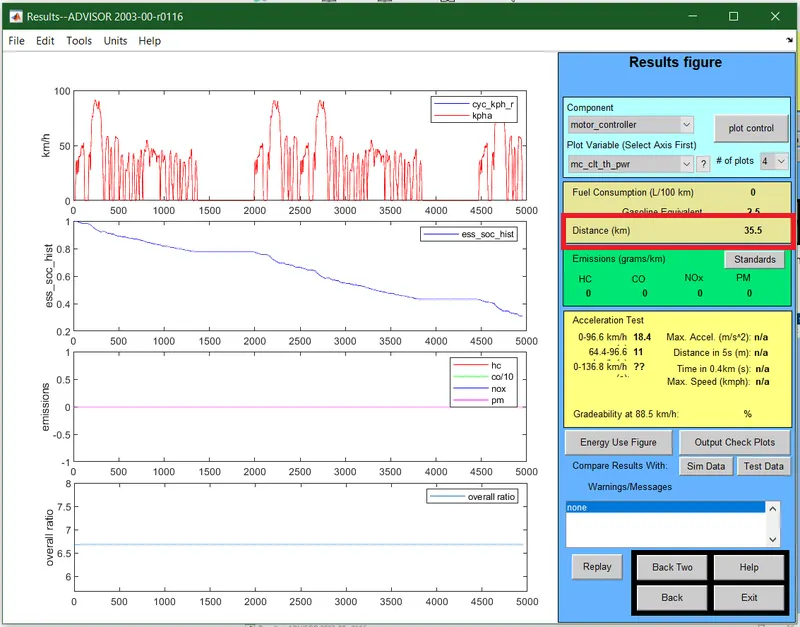
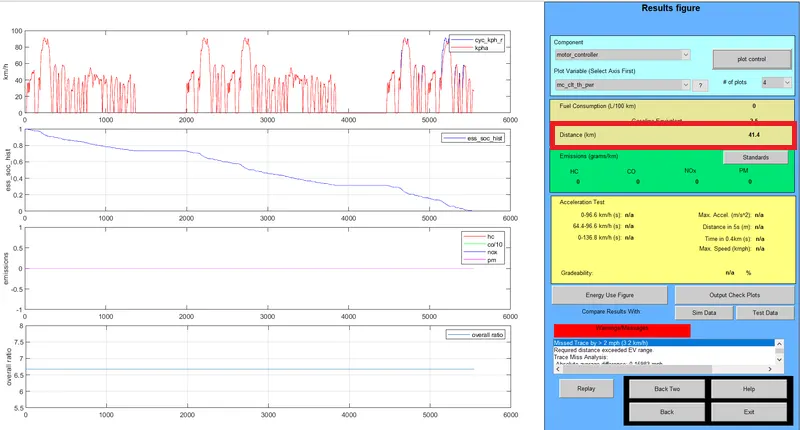
Now we will increase the number of drive cycle to see how far the vehicle can travel with the current battery capacity.
drive cycle 1
Changing the drive cycle to 2
Changing the drive cycle to 3
2. Change the battery capacity in the above simulation.
To change the battery capacity means to change the module of the battery which in turns increase its output capacity also it increases the weight of the battery as the number of cells are also increasing.
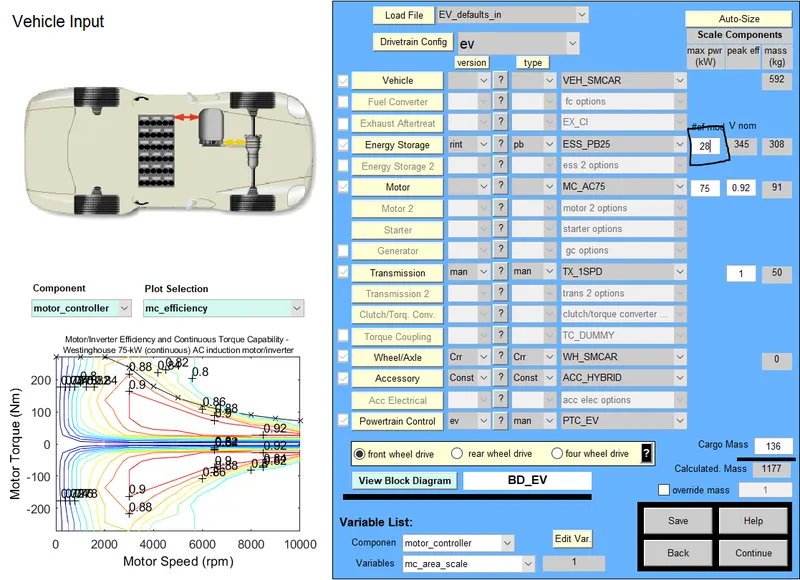
- In-Vehicle Input window we will change the capacity of battery form energy storage which will be open in 1
- “#of mod V nom” describes the battery capacity, so we will change the module number of batteries from the first box and we will see that changes in voltage and weight of the battery
Now, we will be seeing the output the of the current EV for the module as 27, 28 for the drive cycle as 2 and 3 only.
Module as 27
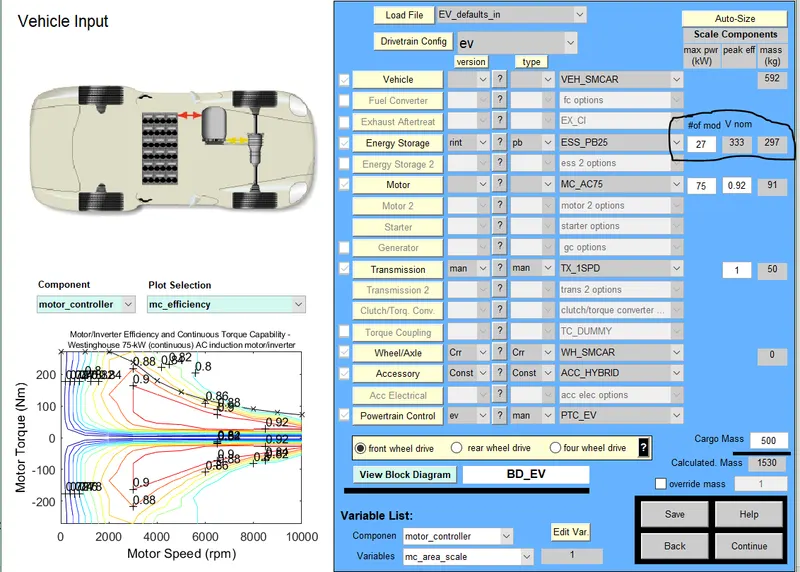
Number of Drive cycle-2
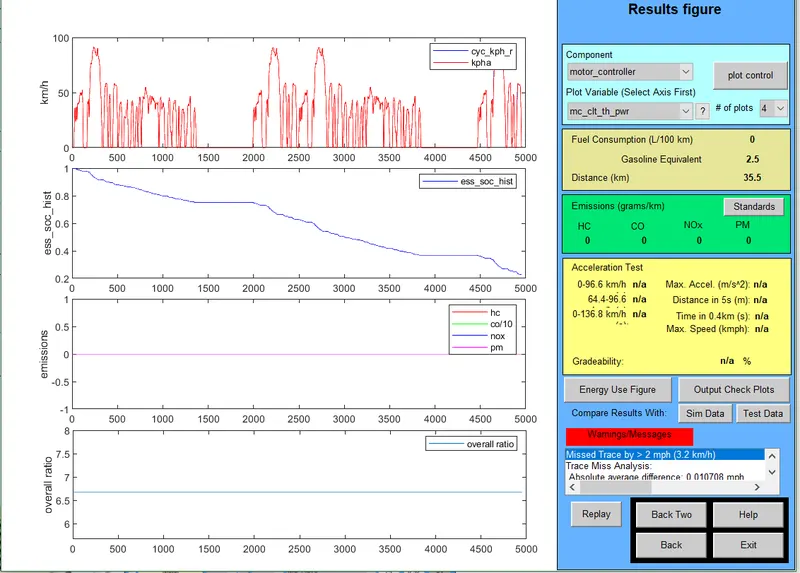
Number of Drive cycle-3
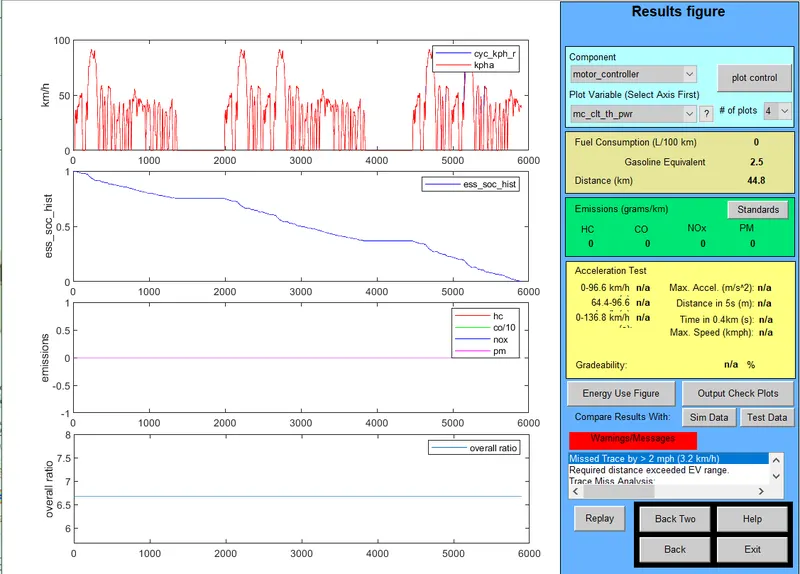
Module as 28
- Number of Drive cycle-2
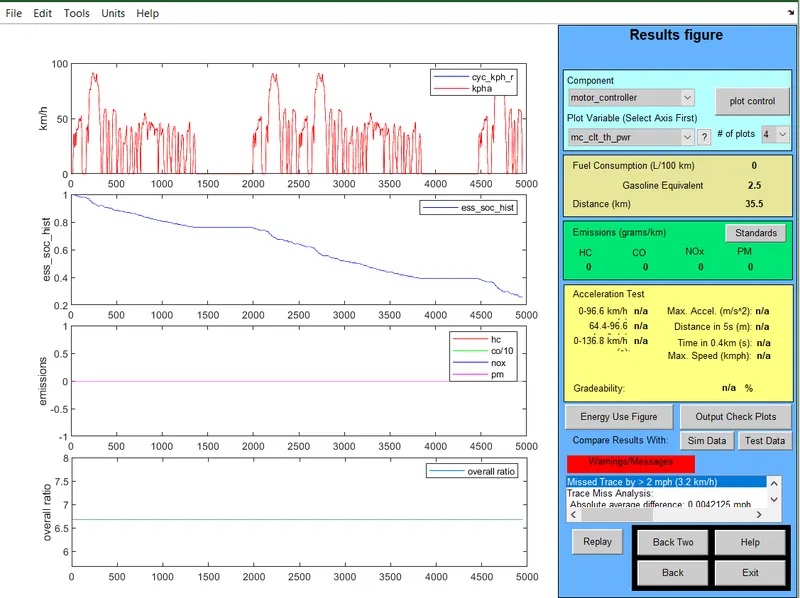
- Number of Drive cycle-3
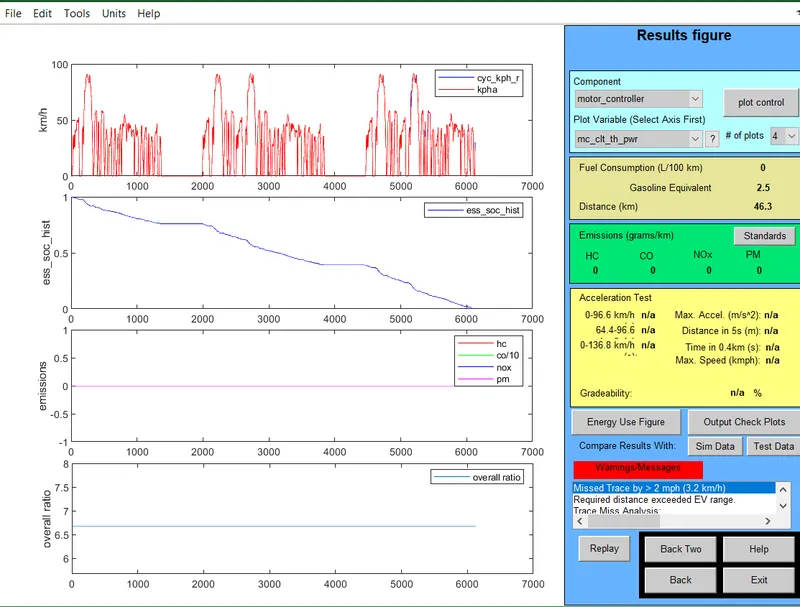
At the end of the drive cycle 3 can see the warning that the EV range has exceeded the value i.e the battery state of charge has reduce to 0 which is not preferable to be kept in any EV vehicle.
3.Perform the gradeability test on the PIRUS_JPN_defaults_in file.
- In ADVISOR tool Vehicle Input window select PRIUS_Jpn_default model.
- Continue to the next window and a simulation parameter window will open.
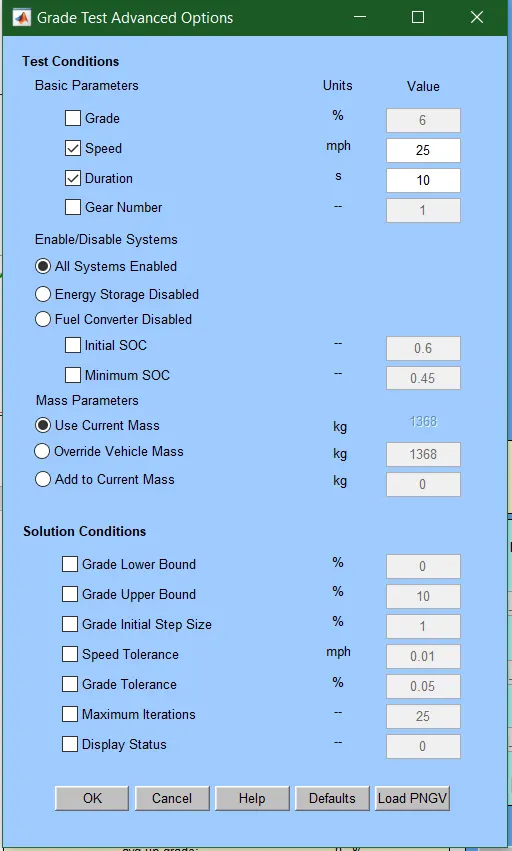
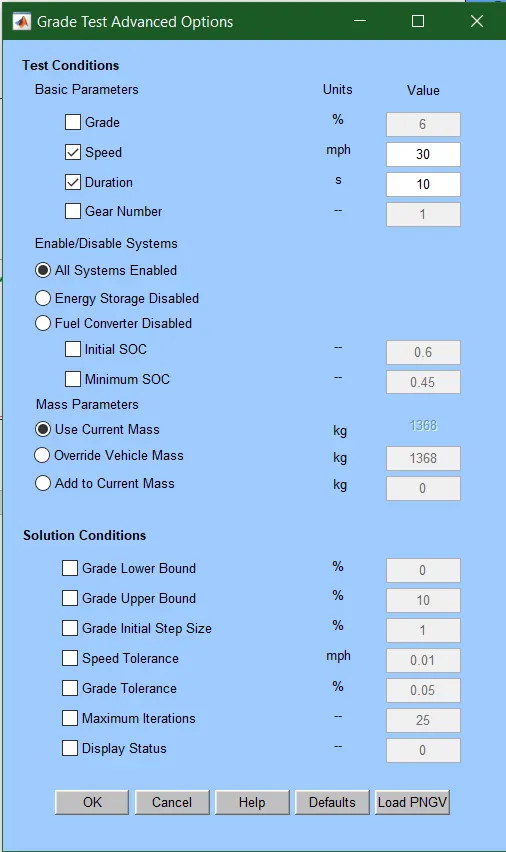
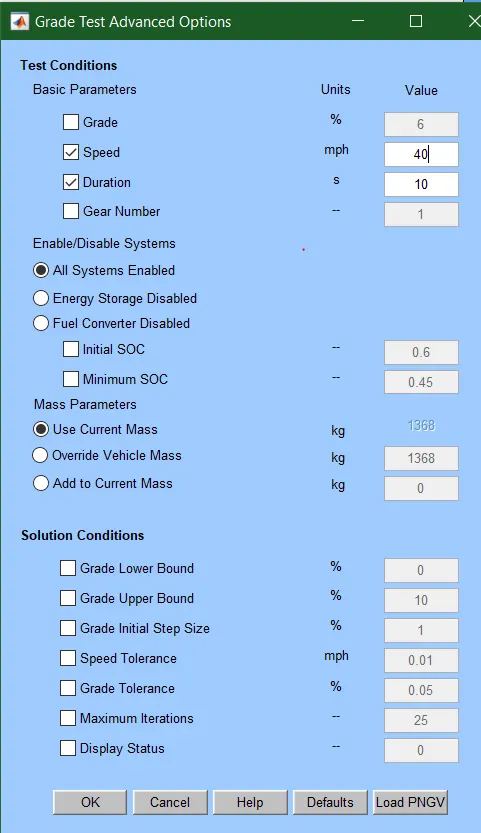
- Select the gradeability test and click on the grade Option box, a new dialogue box will open.
- In grade option box we can change speed or duration with respect to our simulation.
- So, for this simulation, change speed one time and duration another time.
- Click on All system enabled.
- Also, click on constant road grade.
- Click Ok and run the simulation and a Result window will open showing different results depend upon input data
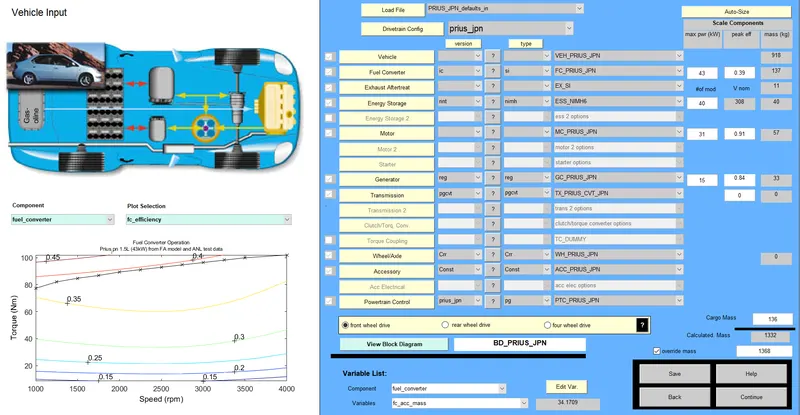
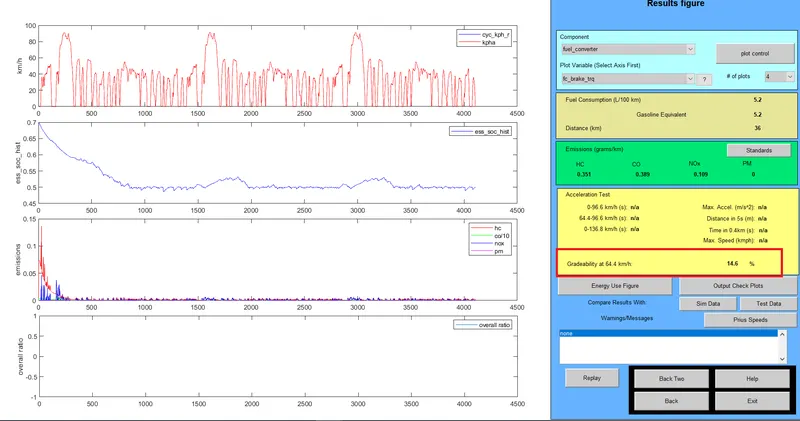
First we will see the default value of the model and run the simulation for 3 drive cycle.
1.55 mph or 88.5kmph for 10sec
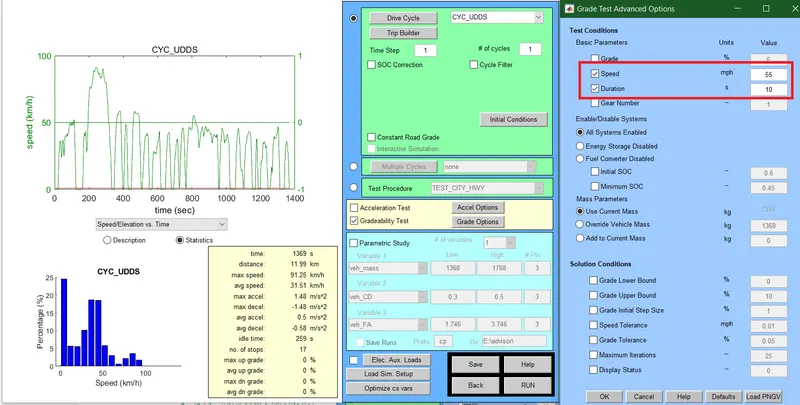
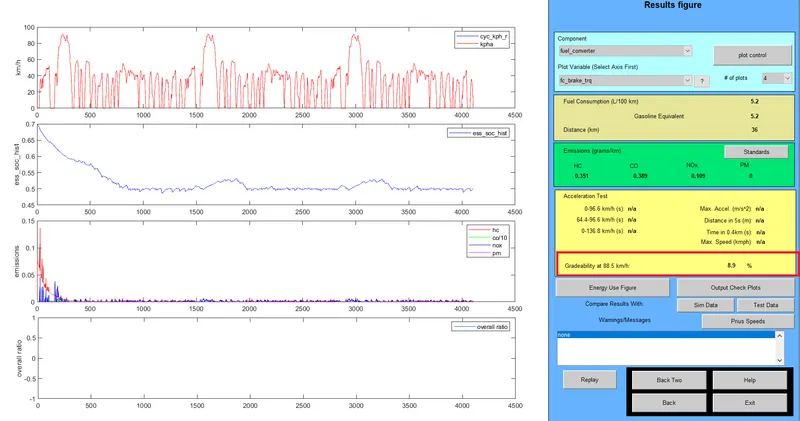
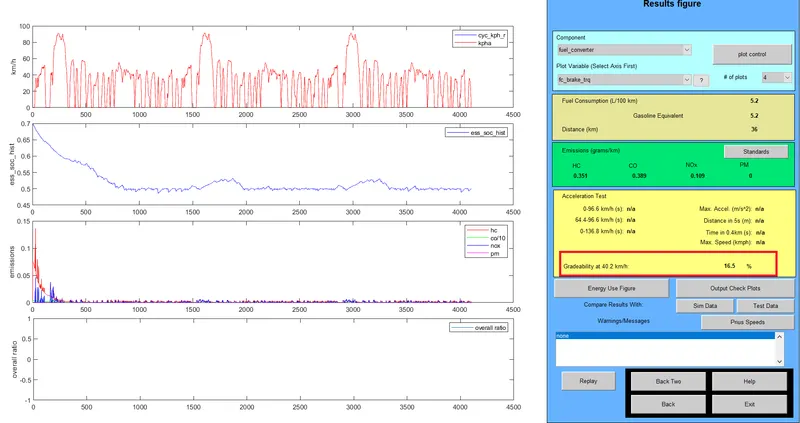
2. 25mph for 10sec
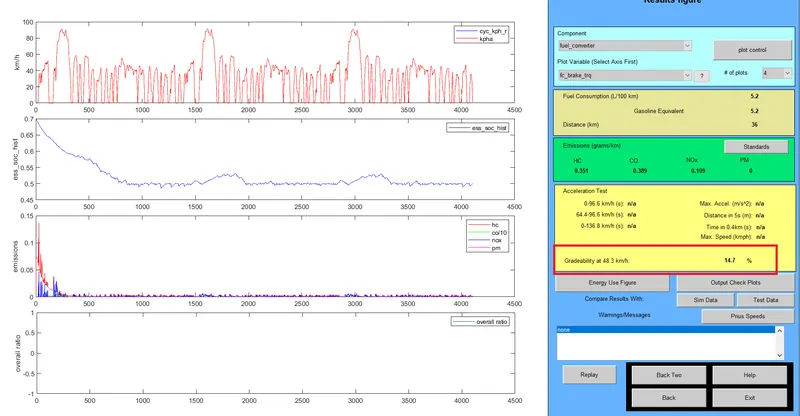
3. 30mph for 10sec
4. 40mph for 10sec
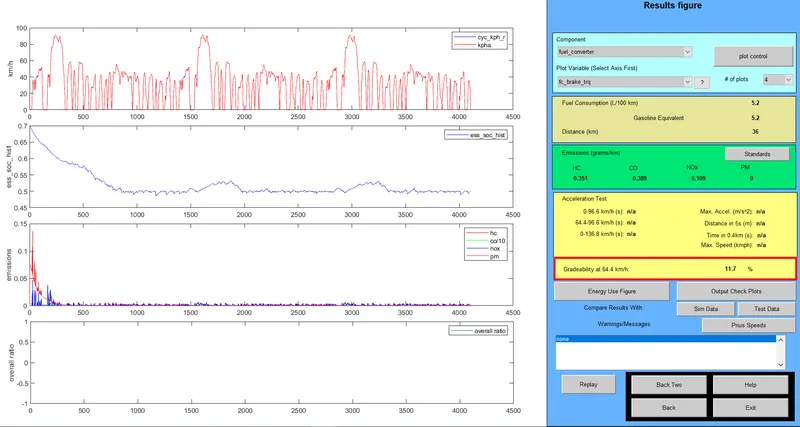
Now the time is kept at 20 sec
25 mph for 20sec
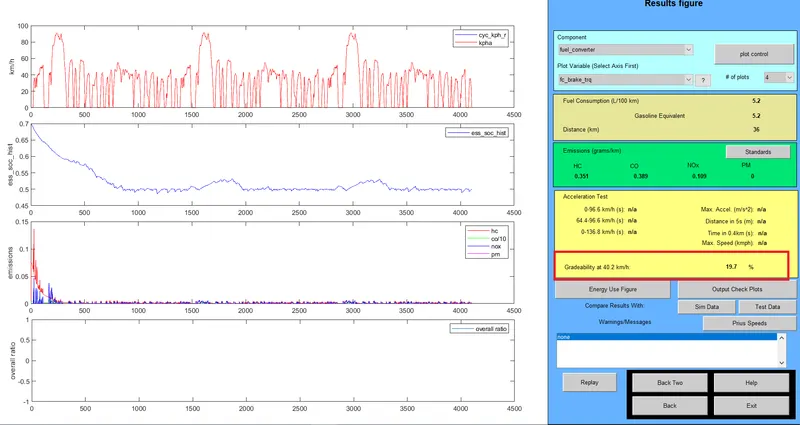
30 mph for 20sec
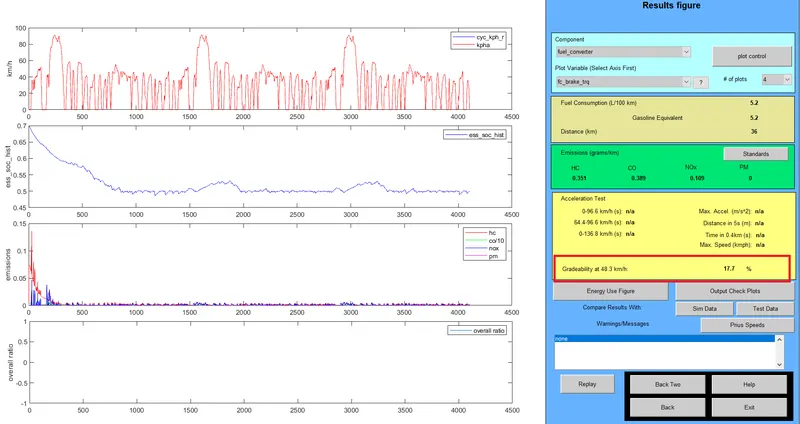
40 mph for 20sec
RESULTS :
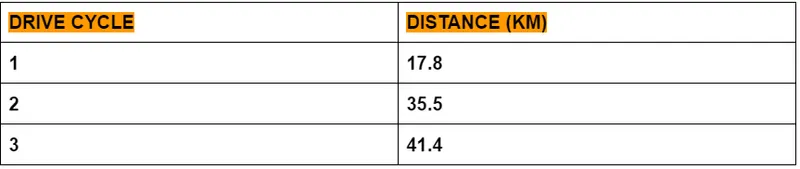
1. Distance covered in each cycle for the EN_defaults_in with 500kg added cargo mass
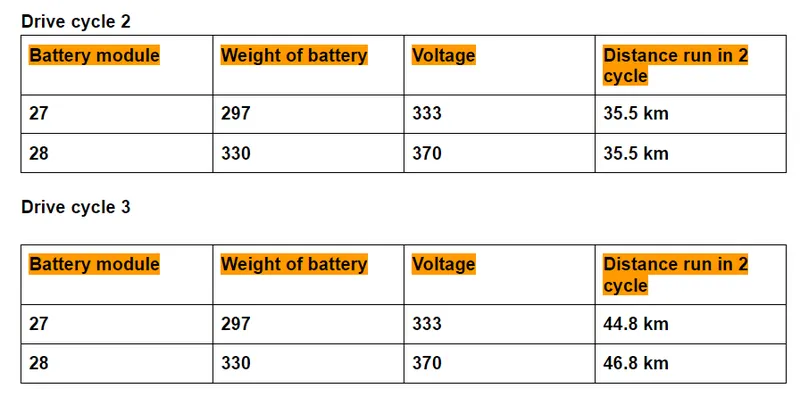
2. changing the Battery capacity of the vehicle to see the distance covered by the same vehicle in each drive cycle
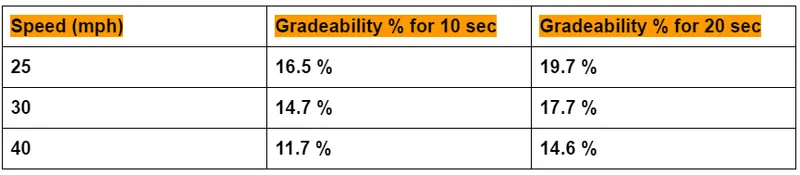
3. Gradebility for the PIRUS_JPN obtained are as follows for the given parameters
CONCLUSION :
- The vehicle cannot travel for 45km in all the drive cycle following the FTP cycle. The max vehicle can travel is 41.4 km but by the end battery state of charge is reduced to somewhat 0 which is not desirable for any EV.
- Maybe if the cargo weight is reduced, it might be possible for the vehicle to achieve the run of 45km for drive cycle 3.
- The battery capacity is increased by changing the module which in turn increases the overall weight of the vehicle.
- By increasing the capacity shows that vehicle travel to almost 46.8 km at the end of 3 drive cycle but it also shows waring that the distance has exceeded the EV range which means battery SOC is very low.
- The increase in speed and time also increases the gradeability of the vehicle as the results shows.