Week 2- 2R Robotic Arm Challenge
AIM: to write a program in Matlab to simulate the forward kinematics of a 2R robotics arm.
Objective:-
- write a program to simulate the kinematic of a 2R robotic arm
- To create an animation from the plots obtained from the program
Introduction:-
A robotics arm is a mechanical arm, usually programmable, with similar functions to a human arm,
the arm may be some complex robot. The link such as manipulators is connected by joints allowing either rotational motion or transitional displacement. the Links of the manipulator can be considered to form a kinematic chain. The links of the kinematic chain.The terminus of the kinematic chain of the manipulator is called the end effector and it is analogous to the human hand
-In this project, we consider a 2R robotic arm represents a robotic arm with two rotations.i,e. it has two links which rotate or work over a two-dimensionless plane with each of the link having a single degree as described.
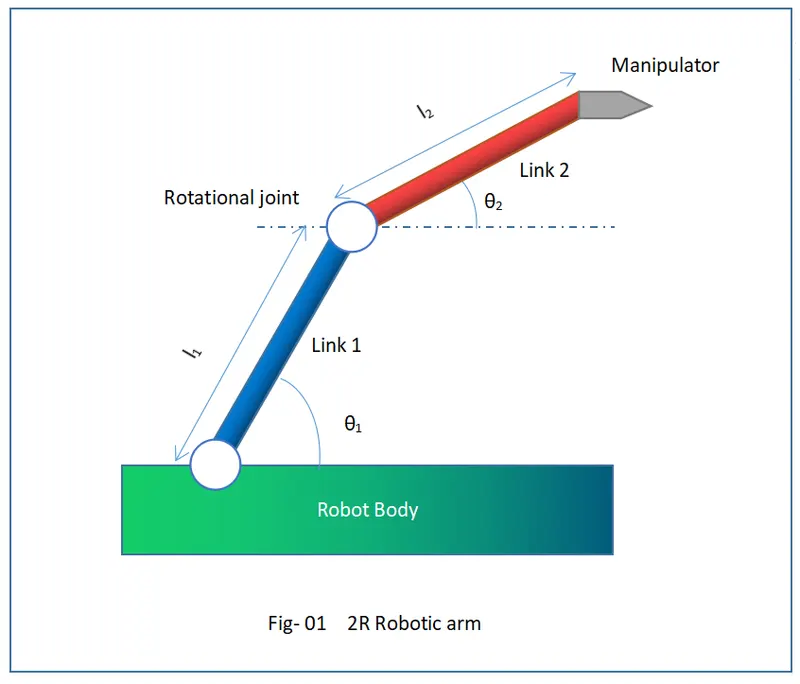
let's consider L1 & L2 to be the length of the link_1&link-2 respectively
let theta be the angle formed by link 1 with horizontal and theta2 be the angle formed by the horizontal
let starting coordinates are (Xo,Yo) and (X1 Y1) for link-1
starting and ending coordinates for link-2 (X1, Y1),(X2, Y2)
explanation of the program:-
the program performed in Matlab
starting the program by comment
provide the input parameters like the length of the links and robotics arms&
theta-1 & theta-2 using linspace command for theta=0 for 115 values
now using the 'for' command for iterating the value of the desired parameter
once again use the 'for' command for movement for the second robotic arm
provide the equation for the X1 Y1,X2 Y2
increment the cr value +1 each time it executes for loop
plot the all the command values and provide axis no
by using the pause command to look the plot as realistic
all the figure are assigned to a variable M, one at a time it executes for loop
using the movie command to combine all the figures saved in the M file to make an animation/movie
at the end saving the movie.avi format
Matlab code:-
%program for 2R robotic arm manipulator
clear all
close all
clc
% inputs
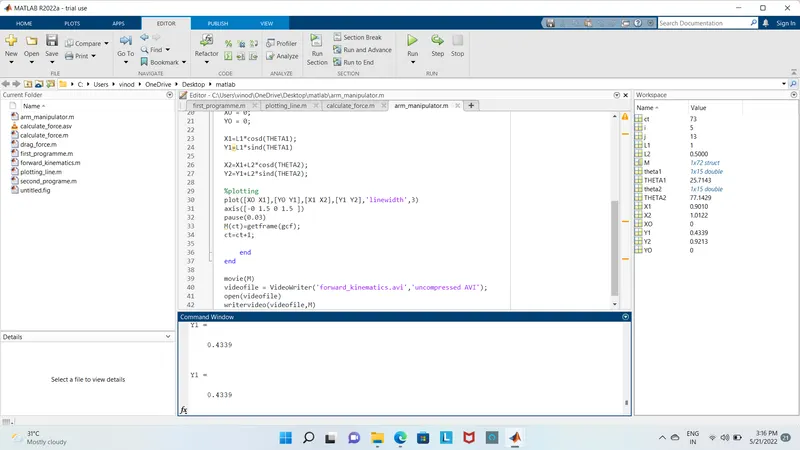
Errors & command window Execution:-
NO ERRORS IN EXECUTION TO GET OUT OF ERRORS USE [;] FOR BETTER OUTPUT
CONCLUSION:-
Thus we have simulated a 2R robotic arm by using the using Matlab programming and also create an animation from the plots obtained by the program
The animation google drive link of the 2R robotic arm manipulator
https://drive.google.com/file/d/1T2wzj-JB5PQfBm0_F4i53r_DT3Vtmmvz/view?usp=sharing