Week 8 - Simulation of a backward facing step in OpenFOAM
OPEN FOAM
AIM: To simulate an incompressible-laminar-viscous flow through the backward-facing step geometry.
|
To create the geometry as shown in the figure, we need edit the blockMeshDict file that is available in the system folder of the case setup. Geometry Creation: Let us consider creating the geometry using 5 blocks as shown in the figure below, NOTE: We have demonstrated the geometry creation using 5 blocks and have indexed the vertices this way. This can be varied, according to your comfort. The Isometric View, Now let’s, start indexing the Vertices on the Back side of the Blocks, Since OpenFOAM uses C++ programming, we start the index from “0”. (The Numbering of the vertices can be varied according to your comfort) Similarly, the indexing for the front side of the Blocks is, To View the Bigger Picture, Finally, to define the blocks, we need to specify the right order of vertex indices For example: to create the 1st Block for this case, hex (0 1 2 3 11 12 13 14) (1 1 1) simpleGrading (1 1 1) Similarly proceed by defining the vertices of the other blocks in the Geometry. To View, the geometry that you have created, clear out all the entries inside the boundary section of the blockMeshDict file and execute the blockish command in the terminal. Now open ParaView and view the geometry that you have created. Meshing: Now to mesh the geometry fill in the number of cells in the x, y, and z directions inside the second parenthesis of the Hex command, i.e., hex(0 1 2 3 11 12 13 14) (10 10 1) simple grading(1 1 1). since this is a 2D problem, increasing the number of cells in the z-direction, doesn’t make sense. To view the mesh in para form, select the surface with edges option and view the mesh. Similarly to refine the mesh near the walls of the geometry, you need to play around with the numbers in the third parenthesis. We leave that for you to figure out, how It can be done. Boundary Conditions: Before we run the simulations, we need to specify the initial and boundary conditions. The given boundary conditions are, 1.Inlet: (Type patch) The faces that contribute to the inlet boundary are shown above. If we are looking at these faces from the outside, the definition of inlet boundary will be in a counter-clockwise direction, (0 11 14 3) (3 14 16 5) 2.Outlet: (Type patch) Similarly, we have 3 faces contributing to the outlet boundary condition. Since we are viewing the faces from the outside, hence the definition of the outlet boundary will be in a counter-clockwise direction, (9 8 19 20) (8 7 18 19) (7 6 17 18) Now for the other boundary look at the images below and repeat the steps to define the boundaries. 3.Front & Back: (Type empty) 4.No Slip walls: (Type wall) After defining the boundaries correctly, to check if you have given defined them correctly, execute the blockish command in the terminal. Now open the para form, select all the patches and click apply. You will now be able to see the boundary conditions that have been applied to the geometry. As part of the Challenge, figure out the right initial conditions. PostProcessing Line probe: After the simulation runs through, open the case in para form and click apply. Then click on the Filters, and expand the data analysis group. You will find the plot over line option. If it's not present here, use the search option in the filters toolbar and type in “plot over the line” to find the option. After selecting the plot over the line, click apply. Now scroll down the plot over line definition, and input the right values of (x,y,z) coordinate to position the probe, just after the step. After positioning the probe, scroll down further until you find a checklist to select the parameter you want to plot along the line probe. Hit apply to get the parameter plotted along the line probe. To extract the plot data to an Excel file, click the file option in the toolbar and select the “Export Scene” option. Name the output document and save it. Now use the GUI to navigate to the directory where the excel file with the plot data has been saved to. Note: The line plot can also be done by installing GNUplot and using single graph postprocessing commands. |
Case 1 - Simulate the flow without using any grading factor (i.e., GF = 1).
BlockMeshDict:
/*--------------------------------*- C++ -*----------------------------------*
  =========                 |
  \      /  F ield         | OpenFOAM: The Open Source CFD Toolbox
   \    /   O peration     | Website:  https://openfoam.org
    \  /    A nd           | Version:  8
     \/     M anipulation  |
*---------------------------------------------------------------------------*/
FoamFile
{
    version     2.0;
    format      ascii;
    class       dictionary;
    object      blockMeshDict;
}
// * * * * * * * * * * * * * * * * * * * * * * * * * * * * * * * * * * * * * //

convertToMeters 0.1;

vertices
(
    (0 0 0)
    (8 0 0)
    (8 0.5 0)
    (0 0.5 0)
    (8 1 0)
    (0 1 0)
    (20 1 0)
    (20 0.5 0)
    (20 0 0)
    (20 -1 0)
    (8 -1 0)
    (0 0 0.1)
    (8 0 0.1)
    (8 0.5 0.1)
    (0 0.5 0.1)
    (8 1 0.1)
    (0 1 0.1)
    (20 1 0.1)
    (20 0.5 0.1)
    (20 0 0.1)
    (20 -1 0.1)
    (8 -1 0.1)
 );

blocks
(
    hex (0 1 2 3 11 12 13 14) (100 5 1) simpleGrading (1 1 1)
    hex (3 2 4 5 14 13 15 16) (100 5 1) simpleGrading (1 1 1)
    hex (10 9 8 1 21 20 19 12) (120 10 1) simpleGrading (1 1 1)
    hex (1 8 7 2 12 19 18 13) (120 5 1) simpleGrading (1 1 1)
    hex (2 7 6 4 13 18 17 15) (120 5 1) simpleGrading (1 1 1)
 );

edges
(
);

boundary
(
    inlet
    {
        type patch;
        faces
        (
            (0 11 14 3)
            (3 14 16 5)
        );
    }
    outlet
    {
        type patch;
        faces
        (
            (9 8 19 20)
            (8 7 18 19)
            (7 6 17 18)
        );
    }
    frontAndBack
    {
        type empty;
        faces
        (
            (0 3 2 1)
            (3 5 4 2)
            (10 1 8 9)
            (1 2 7 8)
            (2 4 6 7)
            (11 12 13 14)
            (14 13 15 16)
            (21 20 19 12)
            (12 19 18 13)
            (13 18 17 15)
        );
    }
    no-slip walls
    {
        type wall;
        faces
        (
            (5 16 15 4)
            (4 15 17 6)
            (10 21 12 1)
            (0 1 12 11)
            (10 9 20 21)
        );
    }
);

mergePatchPairs
(
);

// ************************************************************************* //
ControlDict:
/*--------------------------------*- C++ -*----------------------------------*
  =========                 |
  \      /  F ield         | OpenFOAM: The Open Source CFD Toolbox
   \    /   O peration     | Website:  https://openfoam.org
    \  /    A nd           | Version:  8
     \/     M anipulation  |
*---------------------------------------------------------------------------*/
FoamFile
{
    version     2.0;
    format      ascii;
    class       dictionary;
    location    "system";
    object      controlDict;
}
// * * * * * * * * * * * * * * * * * * * * * * * * * * * * * * * * * * * * * //

application     icoFoam;

startFrom       startTime;

startTime       0;

stopAt          endTime;

endTime         0.5;

deltaT          0.001;

writeControl    timeStep;

writeInterval   20;

purgeWrite      0;

writeFormat     ascii;

writePrecision  6;

writeCompression off;

timeFormat      general;

timePrecision   6;

runTimeModifiable true;


// ************************************************************************* //
Here I have given step time =0.001 to satisfy the courant number condition.
Velocity file:
/*--------------------------------*- C++ -*----------------------------------*
  =========                 |
  \      /  F ield         | OpenFOAM: The Open Source CFD Toolbox
   \    /   O peration     | Website:  https://openfoam.org
    \  /    A nd           | Version:  8
     \/     M anipulation  |
*---------------------------------------------------------------------------*/
FoamFile
{
    version     2.0;
    format      ascii;
    class       volVectorField;
    object      U;
}
// * * * * * * * * * * * * * * * * * * * * * * * * * * * * * * * * * * * * * //

dimensions      [0 1 -1 0 0 0 0];

internalField   uniform (0 0 0);

boundaryField
{
    inlet
    {
        type            fixedValue;
        value           uniform (1 0 0);
    }

    outlet
    {
        type            zeroGradient;
    }
    noslipwalls
    {
        type           noSlip;
    }
    frontAndBack
    {
        type            empty;
    }
}

// ************************************************************************* //
Pressure file:
/*--------------------------------*- C++ -*----------------------------------*
  =========                 |
  \      /  F ield         | OpenFOAM: The Open Source CFD Toolbox
   \    /   O peration     | Website:  https://openfoam.org
    \  /    A nd           | Version:  8
     \/     M anipulation  |
*---------------------------------------------------------------------------*/
FoamFile
{
    version     2.0;
    format      ascii;
    class       volScalarField;
    object      p;
}
// * * * * * * * * * * * * * * * * * * * * * * * * * * * * * * * * * * * * * //

dimensions      [0 2 -2 0 0 0 0];

internalField   uniform 0;

boundaryField
{
    inlet
    {
        type            zeroGradient;
    }

    outlet
    {
        type            fixedValue;
        value            uniform 0;
    }
    noslipwalls
    {
        type            zeroGradient;
    }
    frontAndBack
    {
        type            empty;
    }

}

// ************************************************************************* //
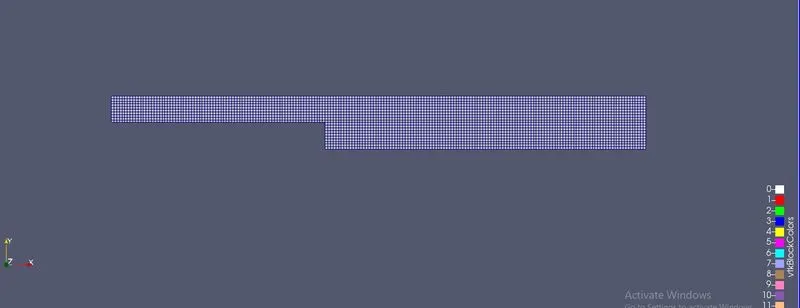
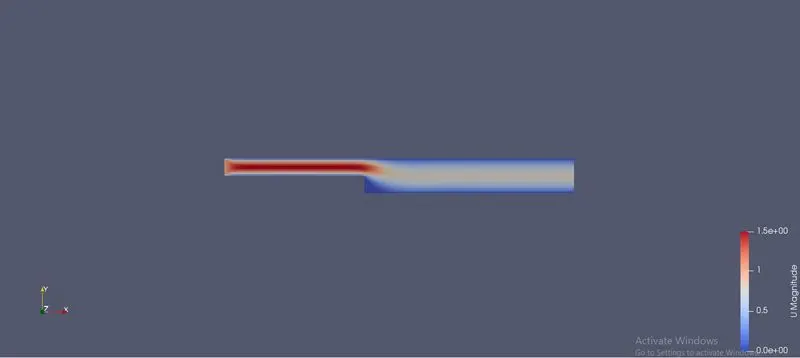
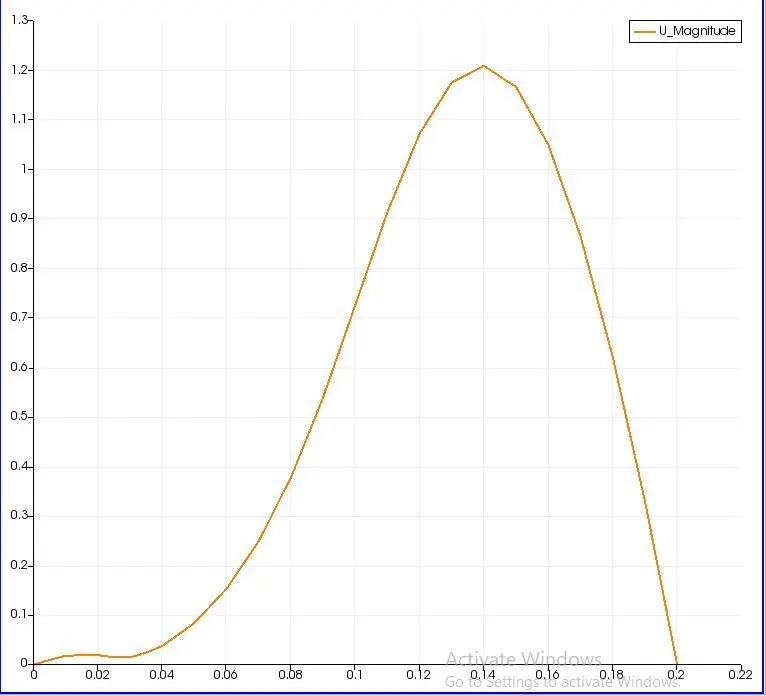
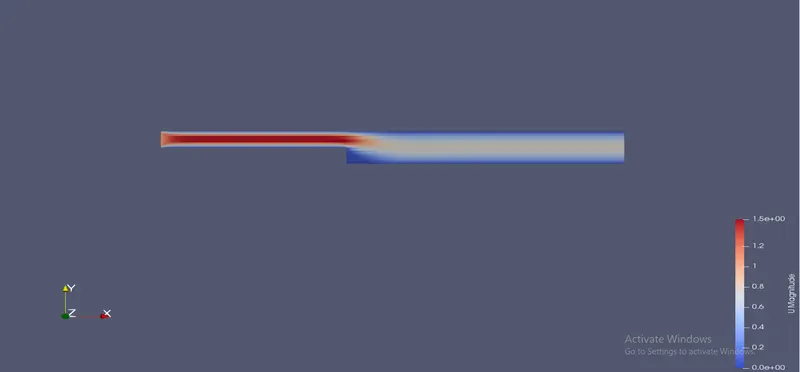
Plots that we get from the above simulation:
Surface with edges:
Velocity profile:
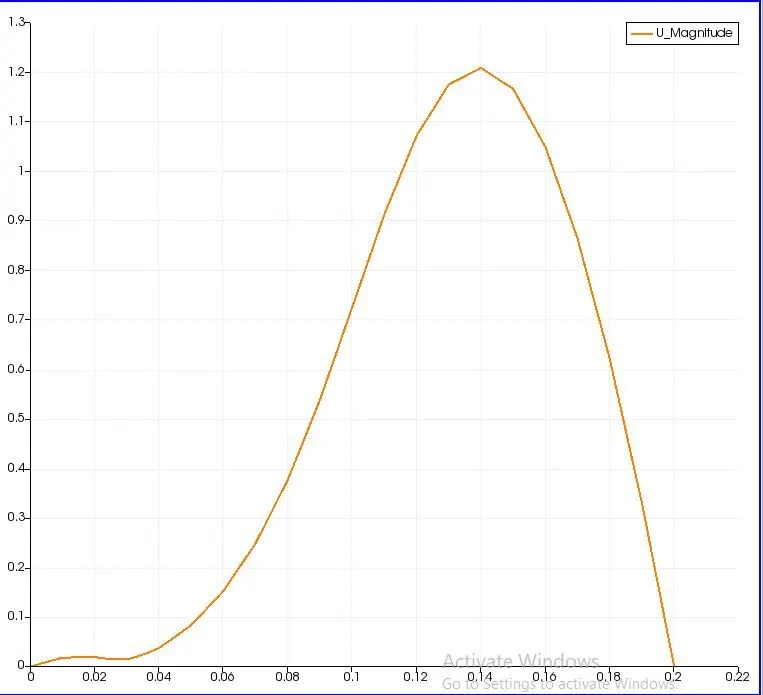
Velocity plot:
Case 2 - Simulate the flow with a grading factor of 0.2.
Here we have to alter the blockmeshdict block:
BlockMeshDict:
/*--------------------------------*- C++ -*----------------------------------*
  =========                 |
  \      /  F ield         | OpenFOAM: The Open Source CFD Toolbox
   \    /   O peration     | Website:  https://openfoam.org
    \  /    A nd           | Version:  8
     \/     M anipulation  |
*---------------------------------------------------------------------------*/
FoamFile
{
    version     2.0;
    format      ascii;
    class       dictionary;
    object      blockMeshDict;
}
// * * * * * * * * * * * * * * * * * * * * * * * * * * * * * * * * * * * * * //

convertToMeters 0.1;

vertices
(
    (0 0 0)
    (8 0 0)
    (8 0.5 0)
    (0 0.5 0)
    (8 1 0)
    (0 1 0)
    (20 1 0)
    (20 0.5 0)
    (20 0 0)
    (20 -1 0)
    (8 -1 0)
    (0 0 0.1)
    (8 0 0.1)
    (8 0.5 0.1)
    (0 0.5 0.1)
    (8 1 0.1)
    (0 1 0.1)
    (20 1 0.1)
    (20 0.5 0.1)
    (20 0 0.1)
    (20 -1 0.1)
    (8 -1 0.1)
 );

blocks
(
    hex (0 1 2 3 11 12 13 14) (80 5 1) simpleGrading (1 5 1)
    hex (3 2 4 5 14 13 15 16) (80 5 1) simpleGrading (1 0.2 1)
    hex (2 7 6 4 13 18 17 15) (120 5 1) simpleGrading (5 0.2 1)
    hex (10 9 8 1 21 20 19 12) (120 10 1) simpleGrading (5 5 1)
    hex (1 8 7 2 12 19 18 13) (120 5 1) simpleGrading (5 5 1)

 );

edges
(
);

boundary
(
    inlet
    {
        type patch;
        faces
        (
            (0 11 14 3)
            (3 14 16 5)
        );
    }
    outlet
    {
        type patch;
        faces
        (
            (9 8 19 20)
            (8 7 18 19)
            (7 6 17 18)
        );
    }
    frontAndBack
    {
        type empty;
        faces
        (
            (0 3 2 1)
            (3 5 4 2)
            (10 1 8 9)
            (1 2 7 8)
            (2 4 6 7)
            (11 12 13 14)
            (14 13 15 16)
            (21 20 19 12)
            (12 19 18 13)
            (13 18 17 15)
        );
    }
    noslipwalls
    {
        type wall;
        faces
        (
            (5 16 15 4)
            (4 15 17 6)
            (10 21 12 1)
            (0 1 12 11)
            (10 9 20 21)
        );
    }
);

mergePatchPairs
(
);

// ************************************************************************* //
Contraldict:
/*--------------------------------*- C++ -*----------------------------------*
  =========                 |
  \      /  F ield         | OpenFOAM: The Open Source CFD Toolbox
   \    /   O peration     | Website:  https://openfoam.org
    \  /    A nd           | Version:  8
     \/     M anipulation  |
*---------------------------------------------------------------------------*/
FoamFile
{
    version     2.0;
    format      ascii;
    class       dictionary;
    location    "system";
    object      controlDict;
}
// * * * * * * * * * * * * * * * * * * * * * * * * * * * * * * * * * * * * * //

application     icoFoam;

startFrom       startTime;

startTime       0;

stopAt          endTime;

endTime         0.5;

deltaT          0.001;

writeControl    timeStep;

writeInterval   20;

purgeWrite      0;

writeFormat     ascii;

writePrecision  6;

writeCompression off;

timeFormat      general;

timePrecision   6;

runTimeModifiable true;


// ************************************************************************* //
Velocity file:
/*--------------------------------*- C++ -*----------------------------------*
  =========                 |
  \      /  F ield         | OpenFOAM: The Open Source CFD Toolbox
   \    /   O peration     | Website:  https://openfoam.org
    \  /    A nd           | Version:  8
     \/     M anipulation  |
*---------------------------------------------------------------------------*/
FoamFile
{
    version     2.0;
    format      ascii;
    class       volVectorField;
    object      U;
}
// * * * * * * * * * * * * * * * * * * * * * * * * * * * * * * * * * * * * * //

dimensions      [0 1 -1 0 0 0 0];

internalField   uniform (0 0 0);

boundaryField
{
    inlet
    {
        type            fixedValue;
        value           uniform (1 0 0);
    }

    outlet
    {
        type            zeroGradient;
    }
    noslipwalls
    {
        type           noSlip;
    }
    frontAndBack
    {
        type            empty;
    }
}

// ************************************************************************* //
Pressure file:
/*--------------------------------*- C++ -*----------------------------------*
  =========                 |
  \      /  F ield         | OpenFOAM: The Open Source CFD Toolbox
   \    /   O peration     | Website:  https://openfoam.org
    \  /    A nd           | Version:  8
     \/     M anipulation  |
*---------------------------------------------------------------------------*/
FoamFile
{
    version     2.0;
    format      ascii;
    class       volScalarField;
    object      p;
}
// * * * * * * * * * * * * * * * * * * * * * * * * * * * * * * * * * * * * * //

dimensions      [0 2 -2 0 0 0 0];

internalField   uniform 0;

boundaryField
{
    inlet
    {
        type            zeroGradient;
    }

    outlet
    {
        type            fixedValue;
        value            uniform 0;
    }
    noslipwalls
    {
        type            zeroGradient;
    }
    frontAndBack
    {
        type            empty;
    }

}

// ************************************************************************* //
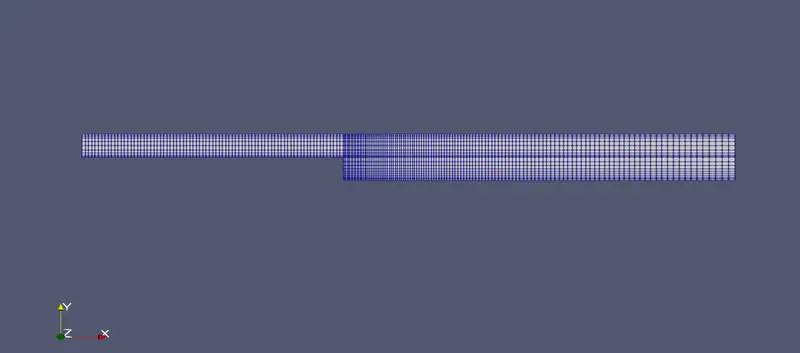
Plots that we get from the above simulation:
surface with edges:
Velocity profile:
Velocity plot:
comparing
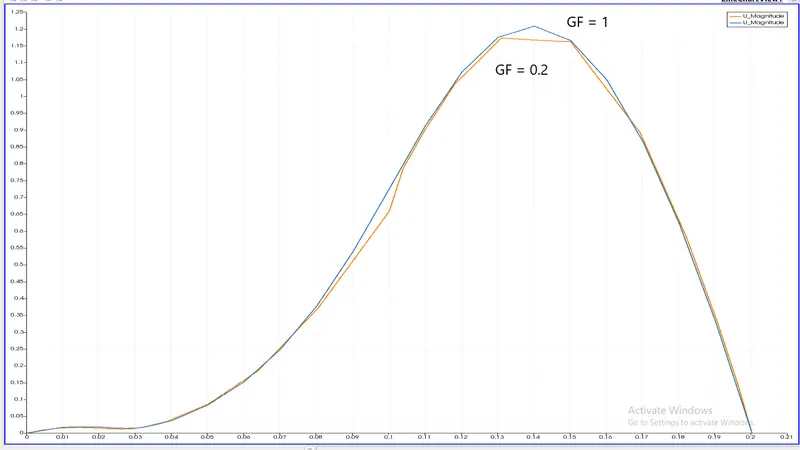
- Two different meshes indicate the significance of grading/growth factor as the mesh without any grading factor (GF = 1) was not refined enough to capture the near wall gradients of the flow properties, especially velocity, as compared to the mesh using a grading factor of 0.2 in the relevant blocks of the decomposed domain.
Conclusion:
- By changing the simple grading factor from the value of 1 to 0.2 the mesh becomes finer at the walls and the solution becomes very accurate.
- From the graph, it can be seen that the velocity in the two cases is the same that is 1.2 m/s at a distance of 0.085 from the inlet on the x-axis.
- Overall the change in the size of the simple grading factor (mesh size) the results remain the same as approximately.