Concept on positioning of Columns
Q1.
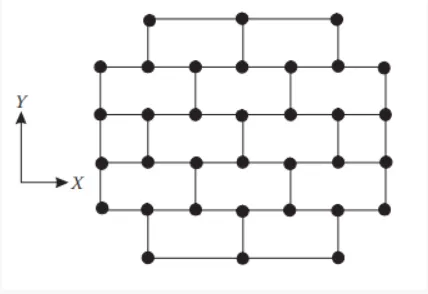
Investigating the frame plan with respect to the symmetry in the X direction.
If the frame plan is split into two VERTICALLY, it will look like a mirrored structure, the look exactly the same, but mirrored.
By which we conclude the given frame plan is symmetry in the x direction and it has no irregularities.
Investigating the frame plan with respect to the symmetry in the Y direction.
If the frame plan is split into two HORIZONTALLY, it will look like a mirrored structure, the look exactly the same, but mirrored.
By which we conclude the given frame plan is symmetry in the Y direction and it has no irregularities.
Investigating the frame plan with respect to the redundancy in the X direction.
In the structure frame plan, the columns in the X direction are adequate in numbers and evenly spaced, so the structure is more redundand in the X direction.
But, by analysing the top and bottom area of the plan we can see the provided column is compartively lesser then half apart from the rest of the column in x direction.
So the redundancy of the column in the top and bottom of the plan is low.
Investigating the frame plan with respect to the redundancy in the Y direction.
The number of column in the Y direction is lass than the ccolumn provided on the X direction.
The structure is redundant, but not better than the columns in the X direction.
Such scenario cause the mass carried by the column in the vertical direction is more comparitively to the X direction.
Investigating the frame plan with respect to the Bi-directional stiffness.
Column in the horizontal direction (X axis) are connected to the straight to straight beams.
So, when the building faces the lateral force horizontally (X direction) the stress is carried threought the beam without any diversion.
Hence the bidirectional stiffness is good in the X direction.
But the some columns in the Y direction are not connected on the straight to straight.
So the lateral force on the y direction has to diverted to the beams on thier perpendicular direction to reach the next column on the y direction.
The frame plan is not so strong the Y direction with respect to the bidirectional stiffness.
Investigating the frame plan with respect to ductility:
Generally the ductility is inversly proposional to the stiffness.
Since the no of columns in the X direction is comparitively more than the columns on the Y direction, it refers that the ductility is lesser in the X direction.
-----------------------------------------------------------------------------------------------
Q2.

VERTICAL INREGULARITY:
The land area on the first two floors are higher, the plan area gets decreased as the heigth of the structure gets increases.
Which may reduces the stiffness of the floor on the top.
The offset of the plan area must satisfy the criteria mentioned on the code IS 1893-2016(table 6).
SOFT STOREY:
The building has the open space on the 6th floor, with no walls embedded to the columns. The situation may cause the plastic hinge formation at the columns.
-----------------------------------------------------------------------------------------------
Q3.
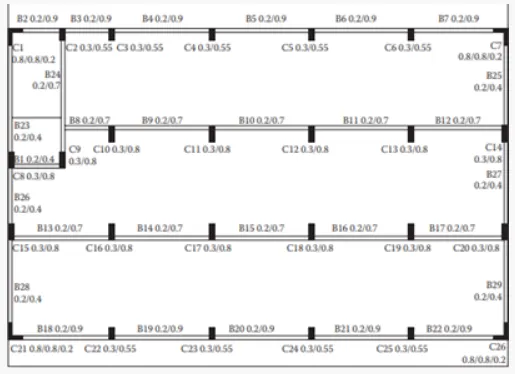
First thing that could be noticed on this picture is the ground floor has no infills, which may cause the plastic hinge condition on the cloumn on the ground floor.
Irregularity in the ground floor itself the greatest cause of the buildinbgs total collapse.
The reason behind the non collapsed staircase area is that the stair case structure has very much concentratede concrete in it.
From the structural plan and the detail we conclude that the top and bottom area of ther plan has the rooms occupied with the appliances or other objects while the center bay has nothing in that sort.
That causes the mass difference on the structure.
The major reason for collapse could be,
The columns are only connected to each other only on the horizontal direction (x axis) but not on the vertical direction.
In case the lateral force from the earth quake is been face by the building on the Y direction, the building has no way to pass the lateral force from the top bay to the bottom bay, there is not even any way from diversion.
Which might have lead to the collapse of the building.
The columns with the higher dimesions are in the y direction hence the column in the Y direction has the better stiffness but beams are only connecter the column son the X direction, hence the transfering of the lateral loads is betteron the X direction only but the column dimension in the X direction are lesser so it doesn't do a goof job in transfering the load.
-----------------------------------------------------------------------------------------------