Week 3 Challenge
Q1.
1. State the primary load cases to be considered for design.
ANSWER:-
The primary load cases that are to be considered for design are listed below:
- Dead Load (IS 875: Part I).
- Live Load (IS 875: Part II).
- Wind Load (IS 875: Part III).
- Snow Load (IS 875: Part IV).
- Seismic Load (IS 1893: 2016).
2. What is One – Way slab?
ANSWER:-
ONE-WAY SLAB:-
- One-way slab is a plane surface of uniformly loaded which deforms into a cylindrical shape and hence the bending moment develops only in one direction. These type of slab is called one-way slab.
- One-way slab is a slab in which the ratio of the longer span to its shorter span is more than or equal to 2.
- One-way slab load distribution takes place along its shorter span.Hence bending also happens at the shorter span of the slab.
3. What is the value of unit weight of structural steel and soil?
ANSWER:-
The value of unit weight of structural steel and soil are given below:
Unit-weight of Structural Steel: 7850 Kg/cu.m.
4. Name few sections that can be defined using Properties tab in STAAD Pro.
ANSWER:-
Few sections that can be defined using Properties tab in STAAD Pro are listed below:
- Circular sections.
- Rectangular sections.
- I-Sections.
- T-Sections.
- Tapered-I sections.
- Trapezoidal sections.
- Custom Geometric Sections.
5. Define Primary Beams.
ANSWER:-
Primary Beams:-
- The primary beams are the beams that are directly connected with the column on both the ends.
- The function of the primary beams are to transfer the load of the slab directly to the column that they are resting on.
Q2.
1. State the factors and parameters that influence the design pressure intensity of a high-rise building.
ANSWER:-
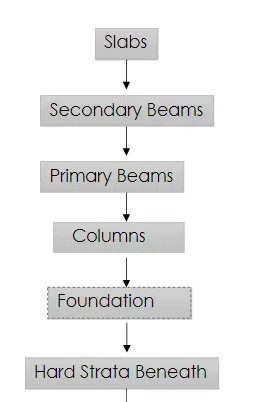
2. Mention the load transfer process of a Reinforced Concrete Building.
ANSWER:-
The load transfer procedure of a reinforced concrete building has been illustrated below in the form of the flowchart`
Q3.
1. Differentiate One-Way and Two way slabs. Elaborate each slab type.
ANSWER:-
| One-Way Slab | Two-Way Slab |
|
|
|
|
|
|
|
|
|
|
|
|
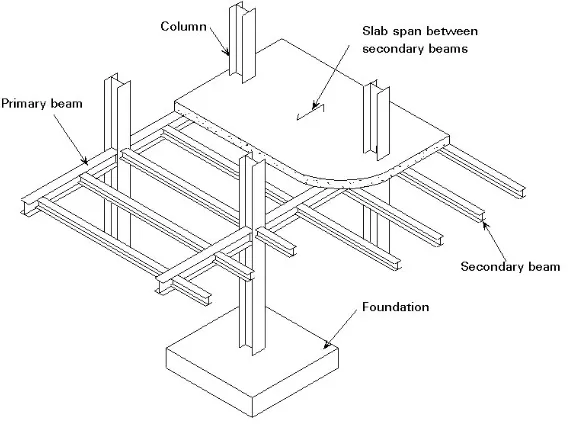
2. Explain the concept of secondary beams with proper sketch.
ANSWER:-
SECONDARY BEAM :-
The secondary beams are primarily connected to the primary beams mainly simply supported beams.
- The secondary beams are provided for the better distribution of slab loads along with the primary beams which rests on thed slabs.
- So mainly the secondary beams are the beams that are not directly connected to the columns. The secondary beams rest on the other beams that are directly rest on the column and those beams are known as the primary beams.
- So the secondary beams carries a certain amount of total load and help them to distribute the loads in the respective manner.
- In secondary beams,it is important to release the end moments at the supports,because of this all the secondary beams are provided with the pinned connection.
3. Mention the Primary load cases.
a. State the Indian Standards for each load case
b. Detail the parameters of each load case
c. Brief each load case
ANSWER:-
a. State the Indian Standards for each load case:
- Dead Load (IS 875:Part 1).
- Live Load (IS 875:Part 2).
- Wind Load (IS 875:Part 3).
- Snow Load (IS 875:Part 4).
- Earthquake Load (IS1893:2016).
b. Detail the parameters of each load case:
- Member Loads.
- Concentration Loads.
- Floor Loads.
- Plate Loads.
c. Brief each load case:
Dead Load:-
- The dead load is defined as the continuous load in a structure i.e the load of machine etc and this load caused by the weight of the members that are pemanently attached to the particular structure.
- The dead load of the structure comprised of the load of the column, load of the beam , loads of the floor slab, roofing,walls, the load of the windows or may be the load of the electrical fixture. All the loads which is permanent on the structure is called as the dead load of the structure.
Some of the Dead Load(Unit Weight) of the following materials:
- Cement : 1440 Kg/cu.m.
- Steel : 7850 Kg/cu.m.
- Sand : 1600 Kg/cu.m.
- Concrete : 2400 Kg/cu.m.
- RCC : 2500 Kg/cu.m.
- Soil : 1800 Kg/cu.m.
Dead Load factor is 1.
Live Load:-
- Live loads are the loads that are fully or partially vary from time to time on the structure.
- Live loads are not constant loads throughout of the life span of a structure.
- Live loads may vary time to time according to its usage or the occupancy.
- Live load may vary depend on the type of the structure such as the residential building,commercial building,industrial building etc.
- For residential building we use 3KN/sq.m Live Load.
- Live loads on floors and the roofs consist of all loads which are temporarily placed on the structure. Some of the live loads (Unit Weight) are:
- All rooms and kitchen : 2 KN/sq.m.
- Bathrooms and Toilets : 2 KN/sq.m.
- Balcony : 3 KN/cu.m.
- Staircase/Corridors : 3 KN/cu.m.
Wind Load:-
- Wind Load is a force on a structure that is arising from the impact of the wind. Wind load is an important load case for the structure. We considered this type of load where the structure are situated or located in the hilly areas of the mountain areas where we can expect high speed of the winds that can affect the structure. In those areas we need to consider the wind loads.
- Mainly we calculated the wind loads for the roofs of the structure.
Earthquake Load:-
- Earthquake loads or seismic loads are also an important load case that needs to be considered while designing and analysing of the high-rise structure of the building.
- Mainly we considered this type of loads where there are high chances of earthquakes or we can say we have to consider this load in the earthquake prone areas,where there is a high risk of earthquake.
- And according to the codal provision,the dynamic seismic analysis can be carried out via any of the two methods and these two methods are spectrum analysis and the time history analysis.
4. Detail the steps involved in assigning Properties and Support to a model using STAAD Pro sequentially.
ANSWER:-
Assigning Properties:-
The steps that are involved in assigning the properties and support to a model using the STAAD Pro software have been discussed below:
- The first step in order to assigning the properties to a model in a model using STAAD Pro software,go to the Properties tab and then there will be a dialoige box and in that dialouge box there is an option called Define menu just click on that option.
- After clicking the define option there will be another dialouge box,in that dialouge box there will be a list of existing sectional properties,from that list choose the desired sectional property like Circular section,Rectangular section,Trapezoidal section etc.
- After choosing the section properties specify the dimensions in that dialouge box.
- And now there will be another option called Add just click on that option and then click OK.
- And now assign the property to the model or structure,and to assign the property select the section that we have just created from the created section,and click on the opion Assign to the selected view and then click on the assign option and then assign the property and done.
Assigning Support:-
- In order to assign the Support to the model using the STAAD Pro software,go to the Section tab and then there will be another dialouge box and in that dialouge box there will be an option called Create New just click on that option.
- After clicking on that option there will be another dialouge box and in that dialouge box there will be another options like Fixed,Pinned,Fixed But etc.
- Click on the desired end conditions,then there will be an option called Add just click on that option.
- And now assign the Support to the model or structure,and to assign the support select the support that we have just created from the created section,and click on the opion Assign to the selected view and then click on the assign option and then assign the property and done.
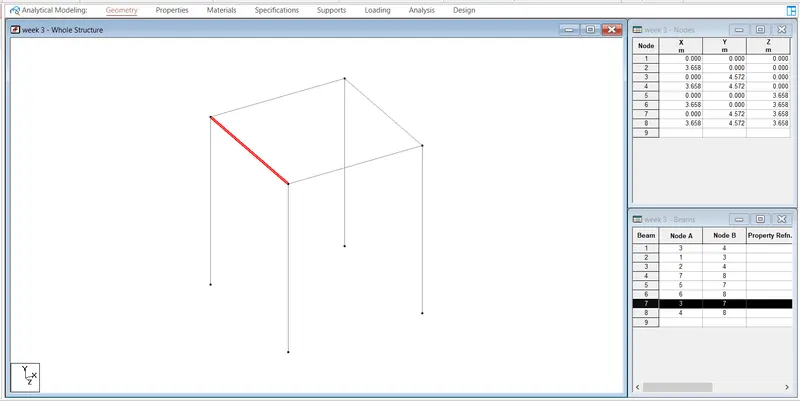
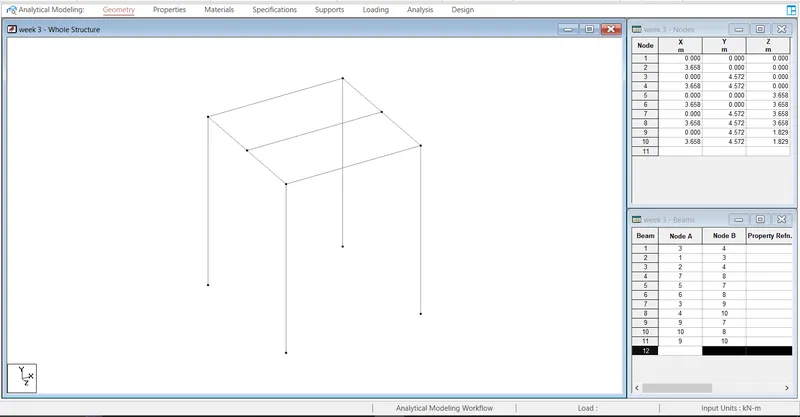
5. Brief the steps to be followed to create and assign secondary beams in STAAD Pro
ANSWER:-
The steps that are involved in creating and assigning the secondary beams in STAAD Pro are discussed below:
- First create a simple model by using the node in STAAD .pro
- Click on the create beam option and create a beam in the direction of X and Z axis
-
- Right Click on primary beam in the section
- Right click and add Add node at the mid on the beam section a node will be added
- Click on the create beam to draw the beam along mid of the bay
-
Practical
1. Calculate the wind pressure for the given building
a. Building Dimension : 20m x 30m x 20m height RCC
b. Building usage : Hospital block in city centre
c. Location : Darjeeling
2. Calculate the Dead load and Live load for the above building with reference to IS standards ( assume suitable sections )
PROCEDURE:
Given;
Building dimensions:- 20m * 30m * 20m.
Buidling usage:- Hospital Block.
Location of the building:- Darjeeling.
STEP 1:-
Calculate Design Wind Speed:-
We know the formula to calculate the design wind speed,that is:
`V_z=V_b*k_1*k_2*k_3*k_4`
where, `V_b` = Basic Wind Speed (m/sec).
`k_1` = Risk Co-efficient.
We can find the value of risk co-efficient,`k_1` from IS code 875:Part 3 2015, Table 1).
`k_2` = Terrain Roughness and Height Factor.
`k_3`= Topography Factor.
We can find the value of topography factor from IS cide 875:Part 3 2015 clause no 6.3.3.
`k_4` = Importance factor.
Given Data form the IS code:
`V_b = 47 m/s`
`k_1 = 1.07.`
`k_2 = 0.8.`
`k_3 = 1.`
`k_4 = 1.`
CALCULATION:
`V_z=V_b*k_1*k_2*k_3*k_4`
`V_z = 47 * 1.07 * 0.8 * 1 * 1.`
`V_z = 40.23 m/s`
STEP 2: Calculation of Wind pressure:
`P_z=0.6*V_z^2`
`P_z=0.6*(40.23)^2`
`P_z = 971.071N`
`P_z=0.97117 KN`
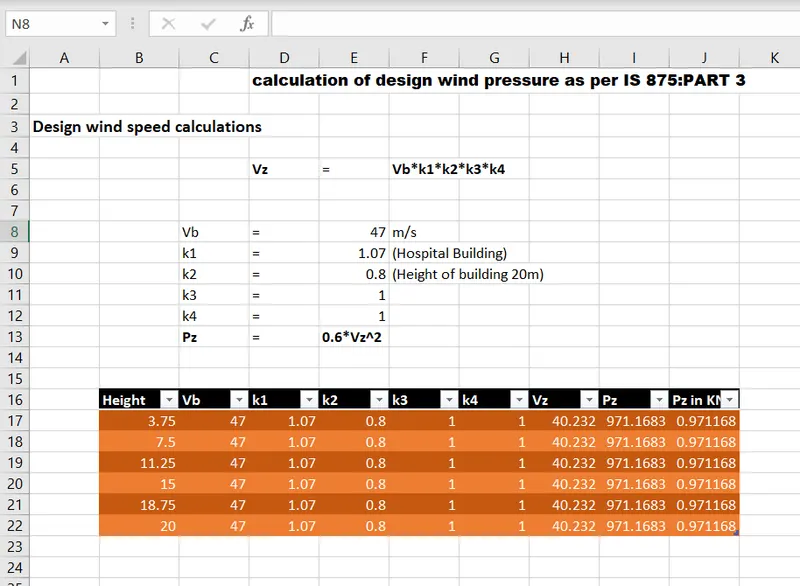
Similarly,we can calculate the for different heights,the calculation for different height has been done in the excel sheet so the excel sheet has been given below:
Question 2. Calculate the Dead load and Live load for the above building with reference to IS standards (Assume suitable sections).
Answer.
- Dead Load due to Slabs:
Assuming the slab thickness of 150mm.
Dead Load due to the Slabs = Length * Breadth * Height * Slab Thickness.
Dead Load due to the Slabs `= 20 * 30 * 25 * 0.15`
Dead Load due to the Slabs `= 225 KN`
In this project we have total of five floor slabs,therefore:
Total dead load due to all the slabs = 5 * Dead Load due to the Slabs.
Total dead load due to all the slabs `= 5 * 225`
Total dead load due to all the slabs = 1125 KN.
- Dead Load due to the beams:
Assume the beams of cross-section 350*450mm.
Dead load due to the beams = Size of the beam * Height.
Dead load due to the beams `= 0.35 * 0.45 * 25`
Dead load due to the beams `= 3.94 (KN)/m`
Dead load due to the beams `= 4 (KN)/m`
- Superimposed Loads due to the Partition walls:
Assuming 150mm thickness of brickwork.
Height of brickwork = Floor height - depth of the beam.
Height of the brickwork `= 3.75 - 0.45`
Height of brickwork `= 3.3 m`.
Therefore,the dead load due to the brick masonary partition `= 3.3 *0.15 * 18`
The Dead Load due to the brick masonary partition = 8.91 KN/m.
- Live Load:
We can calculate the live load of a given structure by using the IS 875:Part 2,which states different live loads values for different rooms.
- As our building is the Hospital building,the all the proposed live load values for hospital building according to the IS 875:Part 3 has been listed below:
| OCCUPANCY |
LIVE LOAD |
|
`2.0 (KN)/m^2` |
|
`3.0 (KN)/m^2` |
|
`3.0 (KN)/m^2` |
|
`2.0 (KN)/m^2` |
|
`3.0 (KN)/m^2` |
|
`2.5 (KN)/m^2` |
|
`4.0 (KN)/m^2` |