Week 2- 2R Robotic Arm Challenge
AIM: To write a command to visualize the forward kinematics of a 2R Robotic Arm.
YOUTUBE LINK:https://youtu.be/hQNwINIHHiQ
Code:
%Forward Kinematics of a Robotic Arm

clc
close all
clear all

%link width in meters
l1=1;
l2=0.5;
%angles in degree
theta1= linspace(0,90,50);
theta2= linspace(0,90,50);
ct=1
for i=1:length(theta1)
    THETA1=theta1(i);
    for j=1:length(theta2)
        THETA2=theta2(j);


        x0=0;
        y0=0;
        x1=l1*cosd(THETA1);
        y1=l1*sind(THETA1);

        x2=x1+l2*cosd(THETA2)
        y2=y1+l2*sind(THETA2)
        plot([x0 x1],[y0 y1],[x1 x2],[y1 y2],'LineWidth',3)
        axis([-0.1 1.5 0 1.5])
        R(ct)=getframe(gcf);
        ct=ct+1
    end

end
movie(R)
File_object=VideoWriter("pendulum_animation.avi");
open(File_object)
writeVideo(File_object,R)
close(File_object)
Output:-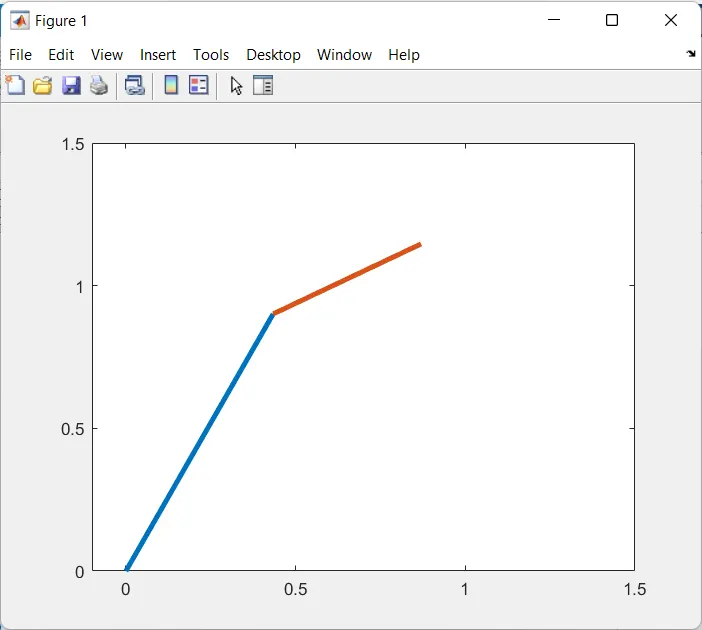
The above is a still image of 1 of many iterations of the code for the variations between both the links, for the animation, kindly refer to the attached video file.
Code Stepwise Explanation:-
> At first we have set the links(Arms) of the robot namely l1 and l2 at 1m and 0.5 m, respectively.
>We set the angle range of both the arms at which the links may move by using the (initial:incremental: final) format, thereby restricting the angles(theta1 and theta 2) to be from 0 to 50. And using the function called "linspace", thereby creating equal spacing and an equal number of instances between the initial and final value.
>Now, we began to form a 'for loop' to run the program for all the values of theta1 and theta2.
Syntax: for var_name=initial_value:final_value
#1st for loop: this is used to run the program code up to the range of the values theta1 have.
in the successive line, we then put the value of i,(generated using a range of values of theta1) in THETA1.
#2ND for loop: this internal second for loop helps us to visualize the actual position of the manipulator attached to the end link, thereby it is denoted by another variable name 'j', which runs up to the range of values of theta2.
Then we save that value to THETA2.
So, for each value of 'for loop 1', the second loop will run to the full length of theta2.
Therefore, for example, if the length of theta1=3 & theta2=3, then the entire code will run 9 times.
>Now, we use a coordinate system, stating (x0, y0) be the starting point and hence is at (0,0)
Moving forward, we assume, (x1, y1) to be the intersecting point of link 1 and link 2, and (x2, y2) to be the endpoints of link 2. Also, since these are inside loop2, thereby we are calling the angles using THETA1 and THETA2 to get the exact value of theta1 and theta2 for a particular instance.
Using trigonometry, we found:
[Note: In the code sin and cos are followed by 'd', which is used to tell the MATLAB AI that we want the values to be in degrees and not in Radians.]
>In the succession, we then use the "axis" command to set the limits of the x-axis and y-axis of the curve.
>As the second loop is running up to the length of the theta2, and generating plots with each iteration, we need to save each instance in a variable, therefore we use 'ct' as a variable to store the instance in it, as for the first iteration we kept 'ct' at 1 and thereafter increasing it by 1 in each succession.
>Now to have the figure plot saved in 'ct', we use 'getframe(gcf)' command and save that figure in another variable called 'R'.
>Now we open the File_object, then write in the File_object by retrieving the data from the variable "R".
>Then we close the File_object
Errors Faced during running the code:-
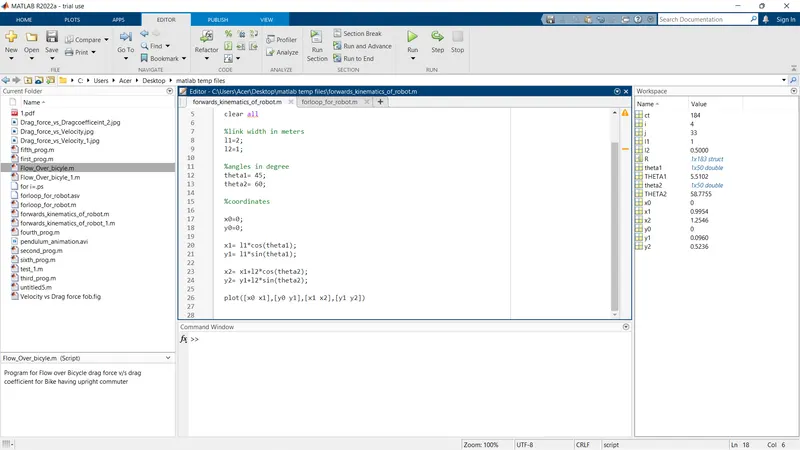
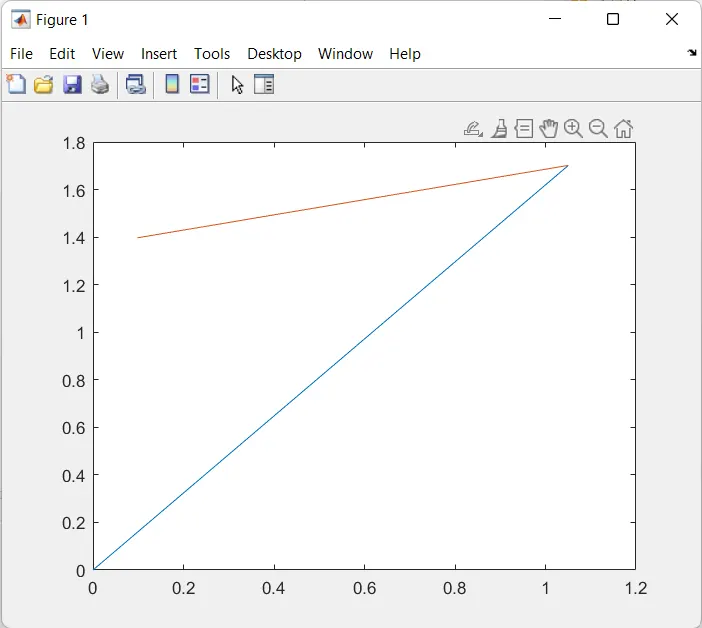
#1: Not adding 'd' in cosine and sine function which results in values which came out to be in radian form, bellow is the result:-
Input:-
Output:-
#2: Adding the get frame function after the increment of the variable called 'ct'. This results in not showing the first figure frame captured by ct, as that frame was not recorded, thereby starting of the output when ct has already reached a value of 2.
Hence ct needed to be incremented at the very last of the second loop so that the first image will get captured and recorded.
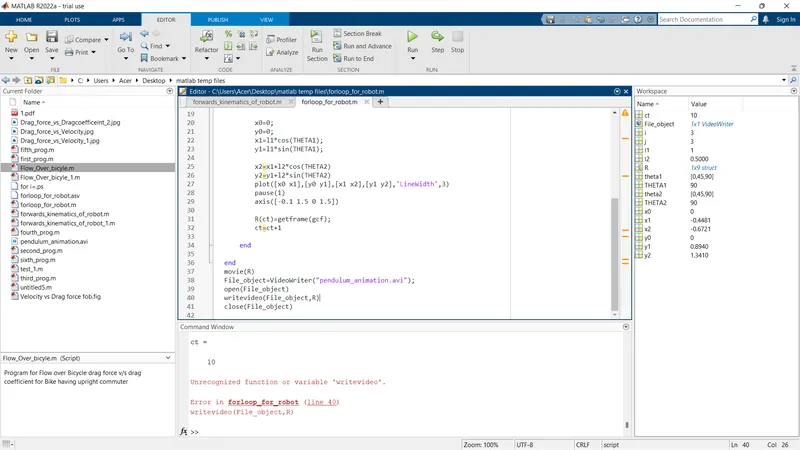
#3: Not writing the keywords in the right format, like 'writeVideo' if written in the wrong format like 'writevideo', the MATLAB AI will consider it as a variable and not a keyword and you will get an error like below:-
Therefore as the AI is case sensitive, write in the correct format.
Conclusion:-
>The above program with the nested for loop format helps tremendously while projecting and determining the workspace of the manipulator as well as predicting position of it if the length of the links and angles were given for a particular situation.