Project 1 - Parsing NASA thermodynamic data
Aim: To write a code that extracts the 14 coefficients and calculates the enthalpy, entropy, and specific heats for all the species in the data file.
Theory: File parsing in computer language means to give meaning to the characters of a text file as per the formal grammar. This aims at facilitating performing some kind of transformation on the data. Parsing splits a file or other input into pieces of data that can be easily stored or manipulated.
The formula used for enthalpy, entropy, and specific heat is given below:- 
Note:
Cp= Specific Heat
R= Universal Gas constant
H= Enthalpy
S= Entropy
#Main Code:-
clear all
close all
clc

%To read the therm file of NASA
Therm=fopen('THERMO.dat','r');
fgetl(Therm)
Temp_data= fgetl(Therm);
P=strsplit(Temp_data,' ');

%The Global temperatures
LowTG= str2num(P{2});
MidTG= str2num(P{3});
HighTG= str2num(P{4});

for i=1:3
    line1=fgetl(Therm);
end


%Defining storage to put value in
get= input('Enter Species name : ','s');


while ~feof(Therm)

    line_one = fgetl(Therm);
    a=strsplit(line_one,' ');
    g= a(1);

    %Comparing in-build data and input provided
     compare= strcmpi(g,  get);
     if compare==1
         disp('Species Data Present')
         Line1= fgetl(Therm);
         S1= strfind(Line1, 'E');
         Coef1= Line1(1:S1(1)+3);
         Coef2= Line1(S1(1)+4: S1(2)+3);
         Coef3= Line1(S1(2)+4: S1(3)+3);
         Coef4= Line1(S1(3)+4: S1(4)+3);
         Coef5= Line1(S1(4)+4: S1(5)+3);
         a1= str2num(Coef1);
         a2= str2num(Coef2);
         a3= str2num(Coef3);
         a4= str2num(Coef4);
         a5= str2num(Coef5);

         Line2= fgetl(Therm);
         S2= strfind(Line2, 'E');
         Coef6= Line2(1:S2(1)+3);
         Coef7= Line2(S2(1)+4: S2(2)+3);
         Coef8= Line2(S2(2)+4: S2(3)+3);
         Coef9= Line2(S2(3)+4: S2(4)+3);
         Coef10=Line2(S2(4)+4: S2(5)+3);
         a6= str2num(Coef6);
         a7= str2num(Coef7);
         a8= str2num(Coef8);
         a9= str2num(Coef9);
         a10= str2num(Coef10);

         Line3= fgetl(Therm);
         S3= strfind(Line3, 'E');
         Coef11= Line3(1:S3(1)+3);
         Coef12= Line2(S3(1)+4: S3(2)+3);
         Coef13= Line2(S3(2)+4: S3(3)+3);
         Coef14= Line2(S3(3)+4: S3(4)+3);
         a11= str2num(Coef11);
         a12= str2num(Coef12);
         a13= str2num(Coef13);
         a14= str2num(Coef14);

         %Getting The Local Temperature

         MidTl=a(end-1);
         midtl= str2double(MidTl);
         HighTl=a(end-2);
         hightl= str2double(HighTl);
         LowTl=a(end-3);
         lowtl= str2double(LowTl);

         break
     elseif compare==0
         disp('Species Data Not Present');
     else
         continue
     end
end

f= upper(get);

% Showing the Molecular weight of I/P molecule
M_weight = MW(get);
disp('Molecule You have Entered')
disp(f)
disp('Molecular Weight')
disp(M_weight)
Temp_range= linspace(100,10000,9000);
R= 8.314;

%Getting the Specific Heat
cp= specific_heat(a1,a2,a3,a4,a5,a8,a9,a10,a11,a12,midtl,Temp_range,R);

%Getting the value of Entropy
s=entropy(a1,a2,a3,a4,a5,a7,a8,a9,a10,a11,a12,a14,midtl,Temp_range,R);

%Getting the value of Enthalpy
h= enthalpy(a1,a2,a3,a4,a5,a6,a8,a9,a10,a11,a12,a13,midtl,Temp_range,R);

cd('D:\Skill Lync')
%Forming folder to save the plots
mkdir(f)

%Cp vs T
figure(1)
plot(Temp_range, cp, 'LineWidth',3,'Color','c')
grid on
xlabel('Temperature')
ylabel('Specific Heat in J/K')
title(f)

%h vs T
figure(2)
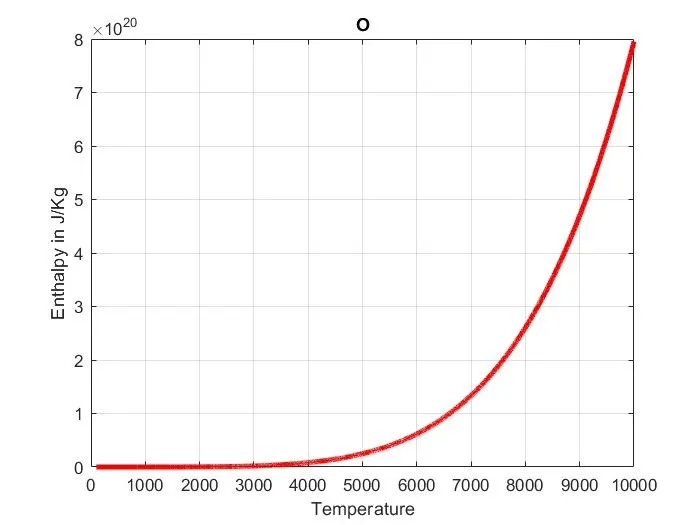
plot(Temp_range, h, 'LineWidth',3,'Color','r')
grid on
xlabel('Temperature')
ylabel('Enthalpy in J/Kg')
title(f)

% S vs T
figure(3)
plot(Temp_range, s, 'LineWidth',3,'Color','y')
grid on
xlabel('Temperature')
ylabel('Entropy in J/Kg')
title(f)

cd(f)

%Saving the images
saveas(figure(1),'Cp vs T.jpg')
saveas(figure(2), 'h vs T.jpg')
saveas(figure(3), 'S vs T.jpg')
cd('C:\Users\Acer\Desktop\matlab temp files')
fclose('all');
#Supporting code Molecular Weight:-
%Code for Molecular Weight
function M_weight= MW(get)
Weight=0;

%Atoms present in data are Hydrogen, carbon, Nitrogen, Oxygen, Argon
%Respective atomic mases are 1 12 14 16 40

%Using symbols of the elements
atoms= ['H', 'C', 'N', 'O', 'A'];
mass= [1,12,14,16,40];

for i=1:length(get)
    for j=1:length(atoms)
        if strcmpi(get(i),atoms(j))
            Weight= Weight+ mass(j);
            y=j;
        end
    end
    %if There are more tha one atoms of same molecule
    number= str2num(get(i));
    if (number>1)
        Weight= Weight +(mass(y)*(number-1)); %To add more weight of extra molecule
    end
end
M_weight=Weight;
end
#Supporting Function for enthalpy:-
%Code For Enthalpy

function hvalue= enthalpy(a1,a2,a3,a4,a5,a6,a8,a9,a10,a11,a12,a13,midtl,Temp_range,R)
if (Temp_range>midtl)
    hvalue = (a1+((a2.*Temp_range)./2)+((a3.*(Temp_range.^2))./3)+((a4.*(Temp_range.^3))./4)+((a5.*(Temp_range.^4))./5)+(a6./Temp_range)).*(R.*Temp_range);
else
    hvalue = (a8+((a9.*Temp_range)./2)+((a10.*(Temp_range.^2))./3)+((a11.*(Temp_range.^3))./4)+((a12.*(Temp_range.^4))./5)+(a13./Temp_range)).*(R.*Temp_range);
end
end
#Suppurting function for entropy:-
function svalue = entropy(a1,a2,a3,a4,a5,a7,a8,a9,a10,a11,a12,a14,midtl,Temp_range,R)

if (Temp_range>midtl)
    svalue= ((a1*log(Temp_range))+(a2*Temp_range)+((a3*(Temp_range.^2))/2)+((a4*(Temp_range.^3))/3)+((a5*(Temp_range.^4))/a4)+(a7))*R;
else
    svalue = ((a8*log(Temp_range))+(a9*Temp_range)+((a10*(Temp_range.^2))/2)+((a11*(Temp_range.^3))/3)+((a12*(Temp_range.^4))/4)+(a14))*R;
end
end
#Supporting function for specific heat:-
%Function for Specific Heat

function cpvalue = specific_heat(a1,a2,a3,a4,a5,a8,a9,a10,a11,a12,midtl,Temp_range,R)

if(Temp_range>midtl)
    cpvalue= (a1+(a2*Temp_range)+(a3*(Temp_range.^2))+(a4*(Temp_range.^3))+(a5*(Temp_range.^4)))*R;
else
    cpvalue= (a8+(a9*Temp_range)+(a10*(Temp_range.^2))+(a11*(Temp_range.^3))+(a12*(Temp_range.^4)))*R;
end
end
#Output:-
1: Enthalpy
2: ENTROPY:-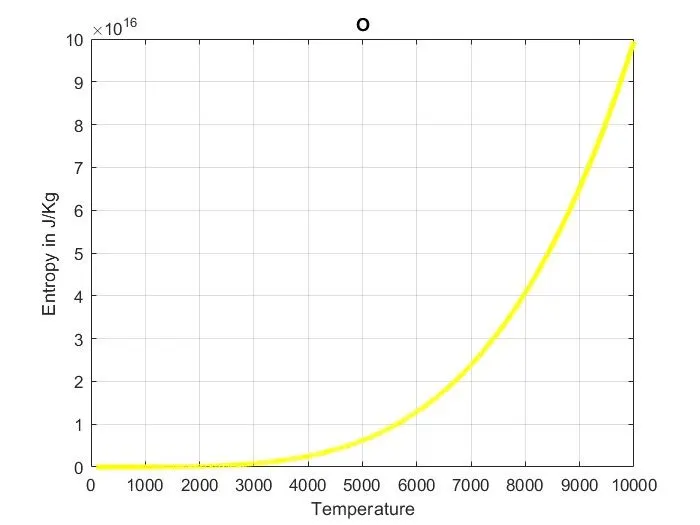
3: SPECIFIC HEAT:-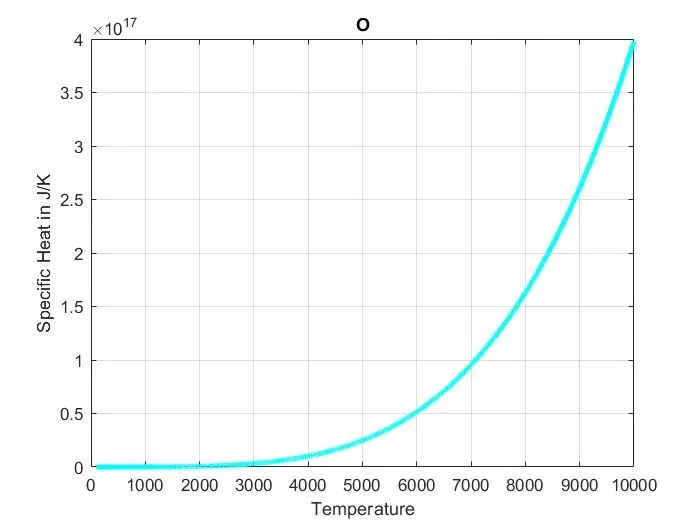
4: Command window: 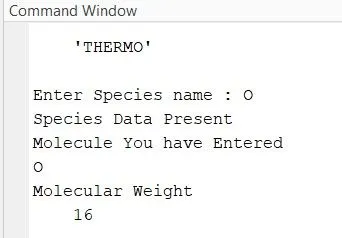
NOTE: The Outputs shown above are for Oxygen, one might choose other species as well via the initials like H, C, or N.
#Code Explanation:
> In this code, at first we read the data of 'Thermo.dat' and put its value in the variable 'Therm'.
>Then we read the first line using the 'fgetl' command, following which we use 'strsplit' command to split the string data of line 1 and put it in a variable 'P'.
> Now we segregate the global temperature into low, mid, and high criteria.
> Then we use a loop to change the position of the pointer to line 5, following which we ask for an input from the user to ask for the species.
> Now we begin a 'while loop' till the end of the Therm file. The n in it we also introduce the 'if loop' to check if the input via the user matches with our data, if it matches then we start the 'if loop', and line by line we segregate the variables, and if not the loop will return a statement stating 'Species Data Not Present'.
>If the data is present in our file, by the end of the if loop we then start to segregate the LOCAL temperature into high, mid, or low criteria.
> Now, we create the supporting functions for entropy, molecular weight, enthalpy, and specific heat and accordingly we call it in the subsequent main code.
>Then we create a directory to save all the plots and the data and this directory will be saved in the provided address 'C:\Users\Acer\Desktop\matlab temp files'
#Errors faced:-
> We need to check the position of the pointer in the Thermo.dat file to correctly sort out the data or we will face the error.
>While saving the directory we need to specify the correct desired location.
#Conclusion:-
>File parsing is a great method to sort out data in a uniform manner.