Week-6 Calculate the Stretch Ratio by comparing the ELFORM (-2,-1,1,2) with Ogden_Material Model.
AIM:
To perform the simulation by calculating the strach ratio & comparing with ELFORM(-2,2,-1,1) with Ogden material model.
OBJECTIVE:
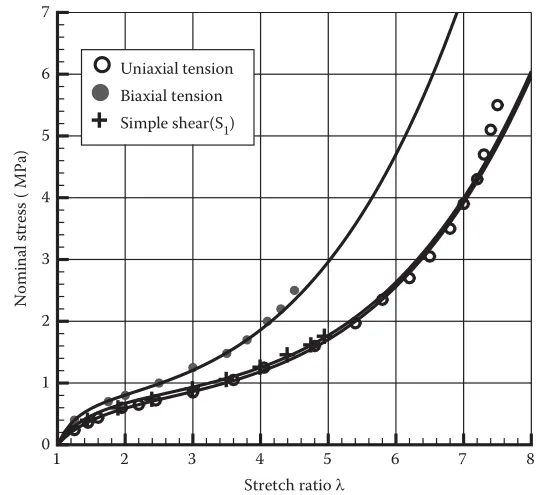
- Create a block of 10mmx10mmx10mm dimension with 10 elements for each direction and use the material card attached (Ogden_Material.k) that is representative of the material properties from the above figure.
- Use appropriate boundary conditions to simulate tensile behavior for the model and finally compare the results from your simulation to the plot above up to stretch ratio 5. Only the uniaxial plot is to be compared.
- Compare the results for the simulation using ELFORM -2,2,-1,1
- The unit of µ in the material definition is in MPa and α is a dimensionless quantity. Modify those quantities according to your unit systems.
- Use a proper solver (Implicit/Explicit) and also explain the reason.
DESCRIPTION:
The Ogden material model is a hyperelastic material model used to describe the non-linear stree strain behaviour of complex materials such as rubbers,polymers and biologiacal tissue. The model was developed by Raymond Ogden in 1972. The Ogden model, like other hyperelastic material models, assumes that the material behaviour can be described by means of a strain energy density function from which the stress–strain relationships can be derived.
PROCEDURE:
The given LS-Dyna keyword file is opened in LS-PrePost using the option File-Open-LS-Dyna Keyword File. The imported keyword file consists of only the Ogden material card as shown in the image given below.
- The FE model of a solid block of 10mmx10mmx10mm dimension with 10 elements for each direction is created using the Shape Mesher under the mesh tab as shown in the image given below.
SECTION CREATION:
- The section properties of the FE model created is assigned as a solid element with different ELFORM such as,
- Case (1). ELFORM = 1, constant stress solid element.
- Case (2). ELFORM = -1, Fully integrated S/R solid intended for elements with poor aspect ratio, efficient formulation.
- Case (3). ELFORM = 2, Fully integrated S/R solid
- Case (4). ELFORM = -2, Fully integrated S/R solid intended for elements with poor aspect ratio, accurate formulation.
- The section definition for each case is shown in the images given below.
MATERIAL:
- The material card given in the below image is already provided in the keyword file, the unit system followed is gm-mm-ms and it is assigned to the solid block part.
ASSIGNING MATERIAL & SECTION TO PART:
- The material and section properties are assigned to the solid part as shown in the image given below.
BOUNDARY CONDITIONS:
- To perform the uniaxial tensile test on the specimen, the nodes of one of the faces are fixed along the X-axis.
- Then we fix the vertical middle nodes along Z- direction fixed in Y-direction.
- Then we fix the horizontal Middle nodes along Y-direction fixed in Z-direction.
- The Nodes in the moving face are selected for applying load.
- The node-set and load curve ID's are assigned to the prescribed motion set so the selected nodes move along the X-direction.
CONTROL CARDS:
- CONTROL_IMPLICIT_AUTO card as shown in the below image is used for automatic time step control during implicit analysis. Input value for Automatic time step control flag = IAUTO = 1.
- CONTROL_IMPLICIT_GENERAL
card as shown in the below image is used to activate implicit analysis and define associated control parameters. This keyword is required for all implicit analyses. - The input value for IMFLAG=Implicit/Explicit switching flag = 1 (implicit analysis)
- DT0=Initial time step size for implicit analysis = 0.1.
- CONTROL_IMPLICIT_SOLUTION
card as shown in the below image is used to specify whether a linear or nonlinear solution is desired. The default values are set as it is in the card.
- CONTROL_IMPLICIT_SOLVER
card as shown in the below image is used for implicit calculation.
- The control termination function as shown in the below image is enabled to specify the end time of the simulation. The termination time is set for 1 ms.
- The time step value of 0.01 ms is given for the BINARY_D3PLOT as shown in the below image and the DATABASE_ASCII option for GLSAT and ELOUT.
- The DATABASE_EXTENT_BINARY car
d with STRFLG =1, as shown in the below image is used to compute the elastic strain in the model.
- The DATABASE_HISTORY_SOLID car
d as shown in the below image is used to compute the stress/strain of a 530 node in the model.
MODEL CHECK:
- The keyword file created is checked for errors using the option keyword manager>model check as shown in the below image.
- The keyword file is saved using the .k extension and is made to run in the solver by getting normal termination messages for different cases of ELFORM.
CONTOUR PLOTS FOR VON MISES STRESS:
ELFORM(-2) :
ELFORM(2) :
ELFORM(-1) :
ELFORM(1) :
CONTOUR PLOTS FOR EFFECTIVE PLASTIC STRAIN:
ELFORM(-2) :
ELFORM(2) :
ELFORM(-1) :
ELFORM(1) :
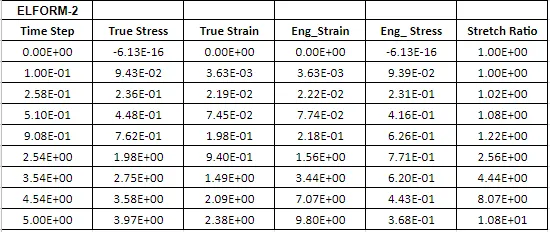
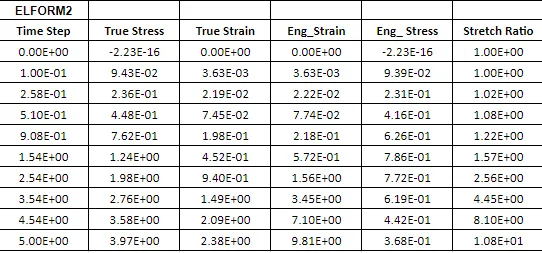
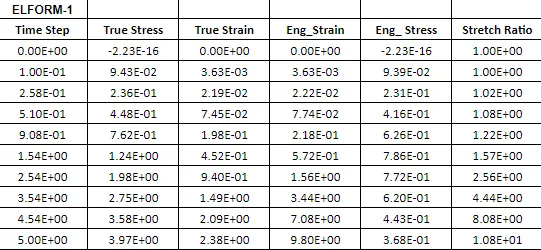
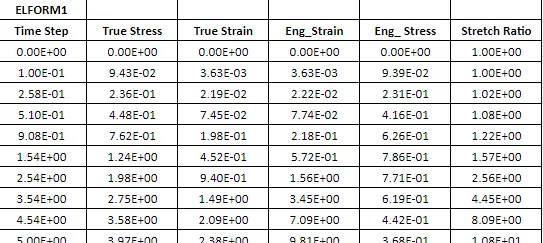
CALCULATION OF ENGINEEERING STRESS, STRAIN & STRECH RATIO:
In LS-DYNA always the output of stress and strains which we get from the Post Fringe Comp Stress/Strain are given as true stress and strains. To find the engineering stress/strain and stretch ratio following relations are used,
True stress - `σt=σe(1+ϵe)">σt=σe(1+ϵe)`
Engineering stress - `σe=σt(1+ϵe)">σe=σt / (1+ϵe)`
Similarly, True strain - `ϵt=ln(1+ϵe)">ϵt=ln(1+ϵe)`
Engineering strain - `ϵe=eϵt-1">ϵe=eϵt−1`
Stretch ratio - `λ=1+εe">λ=1+εe`
TABLE:
ELFORM(-2):
ELFORM(2):
ELFORM(-1):
ELFORM(1):
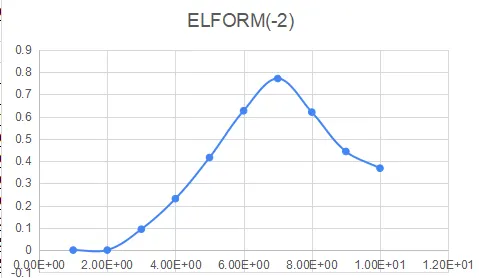
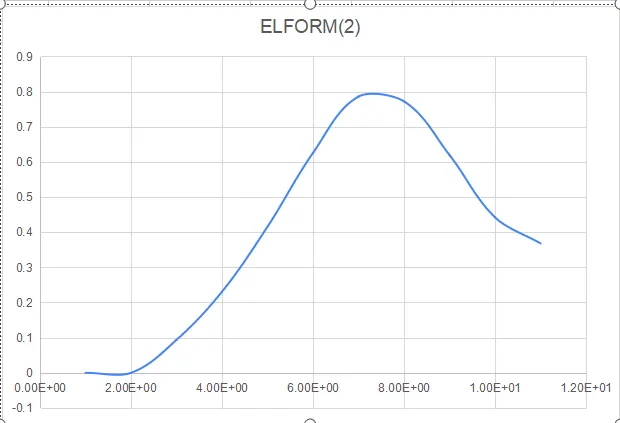
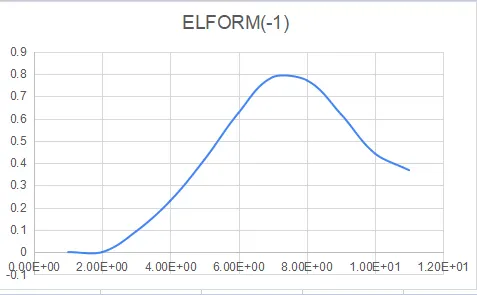
PLOTS:
ELFORM(-2):
ELFORM(2):
ELFORM(-1):
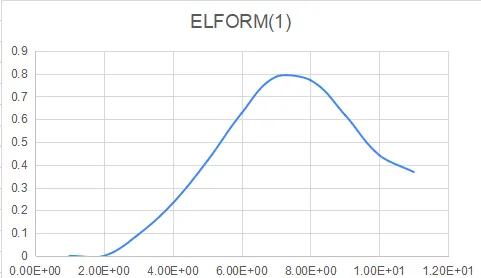
ELFORM(1):
RESULTS:
- A FE model of the solid block was created with Ogden material to simulate a uniaxial tension test for different cases of ELFORM (1, -1, 2, -2)
- Vonmisses stress animation & Effective plastic strain is created.
- Table & plots where created for the calculation of Stress, Strain & Stretch ratio for all the Elform.