Meshing an Automobile Rear Door Model
AIM:
To mesh the component (rear wheel holder) with the given quality criteria.
QUALITY CRITERIA:
Target Element Length = 5 Units
| S.N | Quality Criteria | Value |
| 1 | Aspect Ratio | 5 |
| 2 | Skewness | 45 |
| 3 | Warping | 15 |
| 4 | Taper | 0.5 |
| 5 | Min. Length | 2 Units |
| 6 | Max. Length | 8 Units |
| 7 | Min angle Quad | 45 |
| 8 | Max angle Quad | 135 |
| 9 | Min angle Tria | 20 |
| 10 | Max angle Tria | 120 |
| 10 | Tria % | 10 |
PROCEDURE:
GEOMETRY CLEAN-UP & MID-SURFACE EXTRACTION:
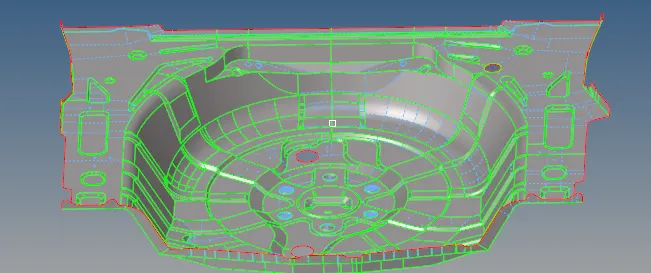
- The model is imported in the form of hm file.
- Once the geometry is cleaned, Mid-surface can be extracted by manual or auto process.
- Hence auto midsurface can be carried out(Geometry - midsurface - auto midsurface - offset option)
- In this component, there is no ribs or pad in the component & constant thickness for the whole component.
- Once the midsurface is extracted for the component, meshing can be done by obtaining proper quality criteria.
MESHING & ELEMENT QUALITY CHECKING:
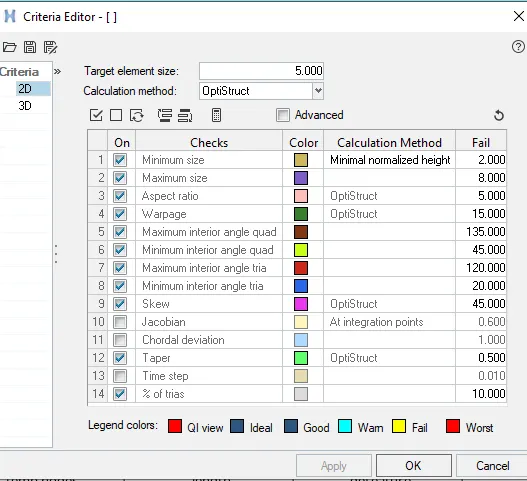
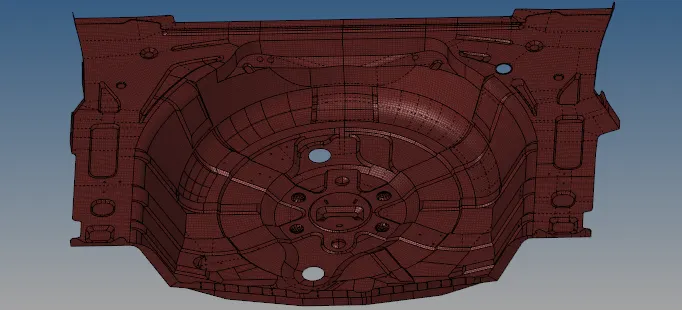
- By using (2d- automesh) mesh is created for the component. Once meshing is done, we have to check if any element fails for minimum quality length, it should be clear by meshing the respective region again.
- After meshing the component, by using quality index, the failed element size can be adjust by element optimize, place node, dragging the tria elements & splitting the quad elements.
- While meshing is followed in the flat surface, there should be zero element failure according to the given quality criteria, mesh flow & feature capturing should be followed.
- Apart from the above given quality criteria, there shouln't be any trias in the edges & corners of the geometry. No opposite trias, back to back trias & roatational quads shouldn't occur in meshing.
- There shouldn't be any trias on the curved surfaces & edges on the surface. Because tria elements are stiffer than quad element & it has only one plane & which can't be bent. So if trias are present on curves or edges of the surfaces it leads you less deformation.
- Once all edges are meshed, we need to check for connectivity of elements by using (tools-edges)
ASSIGNING THICKNESS OF THE MATERIAL:
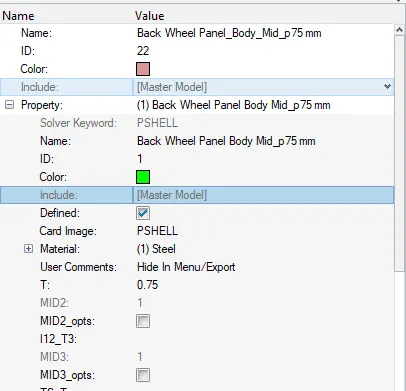
- 2d mesh is created to reduce the computational cost & time to simplify the solution.
- But there is need of designing the 3rd dimension to the software & to carry out the calculations in the particular dimension.
- For assigning the thickness of the material, we need to create property of required thickness & assign the property according to the thickness of the surfaces.
RESULTS:
- For the given component geometry is cleaned up & mid-surfaces has been extracted.
- Proper mesh flow is obtained, by following the given quality criteria.
- Thickness has been assigned for the required property of the material.