2D meshing for sheet metal
AIM:
To extract the midsurface & mesh the component with given quality parameters & assign the thickness on a hood component.
DESCRIPTION:
Hood model consisits of five parts:
- Hatch
- Left & right hinge
- Inner pannel & Outer pannel
|
S.No |
Quality Criteria |
Value |
|
1 |
Target/Average length |
5 |
|
2 |
Minimum Length |
2 |
|
3 |
Maximum Length |
7 |
|
4 |
Aspect |
3 |
|
5 |
Warpage |
15 |
|
6 |
Skewness |
45 |
|
7 |
Jacobian |
0.7 |
|
8 |
Minimum Quad Angle |
45 |
|
9 |
Maximum Quad Angle |
135 |
|
10 |
Minimum Tria Angle |
30 |
|
11 |
Maximum Tria Angle |
120 |
|
12 |
Tria Percentage |
15 |
PROCEDURE:
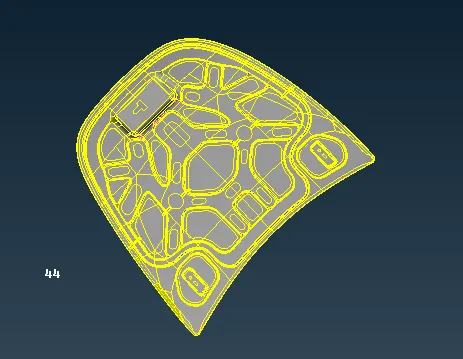
- The hood component geometry model ios open in the format of stp file.
- The hood components has four different parts which are looked differently to see each part individually to extract the component.
- For topology checking the unnecessary cons in parent component of the defom faces, cracks in the geometry. After checking the errors in checks it can be fixed by using auto fix option. Once errors are fixed, we need to analyse if any surfaces are changed in the component.
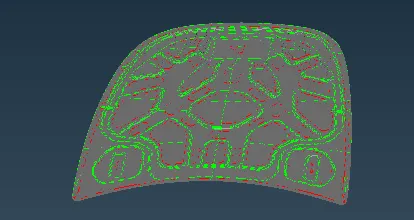
- Hood panel consists of five parts in which three of them are similar thickness of 1.2 mm & remaining parts are outer & inner panel are 0.75 mm. Thus hood component are non-linear.
- To extract the middle surface of the component can be done manually or auto option. The right, left hinge & hatch extracted manually by selecting the faces & taking the middle surface by the value of 0.6 mm.
- Outer & inner panel is middle surface is extracted by using auto option & selecting the entity by giving the middle value of 0.375 mm.
- By extracting the midsurface of each part, the component is assigned to the property with individual thickness as the three parts have a similar thickness, so it can be assigne dto the 1.2 mm & inner, outer pane can be assigned to the 0.75 mm.
- The property is assigned in the properties panel by creating new property & giving T to the component as per the particular value.
- After extracting the middle surface & assigning a thickness, the component is meshed by partiucular process by following the quality paramaters.
- In Finite Element Analysis process that divide the component at finite surface by giving nodes & element to solve for mathematical equations in analysis software.
- While meshing the component the target element size is 5 mm which has been given in the quality parameters panel. Once the components are meshed it may indicates several failing elements such as skewness, warpages, minimum & maximum length, minimum & maximum quad angle.
- If the mesh flow is not proper, it should be reconstruted again to obtain proper mesh flow. We need to check trias, quads are not allowed in the corner of the edges. Rotational quads are not allowed & some trias are acceptable in some particular region.
- Trias are fixed by spliting them at a particular area to have a proper mesh flow. The sharp edges are moved at a particu;ar distance or it should be reconstructed them again. The smooth option can be used to achieve proper mesh flow. Back to back trias are fixed by spliting them at a particular distance.
RESULTS:
- The mesh is obtained significantly on each component by fixing them using several options in the mesh panel.
- The given component is extracted with mid-surface & thickness is assigned for the component & it's been meshed for the given quality patrameters & element size with the given value & fine mesh flow is achieved.