Week 9-Creation of 1D Connectors Challenge
AIM:
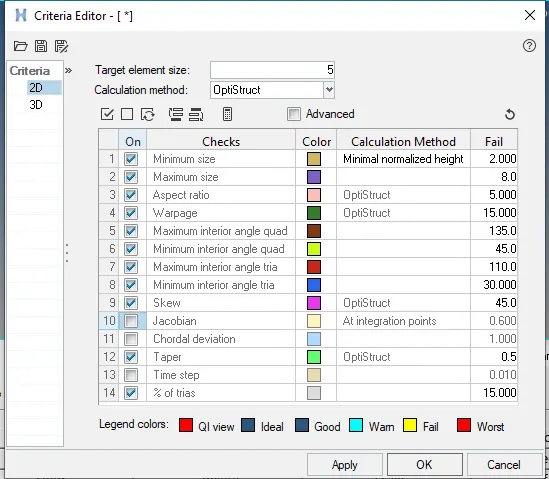
To create 1D connectors in the given component in hypermesh by achieiving following quality criteria.
|
S.N |
Quality Criteria |
Value |
|
1 |
Aspect Ratio |
5 |
|
2 |
Skewness |
45 |
|
3 |
Warping |
15 |
|
4 |
Taper |
0.5 |
|
5 |
Min. Length |
2 Units |
|
6 |
Max. Length |
8 Units |
|
7 |
Min angle Quad |
45 |
|
8 |
Max angle Quad |
135 |
|
9 |
Min angle Tria |
30 |
|
10 |
Max angle Tria |
110 |
|
11 |
Tria % |
15 |
DESCRIPTION:
CONNECTORS:
With the introduction of subsystems, all connectors are now organized into general connectors or subsystem connectors depending on whether the connector links are within one subsystem (general connectors) or across many (subsystem connectors). The realizations of the connectors will be organized into the correct subsystem, in the case of general connectors, or into its own subsystem, in the case of subsystem connectors. If you are not using subsystems, everything will be classified as a general connector.
ATTACHMENT CONNECTORS:
Attachment connectors are a single linked entity on a part that are designed to be used to manage subsystem to subsystem connections. A set of bolt connector realizations can use attachments as their links, and these bolt connectors can be created automatically by a proximity search of attachments. The attachment realization styles are a rigid spider or a rigid patch.
BOLT FE:
Added support to absorb bolt connectors. The absorb function creates a new bolt connector for each cluster of elements identified. The newly created connector also holds all relevant information about links, tolerance, dimensions etc. Check box with attachment links will absorb head elements as attachments and create bolt connector with those attachments as links.
PROCEDURE:
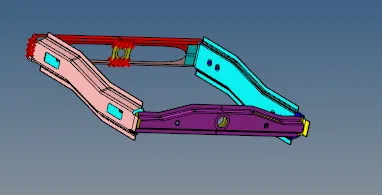
- Import the model in hypermesh & visualize the component.
- Check the criteria file settings assign the values, which has been mentioned in the given.
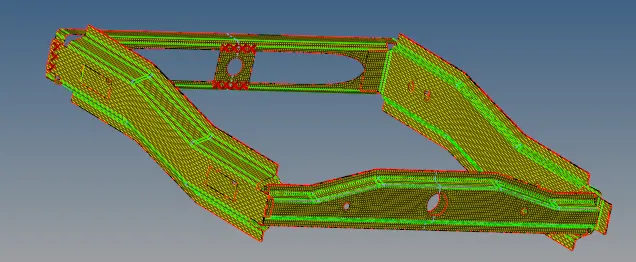
- Mesh all the components by keeping the element size as 5unit. Once meshing is done, check for the quality & repair failed elements.
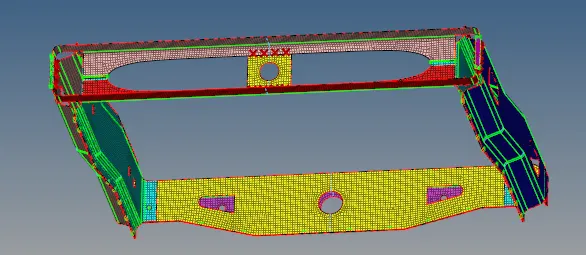
- Connectors has been created for various components as per the requirements.
1) Right_Rail_2 & Front_truss_1:- Seam-Quad(angled+capped+L)
- To create these connectors, go to connectors select seam tab. The spacing should be 5 & tolerance can be feed upto 10 to avoid failure of connectors.
- By selecting the nodes & property is created thus seam-quad is created.
2) Left_Rail_2 & Front_truss_1:- Quad elements
To connect these same procedure is followed & the typ ponent alter the some values & 3 layers shiould be selected. Diameter should be given as 5 as required.
4) Front_truss_2, Front_truss_1 & Left_Rail_1:- Hexa (Adhesive)
- In this method we can select elements, where we have to connect adhesive, then select all the components, choose the type & create.
5) Rear_truss_2 & Right_Rail_2:- Bolt Connector & 6) Rear_truss_2 & Left_Rail_2:- Bolt Connector
- For the above 2 bolt connections, go to bolt tab in connectors.
- Select nodes & pick the component & tolerance should be 10 to avoid failure of connection (type is selected as bolt(general)
7) Right_Rail_1 & Right_Rail_2:- Spot-weld with Rigid Elements & 8) Left_Rail_1 & Left_Rail_2:- Spot-weld with Spring Elements
- For the above method we follow similar steps, we need to select rigids/ spring type as required for the different components respectively.
9) Rest all the component left Join them with suitable connectors
- I have connected spot weld for the rest of the components, with rigid elements.
RESULTS:
- In this method, we have implemented about connectors like spot weld, seam weld, adhesives & bolts.
- We have learnt, which connectors should be assigned for thne various components.