Optimization of stalagmite function using MATLAB's inbuilt Genetic Algorithm
Aim :- To write a code in Matlab to optimise the stalagmite function and find the global maximum of the function using genetic algorithm.
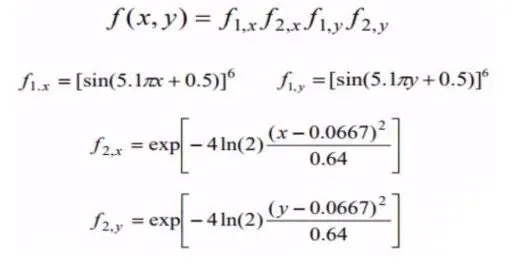
Stalagmite Function:- A stalagmite function generally refers to the function with which we are generating values over a stalagmite kind of surface for finding out the local and global maxima and minima of that particular given function. The below are the formulae governing the stalagmite function.
Genetic Algorithm :-
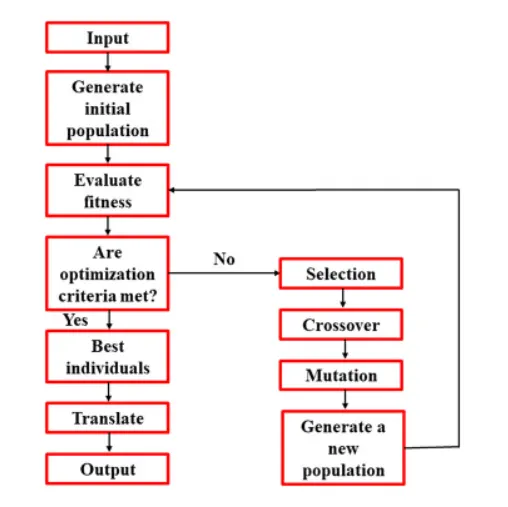
Genetic algorithm (GA) is an adaptive exploratory algorithm based on the principle of natural selection. It is classified as an evolutionary algorithm. GA is generally used for providing efficient process optimization and solutions for search problems. GA operates on the basis of bioinspired operators like crossover, mutation, and selection (Goldberg, 1989). GA is designed by the evolutionary concepts of natural selection and genetics. These algorithms are adaptively envisioned for increasing the efficiency of solving complicated issues. It facilitates excellent optimization and solution of problems associated with large multifaceted processes by addressing different parameters of the same. GA attempts to achieve global fitness. It is developed on the basis of processes that guide biological evolution. GA has been widely applied in recent studies for the optimization of process parameters for environmental problems . The standard procedure of a GA has been shown in figure.
Syntax of GA:-
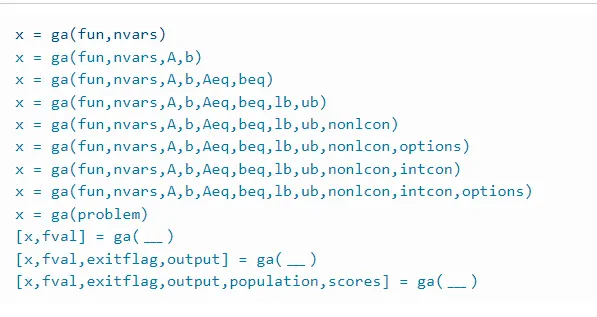
x = ga(fun,nvars) finds a local unconstrained minimum, x, to the objective function, fun. nvars is the dimension (number of design variables) of fun.
Another syntax possibilities are shown in the figure below.
Stopping Criteria:-
Stopping criteria determine what causes the algorithm to terminate. You can specify the following options:
1. Max Generations :- Specifies the maximum number of iterations for the genetic algorithm to perform.
2. MaxTime :- Specifies the maximum time in seconds the genetic algorithm runs before stopping, as measured by tic and toc. This limit is enforced after each iteration, so ga can exceed the limit when an iteration takes substantial time.
3. Fitness Limit :- The algorithm stops if the best fitness value is less than or equal to the value of Fitness Limit.
Code for evaluating stalagmite function :-
clear all
close all
clc
%assigning the search space
x = linspace(0,0.6,150);
y = linspace(0,0.6,150);

%Creating 2D array
[xx, yy] = meshgrid(x,y);

%Creating loop for evaluating stalagmite function
for i = 1: length(xx)
    for j= 1:length(yy)
        input_vector(1)=xx(i,j);
        input_vector(2)=yy(i,j);
        %Calling stalagmite function
        f(i,j) = stalagmitefunction(input_vector);
    end
end

%Creating a visual data surface and labeling the axis
surfc(xx,yy,f)
xlabel('xvalue')
ylabel('yvalue')
shading interp

%Using inbuilt matlab Genitic Algorithm for evaluation
[inputs, fval] = ga (@stalagmitefunction,2)
Function code :-
% To create a function to evaluate stalagmite function for calling it in
% main code

function[stalagmite] = stalagmitefunction(input_vector)
% Assigning Inputs
x=input_vector(1);
y=input_vector(2);
f1x=(sin(5.1*pi*x+0.5)).^6;
f1y=(sin(5.1*pi*y+0.5)).^6;
f2x=exp((-4*log(2))*(x-0.0667).^2/0.64);
f2y=exp((-4*log(2))*(y-0.0667).^2/0.64);
stalagmite = f1x.*f1y.*f2x.*f2y;
end
Results:-
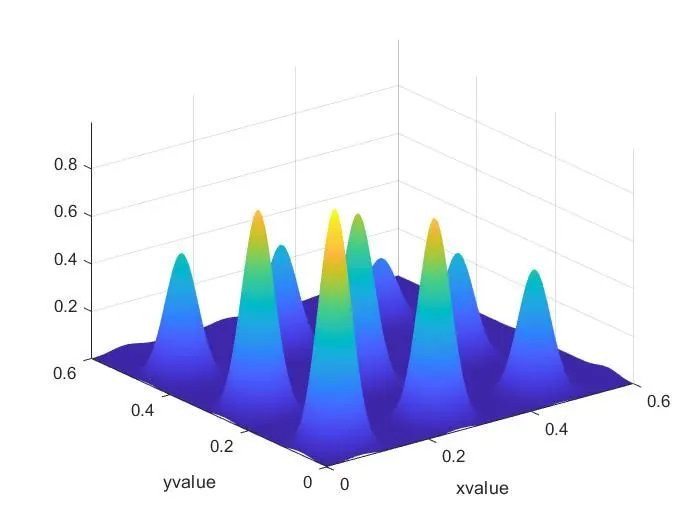
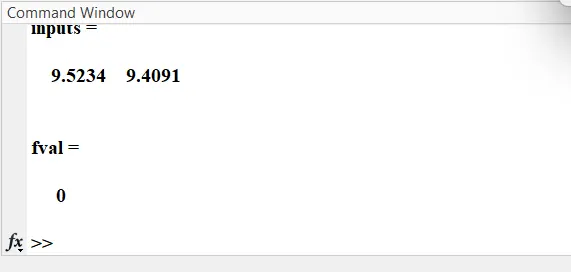
Code for finding Global Maximum of Stalgamite function with unbounded inputs, Bounded Inputs and Bounded inputs with increase in population size respectively :-
clear all
close all
clc
%Assigning the workspace
x = linspace(0,0.6,150);
y = linspace(0,0.6,150);
%Assigning the number of iterations to perform
num_cases = 50;
[xx, yy] = meshgrid(x,y);

%Evaluating stalgamite function
for i = 1: length(xx)
    for j= 1:length(yy)
        input_vector(1)=xx(i,j);
        input_vector(2)=yy(i,j);
        f(i,j) = stalagmitefunction(input_vector);
    end
end

%Case 1 :- Unbounded inputs
%Enabling timer for capturing data
tic
for i = 1:num_cases
    [inputs,Fopt(i)] = ga(@stalagmitefunction,2);
    xopt(i) = inputs(1);
    yopt(i) = inputs(2);
end
%Assigning the captured data to study time
study_time_1= toc;

%Plotting surface for data visualisation
figure(1)
subplot(2,1,1);
hold on
surfc(xx,yy,f);
shading interp;
xlabel('X data');
ylabel('Y data');
plot3(xopt, yopt, -Fopt, 'marker','o','markersize',5,'markerfacecolor','r');
title('Unbounded Inputs')
subplot(2,1,2)
plot(-Fopt) % - is used to find maximum value
xlabel('Iterations');
ylabel('Maximum Function');

% Case 2 :- Bounded Inputs
%Enabling timer for capturing data
tic
for i=1: num_cases
  [inputs,Fopt(i) ]= ga(@stalagmitefunction,2,[ ],[ ],[ ], [ ],[0;0],[1;1]);
      xopt(i)=inputs(1);
      yopt(i)=inputs(2);
end

%Assigning the captured data to study time
study_time_2 = toc;

figure(2)
subplot(2,1,1)
hold on
surfc(xx, yy, f)
shading interp

xlabel('X data');
ylabel('Y data');
plot3(xopt, yopt, -Fopt, 'marker','o','markersize',5,'markerfacecolor','r');
title('Bounded Inputs')
subplot(2,1,2)
plot(-Fopt)
xlabel('Iterations');
ylabel('Maximum Function');

%Case 3 :- Bounded Inputs with increase in Population size

options = optimoptions('ga');
options = optimoptions(options, 'populationsize', 350);
tic

for i=1: num_cases
  [inputs,Fopt(i)] = ga(@stalagmitefunction,2,[ ],[ ],[ ], [ ],[0;0],[1;1], [ ], [ ],options);
      xopt(i)=inputs(1);
      yopt(i)=inputs(2);
end
study_time_3 = toc;

figure(3)
subplot(2,1,1)
hold on
surfc(xx, yy, f)
shading interp

xlabel('X data');
ylabel('Y data');
plot3(xopt, yopt, -Fopt, 'marker','o','markersize',5,'markerfacecolor','r');
title('Bounded Inputs with increased population size')
subplot(2,1,2)
plot(-Fopt)
xlabel('Iterations');
ylabel('Maximum Function');
Results for the above code :-
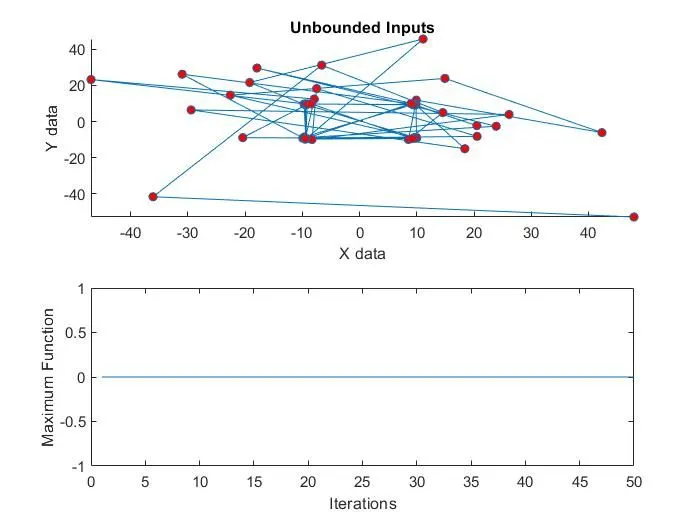
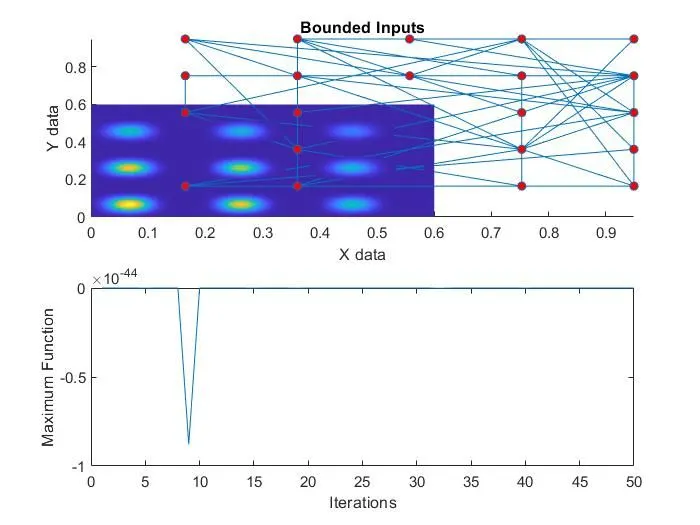
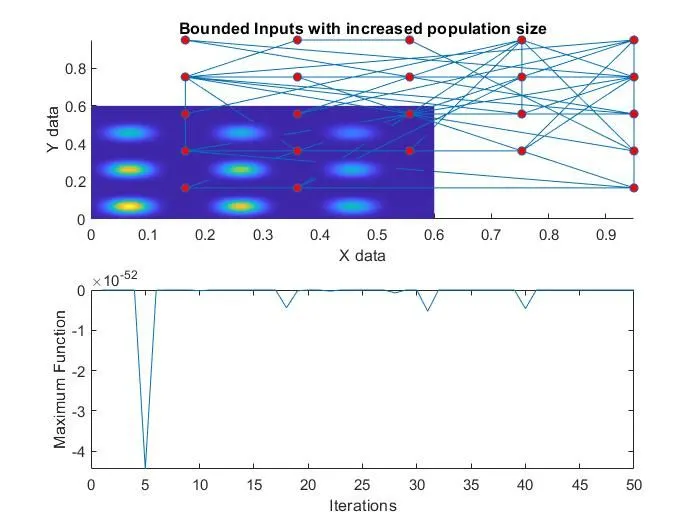
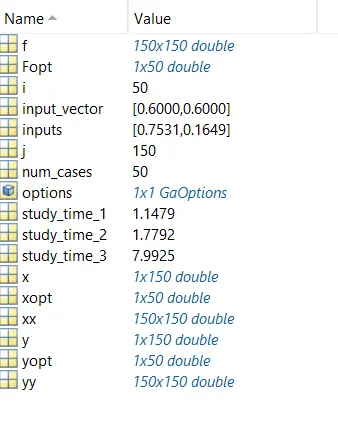
From the above graphs it is observed that for unbounded inputs the data is too inconsistent. But for the bounded inputs, because of iterations the global maximum evaluation becomes accurate. Also with increase in population size, the results will be more promising.
Referenes :-
1. https://www.sciencedirect.com/topics/earth-and-planetary-sciences/genetic-algorithms
2. https://in.mathworks.com/help/gads/genetic-algorithm-options.html#responsive_offcanvas
3. https://skill-lync.com/knowledgebase/genetic-algorithm-explained