Writing a MATLAB code to simulate 2R Robotic Arm
To write a program in Matlab to simulate forword kinematics of a 2R robotic arm.
Engineering data :-
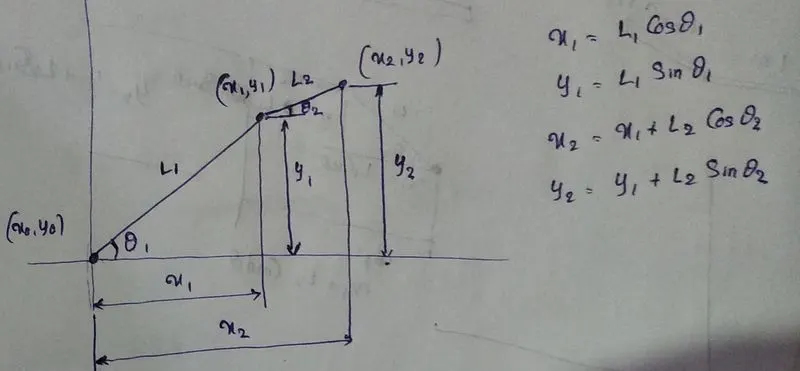
The 2R robotic arm consists of 2 links and 2 joints without consideration of end effector. The link lengths are assumed to be 1m of body and 0.5m of arm. The joints are capable of rotaing ib between 0 to 90 degrees. The base is at origin and the rough sketch for the robo setup is shown in the figure. The formulae for the position of end point of links are given below.
x1 = L1*cosd(THETA1);
y1 = L1*sind(THETA1);
x2= x1 + (L2*cosd(THETA2));
y2= y1+ (L2*sind(THETA2));
Code :-
clear all
close all
clc
%To create animation of a 2R robotic arm for determinaton of robot
%workspace

%The inputs given are link lengths and joint angles. The units for angle is
%in Degrees and length of the arms is in meters
%Inputs
L1= 1.5;
L2 = 0.5;
%Angles using linspace command are given to create intervals for creating
%animation
theta1= linspace(0,90,10);
theta2= linspace(0,90,10);
%for counting frames
ct=1
%For loop command is used for assigning all the angles in the given
%interval for the execution.
for i = 1: length(theta1)
    THETA1 = theta1(i);
    %THETA1 AND THETA2 are the variables assigned to each theta values
    %generated by inspace in the given interval.
    %Another forloop inside a forloop is used to assign 2nd joint angle
    %to the each of the first joint intervals.
    for j = 1:length(theta2)
        THETA2 = theta2(j);
        x0=0;
        y0=0;
        %Below formulae are basic trignometric relations in coordinate
        %geometry
        x1 = L1*cosd(THETA1);
        y1 = L1*sind(THETA1);
        x2= x1 + (L2*cosd(THETA2));
        y2= y1+ (L2*sind(THETA2));
        %For plotting graph with line thickness
        plot([x0 x1],[y0 y1], [x1 x2], [y1 y2],'linewidth',3)
        axis([-0.1 2 0 2])
        %pause is used to create animation by creating plots different
        %plots but within time gap. Like a video is a combintion of photos,
        %here animation is combination of plots.
        pause(0.03)
        %To capture frames generated by plot the below command is used
        M(ct) = getframe(gcf);
        ct=ct+1;
    end
end
%To create animation and dump it in AVI file the below steps are generally
%followed
movie(M)
%Creating a blank videofile with the name and profile of video
videofile=VideoWriter('Assignment', 'Uncompressed AVI');
%Opening the blank video file
open(videofile)
%Writing the blank video file with the frames captured before
writeVideo(videofile,M)
close
Results and Observations :-
By using the above code the robotic arm is animated and the animation file is attatching by using the google drive link below. Due to space constraint the animation frames are made faster.
https://drive.google.com/file/d/1WKIZVJ4UeHwd7oaHJgy0qvbJ9NVOp0Yr/view?usp=sharing