Week 3 - Solving second order ODEs
Equation:
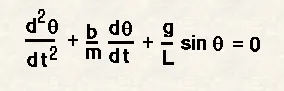
In the above equation,
g = gravity in m/s2,
L = length of the pendulum in m,
m = mass of the ball in kg,
b=damping coefficient.
Write a program in Matlab\Octave that will simulate the pendulum motion, just like the one shown in the start of this challenge.
use,
L=1 metre,
m=1 kg,
b=0.05.
g=9.81 m/s2.
Simulate the motion between 0-20 sec, for angular displacement=0,angular velocity=3 rad/sec at time t=0.
Ode45:
MATLAB’s standard solver for ordinary differential equations (ODEs) is the function ode45. This function implements a Runge-Kutta method with a variable time step for efficient computation. ode45 is designed to handle the general problem of differnetial equations.
[t,y] = ode45(odefun,tspan,y0), where tspan = [t0 tf], integrates the system of differential equations y′=f(t,y) from t0 to tf with initial conditions y0. Each row in the solution array y corresponds to a value returned in column vector t.
All MATLAB® ODE solvers can solve systems of equations of the form y′=f(t,y), or problems that involve a mass matrix, M(t,y)y′=f(t,y). The solvers all use similar syntaxes. The ode23s solver only can solve problems with a mass matrix if the mass matrix is constant. ode15s and ode23t can solve problems with a mass matrix that is singular, known as differential-algebraic equations (DAEs). Specify the mass matrix using the Mass option of odeset.
ode45 is a versatile ODE solver and is the first solver you should try for most problems. However, if the problem is stiff or requires high accuracy, then there are other ODE solvers that might be better suited to the problem. See Choose an ODE Solver for more information.
Code explanation:
- With the given data the ode solver is used to solve the equation.
- As the equation is second order derivative, we need to differtiate twice the equation.
- Thus the function is used to provide tow variables which is differentiate on after other.
- Once the differntiation is over, the valuse stored in the array is ploted and studied.
- For the pendulum motion the position of pendulum is marked with line is drawn.
- In a for loop, the plot is stored in a array and made into movie using matlab.
Program:
clear all
close all
clc

%inputs
 b = 0.05;
 g = 9.81;
 m = 1;
 l = 1;

ode_matrix = [0;3];

t_s = linspace(0,20,100);

[t,results] = ode45(@(t,theta) pendulum_ode_function(t,theta,b,g,l,m),t_s,ode_matrix);

%plot
figure(1)
plot(t,results(:,1),'linewidth',1)
hold on
plot(t,results(:,2),'linewidth',1)
axis([0 25 -3 3])
xlabel('Time - sec')
ylabel('Angular Velocity & Displacement')
legend('change in displacement','change in angular velocity')
title('Change in Angular velocity and Displacement with respect to time')
hold off

figure(2)
plot(results(:,1),results(:,2))
xlabel('Position - rad')
ylabel('Angular Velocity - rad/sec')
title('Position Vs Angular velocity')

%Pendulum plot and animation
theta2 = results(:,1);
ct = 1;
for i = 1:length(theta2)
    theta3 = theta2(i);

    x0 = 0;
    y0 = 0;

    x1 = l*sin(theta3);
    y1 = -l*cos(theta3);

    figure(3)
    plot([-1.1 1.1],[0 0],'linewidth',2);
    hold on
    plot([x0 x1],[y0 y1],'color','r','linewidth',2)
    hold on
    plot(x1,y1,'o','markers',20,'markerfacecolor','g')
    hold off
    grid on
    axis([-1.5 1.5 -1.5 0.5])
    title('Pendulum Motion')
    pause(0.003)
    M(ct) = getframe(gcf);
    ct = ct+1;
end
movie(M)
videofile = VideoWriter('pendulum.avi','uncompressed avi');
open(videofile)
writeVideo(videofile,M)
close(videofile)
Function:
function [dtheta_dt] = pendulum_ode_function(t,theta,b,g,l,m)
         theta1 = theta(1)
         theta2 = theta(2)
         dtheta1_dt = theta2;
         dtheta2_dt = -(b/m)*theta2-(g/l)*sin(theta1);
         dtheta_dt = [dtheta1_dt; dtheta2_dt];
end
Result:
Pendulam animation:
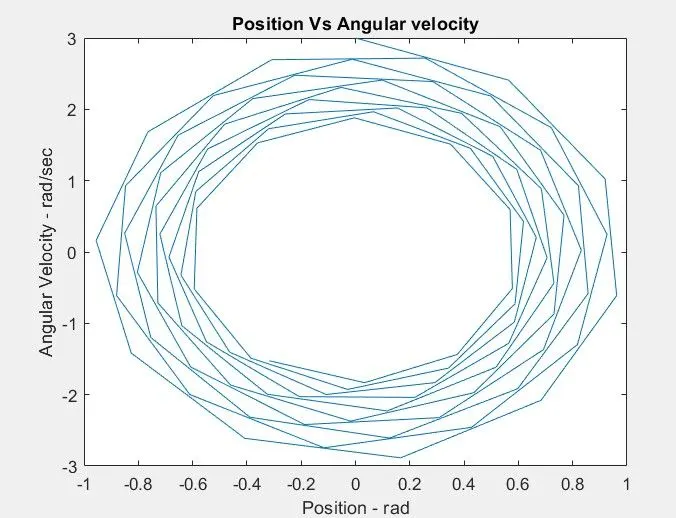
Position Vs Angular velocity:
Change in Angular velocity and Displacement with respect to time:
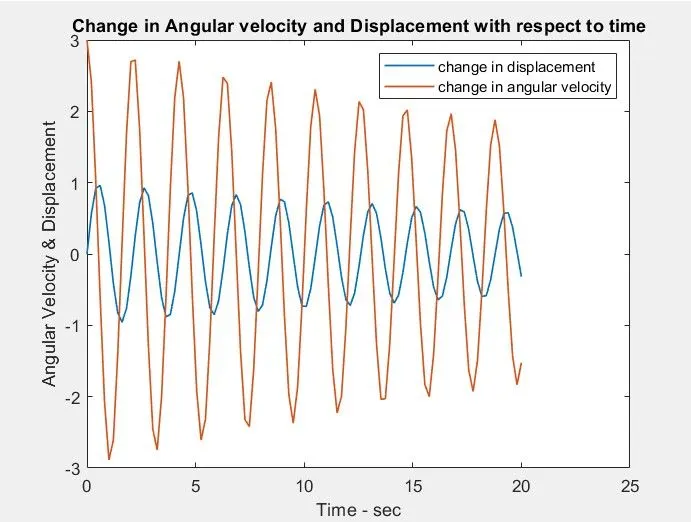
in