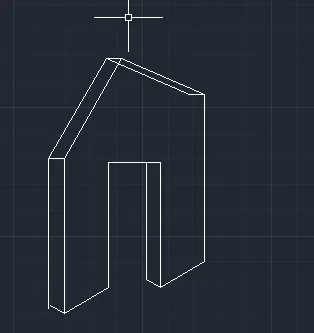
Creating a Floor plan, Footing detail and Isometric view using AutoCad
aim to draw the given digram
1 open auto cad
2 open a new sheet from home rebbon
3 now give the commandrec to create a rectagle give the measurments od rec to cre
4 now take the curser in the negative x direction and give value
5 give next value by plcing the curcer in required direction give value 0.05 from each side
6reduce the radius to 30 by leaving0.05 on each side
7 now give the -x cordinate 1.5
8 to creatte step like diagram having h =0. 1
9 now again give he h = 0.15 b =0.30 to join the diagram
now reduce the breadth to 0 and make a rec of 0.30 , 1 by giving rec command in command box
10 result
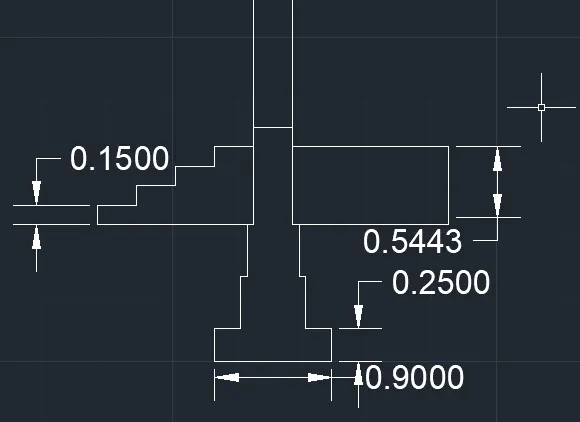
1 aim to draw the given diagram
c g isolated footing
2 first lest us draw a line by giving l enter command
3 the length od the line is 1.00
4 now give its height h 1.5
5 give the next point 0.25, 0.38 to make a slant line
6 now give the y cordinate 1.60
7 now move the curser to the right side give b = 0.04
8 make rectangles of same size by copy cpmmand and place it on top of each other
9 the beath = 0.20 lenght = 0.24
0 result 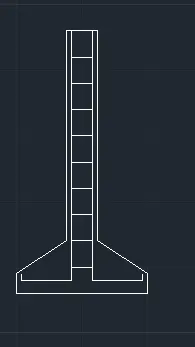
aim to draw line diagram o 2 bedroom
1 draw a line of lenghth by useing a command l 3.60
2 now draw a line with giving x direction 3.60
3 create 3 smalll rec of lenght 1 and breadth 0.30
4 now continue the line give lenth 4.20
5 five the breath in negative x direction 3.60
6 now join the lines by using join command
7 write in 2 rooms by using tet command
8 dive its dimentions by using dimention command
9 select all lines
result 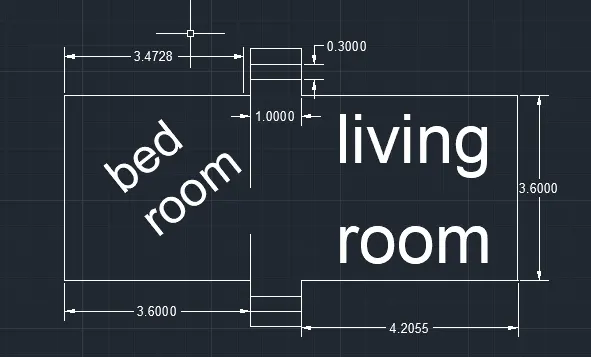
1 aim to draw a digram of lad bearing wall showing foundation deatils
2 make a rec by selecting rec command
3 give its measurment 0.90 , 0.45
4 now reduce the radus by leaving 0.05 on both side with kine
5 give its height 0.40
6 now again reduce the breadth by leaving 0.05 on both side
7 at top make a rec of l 1 and b 0.20 by selecting rec from the rebbon
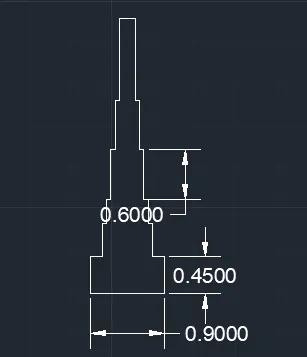
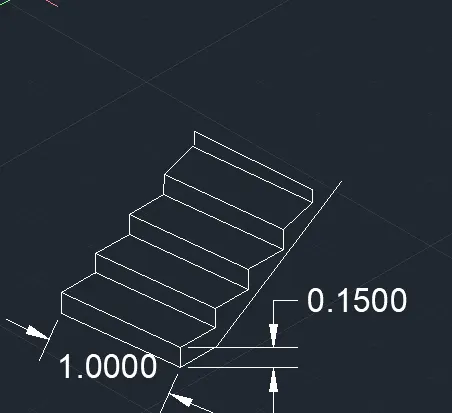
aim to draw steps in auto cad
2 use of right iso metric draft give vlue 1
3 then give height of the steps 0.30
4 take the option isometric top and make the top view
5 the thikness of the stier is 0.15
6 take the line option and drw a line feom the 1st stare to a random space
7 repeat the process
8 select dimention option and give dimentions
iaim to draw a isometric view of grabel wall
result