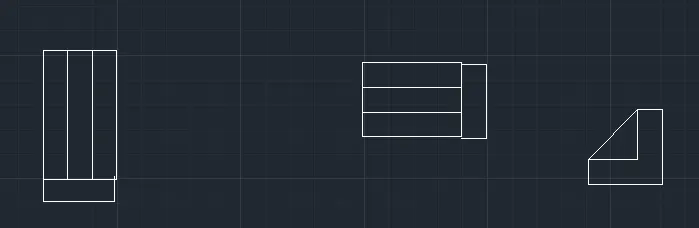
Drafting of various geometries using Chamfer, Fillet tool in AutoCad
aim to draw the shape
procedure 1 open autcad
2 take a new sheet
3 draw a line of 3.0
4 now make a line of 2.12 with the angle 4 2.12<45
5 a slant line will be drawn
6 now draw a lineof 2
7 elect close option to close the diagram
8 now the circle is atthe mid point 1.15 nd h = 1
9 open snap setting and select mid point after that take the curser to the line to
the referance line draw the circle with diameter 1.20
10 draw another circle at a h=2.50 at same mid point
result 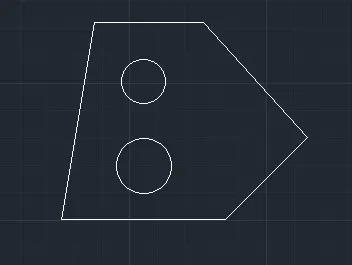
b aaim to draw a shape in autocad
1 open autocad
2 take a new sheet from the home tab
3 draw a line of 8 with l command
4 now from the left corner give -x value 2.5
5 from the right side giive the value 1.9
6 now draw a line of 2.10 with angle 45
7 now draw a line from left side of 3 hich make the angle 90 woth the line of 2.6
8 joim all the lines
9 result 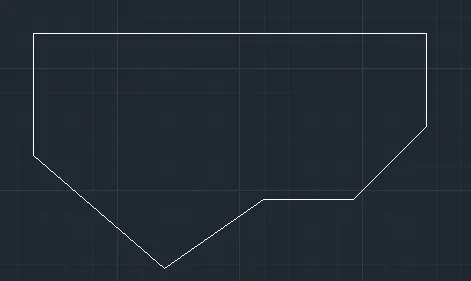
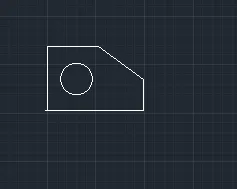
c aim to draw the shape
1 open a new sheet from the home tab
2 draw a line of 5.10
3 now give the y cordinates y= 3.30
4 now to take the curser in =x direction to make a line of 2.65 with l command
5 elect orthoo option so the lines ar straight
6 now from the right side rase 1.16
7 now click on cloe option to close the diagram
8 a circle is t an distance of 1.6from x and 1.3from y
9 take snp opton from the snap refecrnce line draw a circle
10 select circle and give radius 1.60
result
d ] aim to draw a shape
11 draw a lineof 3.0
2 now give y cordinate 0.50
3 now move the curser in y drirection heigt = 3.50
4 now the next point in right direction x = 1
5 now again give the height 2
6 now give the x cordinate 2.50
7 repeat the process by the mentioned value
8 till the diagram is closed
9 result 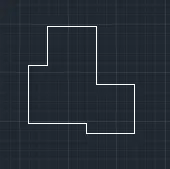
e ] draw a line ofrec
2 now give he height of the rectangle 6
3 the wridth of the rec is 11.50
4 div the rec into 3 parts
5 from the right side 3 and draw a lline
6 frerom the left side draw a line leave 3
7 now the circles re a height of 3
8 open snap setting and select mid point from the referance point of snap line
9 make te circle by selecting cir from rebbon
10 diameter of 2 ceircle at same point is2 and one
11 do it to the left rec also and to the middler one
12 the middlecercle is having same height but the radis is 3
result 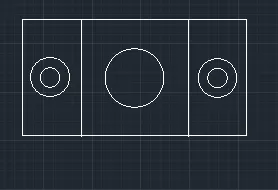
f aim to draw a diagram
1 draw a line of 210
2 give breath of the diagram is 100 from let and 75 from righht
3 use camfer from the modify tool and fgive the r=20from lefft
4 select the two lines to mke it curve shape
5 now draw a line in vertical direction 70 and select circle option
8 from the mid point od line by using snap draw a circle od 35 diameter
9 from the same center draw anothe circle of r25
10 from the right corner draw a line in xaxis direction 55
11 by snapping mid point from the same center draw 2 circles od d 30 and r25
12 join the diagram and use camfer select radius give 20 r and from the right give r 6
13 now draw 2 rec of dimention 30,70 acc according to the dimentions
resut 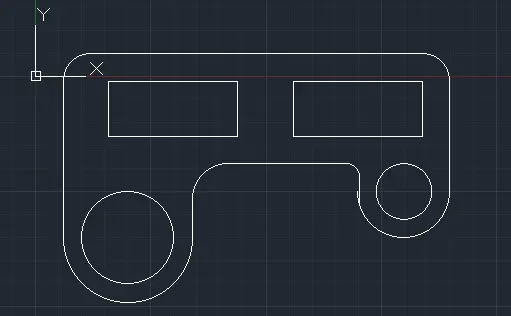
draw a diagram of 2 circles murjing
1 draw a line of 32.6
2 from the lest edge make a circle of r 8
3 from the right edge make a circle of r 9
4 now select arc
5 slect tarting and end point od arc
6 give radius and select direction
7 now same proes is done select starting and ending point select radius 2..10
8 result 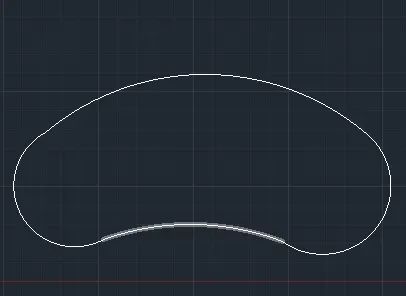
i ] aim to draw a star smape in auto cad
open a new sheet
2 no take the rec from the rebbom
3 give gthe l and b for rec 3,3 to make a square
4 go andd select offset command in modify make a another rec of slightly bigger size
5 now make anothe rec of 3,3 size and of et to make a another rec of diffrent size
6 now go to modify and select rotate option rrotate it 90 :
7 now take the move option and place the 2 rec on each other
8 reuslt 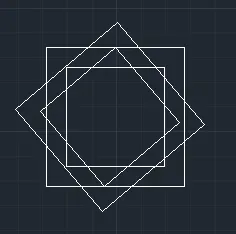
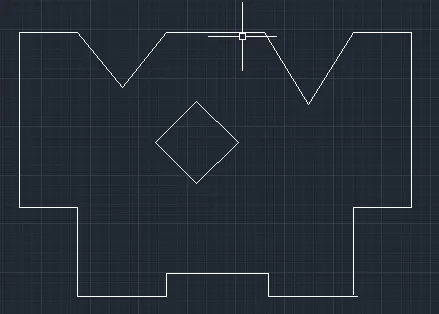
j ] draw the diagram '
1 draw a line of 4.6 by using line command
2 select the left side of the line aand raise it 1.2
3 now make a line of 5 to the let by placeing the curser in that direction
4 now give -y to reduce it 1.2
5 now make a line of 4.6 to the leeft direction
6 give the h =3
7 now from the left and right side rae it 9
8 from both side give b = 3
9 now to make the dip enter 2.3,-2.8 and 2.3 ,+2.8
make the dip on both sides and join the lines
10 a sqare is present at a height of 1.2 from the first line make a red of 3,34
11 now rotate the rec to the 90 digrees
result
k aim to drw the
given diagran