Week 2- 2R Robotic Arm Challenge
To create forward kinematics of 2R robotic arm, we need some inputs to locate the positions of links. let's assume-
length of link 1 is 1.5, length of link 2 is 0.7.
One end of link 1 is fixed at x0(0,0) and it rotate through 0 to 90 degrees, so this angle is assumed as tht1(`theta`1=0:15:90). Using trignometry it's other end co-ordinates (x1,y1) can be calculated as
`x1=l1*costheta1` & `y1=l1*sintheta1`
this is also start point of link 2, and it's end point is calculated as-
`x2=x1+l2*costheta2` & `y2=y1+l2*sintheta2`.
For every `theta1` there will be link2 will rotate through 10 to 100 degrees. So to find co-ordinate at every angle position we use for loop to do iterative calculations. So for every `theta1` link2 will have j=length(`theta2`) iterations and there are i=length(`theta1`), `theta1` angle positions. So 2 for loops will be used.
Every link position is shown using plot command & it is paused (0.01s) see every frame. All figures are captured as movie frame using getframe command.
After ending for loop .avi video file is created using VideoWriter command. All the frames are written in videofile.
Program for the same is as below.
% Week2- 2R Robotic Arm Challenge
clear all
close all
clc

%% Inputs
l1=1.5;         % length of first arm
l2=0.7;         % length of second arm
tht1=0:15:90;   % Link1 angle
tht2=10:5:100;  % Link2 angle
ct=1;

%% Link position calculation program
% Use for loop to find (x1,y1) at every theta 1
for i=1:length(tht1)
    % At every theta1, link2 will have length(tht2) position
    % Again for loop is used to find (x2,y2) at every theta2
    for j=1:length(tht2)

        % Starting co-ordinate for link 1
        x0=0;
        y0=0;

        % End co-ordinates of Link 1 & starting co-ordinates of link 2
        x1=l1*cosd(tht1(i));
        y1=l1*sind(tht1(i));

        % Link 2 End co-ordinate (x2,y2)
        x2=x1+l2*cosd(tht2(j));
        y2=y1+l2*sind(tht2(j));

        %% Plotting link positions and Animation
        plot([x0 x1],[y0 y1],[x1 x2],[y1 y2],'linewidth',3)
        title('Week 2- 2R Robotic arm','FontSize',12,'Color','b')
        legend('Link1','Link2')     % Link legends
        axis([-0.3 2.4 -0.3 2.4])   % Frame space
        xlabel('X axis')            % X axis title
        ylabel('Y axis')            % Y axis title
        grid on

        pause(0.01)
        M(ct)=getframe(gcf);    %capture figure as movie frame
        ct=ct+1;    % increase ct to avoid frame overwrite
    end
end

%% Movie file
movie(M)
% Create file
videofile=VideoWriter('for_kinm_rob_arm.avi','Uncompressed AVI');
open(videofile)             % Open the videofile
writeVideo(videofile,M)     % Writing movie M in video file
close(videofile)
Output File Link
https://youtu.be/Ot0lRK0eMUE -Video file YouTube Link
Errors
- Initialy, for first program where all link position are shown using line command (like in the next image)
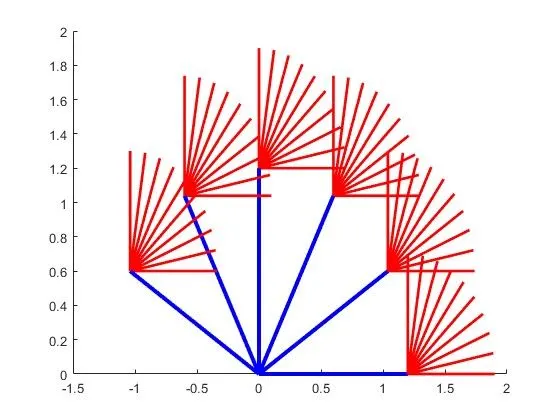 , I wasn't getting that plot, Only last position was showing, made changes as per video but no change in output
 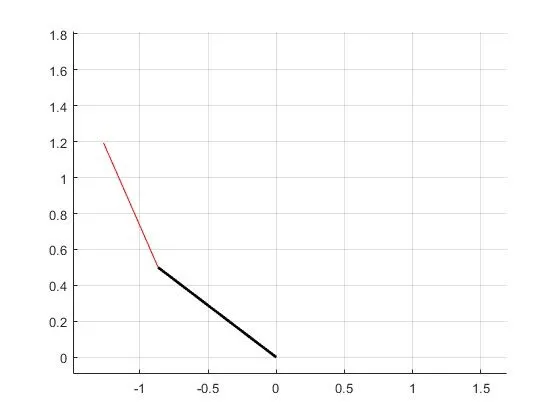 . There wasn't any error, just unable to get the plot as per video. I re write program then I found that in for loop while defining "i" I forgot to put 1
 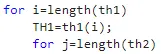 . Because of that there were no iterations performed only position for last (length(th1)) value showing.
 - After writing full program, got error in creating video file.

 After searching got to know that V & W needs to written in Capital format.