Week 2- 2R Robotic Arm Challenge
Report On 2R Robotic Arm Challenge-
Aim- Simulating the forward kinematics of a 2R Robotic Arm link using the Matlab Program.
Objective- To understand the forward kinematic performance of a 2R robotic arm link.
Introduction- The robot to do that we are dealing with the linkage known as Forward kinematics of a 2R Robotic arm (where 2R means 2-rotating Link i.e 2 is a number of links and R is rotation). we are taking two links as a representative of the Robotic arm in which Link-1 is Hinged at (X0, Y0) and making an angle1, while Link-2 is hinged at the end of the Link-1 and making angle2 with respect to datum. We need to animate the Arm and find out its behavior in different conditions.
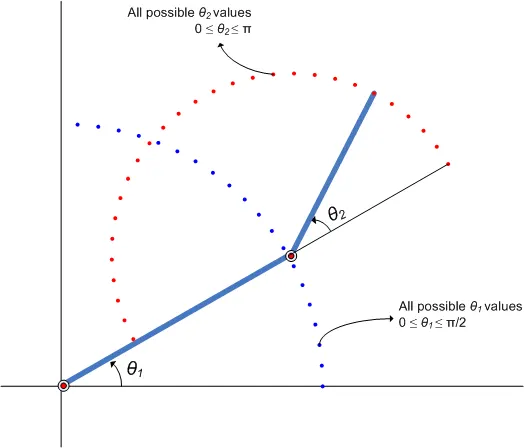
Inputs-
- For this program, we have assumed the length of link 1 and link 2 to 1 m and 0.5 m.
- In order to simulate the robotic arm, it is necessary to vary theta1 and theta2 to obtain the desired animation and it cannot be possible if we manually enter the respective data every time. So we have created a row vector from 0 to 90 with 17 evenly spaced points between them.
- The coordinates of the base are assumed to be at origin (0,0)
MATLAB CODING WITH EXPLANATION-
% Forward Kinematics of a Robotic arm

clc
clear all
close all
% inputs
% length of link 1
 l1 = 1;
 % length of link 2
 l2 = 0.5;
 ct=1;
 % row vector from 0 to 90 with 17 evenly spaced points for theta1
 theta1 = linspace(0,90,17);
 % row vector from 0 to 90 with 17 evenly spaced points for theta2
 theta2 =linspace(0,90,17);

  for i = 1:length(theta1)
      THETA1 = theta1(i);
      for j = 1:length(theta2);
          THETA2 =theta2(j);
          % origin of base of link1
          x0 = 0;
          % origin of base of link2
          y0 = 0;

          %  link1 final coordinates
          x1 = l1*cosd(THETA1);
          y1 = l1*sind(THETA1);

          %  link2 final coordinates
          x2 = x1 + l2*cosd(THETA2);
          y2 = y1 + l2*sind(THETA2);

          % ploting lines of link

          plot([x0 x1],[y0 y1],[x1 x2],[y1 y2],'linewidth',4)
          axis([-0.1 1.5 0 1.5])
          pause(0.03)
          M(ct) = getframe(gcf);
          ct = ct+1;
      end
  end
  % making a movie
  movie(M)
  videofile = VideoWriter('forword_kinematic.avi','Uncompressed AVI');
  open(videofile)
  writeVideo(videofile,M)
  close(videofile)
Output Result is in Youtube Link Provided below-