MATLAB Module for an Element Stiffness Matrix
Objective:-
1) Write a Matlab function module to accept the input information to calculate the stiffness matrix.
The function must accept the following
a) Node coordinates as a vector
b) Must accept material properties E, A, Fy
c) Must return an error message if improper arguments are given to the function
Node vector must clearly mention the order in which ordinates should be given as input
2) Using node vector from function 1 as input develop a Matlab function to calculate the length and orientation φ for each element and save the result to a defined matrix-vector. The function must accept the node vector of the specified element as the input and calculate the length and orientation for the element specified
3) Using outputs of function 1 and function 2 develop a Matlab function to compute the element stiffness matrix and display the output for each element considered. The function must accept material properties E, A as the input from function 1 and length and orientation from function 2 and calculate the stiffness matrix for the element specified
4) Use the function from problem 3 and input individual node vectors for each element and calculate the individual element stiffness matrix. Based on the concept of concatenation and algorithm discussed in class develop a 6x6 chart for the following problem from each element’s stiffness matrix and arrive at the global stiffness matrix
Code for function 1:-
function[node_xy,elements,E,A] = input_take()
%Taking input
prompt_1 ='Enter the Node coordinates ';
disp('input in [node_x1 node_y1,node_x2 node_y2;.......;node_xn,node_yn]');
node_xy =input(prompt_1);

prompt_2 ='Enter the node connectivity ';
disp('Input in [node1 node2,node2 node_3;....; node_n-1 node_n]');
elements = input(prompt_2);

prompt_3 ='Enter the youngs Modulus value ';
E =input(prompt_3);

prompt_4 ='Enter the cross section area ';
A= input(prompt_4);

fprintf('Value of Youngs MOdulud is = %.4fn',E)
fprintf('Value of cross section area is = %.4fn',A)

end
Explanation of the above code:-
function[node_xy,elements,E,A] = input_take() - function to take the input from the user for the node coordinates ,elements,Youngs modulus and Area in mm2 to make the program user friendly
%Taking input - comments
prompt_1 ='Enter the Node coordinates '; - taking the user input for node coordinates
disp('input in [node_x1 node_y1,node_x2 node_y2;.......;node_xn,node_yn]'); - Display the syntax how to enter he node coordinates
node_xy =input(prompt_1);- taking the input for nodes
prompt_2 ='Enter the node connectivity ; - to input the node connectivity or the elements
disp('Input in [node1 node2,node2 node_3;....; node_n-1 node_n]'); - display the syntax for the elements in the node
elements = input(prompt_2); - to input the node elements or the connectivity
prompt_3 ='Enter the YoungsModulus value '; - input the young modulus
E =input(prompt_3); - to input the value
prompt_4 ='Enter the cross section are a'; - input the cross section
A= input(prompt_4);
fprintf('Value of Youngs Modulus is = %.4fn',E)
fprintf('Value of cross section area is = %.4fn',A)
end - to end the function
____________________________________________________________________________________________________________
Code for the function 2: -
function[node_xy,length_element,C,S,E,A] = stiff_element_fun2()

[node_xy,elements,E,A] = input_take();


node_x =node_xy(:,1);
node_y = node_xy(:,2);

x_co = node_x(2,1) - node_x(1,1);
y_co = node_y(2,1) - node_y(1,1);

length_element = sqrt(x_co*x_co + y_co*y_co)

C = x_co/length_element;
S = y_co/length_element;


end
Explanation of the above code: -
function[node_xy,length_element,C,S,E,A] = stiff_element_fun2() - function
[node_xy,elements,E,A] = input_take() - to take the input from the previous function
node_x =node_xy(:,1); - to take in consideration column 1
node_y = node_xy(:,2); to take in consideration column 2
x_co = node_x(2,1) - node_x(1,1); - difference between xcoordinates in the nodes to calculate
y_co = node_y(2,1) - node_y(1,1); -difference between ycoordinates in the nodes to calculate
length_element = sqrt(x_co*x_co + y_co*y_co); - to calculating the length of the node `sqrt((x2^2-x1^2) + (y2^2 - y1^2)`
C = x_co/length_element;
S = y_co/length_element;
end
______________________________________________________________________________________________________________
Code for the function 3 calculation of the stiffness matrix by calling the function:-
function [stiffness] = challenge2_test()
[node_xy,length_element,C,S,E,A,] = stiff_element_fun2();


%k1 = zeros(size(node_xy,1));
stiffness = ((E*A)/length_element)*[C*C C*S -C*C -C*S; C*S S*S -C*S -S*S; -C*C -C*S C*C C*S; -C*S -S*S C*S S*S]
%stiffness = stiffness + k1
end
Explanation of the above code:-
[node_xy,length_element,C,S,E,A] = stiff_element_fun2() - to take the input from the previous function
stiffness = ((E*A)/length_element)* [C*C C*S -C*C -C*S; C*S S*S -C*S -S*S; -C*C -C*S C*C C*S; -C*S -S*S C*S S*S] - to calculate the stiffness for axial stiffness matrix
%stiffness = k1+stiffness - comments
end - end of the function
____________________________________________________________________________________________________________
Code for the generation of a 6*6 stiffness matrix: -
function[mat6by6] = stiffmat66()
[node_xy,elements,E,A] = input_take()
no_nodes = size(node_xy,1);
%to calculate no of nodes
no_elements =size(elements,1);
%To calculate number of elements
%To computate the number of degrees of freedom
%Assuming 2 dof per node
dof=2*no_nodes;
%Assigning stiffness matrix to zero for degree of freedom
mat6by6 = zeros(2*no_nodes);
for e=1:no_elements
%elementDof : element degrees of freedom(Dof)
%elements_nodes : element_nodes
element_nodes = elements(e,1:2);
%nodes coordinates
node_co = node_xy(element_nodes,:);
% Nested function : Calling function in function
stiffness = challenge2_test();
element_dof = 2*(element_nodes(1)-1)+1:2*(element_nodes(1)-1)+2;
element_dof =[element_dof 2*(element_nodes(2) - 1)+1:2*(element_nodes(2)-1)+2];
mat6by6(element_dof,element_dof) =...
mat6by6(element_dof,element_dof)+ stiffness;
end
Explanation for the above code: -
function[mat6by6] = stiffmat66() - to calculate the global stiffness matrix
[node_xy,elements,E,A] = input_take() - to take the input as like node cordintes , elements ,youngs modulus and area
no_nodes = size(node_xy,1); - to calculate the size of the nodes or number of the nodes
%to calculate no of nodes
no_elements =size(elements,1); - to calculate the number of the elements
%To calculate number of elements
%To computate the number of degrees of freedom
%Assigning stiffness matrix to zero for degree of freedom
mat6by6 = zeros(2*no_nodes); - initializing the matrix with zeros with respect to number of nodes
for e=1:no_elements - loop to transverse through the number of the lements
%elementDof : element degrees of freedom(Dof)
%elements_nodes : element_nodes
element_nodes = elements(e,1:2); - calculating the element nodes
%nodes coordinates
node_co = node_xy(element_nodes,:); - to calculate the nodes coordinates
% Nested function : Calling function in function
stiffness = challenge2_test(); - calling the function calculate the individual stiffness matrix
element_dof = 2*(element_nodes(1)-1)+1:2*(element_nodes(1)-1)+2; - to calculate the degree of freedom for the elements
element_dof =[element_dof 2*(element_nodes(2) - 1)+1:2*(element_nodes(2)-1)+2]; - to calculate the degree of freedom for the elements
mat6by6(element_dof,element_dof) =...
mat6by6(element_dof,element_dof)+ stiffness; - to perform the contamination of the individual matrices generated
end - end for the fuction
________________________________________________________________________________________________________________
Results: -
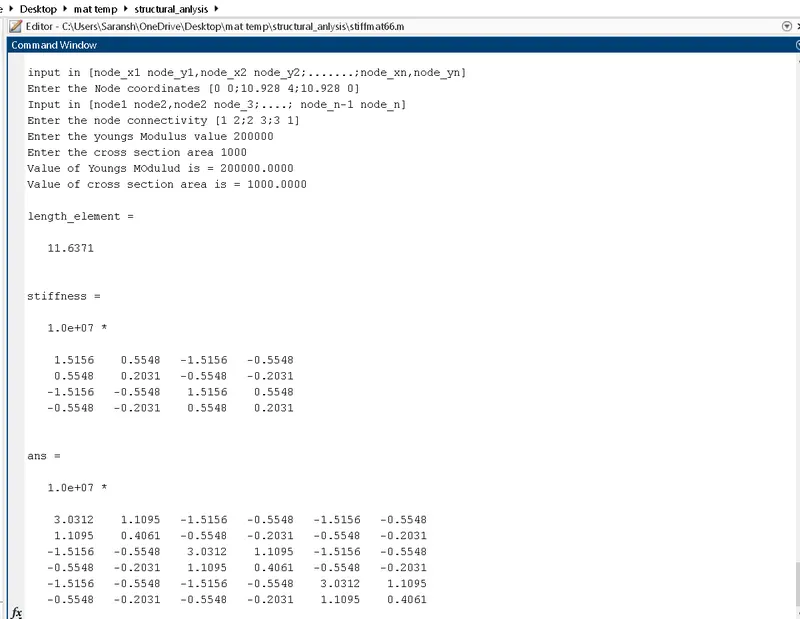
Conclusion and results: -
- The functions are used to take inputs, calculate the length and orientation of the elements.
- The functions are used to generate an individual stiffness matrix.
- The function is used for the concatenation of the matrix and to generate a 6*6 global stiffness matrix.