GD&T Symbols Explained: Symbol Chart, Feature Control Frames, Datums and MMC
GD&T is the symbol language that says how much a part's form, orientation, location, profile and runout may vary. Here are all 14 symbols and what each controls, how to read a feature control frame, datums in plain language, a checked MMC bonus tolerance example, how GD&T is inspected, and what interviewers ask.
 Skill-Lync·Updated 25 Oct 2026·23 min read
In short
- GD&T (geometric dimensioning and tolerancing) is the symbol language on engineering drawings that says how much a feature's form, orientation, location, profile and runout may vary, and what it is measured from.
- There are 14 geometric characteristic symbols in ISO 1101 and the older ASME Y14.5-2009. ASME Y14.5-2018 keeps 12: it removed concentricity and symmetry.
- Every requirement sits in a feature control frame, read left to right: symbol, tolerance zone, optional modifier, then datums in order of precedence.
- Datums A, B and C lock the part's six degrees of freedom in a fixed order, which is how the part sits on a CMM or in a gauge.
- With the MMC modifier, a hole made larger than its smallest size earns bonus position tolerance. The worked example below shows a hole that fails without it and passes with it, and why that is safe.
A drawing that says "Ø10 ±0.1" tells the machinist how big a hole may be. It does not say whether the hole may lean, how far from the edge it may wander, or which face the inspector should measure from. Two honest people can read that drawing two ways, and one of them will reject the part.
GD&T exists to remove that argument. This guide covers all 14 symbols, how to read a feature control frame, datums in plain language, MMC and bonus tolerance with checked numbers, how each control is inspected, the drawing mistakes reviewers see most, and what GD&T means for design, manufacturing and quality jobs in India.
What is GD&T, and why are ± tolerances not enough?
Geometric dimensioning and tolerancing is a standard way of telling everyone who touches a part (designer, machinist, inspector, supplier) which variations are acceptable and which are not. ASME describes its Y14.5 standard as the authoritative guideline for this design language, covering its symbols, rules, definitions and defaults for drawings and for 3D models (ASME).
A plain ± dimension controls size. It says nothing about whether a surface is flat, whether a bore is square to a face, or where a hole's location is measured from. A simple example shows the cost.
Suppose a hole's location is dimensioned from two edges with ±0.1 mm on each coordinate. The allowed region for the hole's centre is a 0.2 × 0.2 mm square. A mating pin does not care about x and y separately; it only cares how far the hole is from where it should be. The corners of that square are 0.141 mm from the true position, so the drawing already accepts holes 0.141 mm off, yet rejects a hole that is only 0.13 mm off in a straight line along y.
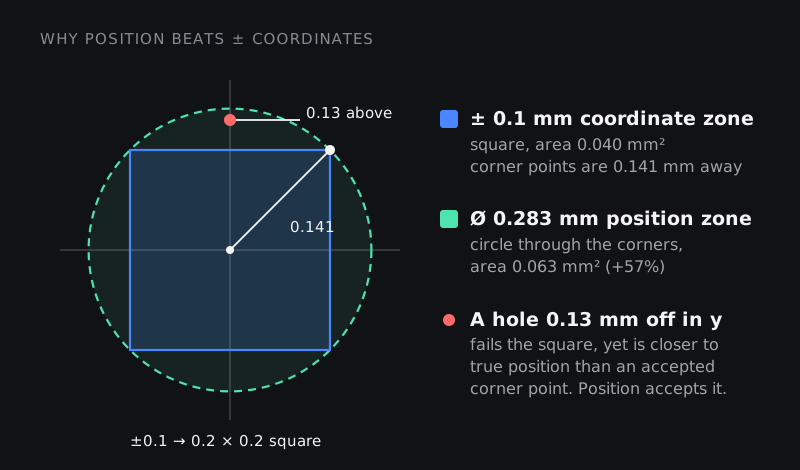
A position tolerance replaces the square with a circle (a cylinder in 3D) of diameter 0.283 mm through those corners. Area of the square: 0.2 × 0.2 = 0.040 mm². Area of the circle: π × 0.1414² ≈ 0.063 mm², about 57% larger (the ratio is exactly π/2). Every part the old drawing accepted is still accepted, plus good parts it used to scrap. Our post on coordinate vs position tolerance goes deeper into this one comparison.
Which standard? ASME Y14.5 vs ISO GPS
Two families of standards define GD&T, and the drawing must say which one applies, usually in the title block or notes.
- ASME Y14.5, from the American Society of Mechanical Engineers. The current edition is Y14.5-2018, which replaced the 2009 edition and was reaffirmed in 2024. ASME says the 2018 revision added model views throughout, because industry is moving away from orthographic drawings towards 3D models, and that it emphasises profile for locating surfaces.
- ISO GPS (geometrical product specifications). ISO 1101:2017 defines the symbol language for form, orientation, location and run-out tolerances, and ISO confirmed it in 2022. Datums are covered separately in ISO 5459:2024, and the maximum and least material requirements in ISO 2692:2021.
| Topic | ASME Y14.5-2018 | ISO GPS |
|---|---|---|
| Concentricity and symmetry | Removed; use position, runout or profile instead | Still available (coaxiality, concentricity, symmetry) |
| Size and form | Rule #1: a feature of size may not exceed its perfect-form boundary at MMC unless stated otherwise | Independency by default (ISO 8015): size and form are checked separately unless the envelope requirement Ⓔ is shown |
| Where the rules live | One large standard | A set of linked standards (ISO 1101, 5459, 2692, 8015 and others) |
The symbols look almost the same in both systems, but some interpretations differ. Before you measure a part or argue about one, check which standard the drawing invokes.
The GD&T symbol chart: all 14 symbols
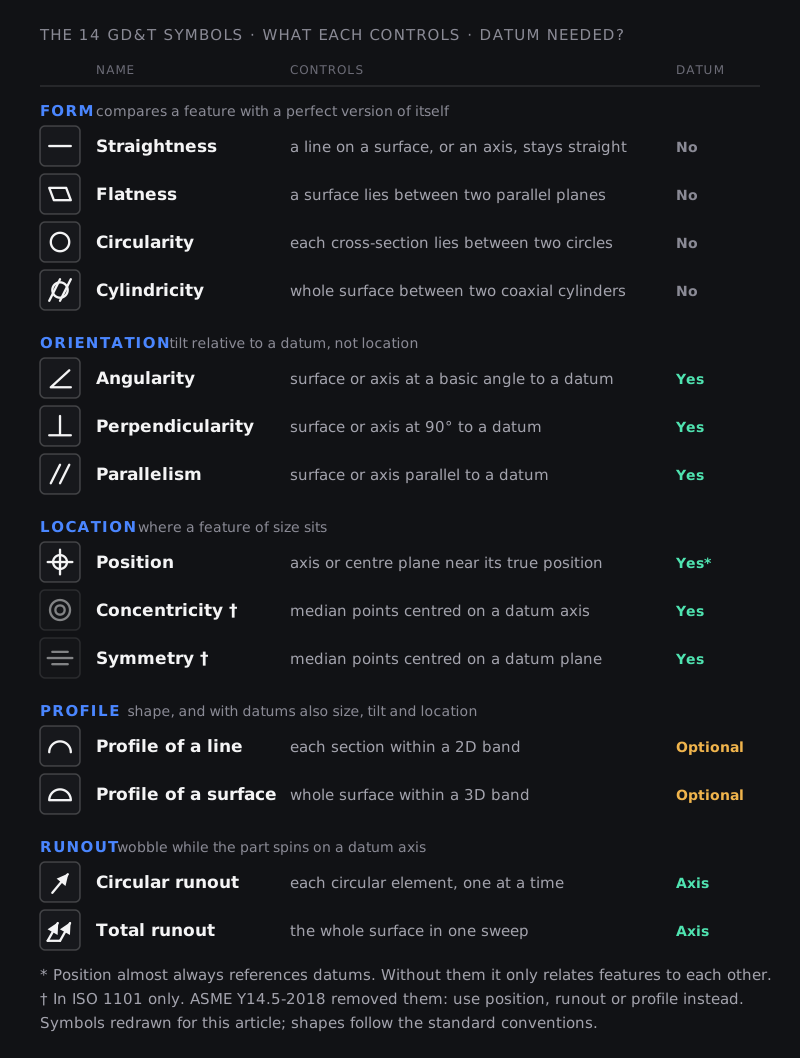
The geometric characteristics fall into five groups. The single most useful thing to learn first is which groups need a datum:
- Form controls never use a datum. They compare a feature with a perfect version of itself.
- Orientation controls always need one. They control tilt relative to a datum, not location.
- Location controls (position, and in ISO concentricity and symmetry) locate a feature of size relative to datums.
- Profile can be used with or without datums. Without datums it controls shape only. With datums it also controls size, orientation and location.
- Runout always needs a datum axis, because it is measured while the part turns on that axis (Keyence).
| Symbol | Tolerance zone | Datum? | Typical use | Usually checked with |
|---|---|---|---|---|
| Form | ||||
| Straightness | Two parallel lines (surface element) or a cylinder (axis, with Ø) | No | Shafts, pins, guide rails | Dial indicator along a surface plate; CMM |
| Flatness | Two parallel planes | No | Sealing faces, mounting pads | Surface plate and indicator; CMM |
| Circularity | Two concentric circles at each cross-section | No | Bearing journals, O-ring grooves | Roundness tester |
| Cylindricity | Two coaxial cylinders over the whole surface | No | Pistons, precision bores | Roundness tester with vertical travel; CMM |
| Orientation | ||||
| Angularity | Two planes, or a cylinder, at a basic angle to the datum | Yes | Inclined faces, angled holes | Sine bar or angle plate with indicator; CMM |
| Perpendicularity | Two planes, or a cylinder, at 90° to the datum | Yes | Bores square to a mounting face | Square or angle plate with indicator; CMM |
| Parallelism | Two planes, or a cylinder, parallel to the datum | Yes | Opposite faces of a block, slideways | Height gauge or indicator over a surface plate |
| Location | ||||
| Position | A cylinder (with Ø) or two planes around the true position | Yes, almost always | Bolt holes, pins, slots: the most used symbol | CMM; functional gauge when Ⓜ is used |
| Concentricity (ISO only) | Median points within a cylinder around the datum axis | Yes | Rare; usually replaced by runout or position | CMM (many points, slow) |
| Symmetry (ISO only) | Median points between two planes centred on the datum plane | Yes | Rare; usually replaced by position | CMM |
| Profile | ||||
| Profile of a line | A 2D band around the true profile at each section | Optional | Aerofoil sections, extrusions, cams | Contour gauge, optical comparator, CMM |
| Profile of a surface | A 3D band around the true surface | Optional | Castings, sheet metal, body panels, any complex surface | CMM or 3D scanner compared with the CAD model |
| Runout | ||||
| Circular runout | Indicator movement at each single cross-section while rotating | Datum axis | Gear blanks, pulleys, rotor seats | V-blocks or centres with a dial indicator |
| Total runout | Indicator movement over the whole surface while rotating and traversing | Datum axis | Shafts that carry bearings and seals | Centres with an indicator traversed along the length |
Three practical notes:
- Controls nest. A parallelism tolerance of 0.1 already keeps that surface flat within 0.1, because the whole surface must fit between two parallel planes 0.1 apart. A flatness callout on the same face only adds something if it is tighter, say 0.05. Position, likewise, also limits orientation of a hole within its own zone.
- Profile of a surface is the most powerful control on modern drawings. With datums it controls location, orientation and form at once, which is why ASME's 2018 edition emphasises profile for locating surfaces (ASME).
- Concentricity and symmetry were removed from ASME for practical reasons. Both require finding median points of a feature, which is slow and expensive to inspect, while position, runout or profile usually express the same design intent and are easier to measure (GD&T Basics).
How to read a feature control frame
Every geometric tolerance is written in a rectangular box called a feature control frame, attached by a leader to the feature it controls. Read it left to right, like a sentence.
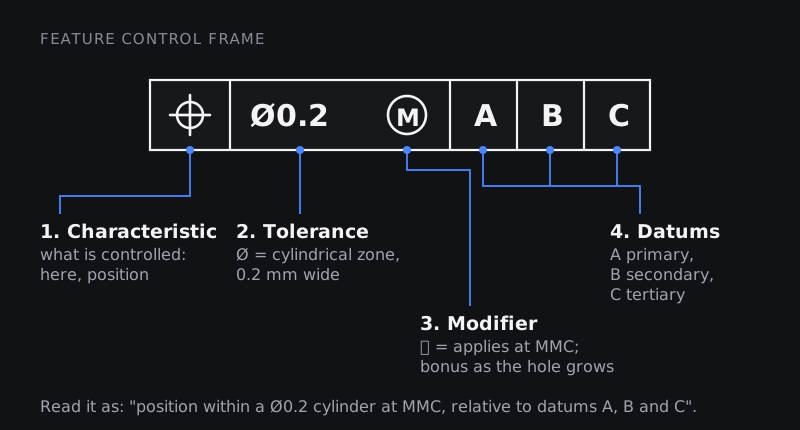
- Geometric characteristic: which of the 14 symbols applies. This tells you the family of control.
- Tolerance zone shape and size: a Ø in front of the value means the zone is a cylinder (or a circle in 2D). Without Ø, the zone is usually two parallel planes or lines, a band whose total width is the value.
- Material condition modifier (optional, features of size only): Ⓜ for maximum material condition, Ⓛ for least material condition. No symbol means the tolerance applies regardless of feature size (RFS), the default in current ASME and ISO practice.
- Datum references: the primary, secondary and tertiary datums, in order of precedence. The order is part of the requirement: "A, B, C" and "B, A, C" put the part in the fixture differently (Keyence).
Then check two things outside the frame. First, the basic dimensions: the boxed numbers that define the true position or true profile. They carry no tolerance of their own; the frame supplies it. Second, where the leader or datum symbol attaches: on a dimension line it means the axis or centre plane of a feature of size, on the surface itself it means the surface.
Here are five common frames turned into plain sentences:
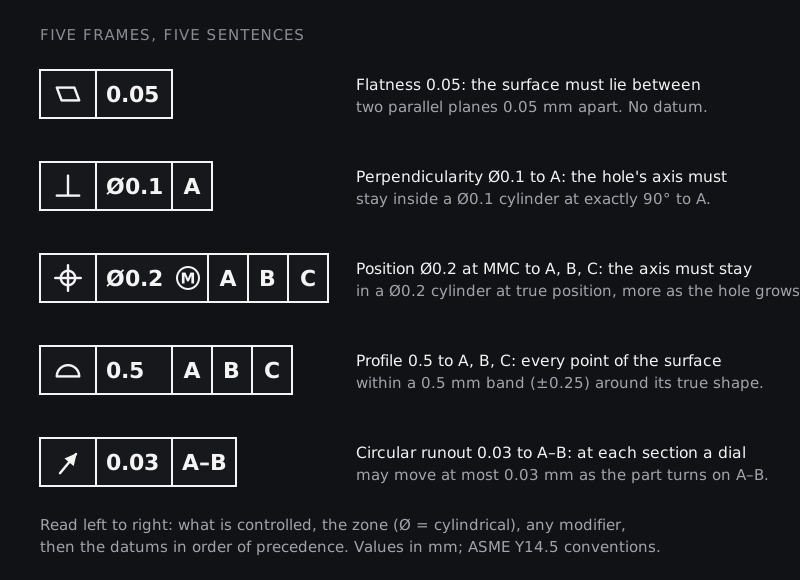
A frame can also be stacked. A composite position frame has two rows that share one symbol: the top row locates a hole pattern to the datums, the lower row, with a tighter value, controls the holes' spacing to each other and their orientation to any datums it repeats. We cover the difference between composite and two single-segment frames in this post.
Datums and the datum reference frame, in plain language
Think of how you would check a part by hand. You put it on a granite table, push it against a square and slide it to a stop. Only then do you start measuring. Datums are the drawing's instructions for exactly that set-up.
Three words get mixed up, so here they are separately (GD&T Basics; Keyence):
- The datum feature is the real, slightly imperfect surface or hole on the part, marked on the drawing with a letter in a box attached to a triangle.
- The datum is the theoretically exact plane, axis or point derived from it.
- The datum feature simulator is the precise physical thing that touches the part to create that datum: a surface plate, an angle plate, a gauge pin, a mandrel, or a plane fitted by a CMM's software.
Together, the datums in a frame form the datum reference frame: a coordinate system that must lock all the degrees of freedom the part needs. A rigid part has six: three moves (along x, y, z) and three tilts (about x, y, z).
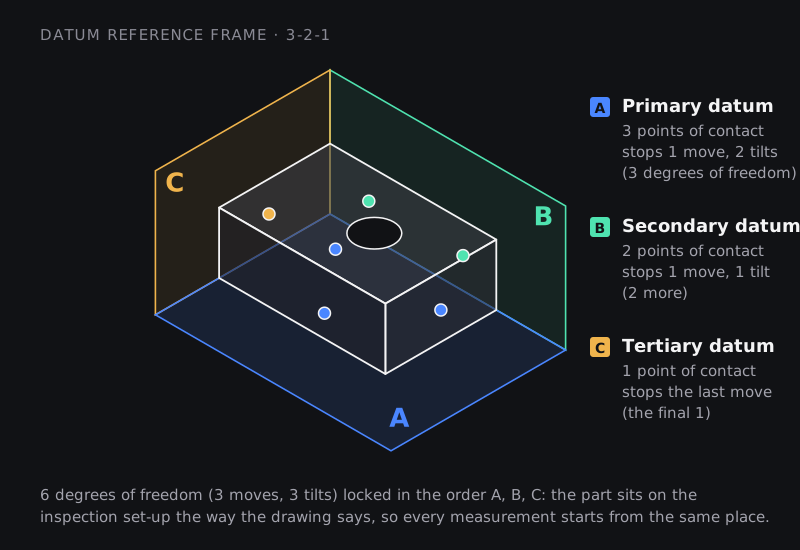
In the classic 3-2-1 set-up with three flat datum features:
- the primary datum A, often the largest mounting face, touches its simulator at a minimum of three points and stops one move and two tilts;
- the secondary datum B touches at a minimum of two points and stops one more move and the last tilt;
- the tertiary datum C touches at a minimum of one point and stops the last move.
Lower-precedence datums only remove the freedoms the higher ones left open (GD&T Basics). That is why the order in the frame matters: swap A and B and a part with slightly out-of-square faces will sit differently, and measure differently.
Datums are not always flat faces. A bore can be a datum: used as the primary datum, its axis stops four freedoms at once (two moves and two tilts), and a second feature such as a slot or pin hole stops rotation about that axis. When a surface is too rough or large to use whole, as on a casting or a body panel, the drawing specifies datum targets: specific points, lines or small areas that the fixture touches.
The rule for choosing datums is short. Use the features that locate the part in its assembly, in the order they engage: the face it bolts down on, then the dowel hole, then the slot. Datums chosen because an edge was easy to dimension from produce drawings that are correct on paper and wrong in function.
One more inspection rule follows from this. Features that reference the same datums in the same order with the same modifiers are a simultaneous requirement: they must be checked in one set-up, without releasing the part (GD&T Basics).
MMC, LMC and RFS, with a worked bonus tolerance example
Features of size, such as holes, pins, slots and tabs, have a size tolerance as well as a geometric one. The material condition modifiers link the two:
- MMC (maximum material condition): the size at which the feature contains the most material: the smallest hole or the largest pin. This is the worst case for assembly.
- LMC (least material condition): the size with the least material: the largest hole or the smallest pin. This is the worst case for wall thickness or edge distance.
- RFS (regardless of feature size): the geometric tolerance does not change with size. No symbol is needed; it is the default.
ISO 2692 describes the same split by function: the maximum material requirement is for "assembly of parts", the least material requirement for "minimum wall thickness", and both apply only to features of size (ISO 2692:2021).
Worked example: a clearance hole at MMC
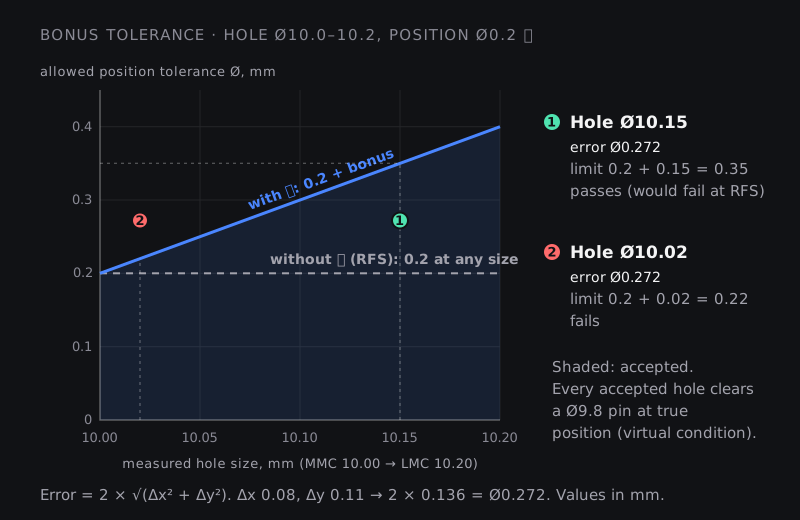
A clearance hole is dimensioned Ø10.0–10.2 mm with a position tolerance of Ø0.2 Ⓜ to A, B and C.
- Find MMC. For a hole, MMC is the smallest size: Ø10.0. At that size the position tolerance is the stated Ø0.2.
- Measure the hole. Hole 1 measures Ø10.15. It is 0.15 mm larger than MMC, so it earns 0.15 mm of bonus tolerance. Allowed position zone: Ø0.2 + 0.15 = Ø0.35. The formula is simply bonus = measured size − MMC size for a hole (GD&T Basics).
- Measure the location. The CMM reports the axis 0.08 mm off in x and 0.11 mm off in y from true position. Position error is a diameter, so it is twice the radial distance: 2 × √(0.08² + 0.11²) = 2 × √0.0185 = 2 × 0.136 = Ø0.272.
- Decide. Ø0.272 is more than the plain Ø0.2, so the hole would fail at RFS. It is less than the Ø0.35 allowed at its actual size, so with Ⓜ it passes.
Now take Hole 2: same location error, Ø0.272, but it measures Ø10.02. Its bonus is only 0.02, so its limit is Ø0.22, and it fails. Bonus tolerance is not a blanket relaxation. It grows only as fast as the hole grows.
Why that is safe: virtual condition
For a hole at MMC, the virtual condition is the MMC size minus the position tolerance: 10.0 − 0.2 = Ø9.8 (GD&T Basics). Every accepted hole, whatever its size and location within the limits, will clear a perfect Ø9.8 pin at true position.
Check it with Hole 1. Its radius is 10.15 / 2 = 5.075 mm and its axis is 0.136 mm off, so the closest its wall comes to the true centre is 5.075 − 0.136 = 4.939 mm. The Ø9.8 pin's radius is 4.9 mm. It fits, with 0.039 mm to spare. A hole exactly at MMC with the full Ø0.2 error comes to 5.0 − 0.1 = 4.9 mm: zero clearance, exactly the boundary.
That boundary is also what a functional gauge is made to: fixed pins of Ø9.8 at the true positions of the holes. If the part drops onto the gauge, every hole meets its position requirement at its actual size, with no calculation (GD&T Basics). The size of each hole still has to be checked separately, with a go/no-go plug gauge or a bore gauge.
LMC: protecting a wall instead of a fit
Now suppose the same Ø10.0–10.2 hole sits close to an edge, with its true position a basic 8 mm from datum B, and the concern is the wall between hole and edge. The drawing uses Ø0.2 Ⓛ.
- At LMC (Ø10.2, the largest hole), the position tolerance is Ø0.2. A smaller hole earns bonus: at Ø10.0 it is Ø0.4.
- The worst-case outer boundary is LMC plus tolerance: 10.2 + 0.2 = Ø10.4, at every size.
- Minimum wall = 8 − 10.4 / 2 = 2.8 mm. Check at Ø10.0 with Ø0.4 error: 8 − (5.0 + 0.2) = 2.8 mm. Check at Ø10.2 with Ø0.2 error: 8 − (5.1 + 0.1) = 2.8 mm. The wall is protected at every size.
Choosing the modifier: use MMC where the function is clearance and assembly; use LMC where it is minimum wall, edge distance or material left for machining; use RFS where the feature must stay accurately located at every size, for example a bore that centres a bearing or a press fit.
Rule #1 (the envelope principle)
Under ASME Y14.5, Rule #1 says that, unless otherwise specified, a feature of size may not extend beyond a boundary of perfect form at MMC. In practice: a Ø20.0–20.1 pin that measures Ø20.1 everywhere must also be perfectly straight, because any bend would push it outside the Ø20.1 envelope. Size tolerance therefore controls form "for free".
ISO works the other way by default: size and form are independent unless the envelope requirement Ⓔ is shown, and ASME has a separate independency symbol to switch Rule #1 off for a feature (GD&T Basics). This is the single most important interpretation difference between the two systems, and the main reason to check which standard a drawing invokes.
How GD&T is inspected: CMMs, gauges and indicators
Every control on a drawing implies a measurement. The designer who knows how a callout will be checked writes better callouts, and many interview questions start with "how would you inspect this?"
| Method | What it checks well | Limits |
|---|---|---|
| Surface plate, height gauge and dial indicator | Flatness, parallelism, straightness; the plate also simulates a planar datum | Manual and slow; depends on operator skill |
| V-blocks or centres with a dial indicator | Circular and total runout; the reading is the full indicator movement while the part turns | V-blocks simulate the datum only approximately; centres need centre holes |
| Roundness measuring instrument | Circularity, cylindricity, coaxiality and runout, using a rotary table and a contact stylus | Rotational parts only |
| Coordinate measuring machine (CMM) | Almost everything: form, orientation, position, profile, from probed points on the part | Programming time, cycle time, and results that depend on the fitting method and point count |
| Functional gauge | Position at MMC, in seconds, on the shop floor | A custom gauge per part; high up-front cost; pass or fail only |
| Optical or laser 3D scanner | Profile of a surface on castings, sheet metal and plastics, by comparing a point cloud with the CAD model | Generally less accurate than a tactile CMM on tight features |
Sources for the table: Keyence's guides to measuring instruments and measuring machines, and its page on measuring true position. Keyence notes that custom gauges have a substantial up-front cost, which makes them hard to justify for prototypes, while a CMM takes time when every part must be inspected.
Three CMM details are worth knowing before you trust a report:
- Datums are set up in software. The CMM builds the datum reference frame from probed points on datum features A, B and C, in the order the frame gives. A wrong order in the program is a wrong measurement, even if every point is accurate.
- The fitting method matters. A CMM calculates a circle or plane from probed points, often with a least-squares fit (Keyence). The standards define form tolerances as the smallest zone that contains the surface, and different fits of the same points can give different numbers. For tight form tolerances, agree the method with the customer.
- Measure along the depth. A hole's position applies to its whole axis, so probe it at more than one depth; one circle at the top cannot see a hole that leans (GD&T Basics; Keyence).
Our post on inspection and measurement techniques in GD&T goes further into the instruments.
Common GD&T drawing mistakes
These are the errors drawing reviewers and inspectors see repeatedly. Several also appear in Sigmetrix's list of common GD&T errors (Sigmetrix).
- Datums chosen for convenience, not function. An edge that is easy to dimension from but plays no part in how the part is located in the assembly. Fix: pick the mounting face, then the locating hole, then the anti-rotation feature.
- Tight tolerances everywhere "to be safe". Every tight number costs machining time and inspection effort, and can scrap parts that work. Fix: tighten only what the function or the stack-up needs.
- Location given twice. A hole with a ± coordinate dimension and a position tolerance has two conflicting requirements. Fix: locate it with basic (boxed) dimensions and let the frame carry the tolerance.
- Orientation or position with no datums, or too few. A position callout with only datum A leaves the part free to slide and rotate on A, so the hole has no defined true position. Fix: make sure the datums lock every freedom the requirement depends on.
- The wrong modifier for the function. MMC on a press fit or a bearing bore lets location drift exactly where it must not. MMC or LMC on a plain surface is meaningless, because they apply only to features of size. Fix: match the modifier to the function, as in the section above.
- Refinements that refine nothing. A flatness of 0.1 on a face that already has a parallelism of 0.1 adds no control. Fix: a form refinement must be smaller than the orientation or location tolerance it sits under.
- Concentricity or symmetry on an ASME Y14.5-2018 drawing, where they no longer exist. Fix: use runout, position or profile.
- No standard stated. Without "ASME Y14.5-2018" or the ISO equivalent in the title block, Rule #1 and independency are both arguable. Fix: always state the standard.
- Ignoring the stack-up. Each part passes but the assembly does not. Fix: run a tolerance stack-up early; see our stack-up analysis primer.
- Callouts nobody can measure. A requirement that needs a measurement the supplier cannot make gets ignored or argued over. Fix: ask quality how each critical callout will be checked before the drawing is released.
How to read a GD&T drawing, step by step
- Find the standard and general tolerances in the title block: ASME Y14.5-2018, the ISO GPS standards, or a company standard.
- Find the datum features (A, B, C) and picture how the part sits on them in a fixture.
- For each feature control frame, read the sentence: characteristic, zone shape and size, modifier, datums.
- Visualise the tolerance zone: two planes, a cylinder, a band around a profile.
- Work out bonus and virtual condition wherever Ⓜ or Ⓛ appears.
- Read the basic dimensions: they define true position and true profile.
- Ask how each critical callout will be inspected, and from which set-up.
GD&T in CAD and model-based definition
GD&T no longer lives only on paper drawings. ISO 1101 notes that the same specifications can be attached directly to a 3D CAD model under ISO 16792 (ISO), and ASME's 2018 edition added model views throughout for the same reason (ASME). This annotated 3D data is called PMI (product and manufacturing information).
When PMI is semantic, meaning the software understands it rather than just displaying it, inspection software can build CMM programs from it. NIST publishes free test CAD models fully toleranced to the ASME Y14 standards, which the CAx Implementor Forum uses to test how CAD software exports GD&T in STEP AP242 files (NIST). They are a good, free way to practise reading real GD&T on a 3D model.
The practical consequence: a wrong callout in the model now flows straight into automatic inspection. Correct GD&T matters more in a 3D workflow, not less.
GD&T careers in India: where it is used and what interviewers ask
GD&T is not a job title. It is a skill that sits inside several mechanical roles:
- Design and product engineers choose datums, apply controls and run stack-ups, typically on machined parts, castings, sheet metal and plastic components for automotive OEMs, their suppliers, and engineering services firms that design for global customers.
- Manufacturing and process engineers plan fixtures and machining sequences that hold the datums and zones the drawing asks for.
- Quality, inspection and supplier quality engineers program CMMs, design and check functional gauges, and judge parts against drawings. The same skills apply in aerospace machining and structures work, where suppliers build to their customers' drawings and standards.
Two public references show how it is assessed. India's national qualification register lists a Jr. Designer (Mechanical) qualification (NSQF Level 5, approved April 2025) whose criteria include providing geometrical accuracies such as runout, circularity, cylindricity and perpendicularity on drawings, and whose lab set-up lists GD&T symbols (NQR qualification file). The Computer Aided Tool & Die Design Engineer qualification (NSQF Level 6, approved May 2025) asks candidates to "apply GD&T principles effectively to convey design intent" (NQR qualification file). Internationally, ASME runs the GDTP certification at Technologist and Senior levels; ASME says it tests selecting the right symbols, calculating tolerances, choosing datum features and using material condition modifiers (ASME GDTP). It is optional; check whether the employers you are targeting ask for it before paying for it.
In interviews for design, manufacturing and quality roles, expect GD&T questions like these, all covered above:
- Read this feature control frame aloud. What is the tolerance zone, and what is it measured from?
- Why use position instead of ± coordinates? (The square-versus-circle argument.)
- Explain MMC, LMC and RFS. A hole is Ø10.0–10.2 with position Ø0.2 Ⓜ; it measures Ø10.15. How much position tolerance does it get?
- What is virtual condition, and how would you size a functional gauge pin?
- What is the difference between flatness and parallelism? Between circular and total runout?
- Why does the order of datums in a frame matter? What is 3-2-1 location?
- What is Rule #1? How does ISO treat size and form differently?
- Why were concentricity and symmetry removed in ASME 2018?
- How would you inspect this callout on a CMM, and how with a gauge?
Our GD&T interview questions post has more practice, and this guide covers the wider design-engineer path in India. To learn GD&T hands-on on real drawings, see the Geometric Dimensioning and Tolerancing course, or build it into a full design skill set with the PG Program in CAD or the PG Program in Manufacturing Design.
Frequently asked questions
How many GD&T symbols are there?
Fourteen geometric characteristic symbols in ISO 1101 and in ASME Y14.5-2009. ASME Y14.5-2018 has twelve, because concentricity and symmetry were removed. There are also many modifying symbols, such as Ⓜ, Ⓛ, Ⓔ, Ø, the projected tolerance zone and free state.
Which GD&T symbols do not need a datum?
The four form controls (straightness, flatness, circularity, cylindricity) never use one. Profile can be used with or without datums. Orientation, location and runout controls need datums.
Is concentricity still used?
Under ISO GPS, yes. Under ASME Y14.5-2018, no; designers use runout, position or profile instead. You will still see it on older ASME drawings made to the 2009 edition, and those are interpreted to the standard stated on the drawing.
What is bonus tolerance?
Extra geometric tolerance earned when a feature with an Ⓜ or Ⓛ modifier departs from its MMC or LMC size. In the example above, a hole made 0.15 mm larger than MMC earns 0.15 mm of extra position tolerance, from Ø0.2 to Ø0.35.
What is virtual condition?
The worst-case boundary created by size and geometric tolerance together. For a hole at MMC it is the MMC size minus the geometric tolerance (Ø10.0 − 0.2 = Ø9.8 in the example); for a pin it is the MMC size plus the tolerance. It is the size of the mating part, or gauge pin, that is guaranteed to fit.
What is the difference between circular and total runout?
Circular runout is checked one cross-section at a time while the part turns on its datum axis. Total runout is checked over the whole surface at once, with the indicator traversed along the length, so it also catches taper and straightness errors that circular runout can miss.
Which GD&T standard is used in India?
There is no single answer; it follows the customer. Read the title block of every drawing, and expect to work with both ASME and ISO drawings over a career. Knowing the differences in this guide, especially Rule #1 versus independency, is what stops misreadings.
Do freshers need to learn GD&T?
For design, manufacturing and quality roles, yes. It turns up in interviews for these roles, and it is one of the fastest ways to make your drawings look professional.
Sources and further reading
- ASME, Y14.5-2018 Dimensioning and Tolerancing (replaces Y14.5-2009; reaffirmed 2024; summary of the 2018 changes)
- ASME, GDTP (Y14.5) Geometric Dimensioning and Tolerancing Professional certification
- ISO, ISO 1101:2017 Geometrical product specifications (GPS): Geometrical tolerancing: Tolerances of form, orientation, location and run-out (confirmed 2022)
- ISO, ISO 5459:2024 GPS: Geometrical tolerancing: Datums and datum systems
- ISO, ISO 2692:2021 GPS: Geometrical tolerancing: Maximum material requirement (MMR), least material requirement (LMR) and reciprocity requirement (RPR)
- NIST, MBE PMI Validation and Conformance Testing: free CAD models, STEP files and test results
- GD&T Basics, GD&T symbols reference; True position; The datum reference frame; Virtual condition; ASME Y14.5 2009 vs 2018
- Keyence, GD&T fundamentals: What are datums?; Feature control frame; Run-out tolerance; Measuring instruments; Measuring machines; Measuring true position
- Sigmetrix, Common GD&T errors and how to avoid them (2025)
- National Qualifications Register (NCVET), Jr. Designer (Mechanical) qualification file and Computer Aided Tool & Die Design Engineer qualification file