DussehraFestive scholarship on Skill-Lync courses, this week onlyFestive scholarship is openOffer ends Wed, 21 Oct, 11:59 pm IST.
Dussehra 2026

Start your next chapter this Dussehra

Tell us where you want to work. A counsellor will match you to the right course and confirm the festive scholarship you qualify for.

  • Festive scholarship on course fees, confirmed on your call
  • Free 20-minute call to map the right course to your goal
  • Real industry projects and placement support with every course

Offer ends Wed, 21 Oct, 11:59 pm IST

3,905 engineers placed since 2019 · 1,277 hiring companies

By submitting you agree to our Terms and Privacy Policy.

You're on the list

Browse courses
Mechanical · Course

HyperMesh for FEA Plastic and Sheet Metal Applications

A comprehensive course on meshing using Hypermesh for Sheet Metal applications. This course is highly suited for beginners

Duration
24 weeks
Content
19 hours
Projects
2
Mode
Online
Overview

What you'll
be able to do.

  • This program will help you improve your skills in 1D, 2D ( shell meshing ), 3D ( solid meshing ) and connectors.
  • There are several complex models in the coursework that will help you in practising the techniques taught in this course.
  • This course is the gateway program to the world of FEA meshing techniques and cleaning geometry before sending it for analysis.
  • It covers different methods to create meshing and clear the mesh quality errors.
Tools you'll use
HyperMesh
Curriculum

12 modules,
built with industry.

Get the full syllabus ↓
  1. 01HyperMesh for FEA Plastic and Sheet Metal Applications12 modules
    1. Basics of FEAW01
      • In this module, you will study the fundamentals of Finite Element Analysis (FEA). FEA is a generic technique used to solve boundary value problems.
      • FEA finds a lot of applications in structural analysis.
      • In this module, we will discuss the math behind FEA, along with the following topics
        • 5Ws of Finite Element Analysis
        • Types of engineering problem-solving methods
        • CAE process types
        • Model setup
    2. Introduction to HyperMesh GUIW02
      • In this module, you will study the meshing software, HyperMesh.
      • HyperMesh is a highly capable simulation software, and in this module, you will learn about the various tools and features that HyperMesh has to offer.
      • In this module, you will learn about the following topics
        • Introduction to the Geometric Tool and the Tools Menu
        • Basic geometric tools
        • Geometry cleanups (includes auto cleanup)
        • Midsurface creation
    3. Key Geometric ToolsW03
      • While dealing with complex 3D components, it is important to remove small features and holes that are inevitable when designing a CAD model.
      • You will be introduced to the batch mesher macro that will be instrumental in accomplishing this.
      • In this module, you will study the following topics
        • Geometry cleanup criteria files
        • MNode's creation & node editing
        • Point edit
        • Edge edit
    4. 1D MeshingW04
      • 1D Meshing is a great way to speed up the simulation time without compromising on accuracy.
      • There are different types of 1D elements, each featuring its own shape function, and characteristics.
      • In this module, you will learn the following
        • 5Masses, Bar, Rod, Rigid, RBE3, Springs, Gaps
        • Connectors, HYPER BEAM, Linemesh, Linear 1D
        • Edit, Element, Split, Replace, and Detach
        • Order change, configuration edit, and element type
    5. Geometry Cleanup and MidsurfaceW05
      • In this module, you will learn to perform surface clean-up on a given geometry and to extract the mid-surface using an in-built tool, auto-mid-surface.
      • You will also learn how to clean up the surface manually because relying only on the auto-mid-surface option may give rise to a distorted surface while dealing with complex geometry.
      • Here is a list of topics that you will learn about in this module.
        • Surface clean up
        • Midsurface generation
        • Handling distorted surfaces
    6. 2D Meshing Introduction and ExamplesW06
      • In this module, you will learn the basics of 2D meshing, how to mesh a surface, how to re-mesh a meshed surface using elements, and how to attain mesh flow in the geometry.
      • You will also learn how to handle the tria elements in the model.
        • Introduction to 2D meshing
        • 2D basic tools
        • Mesh flow
        • Handling tria element
    7. Quality CriteriaW07
      • In this module, you learn what a quality check is and understand the different quality checks that HyperMesh offers.
      • You will also learn how to fix areas that failed the quality check.
      • Here, is a list of key concepts that you will learn in this module,
        • 1D element quality check
        • 2D element quality check
        • Understanding the quality parameters for 2D meshing
    8. Advance 2D MeshingW08
      • In this module, you will learn how to do manual mid-surfacing when the auto-mid surfacing option fails. You will also learn how to handle geometry if it is symmetrical, normal check-in the model and its significance, and free edges along with their significance.
      • The following topics are covered in this
        • Manual mid-surface
        • Handling symmetric geometry
        • Free-edge checks
        • Normals check
    9. 3D MeshingW09
      • In this module, you will learn the different tools and techniques to generate a hexamesh for a given geometry.
      • You will also learn a variety of techniques to generate tetra meshes. You will also understand the quality checks for tetra elements and how to rectify areas that have failed these checks.
      • The following topics are covered in this module.
        • Hexa meshing
        • Tetra meshing
        • Different methods of tetra mesh generation
        • 3D element quality check
    10. ConnectorsW10
      • Sometimes, meshes are made with both 2D and 3D meshes that are interspersed.
      • Connectors help the computer understand that the interface is between two different kinds of meshes.
      • Connectors are time-saving features that are a must in large models.
      • In addition to this, connectors offer a way to let the computer know that two components have been seam welded.
        • Seam weld
        • Spot weld
        • Bolt connection
        • Spring element
        • Adhesive modelling-HEXA
    11. Batch MeshingW11
      • In this module, you will understand the uses of batch meshing and its applications in industries. You learn about the parameter file and criteria file, how they can be optimized for the requirements.
        • Here is a list of key concepts that you will learn in this module.
        • Understand quality parameter and criteria files
          Optimizing these files according to the requirement.
    12. Morphing Techniques and Macro GenerationW12
      • In this module, you will learn about morphing, which can be done using constraints, volumes, and geometry.
      • Also, you will be working with the manipulation of TCL commands, running a TCL command using the inbuilt run options.
        • Morph constraints
        • Morph volumes
        • Map to geometry
        • Basic macro generation using TCL commands
Industry projects

2 projects
you'll ship.

Our projects are designed by experts in the industry to reflect industry standards. By working through our projects, Learners will gain a practical understanding of what they will take on at a larger-scale in the industry. In total, there are 2 Projects that are available in this program.

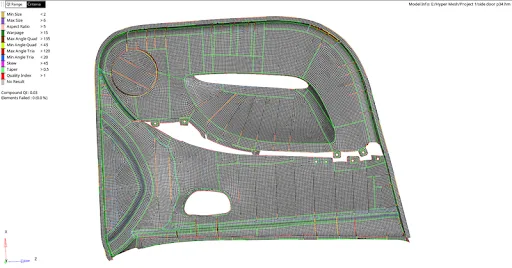
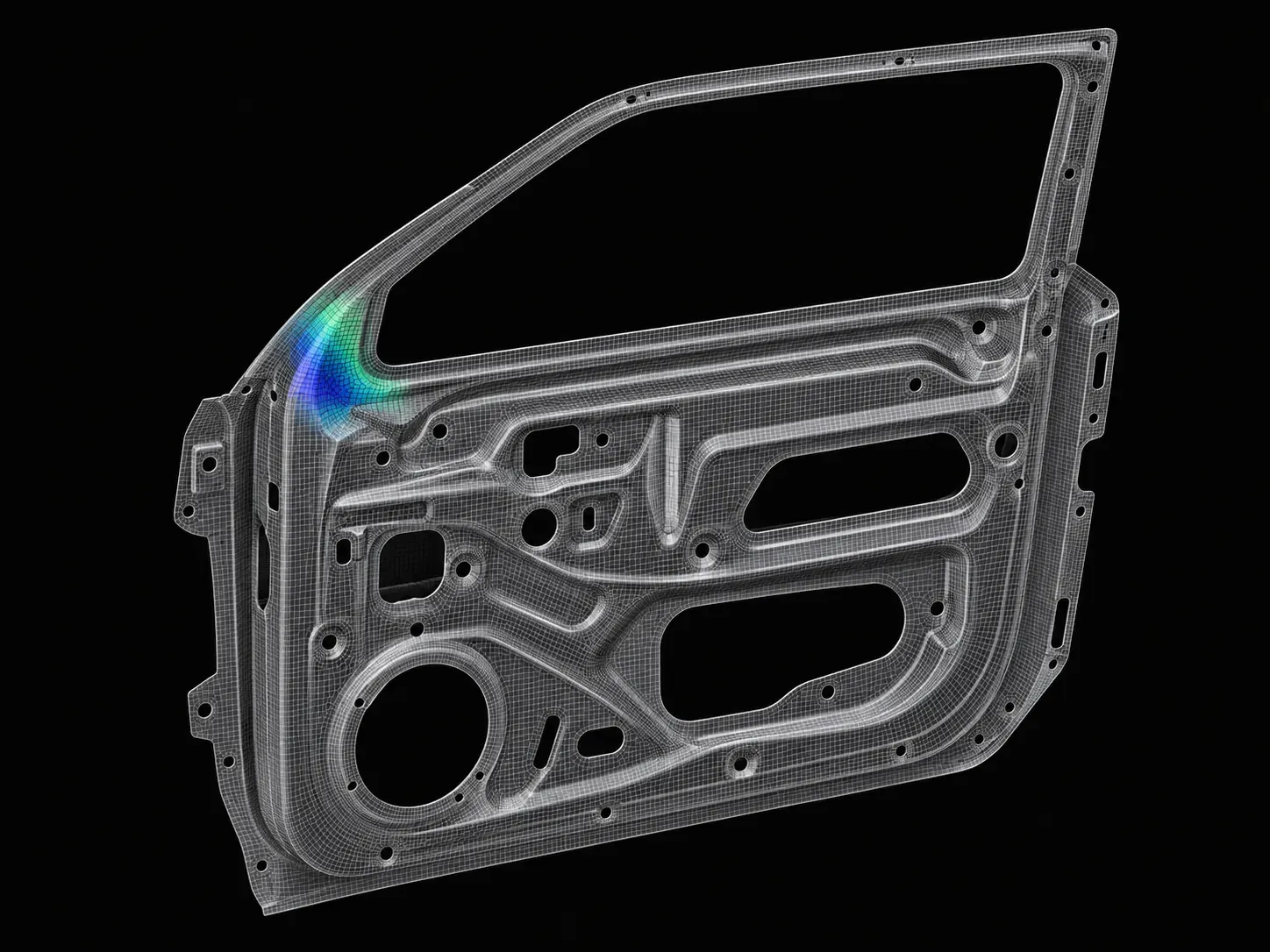
Meshing of Door Panel

Meshing of Door Panel

In this project, the student will mesh the door panel under the given quality criteria. They should capture all the features perfectly.
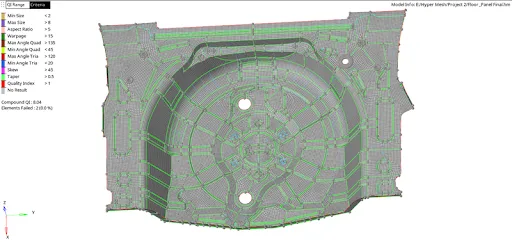
Meshing of Car Spare Tyre Floor Panel

Meshing of Car Spare Tyre Floor Panel

In this project, the student will mesh the floor panel under the given quality criteria. They should mesh the whole component and capture all the features perfectly.

Fee

One fee.
Everything included.

Become job ready with our comprehensive industry focused curriculum for freshers & early career professionals

Premium
₹40,000
Inclusive of all charges
  • 1 Year Access
  • Personalized Page
  • Live Individual & Group Sessions
  • Personalized & Hands-On
  • Job-Oriented Industry Relevant Curriculum
Check eligibility →
FAQ

Questions,
answered.

Who can take up FEA certification courses?

Students and graduates of mechanical engineering and related streams of engineering can take up this HyperMesh for FEA Plastic and Sheet Metal Applications course. If you are interested in designing and analysing the components, you can pursue this FEA online course.

Is this Finite Element Analysis course an online program?

Yes, HyperMesh for FEA Plastic and Sheet Metal Applications course is a 100% online course.

What is the duration of this HyperMesh for the FEA Plastic and Sheet Metal Applications course?

This FEA online course is a 24-week program covering all the basic to advanced level concepts in HyperMesh.

What is the fee for this HyperMesh online course?

The fee structure is flexible, and you can choose a plan that suits you. The basic plan would give you two months of access, the pro plan would give you four months of access, and the premium plan would provide you with lifetime access.

How much can an FEA Simulation Engineer earn?

According to AmbitionBox, the average salary of an FEA Engineer is ₹ 5 Lakhs per annum. However, it increases with your experience and expertise.

Is there any certificate for completing this sheet metal course?

Yes, After completing this HyperMesh for FEA Plastic and Sheet Metal Applications course, you shall be given a course completion certificate. The top 5% of the scorers will be given a merit certificate alongside the course completion certificate.

Is there any technical support for this FEA certification course?

Yes, you can clear your queries with email and forum support.

Are there any prerequisites for pursuing this HyperMesh course?

There is no prerequisite for this course. However, this course is designed for mechanical engineers.

Who has designed this Finite Element Analysis course?

Industry experts in this domain have designed this HyperMesh for FEA Plastic and Sheet Metal Applications course to make this course industry-relevant.

Next step

Not sure it's
the right fit?

A counsellor will walk you through the syllabus, projects and fee options — and tell you honestly if another course suits you better.

Get the syllabus + a call back

We'll email the full syllabus and call within one working day.

By submitting you agree to our Terms and Privacy Policy.

Call usEnquire

Talk to a career counsellor

Free 20-minute call. We'll map the right course to where you want to work.

By submitting you agree to our Terms and Privacy Policy.