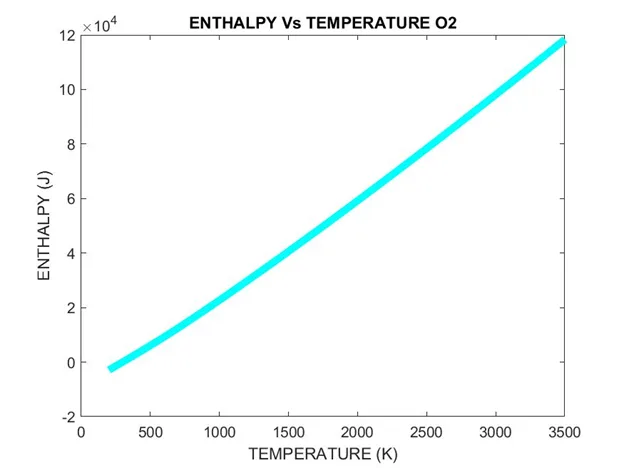
Extracting Data from NASA Thermo.dat File
Learners are required to write a code that can read the NASA-II polynomial file and calculate thermodynamic parameters. They will have to extract the data from the NASA Thermo.dat …
DiwaliEvery Diwali, we upgrade something. This year, upgrade your career.₹60,000 Diwali Scholarship52 seats leftOffer ends Sun, 8 Nov, 11:59 pm IST.
Learn about the fundamentals of MATLAB needed for mechanical engineers.
MATLAB is a platform used to study data sets, develop models of real-world systems, create algorithms, and solve equations. Engineers use MATLAB to develop, design, simulate, and test their models before it can be developed in the real world. In the field of mechanical engineering, MATLAB is used for solving problems related to dynamic and static systems, mechanical vibrations, control systems, statics, and more. This makes MATLAB a fundamental software tool for mechanical engineers.
By taking this course, learners will
Who can enroll in this course?
Students with a background in mechanical or automotive engineering can take this course.
MATLAB has a series of commands and functions that instruct the program to perform a task. Just like any other programming language, it has a syntax that defines the rules of the symbols and characters used to write a code. It is important for learners to understand the MATLAB syntax, basic commands, and functions to write effective programs.
This week will cover
Forward kinematics is the process of determining the position of a robot’s end-effector by using kinematic equations with known values of angular velocities and joint parameters. It is important for learners to understand how MATLAB can be used to determine the unknown values in the kinematic equations, as well as simulate the movement of the manipulator.
This week will cover
The air standard cycle considers air as the working fluid which goes through heat addition and heat rejection. This is a thermodynamic closed loop cycle in which heat energy is converted into mechanical power. By using MATLAB, the pressure and volume diagram of air standard cycles can be plotted and simulated. It is important to understand how to solve for the kinematic equations involved in the air standard cycle, and how to plot the diagram using MATLAB.
This week will cover
Vibrations and dynamics are at the core of physical systems. Most mechanical engineering systems are dynamic in nature. These systems can be represented by equations of motion that form a set of ordinary differential equations (ODEs). It is important for learners to understand how to solve these ODEs, and their application in a real-world context.
This week will cover
Curve fitting is used to understand the relationship between different variables by constructing a curve that fits best through a series of data points. Regression analysis identifies the strength of the relationship between two or more variables. This lets engineers understand the relationship between system input and output, as well as predict how the system will behave in the future. Curve fitting and regression can both be done using MATLAB. It is important to understand curve fitting and regression analysis when working with physical systems in MATLAB.
This week will cover
The genetic algorithm is based on Charles Darwin’s theory of natural selection in which each step identifies the ‘best’ set of parents to reproduce children. Overtime, the continuous process of doing this yields an optimal population. In the same way, the genetic algorithm can be applied to optimization problems and performed using MATLAB. It is important for learners to understand the genetic algorithm, and how it can be used as an optimization technique.
This week will cover
Our projects are designed by experts in the industry to reflect industry standards. By working through our projects, Learners will gain a practical understanding of what they will take on at a larger-scale in the industry. In total, there are 2 Projects that are available in this program.
Learners are required to write a code that can read the NASA-II polynomial file and calculate thermodynamic parameters. They will have to extract the data from the NASA Thermo.dat …
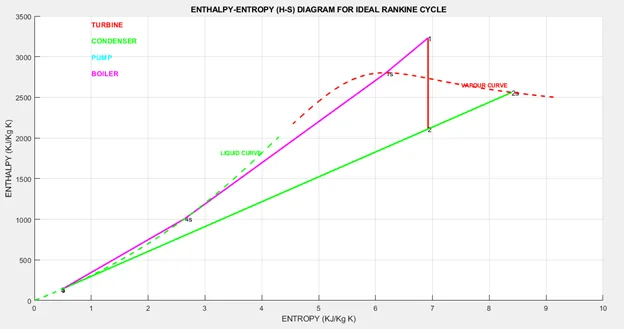
Learners are required to use the XSteam library file to determine the properties of steam under various conditions. They will have to find the Enthalpy and Entropy at various state…
Become job ready with our comprehensive industry focused curriculum for freshers & early career professionals
The duration of this online certification course is two months.
No, the platform will not provide any software license to the students.
Yes, upon completion, students always receive a certificate of completion.
Mechanical engineering or automotive engineering students can apply for this course at Skill-Lync.
Yes, you can pursue this certification course with your regular engineering studies.
Yes, students get access to various industry-based projects and assignments.
A counsellor will walk you through the syllabus, projects and fee options — and tell you honestly if another course suits you better.