DussehraFestive scholarship on Skill-Lync courses, this week onlyFestive scholarship is openOffer ends Wed, 21 Oct, 11:59 pm IST.

Dussehra 2026

Start your next chapter this Dussehra

Tell us where you want to work. A counsellor will match you to the right course and confirm the festive scholarship you qualify for.

  • Festive scholarship on course fees, confirmed on your call
  • Free 20-minute call to map the right course to your goal
  • Real industry projects and placement support with every course

Offer ends Wed, 21 Oct, 11:59 pm IST

3,905 engineers placed since 2019 · 1,277 hiring companies

By submitting you agree to our Terms and Privacy Policy.

You're on the list

Browse courses
Mechanical · PG program

Post Graduate Program inAutomation & Pre-Processing for FEA & CFD Analysis

A comprehensive program on Pre-processing and Automation using automation for CAE. This program is highly suited for beginners

Duration
24 weeks
Content
81 hours
Courses
7
Projects
11
Mode
Online
Overview

What you'll
be able to do.

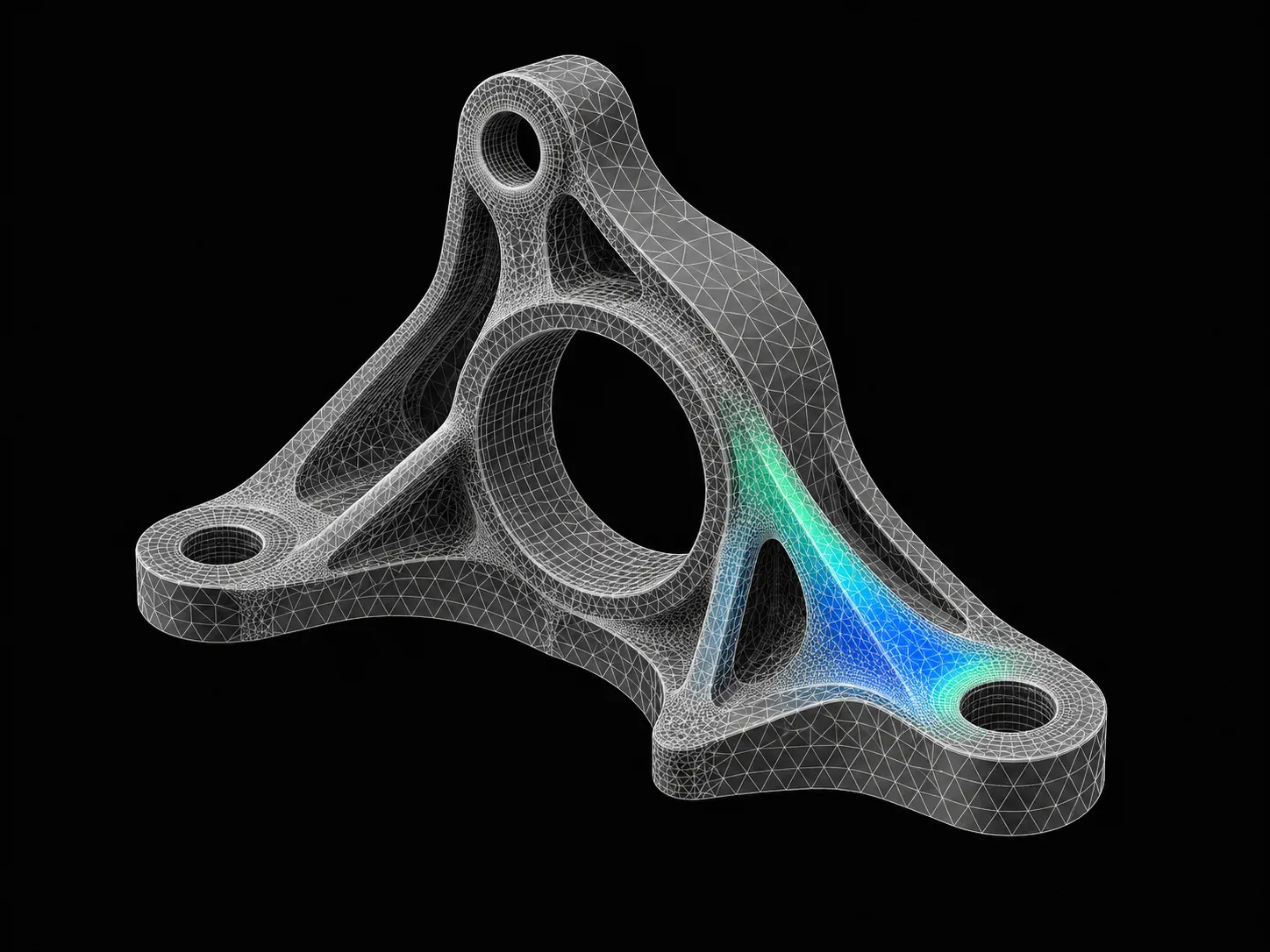
  • This course helps you understand the math behind FEA, along with 1D, 2D & 3D Meshing, Quality check, Morphing Techniques, and Macro Generation.
  • Students will acquire the ability to clean up geometries before meshing and extracting mid-surface.
  • They will gain knowledge about writing programs for real-life scenarios like the simulation of the Robotic Arm Manipulator and codes to simulate an Air Standard Cycle.
  • They will acquire hands-on experience in python programming and understand how it is useful for Automation process.

Why this program

  • Understand the math behind FEA, along with 1D, 2D & 3D Meshing, Quality check, Morphing Techniques, and Macro Generation
  • The ability to clean up geometries before meshing and extracting mid-surface
  • Knowledge about writing programs for real-life scenarios like a simulation of Robotic Arm Manipulator and codes to simulate an Air Standard Cycle
  • Hands-on experience in python programming and understanding how it is useful for the Automation process
  • The student can get employed as
    • CAE Engineer NVH
    • Safety CAE Engineer
    • CAE Analyst
    • CAE Automation Engineer
    • CAE Durability Engineer
Tools you'll use
MATLABANSAPythonHyperMesh
Curriculum

7 courses,
53 modules.

Get the full syllabus ↓
  1. 01Preprocessor for Structural Analysis using ANSA7 modules
    1. Week 01 & 02 - Introduction to ANSA GUI and ToolsW01
      • In this module, you will be introduced to the CAE domain along with an introduction to FEA basics. You will learn the Graphical User Interface(GUI) of the ANSA tool.
      • You will get to know about different solvers and types of analysis carried out using them.
      • You will be introduced to basic tools that will help you with geometric cleanups and other deck setups in ANSA.
      • The topics covered in this module are
        • Introduction to FEA
        • ANSA GUI
        • Geometric Tools and Topology Cleanup
        • Types of CAE Process Tools for Structural CAE
        • Types of Elements
        • Different Tools used in TOPO Deck
    2. Manual Mid-surfacing, 2D Meshing and Quality CriteriaW02
      • In this module, you will study the basics of 2D meshing.
      • You will also learn how to extract mid-surface, deploy 2D mesh on the mid-surface, reconstruct already meshed areas, along with various techniques for achieving the mesh flow.
      • You will also learn how to eliminate the tria concentration present in the geometry and capture the important features in the geometry.
      • You will be working on a sheet metal component in this module.
      • You will also be taught how to achieve mesh quality for the component by assigning the quality criteria parameters.
      • You will study the following topics in this module.
        • Manual mid surfacing for sheet metal components
        • 2D meshing on sheet metal components
        • Quality checkup and taking measures to achieve quality
        • Introduction to different tools used in mesh deck
        • Revising the basic commands
        • Basic commands used in TOPO and MESH deck
        • Practice model provided
    3. Manual Mid-surfacing - Plastic Trims and Cast PartsW03
      • In this module, you will be learning about extracting the mid-surface and working on a plastic part.
      • Plastic parts are of variable thickness therefore, extracting the mid-surface and assigning the thickness is more tricky when compared to the sheet metal component.
      • You will study the following topics in this module
        • Manual mid-surfacing for plastic trim components & cast parts
        • 2D meshing, quality checkup
        • Different tools used in mesh deck
    4. Solid Meshing(Tetra & Hexa)W04
      • In this module, you will learn the different tools and techniques to generate the Tetra mesh for a given geometry.
      • You will also learn the different methods involved in generating a Hexa mesh.
      • You will also understand the quality checks for Tetra elements and how to rectify failed tetra elements.
      • You will study the following topics in this module.
      • Establishing solid (Tetra) meshing on 2 different components
        • Solid (Tetra) meshing
        • 3D meshing quality criteria
        • Volume mesh deck
      • Introduction to solid (Hexa) meshing
        • Solid (Hexa) meshing
        • Volume mesh deck
    5. Connections (Seat and Door)W05
      • In this module, you will be introduced to connections in ANSA.
      • This enables the user to generate FE models for durability, NVH, and crash analysis.
      • Connections are now efficiently designed with the help of the tool.
      • You will also generate connections for the automotive seat & front door.
      • These are the topics that you will learn in this module, different types of connectors such as:
        • Two Nodes RBE2
        • Cluster RBE2
        • RBE2-CBUSH-RBE2
        • RBE2-HEXA-RBE2
        • Nut and Bolt representation
        • Seam weld data representation
        • Different operations such as:
          • Converting and realizing operations
          • Connection manager operations
          • Assigning mass to a node
    6. Week 07 - Introduction to Batch Meshing/CastingW06
      • In this module, you will learn about batch meshing, casting methods, and their applications in industries.
      • The batch meshing/casting method will help you to model the component efficiently and quicker than if you tried to model them manually.
      • But these tools do not guarantee the best results always, and there will be areas where you need to manually check the results.
      • You will study the following topics in this module.
        • Introduction to casting & batch meshing operations
        • Auto mid-surfacing and meshing by using casting and skin methods
    7. Introduction to Morphing BasicsW07
      • In this module, you will learn about a few morphing techniques in ANSA.
      • ANSA allows a full-fledged morphing menu that is completely integrated with ANSA's interface.
      • The functions of the morphing menu can be used to efficiently re-shape both FE and/or geometry-based models.
      • You will study the following topics in this module.
        • Direct morphing
        • Box morphing
        • Hatches
        • Morphing in FE model
        • Morphing in CAD geometry
  2. 02HyperMesh for FEA Plastic and Sheet Metal Applications12 modules
    1. Basics of FEAW01
      • In this module, you will study the fundamentals of Finite Element Analysis (FEA). FEA is a generic technique used to solve boundary value problems.
      • FEA finds a lot of applications in structural analysis.
      • In this module, we will discuss the math behind FEA, along with the following topics
        • 5Ws of Finite Element Analysis
        • Types of engineering problem-solving methods
        • CAE process types
        • Model setup
    2. Introduction to HyperMesh GUIW02
      • In this module, you will study the meshing software, HyperMesh.
      • HyperMesh is a highly capable simulation software, and in this module, you will learn about the various tools and features that HyperMesh has to offer.
      • In this module, you will learn about the following topics
        • Introduction to the Geometric Tool and the Tools Menu
        • Basic geometric tools
        • Geometry cleanups (includes auto cleanup)
        • Midsurface creation
    3. Key Geometric ToolsW03
      • While dealing with complex 3D components, it is important to remove small features and holes that are inevitable when designing a CAD model.
      • You will be introduced to the batch mesher macro that will be instrumental in accomplishing this.
      • In this module, you will study the following topics
        • Geometry cleanup criteria files
        • MNode's creation & node editing
        • Point edit
        • Edge edit
    4. 1D MeshingW04
      • 1D Meshing is a great way to speed up the simulation time without compromising on accuracy.
      • There are different types of 1D elements, each featuring its own shape function, and characteristics.
      • In this module, you will learn the following
        • 5Masses, Bar, Rod, Rigid, RBE3, Springs, Gaps
        • Connectors, HYPER BEAM, Linemesh, Linear 1D
        • Edit, Element, Split, Replace, and Detach
        • Order change, configuration edit, and element type
    5. Geometry Cleanup and MidsurfaceW05
      • In this module, you will learn to perform surface clean-up on a given geometry and to extract the mid-surface using an in-built tool, auto-mid-surface.
      • You will also learn how to clean up the surface manually because relying only on the auto-mid-surface option may give rise to a distorted surface while dealing with complex geometry.
      • Here is a list of topics that you will learn about in this module.
        • Surface clean up
        • Midsurface generation
        • Handling distorted surfaces
    6. 2D Meshing Introduction and ExamplesW06
      • In this module, you will learn the basics of 2D meshing, how to mesh a surface, how to re-mesh a meshed surface using elements, and how to attain mesh flow in the geometry.
      • You will also learn how to handle the tria elements in the model.
        • Introduction to 2D meshing
        • 2D basic tools
        • Mesh flow
        • Handling tria element
    7. Quality CriteriaW07
      • In this module, you learn what a quality check is and understand the different quality checks that HyperMesh offers.
      • You will also learn how to fix areas that failed the quality check.
      • Here, is a list of key concepts that you will learn in this module,
        • 1D element quality check
        • 2D element quality check
        • Understanding the quality parameters for 2D meshing
    8. Advance 2D MeshingW08
      • In this module, you will learn how to do manual mid-surfacing when the auto-mid surfacing option fails. You will also learn how to handle geometry if it is symmetrical, normal check-in the model and its significance, and free edges along with their significance.
      • The following topics are covered in this
        • Manual mid-surface
        • Handling symmetric geometry
        • Free-edge checks
        • Normals check
    9. 3D MeshingW09
      • In this module, you will learn the different tools and techniques to generate a hexamesh for a given geometry.
      • You will also learn a variety of techniques to generate tetra meshes. You will also understand the quality checks for tetra elements and how to rectify areas that have failed these checks.
      • The following topics are covered in this module.
        • Hexa meshing
        • Tetra meshing
        • Different methods of tetra mesh generation
        • 3D element quality check
    10. ConnectorsW10
      • Sometimes, meshes are made with both 2D and 3D meshes that are interspersed.
      • Connectors help the computer understand that the interface is between two different kinds of meshes.
      • Connectors are time-saving features that are a must in large models.
      • In addition to this, connectors offer a way to let the computer know that two components have been seam welded.
        • Seam weld
        • Spot weld
        • Bolt connection
        • Spring element
        • Adhesive modelling-HEXA
    11. Batch MeshingW11
      • In this module, you will understand the uses of batch meshing and its applications in industries. You learn about the parameter file and criteria file, how they can be optimized for the requirements.
        • Here is a list of key concepts that you will learn in this module.
        • Understand quality parameter and criteria files
          Optimizing these files according to the requirement.
    12. Morphing Techniques and Macro GenerationW12
      • In this module, you will learn about morphing, which can be done using constraints, volumes, and geometry.
      • Also, you will be working with the manipulation of TCL commands, running a TCL command using the inbuilt run options.
        • Morph constraints
        • Morph volumes
        • Map to geometry
        • Basic macro generation using TCL commands
  3. 03FEA Super Course - Refresher5 modules
    1. FundamentalsW01
      • Strength of materials
        • Stress, Pressure, Strain
        • Lateral Strain - Why does it happen
        • Poisson’s Ratio - Practical Application
        • Shear
        • Modulus of Rigidity
        • Moment of Inertia
        • Kinetic Energy, Rotational Kinetic Energy
        • Continuity equation
        • Shear Force and Bending Moment
        • Beams and Truss - Theory and Problems
        • Materials and it is Mechanical Properties
        • Stress and Strain Curves
        • Theory of Failures
        • Vibration
      • Finite Element Analysis
        • FEA - Significance and Scope
        • Applications in Various Industries - Examples
        • Types of Analysis
        • Implicit and Explicit - An Overview
        • Degree of Freedom
        • Governing Equations
        • Shape Functions
        • Gaussian Quadrature
        • Boundary Conditions
        • FEA Crash Course - Tool-Based Questions
    2. ANSA Part 1W02
      • Introduction and GUI in ANSA
        • Tool knowledge in ANSA
        • Basics of FEA
        • What is Meshing?
        • Significance of Meshing
        • Elemental Errors
        • Types of Elements in Meshing
        • How to choose and When to choose elements
      • Midsurfacing and Methods of Meshing
        • Types of Midsurfacing Techniques
        • Rearrangement of Construction lines
        • Different meshing strategies
        • Manual and Auto Meshing in sheet metal component
      • Mesh Quality improvement
        • Various different quality criteria and working with them in ANSA
      • Tool Practice
    3. ANSA Part 2W03
      • Mesh Evaluation
        • Things to remember for obtaining a good mesh
        • Important checks to perform
      • Time Management in ANSA
        • Various strategies for Time management while working on the component
        • Tips and Tricks on How to approach a general Tool test
      • Tool Practice
    4. HyperMesh Part 1W04
      • Introduction
        • HyperMesh - Introduction
      • Meshing in HM
        • Meshing Fundamental
        • Mid Surface extraction methods
        • Meshing methods for mesh flow
        • Quality criteria - Checks and fixes
        • Tool Test approach
      • Mesh Improvisation
        • Various different quality criteria and working with them in HyperMesh
      • Evaluating FE
        • Things to remember for obtaining a good mesh
        • Important checks to perform
      • Tool Practice
    5. HyperMesh Part 2W05
      • Time Management
        • Various strategies for Time management while working on the component
        • Tips and Tricks on How to approach a general Tool test
      • Tool Practice
  4. 04MATLAB for Mechanical Engineers6 modules
    1. Introduction to MATLABW01

      MATLAB has a series of commands and functions that instruct the program to perform a task. Just like any other programming language, it has a syntax that defines the rules of the symbols and characters used to write a code. It is important for learners to understand the MATLAB syntax, basic commands, and functions to write effective programs.

      This week will cover

      • MATLAB syntax and commands
      • Methods and ways to use commands in different scenarios
      • Manipulation of calculations and comparisons
      • Use of arrays.
      • Functions (plotting, creating animations, creating figures, and more)
    2. Forward Kinematics SimulatorW02

      Forward kinematics is the process of determining the position of a robot’s end-effector by using kinematic equations with known values of angular velocities and joint parameters. It is important for learners to understand how MATLAB can be used to determine the unknown values in the kinematic equations, as well as simulate the movement of the manipulator.

      This week will cover

      • Manipulator motion using ImageMagick
      • Simulation of a 2R robotic arm manipulator
      • Creating a movie clip with the spatial motions of a robotic arm
      • ‘For’ loop in programming
      • Working of the “hold on” command
      • Arrays and linspace commands
    3. Air Standard Cycle SimulatorW03

      The air standard cycle considers air as the working fluid which goes through heat addition and heat rejection. This is a thermodynamic closed loop cycle in which heat energy is converted into mechanical power. By using MATLAB, the pressure and volume diagram of air standard cycles can be plotted and simulated. It is important to understand how to solve for the kinematic equations involved in the air standard cycle, and how to plot the diagram using MATLAB.

      This week will cover

      • Solving piston kinematics equation to calculate volume trace
      • PV diagrams for different operating conditions.
      • Thermodynamic relationships
      • Pressure-volume variations
      • Order of the program
      • Plots & legends used in the graphs
      • Piston kinematics
    4. Vibrations and DynamicsW04

      Vibrations and dynamics are at the core of physical systems. Most mechanical engineering systems are dynamic in nature. These systems can be represented by equations of motion that form a set of ordinary differential equations (ODEs). It is important for learners to understand how to solve these ODEs, and their application in a real-world context.

      This week will cover

      • Backward difference formula (BDF) and forward difference formula (FDF) methods to solve ODEs
      • Real use of differential equations
      • How differential equations relate to real-world applications
      • Solving differential equations
      • ODE solvers, syntax of ODEs, and various supplementary commands
    5. Curve Fitting and RegressionW05

      Curve fitting is used to understand the relationship between different variables by constructing a curve that fits best through a series of data points. Regression analysis identifies the strength of the relationship between two or more variables. This lets engineers understand the relationship between system input and output, as well as predict how the system will behave in the future. Curve fitting and regression can both be done using MATLAB. It is important to understand curve fitting and regression analysis when working with physical systems in MATLAB.

      This week will cover

      • Polynomials and their best fits
      • PolyFit and PolyVal commands
      • Calculating errors
      • Sum of squares regression (SSR)
      • Sum of squares error (SSE)
      • Sum of squares total (SST)
    6. Genetic AlgorithmW06

      The genetic algorithm is based on Charles Darwin’s theory of natural selection in which each step identifies the ‘best’ set of parents to reproduce children. Overtime, the continuous process of doing this yields an optimal population. In the same way, the genetic algorithm can be applied to optimization problems and performed using MATLAB. It is important for learners to understand the genetic algorithm, and how it can be used as an optimization technique.

      This week will cover

      • Optimization techniques
      • Working of the genetic algorithm
      • Genetic algorithm syntax and finding the global maxima
      • Stalagmite functions and how it works
      • Population size, number of generations, fitness value, and termination of further generations
  5. 05Python for Mechanical Engineers6 modules
    1. Introduction to PythonW01
      • This module provides an introduction to Python using different mathematical operations and performing operations such as,
        • Array manipulations
        • Plotting and understanding the relationship between 2 variables
        • Looping using one or more looping conditions
    2. Plotting and VisualizationW02
      • In this module, you will write programs that plot the p-v line of an air standard cycle and also create animations for a robotic arm with 2 degrees of freedom and simulate the motion of a pendulum.
        • In this module, you will learn the following,
          • Understanding the relationship between 2 variables using plots
          • Saving plots and creating animations using ImageMagick
          • Using tables
    3. Solving Dynamic EquationsW03
      • In this module, you will learn to solve ordinary differential equations using the SciPy module. This is of particular interest since differential equations govern the equations of motion for various mechanical systems and this method can be used to numerically solve initial value problems.
        • Using odeint to solve initial value differential equations
        • Create a pendulum using the available coordinates
        • Plotting and saving images
        • Creating an animation using ImageMagick
    4. Curve Fitting and RegressionW04
      • In this module, you will learn how to perform curve fitting using Python.
      • Curve fitting finds widespread use in predicting the relationship between different variables for which an existing relationship doesn’t exist.
      • Furthermore, curve fitting can also be used as a predictive tool in machine learning and AI to predict what will happen in the future using the trend of the plot.
      • Students will learn about,
        • Curve fitting using the SciPy module
        • Learning how to check how well the data has been fitted
    5. Understanding Iterative SolversW05
      • This module covers iterative solvers, which find widespread use in the solution of polynomial equations, and other aspects like understanding how to obtain the solution in the most optimised manner possible.
      • This module also explains,
        • How to use an iterative solver
        • How to use while loops?
    6. Data AnalysisW06
      • The final module of the coursework deals with data manipulation, which is used in many industries like CAE and CFD to post-process the results from the simulation.
      • This is particularly useful if the same simulation is run multiple times for different configurations, and this code can be used to obtain the data automatically.
      • At the end of this module, you will be able to,
        • Take data from a file and manipulate the data to create meaningful plots.
        • Make the necessary calculations.
        • Automate the post-processing procedure.
  6. 06Advanced CFD Meshing using ANSA5 modules
    1. Introduction to ANSA GUI and ToolsW01
      • In this module, you will be introduced to the ANSA Software. You will learn the Graphical User Interface(GUI) of the ANSA tool.
      • You will get to know about different solvers and the types of analysis carried out using them.
      • You will be introduced to the basic tools that will help you with geometric cleanups and other deck setups in ANSA.
      • The topics covered in this module are,
        • Introduction to ANSA
        • ANSA GUI
        • Geometric tools and topology cleanup
        • Different tools used in the TOPO deck
    2. 2D (Surface) Meshing to Pressure valveW02
      • In this module, you will be introduced to the pressure valve model. You will learn to perform surface meshing on a pressure valve model.
      • The topics covered in this module are,
        • PID creation and PID assignment
        • Different selection techniques and visibility tools
        • Basic Topology cleanup
        • Basic tools used in surface meshing
    3. 3D (Volume) Meshing to TurbochargerW03
      • In this module, you will be introduced to the turbocharger model.
      • You will get to know, how to perform volumetric meshing to a turbocharger model.
      • The topics covered in this module are,
        • Geometry cleanup to define volumes
        • Various geometry checks
        • Surface meshing as per quality criteria
        • Volumetric meshing as per requirements
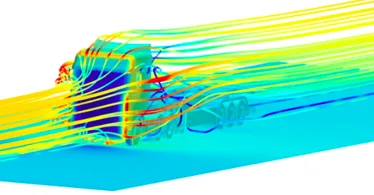
    4. CFD meshing to BMW M6 Model inside Wind tunnelW04
      • In this module, you will be introduced to the BMW M6 model.
      • You will learn how to perform CFD meshing on a BMW M6 model.
      • The topics covered in this module are,
        • Advanced topology cleanup to define volumes
        • Variable surface meshing part by part
        • Solving quality failed elements as per quality criteria
        • Symmetry operation for surface and mesh elements
        • Wind tunnel creation
        • CFD meshing for wind tunnel
    5. Surface Wrap to an Automotive AssemblyW05
      • In this module, you will be introduced to three different automotive models: engine, transmission, and gearbox.
      • You will learn how to perform surface wrap on an automotive assembly for CFD analysis of the outer flow.
      • The topics covered in this module are,
        • Geometry cleanups for the surface wrap.
        • Merging of different models into one GUI.
        • Surface wrapping for an assembly.
  7. 07Automation using TCL/TK for HyperMesh12 modules
    1. Get to know your toolsW01
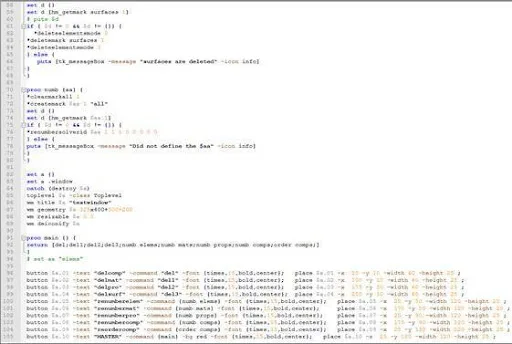
      • In this module, you will learn HyperMesh GUI, what is TCL compiler and hands-on practice of the TCL commands in Notepad++
        • HyperMesh GUI overview
        • TCL compilers
        • Notepad ++
        • “Hello World” TCL code
    2. Let’s learn a new languageW02
      • In this module, you will learn TCL commands like loops, arrays and how TCL is linked with HyperMesh
        • Looping structures
        • Array manipulation
        • TCL wiki
        • HyperMesh and TCL linkage
    3. Dissecting HyperMesh using TCL commandsW03
      • In this module, you will learn several commands and how they can be used in HyperMesh to perform operations
        • “ * ” and “hm_” commands
    4. Let’s build the GUIs with TKW04
      • In this module, you will learn how to build a GUI using TK for the TCL command used in HyperMesh
        • Introduction to TK
        • Creating TK popup box
        • Creating TK buttons
        • Creating TK input boxes
    5. Problem of normalW05
      • In this module, you will be able to understand the problem of normals in pre-processing and how it will affect the results in a simulation. You will also learn how to automate to align the normal in a few quick mouse clicks.
        • Element normals and their significance
        • Fixing normals: code vs. standard
    6. Let’s take care of “zero”W06
      • In this module, you will learn how to handle a null case when you write a code in HyperMesh to automate a process
        • Handling null cases
        • Delete displayed
        • Delete empty
        • Isolate displayed
    7. Let’s meet the CAE nightmare – Free edgesW07
      • In this module, you can understand the concept of free edges and how it will affect the simulation, and also you will be able to write a code to automate the fix for the Free edge issue that occurs during meshing.
        • Free edge and their significance
        • Detecting free edges using available tools
    8. CollectorsW08

      In this module, you will learn the significance of a collector, property card, and material card along with a manual method to assign them. Once you understand that you will also be writing code to automate the process.

      • Different collectors and prop and material assignment
      • Renaming- as per thickness
    9. Auto reflectW09
      • In this module, you learn the importance of Reflect command for the symmetrical models along with the manual renaming of the components and their material and property cards. Once you understand that this method is time consuming and tiring, you will also learn how this can be automated with a few lines of codes.
        • Explain the physics
        • Explain procedure
        • CAD manipulation using TCL
    10. The importance of orderW10
      • In this module, you will understand the significance of numbering in a model for nodes, elements, components, sets, etc., and learn how to automate them with learn the code and its logic
        • Creating ordered sets
        • “Remembering” the selection order
        • Midline generation
    11. Element Quality CheckW11
      • In this module, you will understand the importance of mesh quality. You will also understand the importance of automating this process
        • Quality criteria check
        • How to highlight these elements
        • Popup and report generation
    12. MiscellaneousW12
      • In this module, you will learn how to code to automate the part list and how to read and understand the Userpage.mac
        • Auto part list
        • Userpage.mac understanding
        • Automatic deck setup
Industry projects

11 projects
you'll ship.

Our projects are designed by experts in the industry to reflect industry standards. By working through our projects, Learners will gain a practical understanding of what they will take on at a larger-scale in the industry. In total, there are 11 Projects that are available in this program.

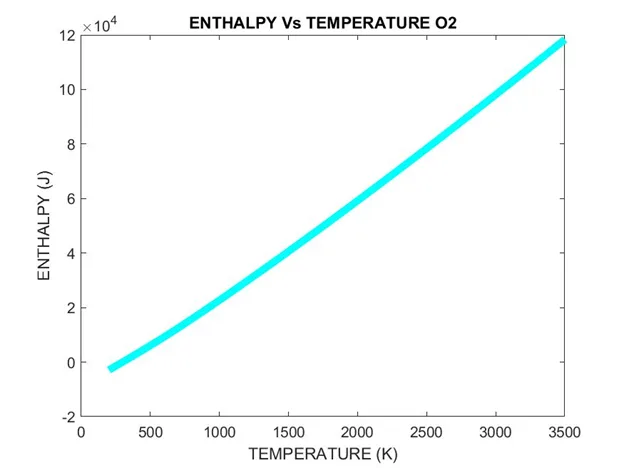
Extracting Data from NASA Thermo.dat File
MATLAB for Mechanical Engineers

Extracting Data from NASA Thermo.dat File

Learners are required to write a code that can read the NASA-II polynomial file and calculate thermodynamic parameters. They will have to extract the data from the NASA Thermo.dat …

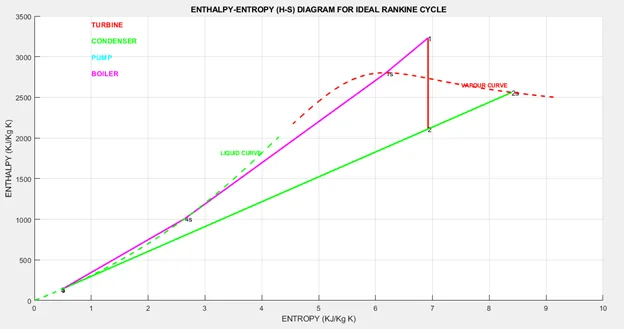
Extracting Steam Properties using Rankine Cycle Simulator
MATLAB for Mechanical Engineers

Extracting Steam Properties using Rankine Cycle Simulator

Learners are required to use the XSteam library file to determine the properties of steam under various conditions. They will have to find the Enthalpy and Entropy at various state…

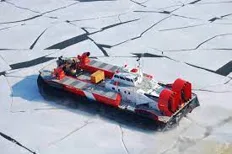
Breaking Ice with Air-Cushion Vehicle
Python for Mechanical Engineers

Breaking Ice with Air-Cushion Vehicle

In this project, you will learn to use the Newton-Raphson method. Here, you'll understand the effects of using a relaxation factor and learn how to use plots and tables to visualiz…

Data Analysis
Python for Mechanical Engineers

Data Analysis

In this project, you will learn how to manipulate the data from a given text file and create plots for different variables based on user input.

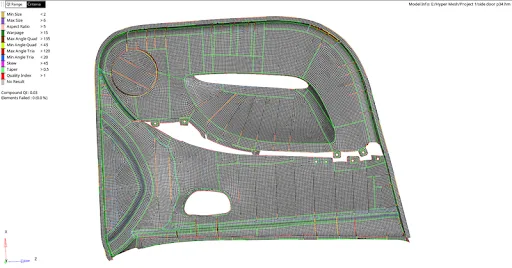
Meshing of Door Panel
HyperMesh for FEA Plastic and Sheet Metal Applications

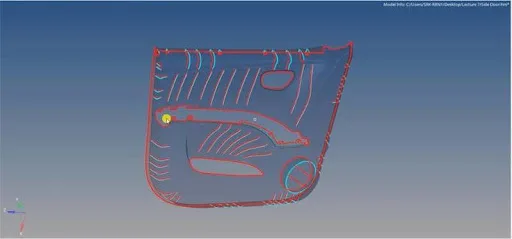
Meshing of Door Panel

In this project, the student will mesh the door panel under the given quality criteria. They should capture all the features perfectly.

Meshing of Car Spare Tyre Floor Panel
HyperMesh for FEA Plastic and Sheet Metal Applications

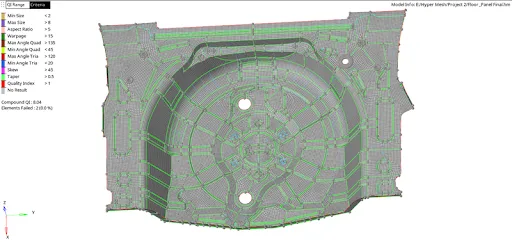
Meshing of Car Spare Tyre Floor Panel

In this project, the student will mesh the floor panel under the given quality criteria. They should mesh the whole component and capture all the features perfectly.

Modeling of an Automotive IP Trim Component
Preprocessor for Structural Analysis using ANSA

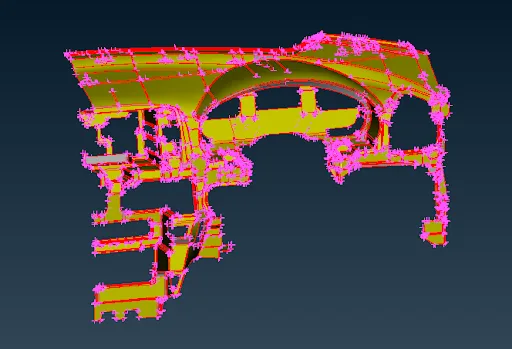
Modeling of an Automotive IP Trim Component

In this project, students will be provided with an IP substrate component and asked to model the same.

Modeling of an Automotive Suspension Assembly
Preprocessor for Structural Analysis using ANSA

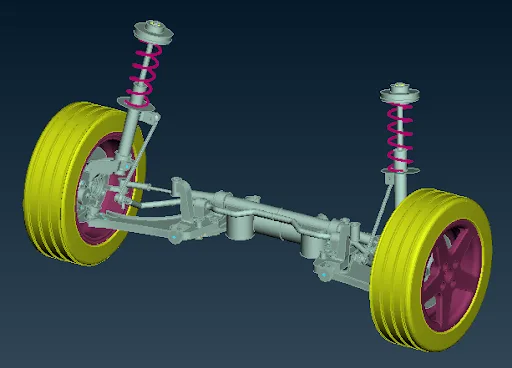
Modeling of an Automotive Suspension Assembly

In this project, the students will model the entire automotive suspension assembly and check for connections.

Master Utility Creation
Automation using TCL/TK for HyperMesh

Master Utility Creation

In this project, you will be creating a Master GUI using TK. This “Master” utility can then be used by the attendees to access any of the macros in the future as needed.

Model Report in HyperMesh
Automation using TCL/TK for HyperMesh

Model Report in HyperMesh

In this project, the students will generate a “Model Report” in excel by asking HyperMesh to write a file containing the necessary inputs.

CFD meshing to a Truck Model inside a wind tunnel
Advanced CFD Meshing using ANSA

CFD meshing to a Truck Model inside a wind tunnel

In this project, the students will perform CFD meshing to a truck model inside a wind tunnel using ANSA.

Placements

3 learners placed
from this program.

Companies
3
Median CTC
3 LPA
20223 LPA
XitaDel
Trainee Engineer

Sudheer Sk
20223.5 LPA
Expleo group
GET - Fea Trainee

Akash M
20213 LPA
Blum novotest
Application Engineer

Sasi Kumar Vs
Fee

One fee.
Everything included.

Become job ready with our comprehensive industry focused curriculum for freshers & early career professionals

Premium
₹2,75,000
Inclusive of all chargesEMI from ₹14,375/month
  • Career Service Assurance
  • Personalized Career Services Mentorship
  • 1 Year Access
  • Personalized Page
  • Live Individual & Group Sessions
  • Personalized & Hands-On
  • Job-Oriented Industry Relevant Curriculum
Check eligibility →
FAQ

Questions,
answered.

What is the benefit of enrolling in this course?

Successful completion of the course will allow you to have the edge over your peers in the industry. Additionally, it will enable you to brush up on your technical skills and polish your resume for improving your job prospects.

Who are the instructors for the course?

All the instructors for the course are skilled technicians, academicians, and industry experts.

Which industries employ FEA and CFD certificate, course holders?

Although you can get a job in various engineering fields, your best prospects are to start a career in R&D or product development.

What is the typical salary of an engineer with a Post Graduate in Automation and Pre-Processing for FEA and CFD Analysis?

The finite element analysis online course will let you earn an annual salary between Rs 10 lakh to 50 lakhs. A lot depends on your skills and relevant experience.

Who can apply for this Post Graduate Program in Automation and Pre-Processing for FEA and CFD Analysis?

The minimum qualification required to enroll in this post graduate program is a bachelor’s degree in mechanical, aerospace, or automotive engineering. Students currently pursuing their graduation are also eligible to sit for this course.

Next step

Not sure it's
the right fit?

A counsellor will walk you through the syllabus, projects and fee options — and tell you honestly if another course suits you better.

Get the syllabus + a call back

We'll email the full syllabus and call within one working day.

By submitting you agree to our Terms and Privacy Policy.

Call usEnquire

Talk to a career counsellor

Free 20-minute call. We'll map the right course to where you want to work.

By submitting you agree to our Terms and Privacy Policy.