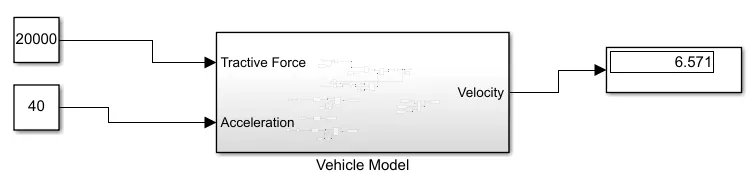
Week 7 Challenge
The vehicle parameters for modeling in MATLAB/Simulink is as follows
fr = coefficient of rolling resistance =0.015
g = gravitational acceleration=9.81
M = vehicle mass=1910.2kg
Q = air density=1.29
Cx = aerodynamic drag coefficient=0.4170
A = frontal surface area of the vehicle=2.86
The simulation is divided into four sections
FIrst calculating the velocity with given acceleration and tractive force and resistances
second calculte the Rolling Resistsnce
third Calculate the Aerodynamic Resistnce
fourth Calculate the Gradient Resistance
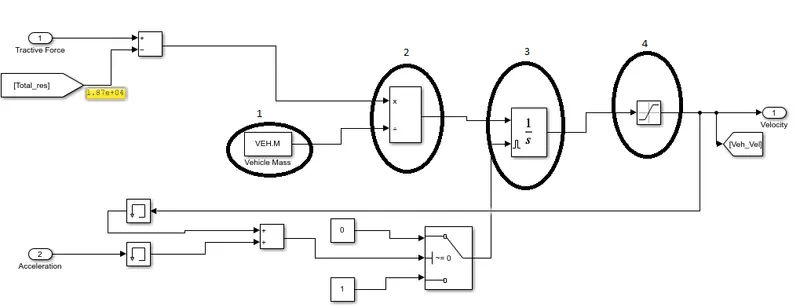
The velocity is calulted by acceleration. According to F=Ma
a=F/M
so, In above fig, (2) represents the mulplication and divide block which is used to calculate the velocity from that.
The integration block is used for velocity calculation. But the result has to be reset externally according to velocity and accelration. The memory block is used for delay to avoid the data clash betwwen input and result.
Finally, the saturation block is used for limiting the output from o to inf.
2. Calculation of rolling resistance force:

To avoid the multible blocks for formuation mathematical equations, MATLAB function which exists in User defined blocks. The code is given as follows
function y = fcn(u)
M=1.910300000000000e+03;
g=9.81;
mu=0.015;
y = M*g*mu*cos(u);
This output of the function again compared for positive value. other wise it has to zero.
3. Aerodynamic Resistive force:
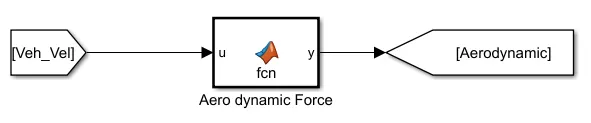
function y = fcn(u)
del=1.29;
Af=2.86;
Cd=0.417;
y = 0.5*del*Af*Cd*u^2;
4. Gradient resistive force:

function y = fcn(u)
M=1910.3;
g=9.81;
y = M*g*sin(u);
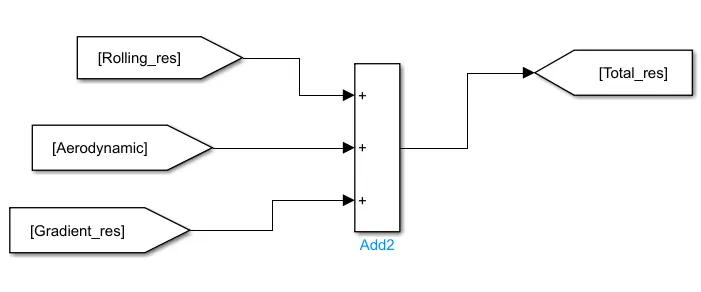
Finally, the block is developed as Vehicle Model.