Week 2- 2R Robotic Arm Challenge
2R Robotic Arm
Aim : Write a program in MATLAB to simulate the forward kinematics of a 2R Robotic Arm.
Create an animation file of the plot.
Objective : Plot the graphical representation of different positions of 2R robotic arm and create an animation file of the plot.
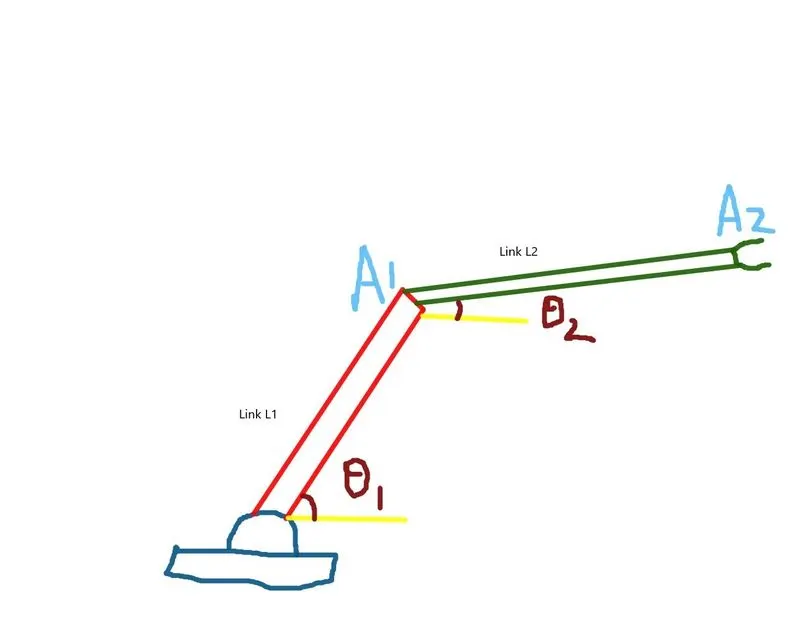
There are 2 links in 2R robotic arm (L1,L2), 1 joint(A1), 1 manipulator(A2).
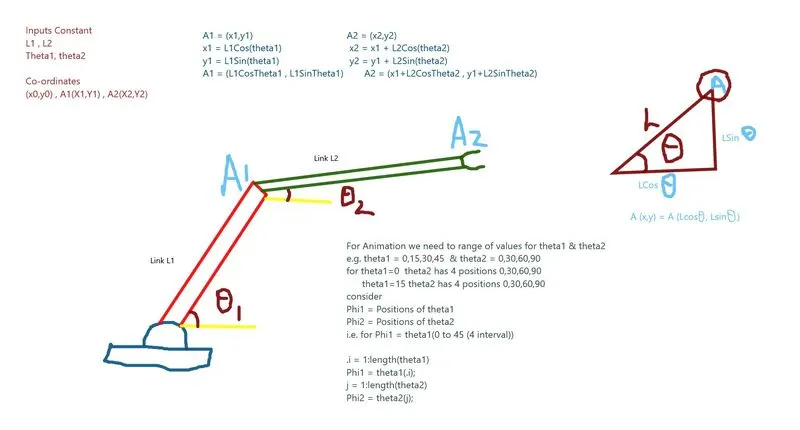
For Plot the graphical representation of different positions of 2R robotic arm we have to determine positions of manipulator A2 (x2, y2).
Positions of manipulator A2(x2, y2) depends upon the position of
A1(x1, y1) , angle θ2 and link L2.
Position of A1(x1, y1) depends on angle θ1 and link L1.
Body of the content:
Programming Language: MATLAB
%forward kinematics of a 2R Robotic Arm%
clear all
close all
clc

%Inputs%
L1 = 1
L2 = 0.5

theta1 = linspace(0,45,4)
theta2 = linspace(0,90,10)

ct=1;

for i = 1:length(theta1)
    Phi1 = theta1(i);

    for j = 1:length(theta2)
        Phi2 = theta2(j);

        x0 = 0;
        y0 = 0;


        x1 = L1*cosd(Phi1);
        y1 = L1*sind(Phi1);

        x2 = x1 + L2*cosd(Phi2);
        y2 = y1 + L2*sind(Phi2);

        %Plotting

        plot([x0 x1],[y0 y1],[x1 x2],[y1 y2],'linewidth',3)
        axis([0 1.5 0 1.5])
        pause(0.2)

        M(ct) = getframe(gcf);
        ct = ct+1;

    end
end

movie(M)
videofile = VideoWriter('Robotic_Arm.avi','Uncompressed AVI');
open(videofile)
writeVideo(videofile,M)
close(videofile)
Program explanation:
L1 = 1 % Length of link 1 = 1mtr
L2 = 0.5 % Length of link 2 = 0.5mtr
Origin (x0,y0) = (0,0)
A1(x1,y1) = (L1*cosd(theta1) , L1*sind(theta1))
theta1 = linspace(0,45,4)
Values of theta1 = 0,15,30,45
theta2 = linspace(0,90,10)
Values of theta2 = 0,10,20,30,40,50,60,70,80,90
Now, for 1 value of theta1, other variables have multiple values.
For theta1 = 0 theta2 = 0,10,20,30,40,50,60,70,80,90
Now consider
Phi1 = different values of theta1
Phi2 = different values of theta2
for i = 1:length(theta1)
Phi1 = theta1(i);
for j = 1:length(theta2)
Phi2 = theta2(j);
x0 = 0;
y0 = 0;
x1 = l1*cosd(Phi1);
y1 = l1*sind(Phi1);
x2 = x1 + l2*cosd(Phi2);
y2 = y1 + l2*sind(Phi2);
% Plotting
Plot 2 arms
(X0 x1 to y0 y1) & another (x1 x2 to y1 y2)
plot([x0 x1],[y0 y1],[x1 x2],[y1 y2],'linewidth',3)
axis([0 1.5 0 1.5])
pause(0.2)
Put pause of 0.2 sec in between each position
For animation and save the video file :
M(ct) = getframe(gcf);
ct = ct+1;
pause(0.2)
end
end
movie(M)
videofile = VideoWriter(' Robotic_Arm.avi','Uncompressed AVI');
open(videofile)
writeVideo(videofile,M)
close(videofile)
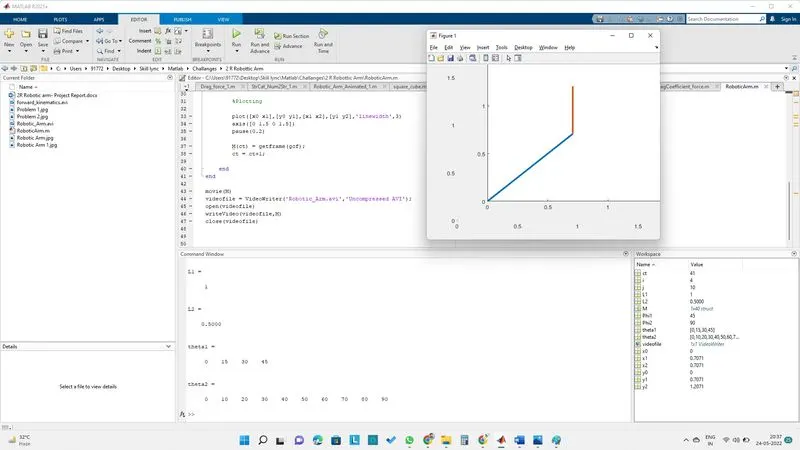
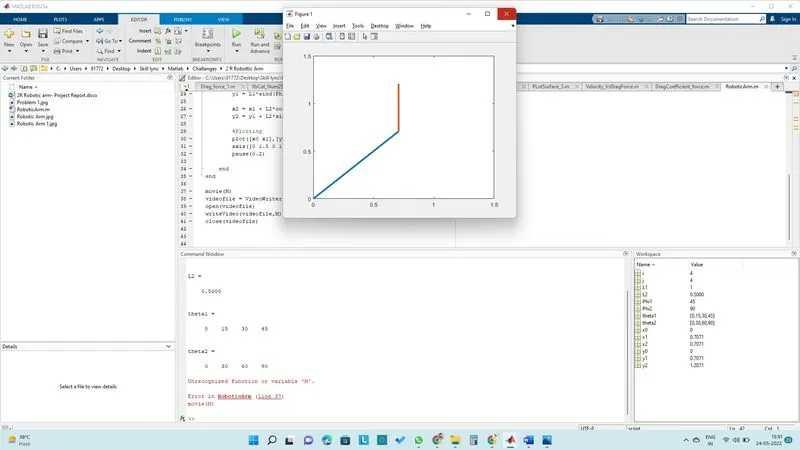
Output Plot Screenshot:
Video Link:
https://drive.google.com/file/d/1FwNOt-zpCc0M4RKQI-p3jAK7MElJBuvd/view?usp=sharing
Errors:
Error1: Forget to put “end” of “for” loop command
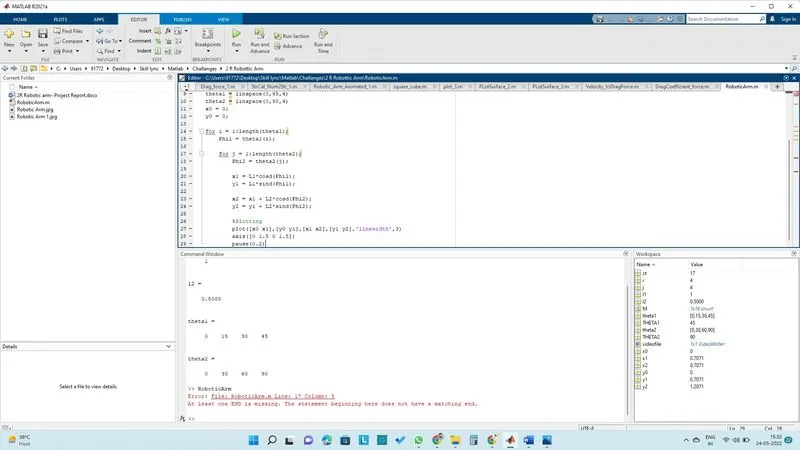
Error2: Typing error in movie name
Conclusions:
Robotic arm shows different positions for different values of angle theta1 & theta2.
We can change speed of animations by adding number of intervals in value of theta1 & theta2.
Word file link:
https://drive.google.com/file/d/1FwNOt-zpCc0M4RKQI-p3jAK7MElJBuvd/view?usp=sharing