Project
AIM
To carry out a system-level simulation of an all-terrain vehicle.
INTRODUCTION
1. SIMULINK:
[1] Simulink is a MATLAB-based graphical programming environment for modeling, simulating, and analyzing multidomain dynamical systems. Its primary interface is a graphical block diagramming tool and a customizable set of block libraries. It offers tight integration with the rest of the MATLAB environment and can either drive MATLAB or be scripted from it. Simulink is widely used in automatic control and digital signal processing for multidomain simulation and model-based design.
2. ALL TERRAIN VEHICLES (ATV):
[2] An all-terrain vehicle (ATV), also known as a light utility vehicle (LUV),a quad bike, or simply a quad, as defined by the American National Standards Institute (ANSI); is a vehicle that travels on low-pressure tires, with a seat that is straddled by the operator, along with handlebars for steering control. As the name implies, it is designed to handle a wider variety of terrain than most other vehicles. Although it is a street-legal vehicle in some countries, it is not street-legal within most states, territories, and provinces of Australia, the United States or Canada. By the current ANSI definition, ATVs are intended for use by a single operator, although some companies have developed ATVs intended for use by the operator and one passenger. These ATVs are referred to as tandem ATVs. The rider sits on and operates these vehicles like a motorcycle, but the extra wheels give more stability at slower speeds. Although most are equipped with three or four wheels, six-wheel models exist for specialized applications. Multiple-user analogues with side-by-side seating are called utility terrain vehicles (UTVs) or side-by-sides to distinguish the classes of vehicle. Both classes tend to have similar powertrain parts. Engine sizes of ATVs currently for sale in the United States (as of 2008 products) range from 49 to 1,000 cc (3.0 to 61 cu in)
3. BAJA SAE:
[3] Baja SAE is a Collegiate Design Series competition run by the Society of Automotive Engineers International (SAE International). Teams of students from universities all over the world design and build small off-road cars. The cars all have engines of the same specifications. As of 2018 the engine has been an unmodified Briggs & Stratton Model 19 Vanguard engine single-cylinder with a displacement of 305cc and power output of approximately 10 bhp (7.5 kW).
The goal in Baja SAE racing is to design, build and race off-road vehicles that can withstand the harshest elements of rough terrain. The vehicles used in Baja SAE racing are often similar in appearance to dune buggies.
4. CONTINUOSLY VARIABLE TRANSMISSION (CVT):
[4] A continuously variable transmission (CVT) is an automatic transmission that can change seamlessly through a continuous range of gear ratios. This contrasts with other transmissions that provide a limited number of gear ratios in fixed steps. The flexibility of a CVT with suitable control may allow the engine to operate at a constant RPM while the vehicle moves at varying speeds. CVTs are used in automobiles, tractors, motor scooters, snowmobiles, and earthmoving equipment. The most common type of CVT uses two pulleys connected by a belt or chain, however, several other designs have also been used at times.
The most common type of CVT uses a V-belt which runs between two variable diameter pulleys. The pulleys consist of two cone-shaped halves that move together and apart. The V-belt runs between these two-halves, so the effective diameter of the pulley is dependent on the distance between the two-halves of the pulley. The V-shaped cross section of the belt causes it to ride higher on one pulley and lower on the other, therefore the gear ratio is adjusted by moving the two sheaves of one pulley closer together and the two sheaves of the other pulley farther apart.
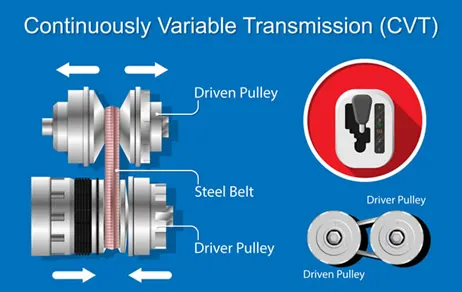
As the distance between the pulleys and the length of the belt does not change, both pulleys must be adjusted (one bigger, the other smaller) simultaneously in order to maintain the proper amount of tension on the belt. Simple CVTs combining a centrifugal drive pulley with a spring-loaded driven pulley often use belt tension to affect the conforming adjustments in the driven pulley. The V-belt needs to be very stiff in the pulley's axial direction in order to make only short radial movements while sliding in and out of the pulleys. The pulley-radial thickness of the belt is a compromise between maximum gear ratio and torque. Steel reinforced v-belts are sufficient for low-mass low-torque applications like utility vehicles and snowmobiles but higher mass and torque applications such as automobiles require a chain. Each element of the chain must have conical sides that fit the pulley when the belt is running on the outermost radius. As the chain moves into the pulleys the contact area gets smaller. As the contact area is proportional to the number of elements, chain belts require many small elements. A belt-driven design offers approximately 88% efficiency, which, while lower than that of a manual transmission, can be offset by enabling the engine to run at its most efficient RPM regardless of the vehicle's speed. When power is more important than the economy, the ratio of the CVT can be changed to allow the engine to turn at the RPM at which it produces the greatest power.
OBJECTIVES
- To carry out a system-level simulation of an all-terrain vehicle and understand the simulated model.
PROBLEM SPECIFICATION AND SOLVING:
PROBLEM STATEMENT I:
To carry out a system-level simulation of an all-terrain vehicle and understand the simulated model. A link provided below gives the necessary information on the model. It is required to prepare a technical report explaining the model properties & comments on the results.
https://www.mathworks.com/matlabcentral/fileexchange/70576-baja-all-terrain-vehicle-atv-model
EXPLANATION AND OBSERVATION:
- Initially, the link given guides us to a YouTube tutorial that clearly explains the model used to design a BAJA ATV. The model can be downloaded in the MATLAB under the name “BAJA All-Terrain Vehicle (ATV) Model”. After downloading the model, it can be opened as a Simulink file.
- The layout of the BAJA ATV Simscape model is as follows:
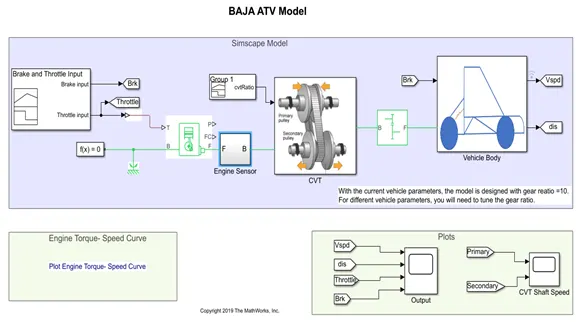
- The inputs to the BAJA ATV are Brake and Throttle which are given through an input block named signal builder.
- The variation of the throttle and the application of the brake are given in the form of a graph as follows:
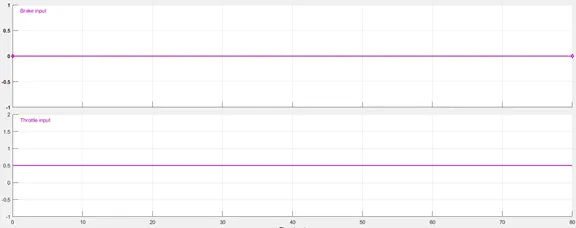
- The brake application value remains zero at all the time intervals upto 80 seconds(which is the total time interval of running the simulated Simscape model).
- The Throttle input remains at 0.5 for the time interval of 80 seconds.
- This is a suggested layout, and the user can modify based on one’s requirement for evaluating the vehicle. One input value i.e., brake value is set to a ‘GoTo’ block whose information is used in the plotting section. The throttle input is the input to the vehicle and therefore, it is transferred to the plotting section to evaluate the results thoroughly.
- As the input to the engine, the throttle value is taken. Since the value is a Simulink signal, it is needed to be converted into a Physical signal using a Simulink-PS converted and is fed as an input to the Generic Engine block.
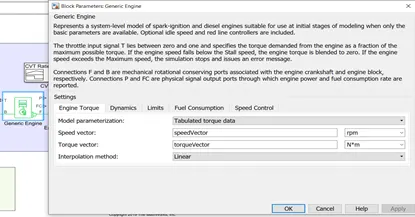
GENERIC ENGINE BLOCK: Internal combustion engine with throttle and rotational inertia and time lag. The Generic Engine block represents a general internal combustion engine. This block is a suitable generic engine for spark-ignition and diesel. Speed-power and speed-torque parameterizations are provided. A throttle physical signal input specifies the normalized engine torque. Optional dynamic parameters include crankshaft inertia and response time lag. A physical signal port outputs the engine fuel consumption rate based on the fuel consumption model that you choose. Optional speed and redline controllers prevent engine stall and enable cruise control. [5]
Representation:
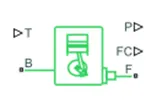
- The Generic Engine block takes a physical signal as an input. Therefore, the throttle input is converted into a Physical signal.
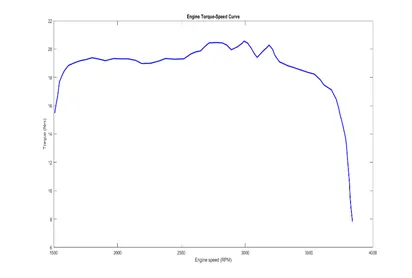
- The Generic Engine block asks the user to feed the speed vector (rpm), torque vector (N*m). This can be done either by feeding numerical values or graphical values. If the values are in the graphical form i.e., in the form of a plot, these can also be fed to the Generic Engine block by extracting the data from the image which can be performed by a File Extension called ‘GRABIT’ and can be fed to the block.
- The speed and torque data that is considered is as follows. The data of the engine torque-speed variation is taken from real time BAJA ATV.
GRABIT: GRABIT Extracts data points from an image file. GRABIT starts a GUI program for extracting data from an image file. It is capable of reading in BMP, JPG, TIF, GIF, and PNG files (anything that is readable by IMREAD). Multiple data sets can be extracted from a single image file, and the data is saved as an n-by-2 matrix variable in the workspace. It can also be renamed and saved as a MAT file. [6]
Following steps should be taken:
- Load the image file.
- Calibrate axes dimensions. You will be prompted to select 4 points on the image.
- Grab points by clicking on points. Right-click to delete a point. Image can be zoomed during this stage.
- Multiple data sets will remain in memory so long as the GUI is open. Variables can be renamed, saved to file, or edited in Array Editor.
- A Solver Configuration and a Mechanical Rotational Reference are connected to the B port of the generic engine.
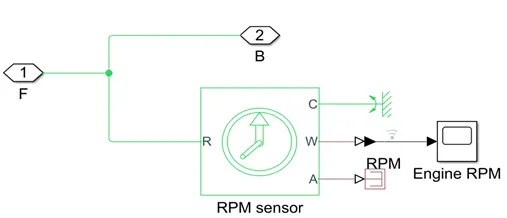
- To the F port of the generic engine, an engine sensor subsystem is connected, and this subsystem constitutes an Ideal rotational mechanical sensor which takes an input from the Generic engine (has only one input), PS terminator to output port A(amplitude) of the sensor, Scope of Engine ROM to output port W(speed) and a Mechanical Rotational Reference to the port C(casing).
- The speed output from the ideal rotational mechanical sensor is in rpm and is a Physical signal. To display the results of the speed (rpm), the scope takes in a Simulink signal as an input. Therefore, a PS-Simulink converter is used to transmit the speed signal from W port to the scope.
- In this subsystem, the port F acts as an input port and the port B acts as an output port.
- The layout of the subsystem is as follows:
- The port B of the Engine Sensor subsystem is connected to CVT subsystem. There are two inputs to the CVT subsystem. One input from the port B of Engine sensor and the other being CVT Ratio.
- The CVT Ratio is a signal builder block. The gear ratio is given as follows:
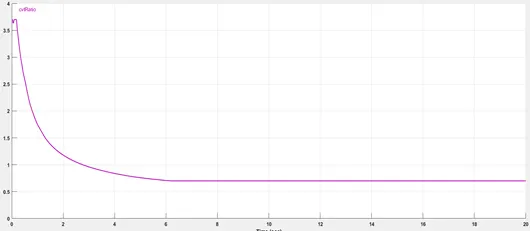
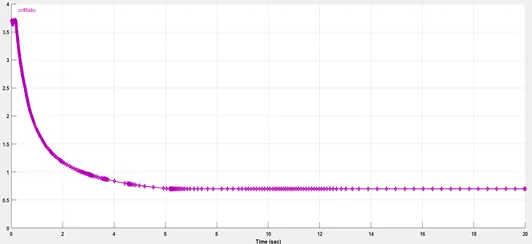
- CVT ratio is a defined curve varying from concavity to convexity and ending up linear for a certain time interval. The curve of CVT is thoroughly given using a signal builder with all the points intact as shown in the figure above. The maximum value of CVT is 3.7 at time 0.0999464 sec and the minimum is 0.7 at 20 sec.
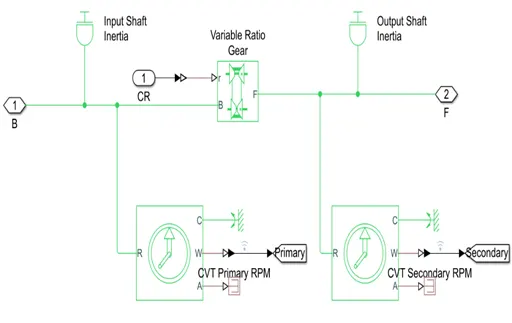
- The CVT subsystem consists of two inertia blocks representing input and output shaft. A variable ratio gear block is connected such that the output shaft rotates in the same direction as that of the input shaft.
- The variable ratio gear box has two input ports. The input port ‘r’ takes in physical input while the other input is from the port B of the Engine Sensor subsystem.
VARIABLE RATIO TRANSMISSION: Dynamic gearbox with variable and controllable gear ratio, transmission compliance, and friction losses. The Variable Ratio Transmission block represents a gearbox that dynamically transfers motion and torque between the two connected driveshaft axes, base, and follower. Ignoring the dynamics of transmission compliance, the driveshafts are constrained to corotate with a variable gear ratio that you control. The user can choose whether the follower axis rotates in the same or opposite direction as the base axis. If they rotate in the same direction, ωF and ωB have the same sign. If they rotate in opposite directions, ωF and ωB have opposite signs. Transmission compliance introduces internal time delay between the axis motions. Therefore, unlike a gear, a variable ratio transmission does not act as a kinematic constraint. One can also control torque loss caused by transmission and viscous losses. B and F are rotational conserving ports representing, respectively, the base and follower driveshafts. It is necessary for the user to specify the unitless variable gear ratio gFB(t) as a function of time at the physical signal input at port r. If the signal value becomes zero or negative, the simulation stops with an error. [7]
Representation:

- Two Ideal rotational motion sensors are connected one between input shaft inertia block and the variable ratio transmission block and the other between the output shaft inertia block and the variable ratio transmission block. The angular velocities from each are taken as primary and secondary speed respectively. The velocities are converted into Simulink signals using PS-Simulink converter and are fed to a ‘GoTo’ blocks named ‘Primary’ and ‘Secondary’ respectively.
- The port A of each of the sensors is connected to PS Terminator whilst the port C (casing) is connected to mechanical rotational reference. The output shaft inertia block is connected to the output of the variable ratio transmission that leads to the output port 2 named as ’F’.
- The CR block in the subsystem indicates the Gear ratio input. The layout of the CVT subsystem is as follows:
- The output from the CVT subsystem is connected to the input of a Simple Gear block.
SIMPLE GEAR: Simple gear of base and follower wheels with adjustable gear ratio, friction losses, and triggered faults. The Simple Gear block represents a gearbox that constrains the connected driveline axes of the base gear, B, and the follower gear, F, to corotate with a fixed ratio that you specify. You choose whether the follower axis rotates in the same or opposite direction as the base axis. If they rotate in the same direction, the angular velocity of the follower, ωF, and the angular velocity of the base, ωB, have the same sign. If they rotate in opposite directions, ωF and ωB have opposite signs. [8]
Representation:
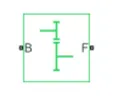
- The output shaft is set to rotate in the same direction as the input shaft in the Simple Gear block and the follower to base teeth ratio is set to 10.
- The output from the Simple Gear is connected to another subsystem ‘Vehicle Body’. The vehicle mass, number of wheels per axle etc can be fed to the Vehicle body block.
- This subsystem consists of a Vehicle Body block which is connected to a system of front and rear wheels. The wheels are represented by tire blocks(Magic Formula) which are inbuilt.
VEHICLE BODY BLOCK: Two-axle vehicle with longitudinal dynamics and motion and adjustable mass, geometry, and drag properties. The Vehicle Body block represents a two-axle vehicle body in longitudinal motion. The vehicle can have the same or a different number of wheels on each axle. For example, two wheels on the front axle and one wheel on the rear axle. The vehicle wheels are assumed identical in size. The vehicle can also have a center of gravity (CG) that is at or below the plane of travel. The block accounts for body mass, aerodynamic drag, road incline, and weight distribution between axles due to acceleration and road profile. Optionally include pitch and suspension dynamics. The vehicle does not move vertically relative to the ground. The block has an option to include an externally-defined mass and an externally-defined inertia. The mass, inertia, and center of gravity of the vehicle body can vary over the course of simulation in response to system changes. [9]
Representation:
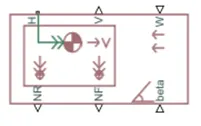
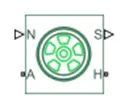
TIRE (MAGIC FORMULA) BLOCK: Tire with longitudinal behavior given by Magic Formula coefficients. The Tire (Magic Formula) block models a tire with longitudinal behavior given by the Magic Formula, an empirical equation based on four fitting coefficients. The block can model tire dynamics under constant or variable pavement conditions. The longitudinal direction of the tire is the same as its direction of motion as it rolls on pavement. This block is a structural component based on the Tire-Road Interaction (Magic Formula) block. To increase the fidelity of the tire model, you can specify properties such as tire compliance, inertia, and rolling resistance. However, these properties increase the complexity of the tire model and can slow down simulation. Consider ignoring tire compliance and inertia if simulating the model in real time or if preparing the model for hardware-in-the-loop (HIL) simulation. [10]
Representation:
- The system of the vehicle body is well established as shown below:
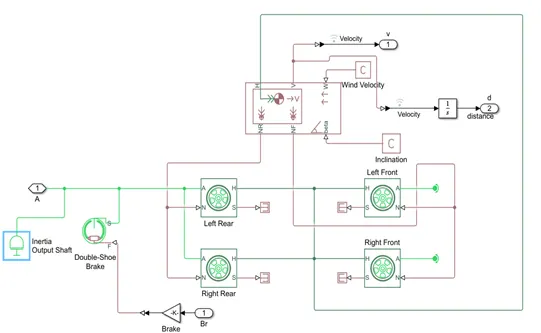
- The Vehicle Body subsystem has break as an input from the input mentioned in the beginning of the program. The output from this is taken into ‘GoTo’ block under the name ‘Vspd’.
- A scope is created to compare the data from Vspd, distance, throttle and break. Another scope is used to compare the data from primary and Secondary CVT shaft speed.
- This model cannot change the values of break and throttle like in the real time scenario. Therefore, a dashboard is included in a modified model to permit the user to achieve more realistic performance of the BAJA ATV.
PROBLEM STATEMENT iI:
Understanding the Simulink model of BAJA ATV which is modified based on the data obtained from the problem statement I.
EXPLANATION AND OBSERVATION:
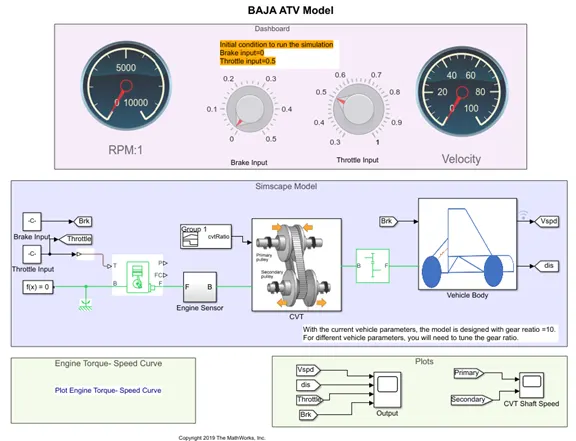
- The modified BAJA ATV model is that there is an addition of a Dashboard that enables the user to vary the values of brake and throttle accordingly.
- There is also a pictographic depiction of speed in RPM and the velocity in speedometer.
- A scope is created to compare the data from vspd, throttle and break. Another scope is used to compare the data from primary and Secondary CVT shaft speed.
- The following is the layout with the dashboard:
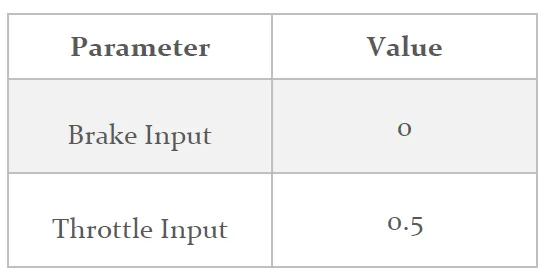
- The initial conditions to run the simulation are specified as follows:
- The above layout is indicative of the state that the simulation is under OFF conditions unless the simulation is ran.
- There is not much difference in the layout of internal subsystems as compared to the previous model according to the Problem Statement I.
- The inputs vary from the previous model. In the previous inputs are created using signal builder and, in this case, the inputs are obtained from the Dashboard where in the user can change the values even during the simulation. This stands a case for a more realistic input for the vehicle to study the performance.
- Constants are used to connect to the ‘GoTo’ block. A constant ‘0’ is assigned to brake. While, constant 0.5 is assigned to the throttle which is the default value.
- A scope is created to compare the data from Vspd, distance, throttle, and break. Another scope is used to compare the data from primary and Secondary CVT shaft speed.
RESULTS
- The layout of the working of the BAJA ATV according to Problem Statement I:
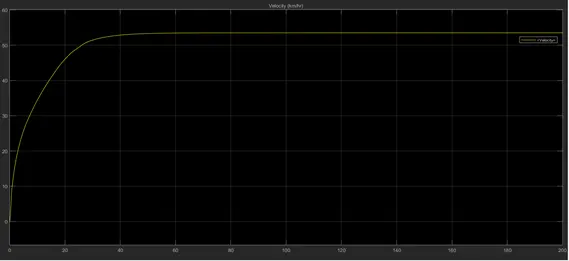
Figure 1. Variation of the Velocity (km/hr)
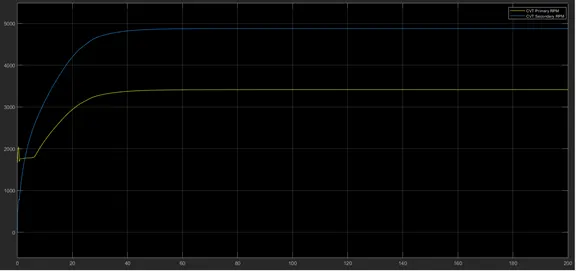
Figure 2. Blue line is Primary CVT whereas yellow line is Secondary CVT.
From the figure 1., the maximum velocity obtained is in the order of 54km/hr and is seemed to be achieved around 45 seconds and remains constant upto 200 sec. The minimum velocity obtained is the starting velocity which is 0 km/hr at time 0 sec. The primary CVT achieved more value than the secondary CVT. Primary CVT starts at 0 while the secondary CVT starts somewhere near 1600 units. Although initially the secondary CVT has shown some signs of disturbance, eventually it runs as a smooth parabola after certain time period. The primary CVT is a smooth parabola with initial part being close to linear curve as shown in the Figure 2.
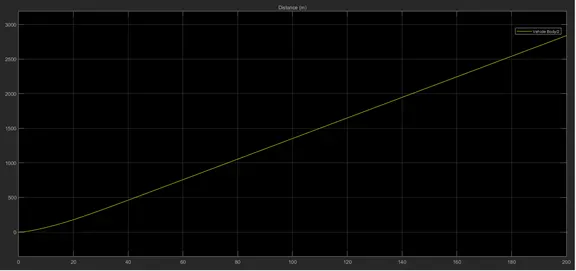
Figure 3. Distance
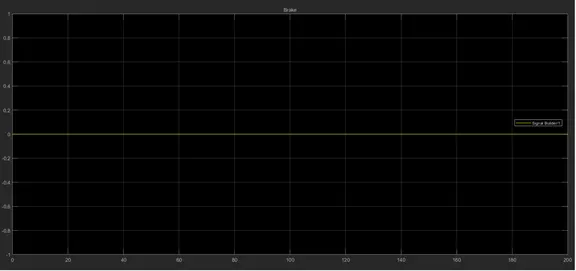
Figure 4. Brake
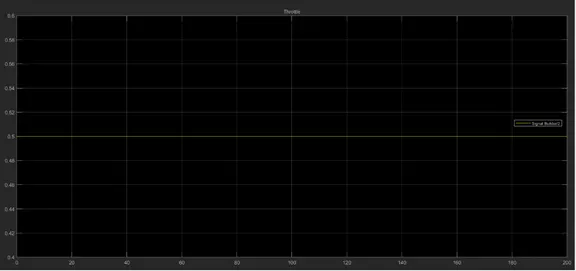
Figure 5. Throttle
As familiar with the model’s initial velocity, the initial distance covered by the body os 0m while distance covered by the body (almost) linearly increases and reaches the maximum value in the order of 2700m at the end of 200 sec as shown in the Figure 3. As can be observed from Figures 4 and 5, the brake and the throttle values in the input have been constant and they have been assigned values of 0 and 0.5 respectively and therefore, it is well suited to obtain a line parallel to X-axis or the time axis, which is fitting.
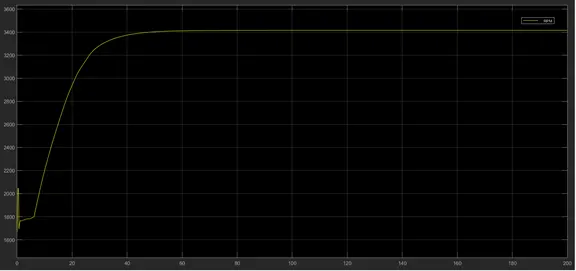
Figure 6. Engine Speed
From the Figure 6., the engine speed undergoes disturbance in the initial time interval of the order 7 sec. and after that the speed linearly increases upto certain time interval and beyond that it becomes a curve and then attains a constant value. The engine speed begins around 1650 rpm and achieves maximum value of 3210rpm.
- The results of the gear logic system are shown below:
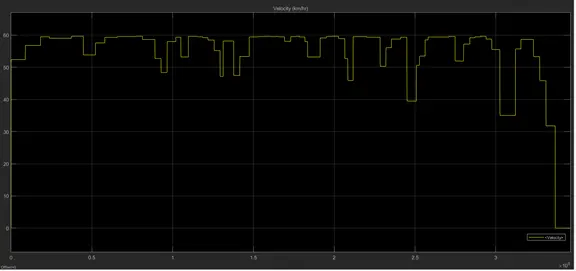
Figure 7. Variation of velocity (km/hr)
From the Figure 7., it can be observed that the velocity variation is not that smooth as seen from the earlier case of Figure 1. The maximum velocity obtained is in the order of 59 and the minimum velocity is 0. This variation is due to the changing of the brake and throttle due to the convenience of the dashboard.
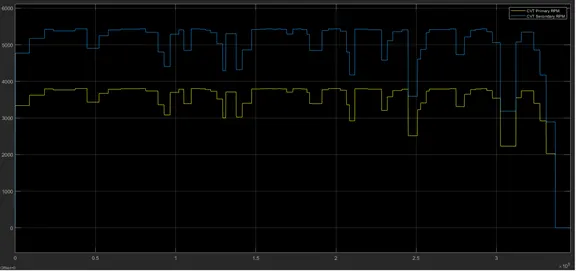
Figure 8. Blue line is Primary CVT whereas yellow line is Secondary CVT.
From the Figure 8., it can be observed like in the case of Figure 2, the primary CVT value is greater than that of secondary CVT value. The primary CVT originates at 0 while the secondary CVT originates around 3300. The step variations observed are due to changing values of input brake and throttle.
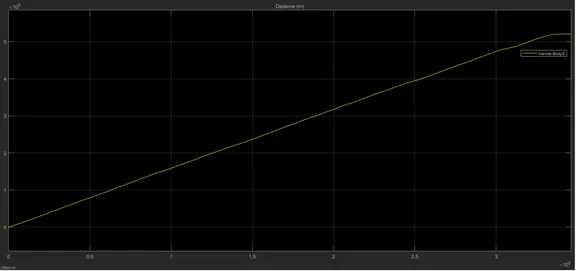
Figure 9. Distance
From the above Figure 9., the distance curve starts initially with the value of 0m and increases linearly till 3 x 10⁵ seconds. Beyond which point of inflation can be observed. The Figure 10., depicts the variation of the engine speed as the input values of brake and throttle keep varying. The maximum engine speed is around 3700 rpm while the minimum lies at 0 rpm. The engine speed begins at around 1700 rpm.
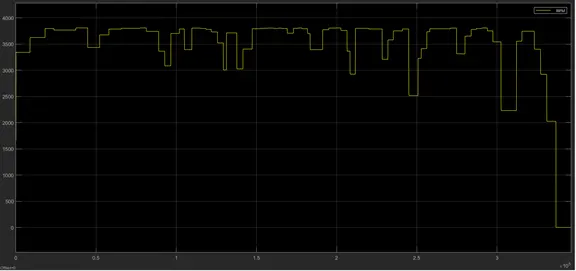
Figure 10. Engine Speed
As this model gives the facility to change the input values of brake and the throttle unlike the previous model as described by the problem Statement I, the Figures 11 and 12 represent the variation in the application of brake and throttle throughout the simulation time.
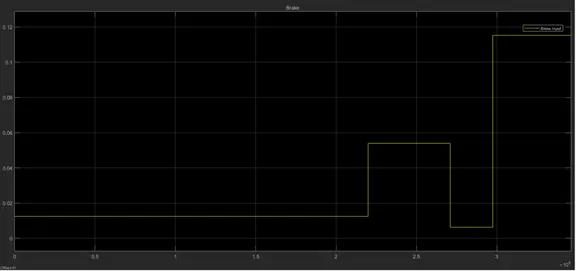
Figure 11. Brake
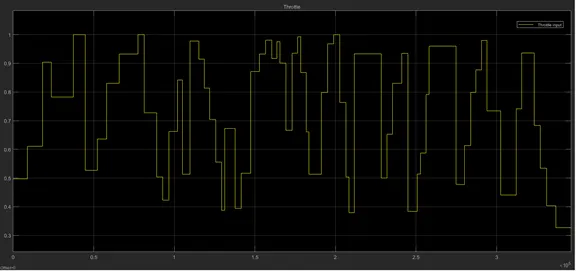
Figure 12. Throttle
CONCLUSION
The required problems have been solved and justified with appropriate results. The working of a BAJA ATV Simscape model is thoroughly understood. The important part of this layout is that the model has inbuilt values of CVT that represent a more realistic performance of the ATV. If this could not be possible, the values of CVT can be obtain from a lookup table by feeding it the values of speed and CVT ratio. The speed can be obtained as a feed back signal from the vehicle body output which in a way has more control over the variation of CVT and the vehicle performance as mentioned in the tutorial video. In conclusion, the model can be modified further to make it more realistic. The effect of material used can also be determined.
BIBLIOGRAPHY
- https://en.wikipedia.org/wiki/Simulink#:~:text=Simulink%20is%20a%20MATLAB%2Dbased,customizable%20set%20of%20block%20libraries.
- https://en.wikipedia.org/wiki/All-terrain_vehicle
- https://en.wikipedia.org/wiki/Baja_SAE
- https://en.wikipedia.org/wiki/Continuously_variable_transmission
- https://in.mathworks.com/help/physmod/sdl/ref/genericengine.html#:~:text=Driveline%20%2F%20Engines%20%26%20Motors-,Description,a%20general%20internal%20combustion%20engine.&text=A%20throttle%20physical%20signal%20input,inertia%20and%20response%20time%20lag.
- https://in.mathworks.com/matlabcentral/fileexchange/7173-grabit?s_tid=srchtitle
- https://in.mathworks.com/help/physmod/sdl/ref/variableratiotransmission.html
- https://in.mathworks.com/help/physmod/sdl/ref/simplegear.html
- https://in.mathworks.com/help/physmod/sdl/ref/vehiclebody.html
- https://in.mathworks.com/help/physmod/sdl/ref/tiremagicformula.html