Week 4.1 - Genetic Algorithm
AIM: Write a code to optimize the stalagmite function and find the global maxima of the function. Plot the graphs for different studies to understand the behavior of the genetic algorithm and for Fmax vs no. of iterations.
OBJECTIVES:
- understand concepts of genetic algorithm
- write a code to optimize stalagmite function and find the global maxima of the function.
- make sure to get the same output even if it is made to run several times.
- plot graphs for different studies and for F maximum vs no. of iterations.
Stalagmite function: it is based on a type of rock formation that rises from the floor of a cave due to the accumulation of material deposited on the floor from ceiling drippings.
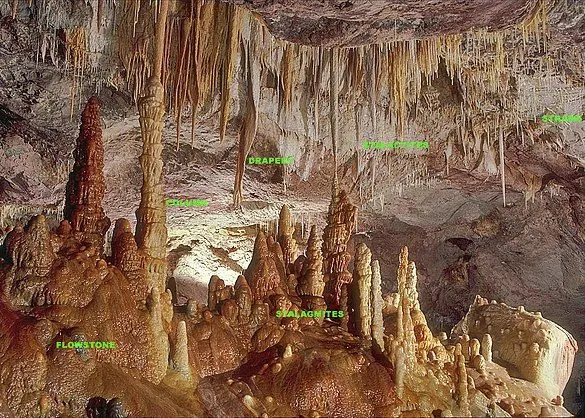
source: https://en.wikipedia.org/wiki/Stalagmite
the mathematical function of a stalagmite function is `f(x,y) = f_(1,x)*f_(2,x)*f_(1,y)*f_(2,y)`
`f_(1,x) = [sin(5.1*pi*x+0.5)]^6`
`f_(1,y) = [sin(5.1*pi*y+0.5)]^6`
`f_(2,x) = exp(-4ln(2)*((x-0.0667)^2/0.64))`
`f_(2,y) = exp(-4ln(2)*((y-0.0667)^2/0.64))`
function for stalagmite in MATLAB
function f = stalagmite(input_vector)
    x = input_vector(1);
    y = input_vector(2);
    f1x = [sin(5.1*pi*x + 0.5)]^6;
    f1y = [sin(5.1*pi*y + 0.5)]^6;
    f2x = exp(-4*log(2)*((x-0.0667)^2)/0.64);
    f2y = exp(-4*log(2)*((y-0.0667)^2)/0.64);

    f = -f1x*f1y*f2x*f2y;
end
in the function definition the negative sign is added to invert the stalagmite function
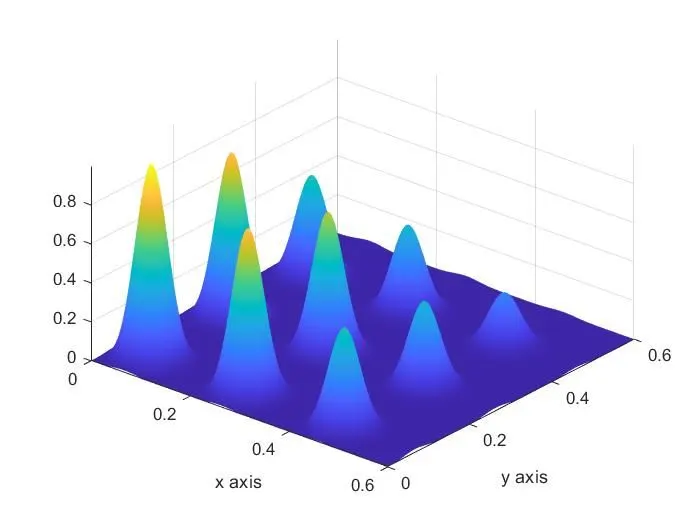
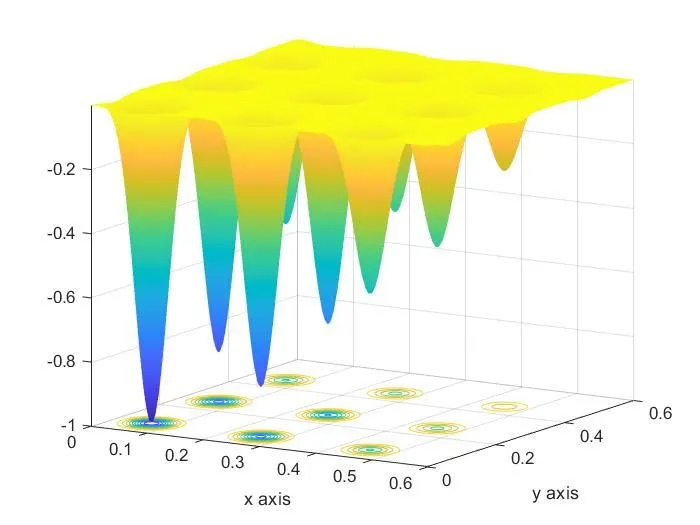
The first figure is without a negative sign and the second one is with a negative sign hence it is inverted.
Optimization
Engineers are often encountered with problems to identify a few appropriate design solutions and then deciding which one best meets the need of the client. This decision-making process is known as optimization.
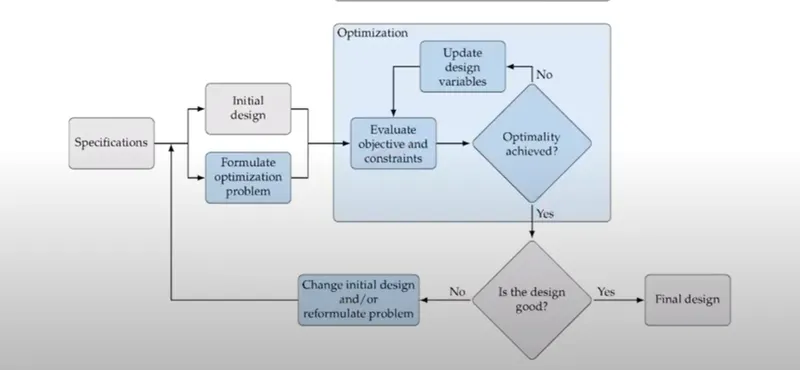
engineers, most of the time use optimization to get the best design parameters rather than using a brute force approach.
Genetic algorithm
The genetic algorithm is a method for solving both constrained and unconstrained optimization problems that are based on natural selection, the process that drives biological evolution. The genetic algorithm repeatedly modifies a population of individual solutions. At each step, the genetic algorithm selects individuals from the current population to be parents and uses them to produce the children for the next generation. Over successive generations, the population "evolves" toward an optimal solution.
there are 3 key principles that need to be in place for evolution to happen
Heredity: there must be a process in place by which children receive the properties of their parents.
Variation: there must be a variety of traits present in the population or a means with which to introduce variation.
Selection: there must be a mechanism by which some members of a population have the opportunity to be parents and pass down their genetic information and some do not. This is referred to as "survival of the fittest".
The basic layout of the genetic algorithm
Setup
Step 1: Initialize: Create a population of N elements, each with randomly generated DNA.
DRAW
Step 2: Selection: Evaluate the fitness of each element of the population and build a mating pool.
Step 3: Reproduction: Repeat N times
- Pick two parents with the probability according to the relative fitness.
- cross over - create a "child" by combining the DNA of these two parents
- mutation - mutate the child's DNA based on a given probability
- add the new child to a new population.
Step 4: replace the old population with the new population and return to step 2.
Function for accessing the stalagmite function
function [f] = get_stalagmite(x,y)

%creating a 2 dimensional mesh
[xx,yy] = meshgrid(x,y);

f = zeros(1,1); %for preallocation

%evaluating the stalagmite function
for i = 1:length(xx)
    for j = 1:length(yy)
        input_vector(1) = xx(i,j);
        input_vector(2) = yy(i,j);
        f(i,j) = stalagmite(input_vector);
    end
end

end
Main code for Optimization
clear
close all
clc

%input arrays
x = linspace(0,0.6,150);
y = linspace(0,0.6,150);

f = get_stalagmite(x,y);

num_cases = 50;
xopt = zeros(1,10);
yopt = zeros(1,10);
fopt = zeros(1,10);

%study 1-statistical behaviour
tic
for i = 1:num_cases
    [inputs, fopt(i)] = ga(@stalagmite,2);
    xopt(i) = inputs(1);
    yopt(i) = inputs(2);
end
study1_time = toc;

figure(1)
subplot(2,1,1)
hold on
surfc(x,y,f)
shading interp
plot3(xopt,yopt,fopt,'marker','o','markersize',5,'markerfacecolor','r')
title('Unbounded inputs')
subplot(2,1,2)
plot(fopt)
xlabel('Iterations')
ylabel('Function minimum')

%study 2-statistical behaviour with upper and lower bound
tic
for i = 1:num_cases
    [inputs, fopt(i)] = ga(@stalagmite,2,[],[],[],[],[0;0],[0.6;0.6]);
    xopt(i) = inputs(1);
    yopt(i) = inputs(2);
end
study2_time = toc;
figure(2)
subplot(2,1,1)
hold on
surfc(x,y,f)
shading interp
plot3(xopt,yopt,fopt,'marker','o','markersize',5,'markerfacecolor','r')
title('Bounded inputs')
subplot(2,1,2)
plot(fopt)
xlabel('Iterations')
ylabel('Function minimum')

%study 3-increasing ga iterations
options = optimoptions('ga');
options = optimoptions(options, 'PopulationSize',150);

tic
for i = 1:num_cases
    [inputs,fopt(i)] = ga(@stalagmite,2,[],[],[],[],[0;0],[0.6;0.6],[],[],options);
    xopt(i) = inputs(1);
    yopt(i) = inputs(2);
end
study3_time = toc;
figure(3)
subplot(2,1,1)
hold on
surfc(x,y,f)
shading interp
plot3(xopt,yopt,fopt,'marker','o','markersize',5,'markerfacecolor','r')
title('Bounded inputs with modified population size')
subplot(2,1,2)
plot(fopt)
xlabel('Iterations')
ylabel('Function minimum')
Explanation:
- First, we have defined the search space x and y
- in the function of stalagmite, a 2d mesh is generated using the mesh grid command and the stalagmite function is generated using the formula.
- study 1 is performed for statistical behavior. using for loop and the ga command in MATLAB we found the location and the optimum value.
- using the surfc command the surface plot is plotted and the optimum points at each iteration is plotted on the surface plot.
- the case was run 50 times.
- and the f value is plotted for the each iteration
- study 2 is performed with upper and lower bounds
x= ga(fun,nvars)x, to the objective function,fun.nvarsis the dimension (number of design variables) offun.x= ga(fun,nvars,A,b,Aeq,beq,lb,ub)x, so that a solution is found in the rangelb≤x≤ub. (SetAeq=[]andbeq=[]if no linear equalities exist.)- using the above syntax, the bounds is entered and the same plots are plotted as in study 1
x= ga(fun,nvars,A,b,[],[],lb,ub,nonlcon,IntCon)x= ga(fun,nvars,A,b,[],[],lb,ub,nonlcon,IntCon,options)IntContake integer values.- we have created options using optimoptions command for particular population sizes.
- and the results are plotted.
- for plotting the optimum function values the plot3 command is used.
Study 1
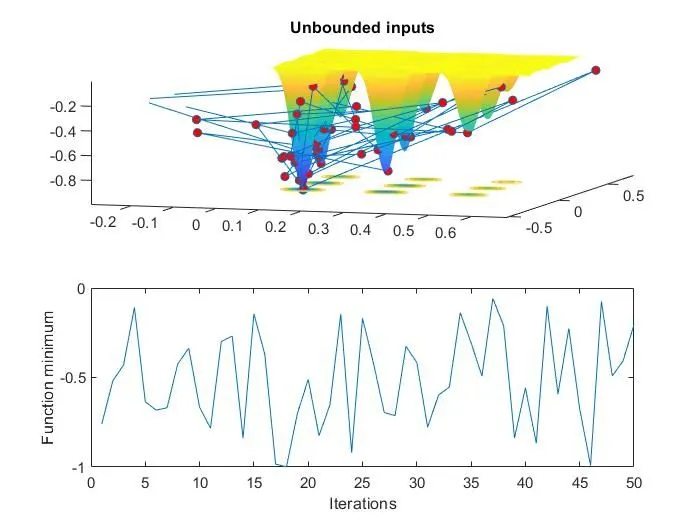
GA is based on random sampling and doesn't know the defined search space is the result space. So the values obtained from the ga is outside the search space as we can see from the above graph. The function value is not constant and fluctuates a lot.
Study 2
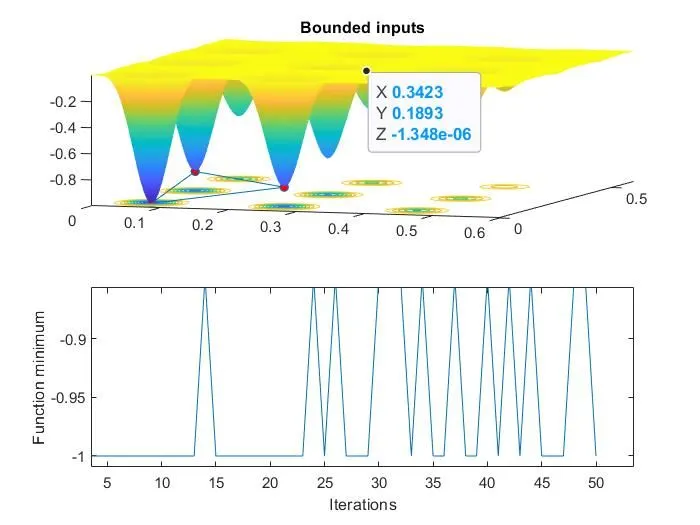
In the second study, the search space is restricted by using the bounds in the syntax we can see that the results are within the range. Still, the optimum value is not obtained with accuracy. The range of f value is narrowed.
Study 3
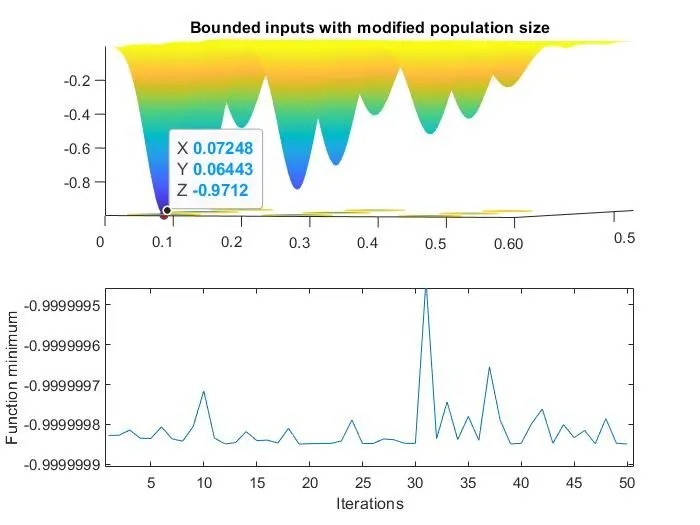
In study 3 we have increased the ga iterations. And used the options command in the syntax and defined the population size.
We have found the optimum values by giving more constraints and the f value is within the precision of 10^-7.
CONCLUSION
- The genetic algorithm finds the minimum value. To find the global maxima we have inverted the stalagmite function.
- the accuracy and precision of GA depend upon the bounds and options provided in the syntax.
- with the bounds and by defining population size we have found the optimum value of the function and the location.