Week 6 - Data analysis
AIM : To Write code in PYTHON that can solve data visualisation, compatability check and basic performance calcuation.
DATA ANALYSIS :
Data analysis involves inspecting, cleaning, transforming, and modeling data to draw useful conclusions, make decisions, and derive insights. It's a process of inspecting, cleaning, and transforming raw data into information that can be used for decision-making.
The types of data analysis:
- descriptive data analysis
- diagnositic data analysis
- predictive data analysis
- perspective data analysis
DESCRIPTIVE DATA ANALYSIS :
This helps with the 'what' statement. example : what is happened to your business. this is done with live data helps in effective visualisation. this analysis the past data.
TOOLS AND TECHNIQUIES USED : metrics and statistics
DIAGNOSTIC DATA ANALYSIS :
this comes up with the 'why' statement. example : why this is happened. this helps to understand the root of your problem. this is also analysis the past data.
TOOLS AND TECHNIQUIES USED : PCA and regression analysis
PREDICTIVE DATA ANALYSIS :
this comes up with the 'if' statement. example: what will happenend if this occurs. this helps to understand the prediction of the future. history helps in predicting the future.
TOOLS AND TECHNIQUIES USED : machine learning algorithms
PERSPECTIVE DATA ANALYSIS :
It help in the 'recommendataion" statement. example : what should i do if this happen, what are the possible recommendation. this is also helps in understanding the future.
TOOLS AND TECHNIQUIES USED : neutral network, recommeder system.
its like a four level of data analysis, as the level increases the value and complexitity of the program is also increased.
INPUT :
it is a array of data points which has an n number of data like pressure, temperature, crankangle, max and min pressure, mean temperature , max and mininum temperature, volume, mass, density, intergrated HR, HR rate, cp, cv, gamma, kinematic viscosity and dynamic viscosity.
total of 17 data's and its data points are provided in the .out format. this is the data got from the ottocycle engine analysis. this data are need to be properly stored and used for analysis and plotting the results. this comes under the descriptive data analysis.
CODE :
import matplotlib.pyplot as plt
import numpy as np

# Initializing empty lists for storing the data
value1 = []
value2 = []
pressure = []
volume = []
label1 = ""
label2 = ""

# Enter the name of the CONVERGE output file
file_name = input("Enter the file name in .out format: ")

# Checking the file name and conditions
if file_name == 'engine_data.out':
    with open(file_name, 'r') as file:
        lines = file.readlines()

        # Extracting labels and units from specific lines
        labels = lines[2].split()
        units = lines[3].split()

        print('List of parameters available for plotting:')
        for i, (label, unit) in enumerate(zip(labels[1:], units[1:]), start=0):
            print(f"{i}. {label} {unit}")

        # User input for parameters for x and y axes
        a = int(input("Enter the parameter index for the x-axis: "))
        b = int(input("Enter the parameter index for the y-axis: "))

        # Reading data and appending to respective lists
        for line in lines[5:]:  # Start reading from the 6th line
            data = line.split()
            value1.append(float(data[a]))
            value2.append(float(data[b]))
            pressure.append(float(data[1]))
            volume.append(float(data[7]))


    #calculating the area under the P-V diagram using trapz(y,x)
    area=np.trapz(pressure,volume)*1000
    print('Area under the P-V diagram: ',area,'J')

    #calculating the power output of the engine (assuming a RPM of 1500 and 4-stroke)
    N = 1500 #engine RPM
    n = 2 #no. of revolution per cycle in four stroke engine
    power=(area*N)/(n*746)
    print('Power: ',power,'HP')

    #calculating the engine specific fuel consumption (assuming it consumes 20gm of fuel in one stroke)
    fc = 20 #fuel consumed per cycle in micro gram
    ffr = (fc*(N/n))/1000000 #fuel flow rate
    sfc= ffr/power
    print('fuel flow rate: ',ffr,'g/m')
    print('Specific Fuel Consumption: ',sfc,'g/hp-m')

    # Assigning labels for axes
    label1 = labels[a + 1] + f" {units[a + 1]}"
    label2 = labels[b + 1] + f" {units[b + 1]}"

    # Plotting the data
    plt.plot(value1, value2)
    plt.xlabel(label1)
    plt.ylabel(label2)
    plt.title(f"Plot of {label2} vs {label1}")
    plt.savefig(f"{label2}vs{label1}.png")
    plt.show()

    #plotting area under PV
    plt.plot(volume,pressure,color='red',label='pv curve')
    plt.fill_between(volume, pressure,color='green',label='area under curve')
    plt.xlabel("volume")
    plt.ylabel("pressure")
    plt.legend()
    plt.savefig("area under PV curve")
    plt.show()

else:
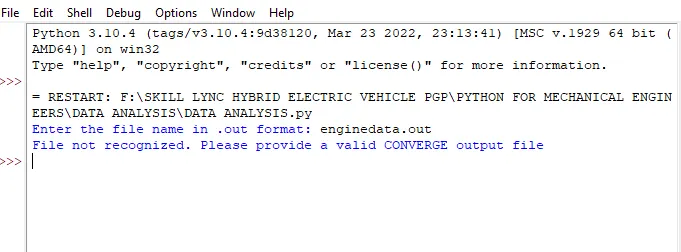
    print('File not recognized. Please provide a valid CONVERGE output file')
CODE EXLANATION :
import matplotlib.pyplot as plt
import numpy as np- mathplotlib is used for plotting the grap for required data points. it can create static and animate and interactive visvalisation
- NumPy is a powerful Python library used for numerical computing. It provides support for arrays, matrices, and a wide range of mathematical functions to work efficiently with large datasets and perform computations.
# Initializing empty lists for storing the data
value1 = []
value2 = []
pressure = []
volume = []
label1 = ""
label2 = ""- these are the empty list for storing the data, if the data is array type it must be in '[]' and incase of the string it must be in double cotation ("").
- so here value1 , value2, pressure, volume is stored as an array and label1 and label2 will be as an string value.
# Enter the name of the CONVERGE output file
file_name = input("Enter the file name in .out format: ")

# Checking the file name and conditions
if file_name == 'engine_data.out':
    with open(file_name, 'r') as file:
lines = file.readlines()- the user needs to give the file name as an input and that file is stored in a file_name variable.
- after entering the file name, the if statement helps the program to check that the file name is 'engine_data.out' if not the file is not recognised is shown.
- once the entered file name is correct, the with open statement helps the file to open as file in read mode
- the file is read and stored in the lines variable.
# Extracting labels and units from specific lines
        labels = lines[2].split()
units = lines[3].split() - as the python starts counts from 0 ,the third line is splitted and stored in the label variable
- then the fourth line is splitted and stored in unit variable.
print('List of parameters available for plotting:')
        for i, (label, unit) in enumerate(zip(labels[1:], units[1:]), start=0):
print(f"{i}. {label} {unit}")- the line " list of parameters available for plottings" is printed in the output screen.
- This line initiates a loop that iterates through the zip of labels and units. It is used to combine the elements of the labels and units lists, starting from the second element (
[1:]), as indicated by the slice notation. - enumerate() is a Python function used to iterate through sequences while keeping track of the index or count. In this case, enumerate is applied to the zip of labels and units.
 # User input for parameters for x and y axes
        a = int(input("Enter the parameter index for the x-axis: "))
        b = int(input("Enter the parameter index for the y-axis: "))
- the user need to provide the input for the paramater index for the x and y axis.
# Reading data and appending to respective lists
        for line in lines[5:]:  # Start reading from the 6th line
            data = line.split()
            value1.append(float(data[a]))
            value2.append(float(data[b]))
            pressure.append(float(data[1]))
volume.append(float(data[7]))- this for loop is iterated where it will be start reading from the 6th line
- then those lines are splited and stored in the data.
- the value1 is appended in the float data types, where the user enters the appropriate index for x axis (a).
- that row will be stored in the value1 empty array which is declared at the start of the program
- then same as the value2 is appended in the float data types, where the user enters the appropriate index for y axis (b).
- that row will be stored in the value2 empty array.
- then to need to generate the pv diagram, the pressure and volume row is also appended and stored in its empty array.
- this will stop reading till the end of the data points.
 #calculating the area under the P-V diagram using trapz(y,x)
    area=np.trapz(pressure,volume)*1000
print('Area under the P-V diagram: ',area,'J')- The np.trapz() function you see in this code snippet is from the NumPy library and is used for numerical integration using the trapezoidal rule. In this context, it's being used to calculate the area under the Pressure-Volume (P-V) diagram.
- The trapezoidal rule is a method for approximating the definite integral of a function by approximating the area under the curve as a series of trapezoids. In this case, np.trapz() takes two arguments: pressure and volume which presumably represent arrays of pressure and volume values.
    #calculating the power output of the engine (assuming a RPM of 1500 and 4-stroke)
    N = 1500 #engine RPM
    n = 2 #no. of revolution per cycle in four stroke engine
    power=(area*N)/(n*746)
print('Power: ',power,'HP')- this code helps to calcuate the engine indicated output power.
- indicated power is calculated from the pressure within the engine cylinders during the combustion process. It is an estimation of the power produced inside the cylinders without considering losses due to friction and other inefficiencies.
#calculating the engine specific fuel consumption (assuming it consumes 20gm of fuel in one stroke)
    fc = 20 #fuel consumed per cycle in micro gram
    ffr = (fc*(N/n))/1000000 #fuel flow rate
    sfc= ffr/power
    print('fuel flow rate: ',ffr,'g/m')
print('Specific Fuel Consumption: ',sfc,'g/hp-m')- this code helps to calculate the engine specific fuel consumption
- assuming that 20 gm of fuel in one stroke
- Engine-specific fuel consumption (SFC) is a measure of an engine's efficiency in terms of fuel consumption.
- It represents the amount of fuel consumed by an engine per unit of power produced.
- SFC is typically expressed in units like grams per kilowatt-hour (g/kWh) or pounds per horsepower-hour (lb/hp-hr) depending on the system of measurement.
 # Assigning labels for axes
    label1 = labels[a + 1] + f" {units[a + 1]}"
    label2 = labels[b + 1] + f" {units[b + 1]}"
- This combination creates a label that represents a specific parameter along with its unit.
- For instance, if a and b are integers representing indices and labels contains descriptive names of parameters (like "Temperature", "Pressure", "Volume", etc.), and units contains corresponding units (like "°C", "kPa", "m³", etc.), the code would create labels such as "Pressure kPa" or "Volume m³" based on the values of a and b.
 # Plotting the data
    plt.plot(value1, value2)
    plt.xlabel(label1)
    plt.ylabel(label2)
    plt.title(f"Plot of {label2} vs {label1}")
    plt.savefig(f"{label2}vs{label1}.png")
    plt.show()

    #plotting area under PV
    plt.plot(volume,pressure,color='red',label='pv curve')
    plt.fill_between(volume, pressure,color='green',label='area under curve')
    plt.xlabel("volume")
    plt.ylabel("pressure")
    plt.legend()
    plt.savefig("area under PV curve")
plt.show()- the plotting data shows that the graphical repesentation of the data points which the user wants to check and visualize
- for this the label and titile is generated automatically with the user input.
- the graph is saved automatically with is user input paramters.
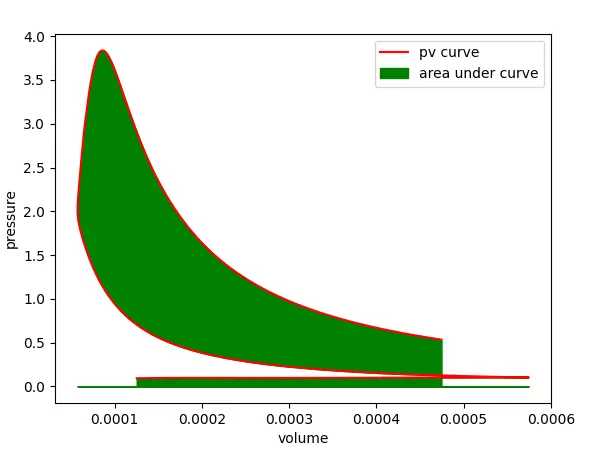
- the plotting area under pv show the graphical representation of the area under the PV curve.
else:
    print('File not recognized. Please provide a valid CONVERGE output file')
- the code is used for the compatability check. if the file_name is not entered correctly the program will directly jump into this code and file is not recognized is printed in the output.
ERROR WHILE CODING :
- The labels in the graph is not placed in the correct order
- recheck the label and unit lines and provided the correct appropriate index value
- then the plot came with the correct label
OUTPUT RESULTS :
while entering the wrong file name :
plotting list and output results for area under the pv curve, power, specific fuel conspumtion.
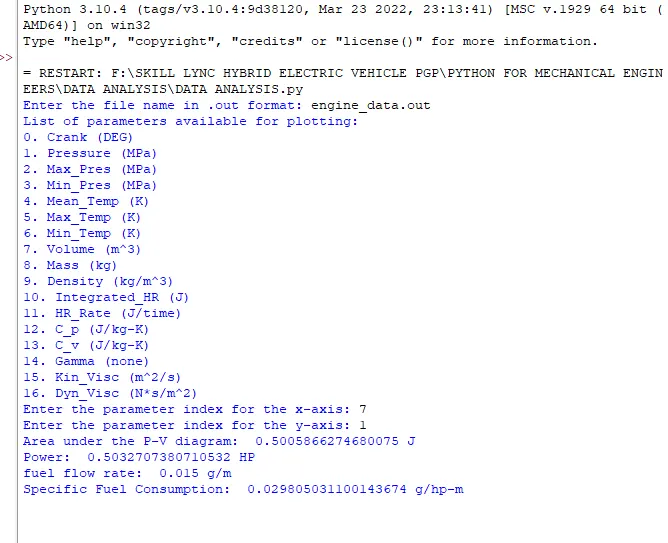
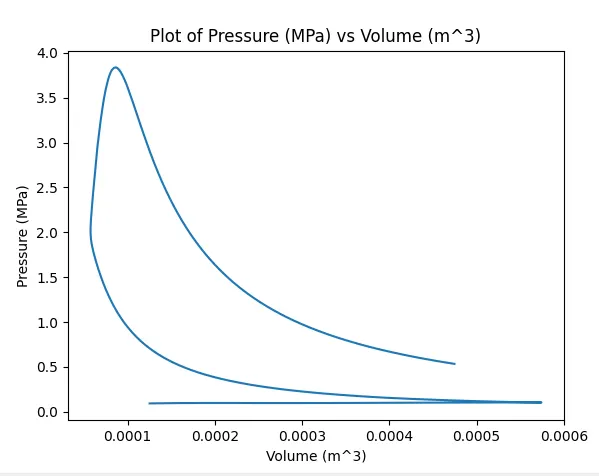
when the x axis is enter as 7 (volume) and y axis is enter as 1 (pressure)
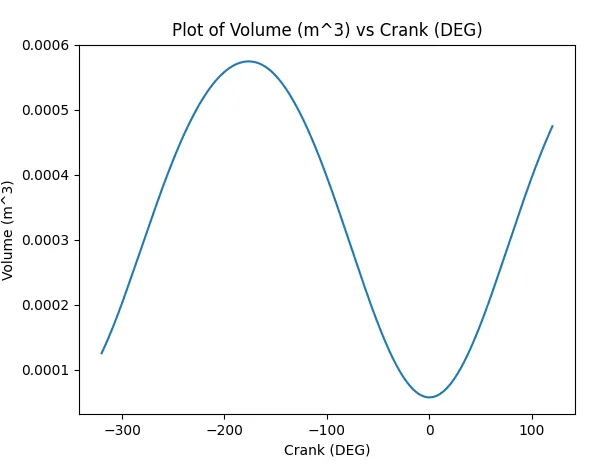
when the x axis is enter as 0 (crank angle) and y axis is enter as 7 (volume)
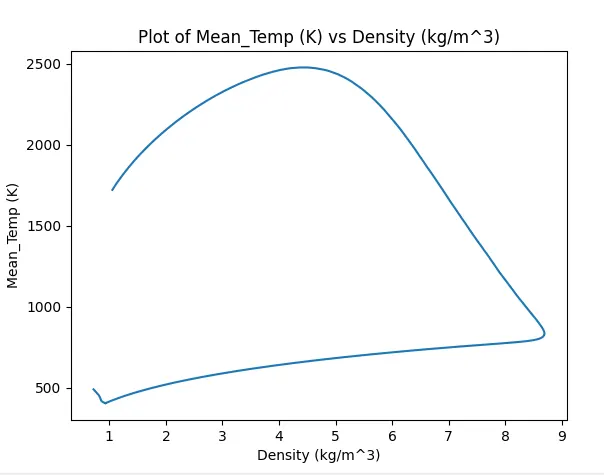
when the x axis is enter as 9 (density) and y axis is enter as 4 (mean temperature)
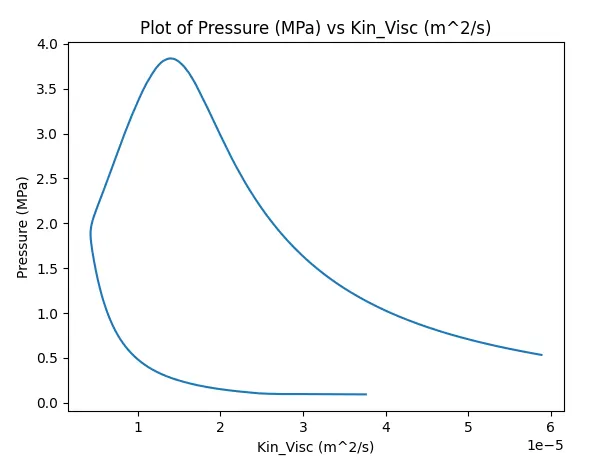
when the x axis is enter as 15 (kinetic viscosity) and y axis is enter as 1 (pressure)
area under the curve
RESULT :
hence the data analysis using the large no. of data points and the visulatization graph is shown according to the user inputs.