Week 3 - Solving second order ODEs
Aim:-
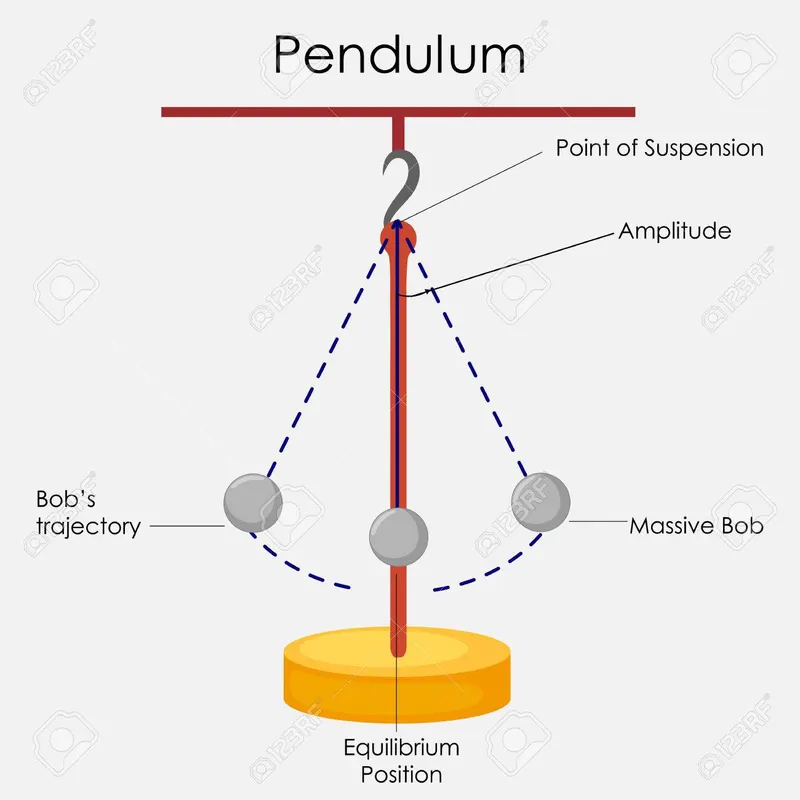
ODE is used to describe the transient behavior of a system. A simple example is a pendulum
INTRODUCTION
The pendulum is a body or mass suspended from a fixed point so that it can swing back and forth under the inflluance of graviy. pendulums are used to regulate the movement of clock because the interaval of time for each complete oscillation, called the period,is constant. The period depends on the length of the pendulum and also to a slight degree, period on the amplitude, the width of the pendulum's swing.
OBJECTIVE:-
This ODE represents the equation of motion of a simple pendulum with damping
In the above equation,
g = gravity in m/s2,
L = length of the pendulum in m,
m = mass of the ball in kg,
b=damping coefficient.
Write a program in Matlab\Octave that will simulate the pendulum motion, just like the one shown in the start of this challenge.
use,
L=1 metre,
m=1 kg,
b=0.05.
g=9.81 m/s2.
Simulate the motion between 0-20 sec, for angular displacement=0,angular velocity=3 rad/sec at time t=0.
When you do this you will get the position of the pendulum as a function of time. Use this information to animate the motion of the pendulum, as shown in the below figure.
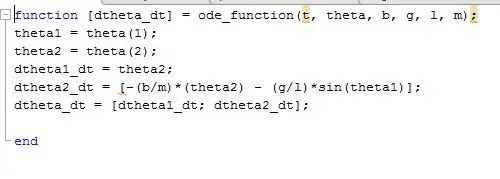
writting the code for the function:
EXPLANATION
. in this function program,the second- order ODE is simplified to the first-order ODE by introducing the them theta1&theta2
. Then theta1&theta is differentiated and the dtheta_dt gives a column matrix.
matlab program
clear all
close all
clc

%inputs
b = 0.05;
g = 9.81;
l = 1;
m = 0.1;

theta_0 = [0;5];

t_span = linspace(0,10,500);

%solve ode
[t,results] = ode45(@(t,theta) ode_function(t,theta,b,g,l,m),t_span,theta_0);

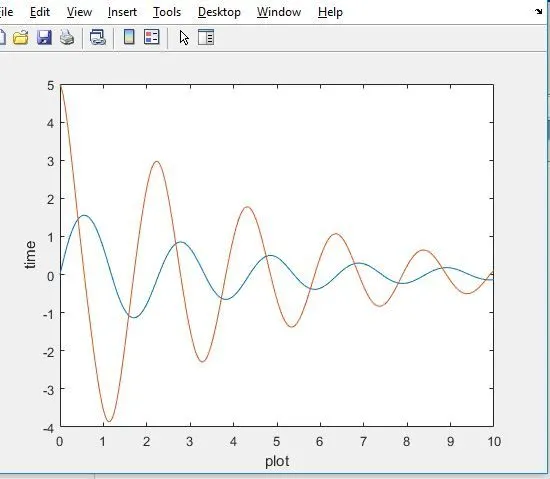
plot(t,results(:,1))
hold on
plot(t,results(:,2))
xlabel('plot')
ylabel('time')

ct=1
for i=1:length(t)
    x0=0;
    y0=0;
    x1=1*sin(results(i,1));
    y1=-l*cos(results(i,1));

   % ploting
   plot([x0 x1],[y0 y1],'color','r')
   hold on
   plot([1 -1],[0 0],'color','b')

   plot(x1,y1,'.','Markersize',50)
   axis([-1 1 -1 1])
   hold off


   M(ct) = getframe(gcf);
   ct=ct+1;

end
movie(M)
videofile = VideoWriter('pendulum_ODE.avi','uncompressed AVI');
open(videofile)
writeVideo(videofile,M)
close(videofile)
EXPLANATION
. in the above program, the fixed parameters are length, mass, dampaning cofficient,and acceleration due to gravity.
. Time and angle are given as initial condition.
. in the t_span command,500 values are taken in between 0to10 times period.
. using the ode45 command velocity and displacement is plotted in the y-axis against time in the x-axis
. using the for for loop command the mass at various points and various times are marked in the graph and are plotted.
. using the movie command the is saved as an uncomprssed avi file.
PLOT