Week 2- 2R Robotic Arm Challenge
Aim -
To a program in Matlab to simulate the forward kinematics of a 2R Robotic Arm.
Objective -
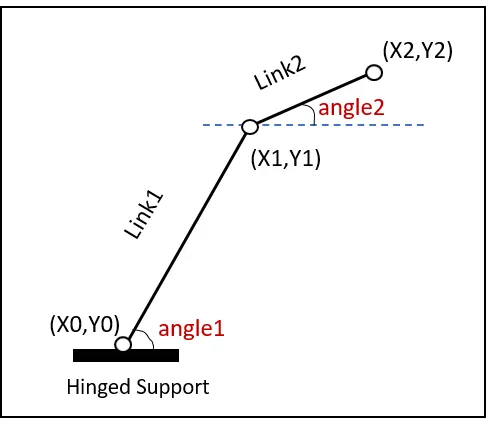
In this report, we are going to use the basic arms of the robot to do that we are dealing with the linkage known as Forward kinematics of a 2R Robotic arm (where 2R means 2-rotating Link i.e 2 is a number of link and R is rotation). we are taking two links as a representative of the Robotic arm in which Link-1 is Hinged at (X0, Y0) and making an angle1, while Link-2 is hinged at the end of the Link-1 and making angle2 with respect to Datum.
We need to Animate the Arm and find out its behavior in Different conditions.
Basic Theory -
In Kinematics only Velocity and Acceleration Analysis of various parts it to be done. Forces are neglected.
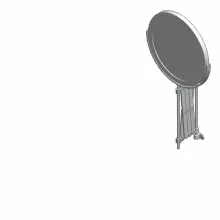
A mechanical linkage is an assembly of bodies connected to manage forces and movement. The movement of a body, or link, is studied using geometry so the link is considered to be rigid. The connections between links are modeled as providing ideal movement, pure rotation, or sliding for example, and are called joints. A linkage modeled as a network of rigid links and ideal joints is called a Kinematic chain. For example, The basic linkage mechanism in practice is a deployable mirror linkage constructed is shown below.
MATLAB CODE -
1.Basic Program represents the basic idea in 2D plot
clear all
close all
clc

%step1 declearing variables
l1=1;
l2=0.5;
o1=45;
o2=60;

%step2 calculating position of linkage1
x0=0;
y0=0;
x1=l1*cosd(o1);
y1=l1*sind(o1);

%step3 calculating position of linkage2
x2=x1+l2*cosd(o2);
y2=y1+l2*sind(o2);

%step4 plotting
line([x0 x1],[y0 y1],'color','r')
line([x1 x2],[y1 y2],'color','b')
Explanation -
- First declearing the values for arm linkage length and angles
- calculating position of linkage1 (x0,y0),(x1,y1)
- calculating position of linkage2 (x1,y1),(x2,y2)
- Plotting the Values
ERROR -
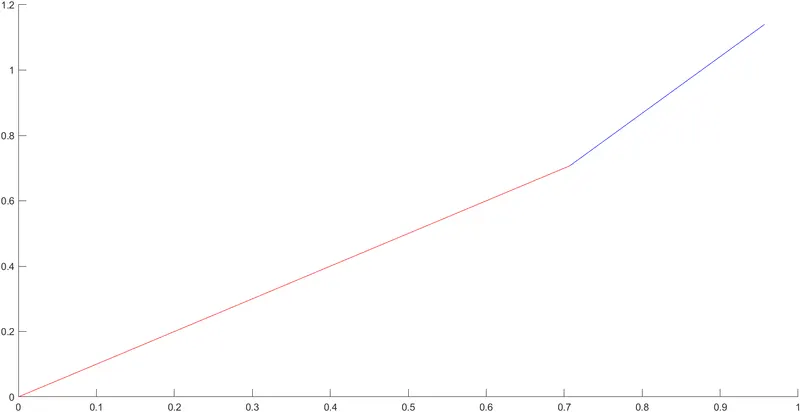
In this code we are unable to get the animated plot for 2R robotic arm.
2.Program represents the 2D plot for multiple values of the angles
clear all
close all
clc

%step1 declearing variables
l1=1;
l2=0.5;
o1=linspace(0,90,10);
o2=linspace(0,90,10);

%step2 using for loop
for i=1:length(o1)
    THETA1=o1(i);
    for j=1:length(o2)
        THETA2=o2(j);

        %step3 calculating position of linkage1
        x0=0;
        y0=0;

        x1=l1*cosd(THETA1);
        y1=l1*sind(THETA1);

        %step4 calculating position of linkage2
        x2=x1+l2*cosd(THETA2);
        y2=y1+l2*sind(THETA2);

        %step5 plotting
        line([x0 x1],[y0 y1],'color','r')
        line([x1 x2],[y1 y2],'color','b')
    end
end
Explanation -
- First declearing the values for arm linkage length and angles
- To change the angle we are using For-loop command
- calculating position of linkage1 (x0,y0),(x1,y1)
- calculating position of linkage2 (x1,y1),(x2,y2)
- Plotting the Values
ERROR & BENIFIT -
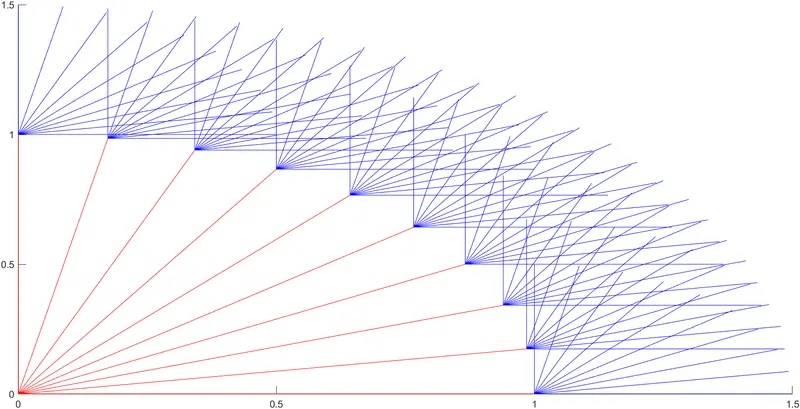
In this code we are unable to get the animated plot for 2R robotic arm.
But from this code we get to se the different positions for the Arm Linkage in different angle.
3.Final Code with to simulate the forward kinematics of a 2R Robotic Arm
clear all
close all
clc

%step1 declearing variables
l1=1;
l2=0.5;
o1=linspace(0,90,10);
o2=linspace(0,90,10);

ct=1;

%step2 using for loop
for i=1:length(o1)
    THETA1=o1(i);
    for j=1:length(o2)
        THETA2=o2(j);

        %step3 calculating position of linkage1
        x0=0;
        y0=0;

        x1=l1*cosd(THETA1);
        y1=l1*sind(THETA1);

        %step4 calculating position of linkage2
        x2=x1+l2*cosd(THETA2);
        y2=y1+l2*sind(THETA2);

        %step5 plotting
        plot([x0 x1],[y0 y1],[x1 x2],[y1 y2],'linewidth',2)
        axis([-0.1 1.5 0 1.5])
        pause(0.03)
        M(ct)= getframe(gcf);
        %incrementing the value each time program gets executed in the for-loop
        ct=ct+1;

    end
end

%step6 for animating the plots
movie(M)
videofile = VideoWriter('forward_kinematics_robotarm_animated.avi','Uncompressed AVI')
open(videofile)
writeVideo(videofile,M)
close(videofile)
Explanation -
- First declearing the values for arm linkage length and angles
- To change the angle we are using For-loop command
- calculating position of linkage1 (x0,y0),(x1,y1)
- calculating position of linkage2 (x1,y1),(x2,y2)
- Plotting the Values
- Then writing the part to make the stimulation for 2R Robotic Arm
Final Plot result -
Link for the animation -
https://drive.google.com/file/d/1xBvRMkhg-dnGlTclu7NTqaWxuOIDf6YM/view?usp=sharing
ERROR & SOLUTION -
- To eliminate the error form No.2 code we are typing figure(ct) before plotting and outside for-loop ct=1 And after the plot command type ct=ct+1 and executing the command we get 100 independent plots.
- While using the writeVideo command use it as it is because it is case sensitive hence any mistake can give an error in the program execution. We used uncompress command.
Conclusion -
Hence, We are able to Program the 2R robotic Arm, with the help of this program.By changing the Data in the above lines and small adjustments in the program we can get multiple outputs such as we can move the arm in multiple directions and multiple speeds.