Project 1 (Mini Project on Vehicle Direction Detection
AIM: To Create and Simulate the Vehicle Direction Detection based on the requirements using Matlab & Simulink.
KEYWORDS: Data Dictionary, SIgnal, Calibration value, Storage Class, etc.,
SOFTWARE: Matlab & Simulink
OBJECTIVE:
- Development of MATLAB Simulink model as per requirement.
- Tag the requirements to the simulink model; tagging requirement 1 & requirement 2 to their corresponding subsystems.
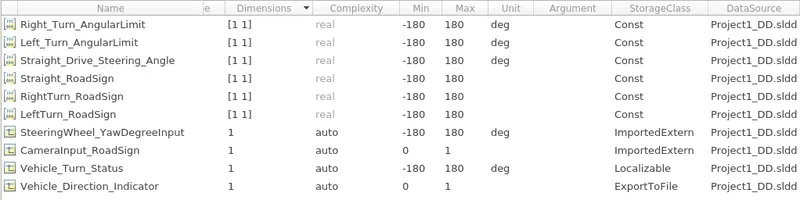
- Create SLDD file in simulink based on the input and output signals.
- Simulate the model and note down the results by varying logical operator.
INTRODUCTION:
Analysis of vehicle driving and parking directions is an important issue in the field of traffic monitoring systems, because it can indicate the driving performance of the vehicle and help the monitoring personnel to distinguish whether the vehicle is parked illegally. However, with the development of the traffic monitoring system, the number of traffic surveillance cameras in the city has increased rapidly, and the analysis of the screens only by manpower is not efficient. Automatically analyzing the direction of the vehicle in the screen by means of artificial intelligence can reduce the workload, enabling efficient judgment and supervision of the vehicle's driving and parking directions, and probably reducing the number of accidents. Our purpose is to locate and classify vehicle objects captured in traffic scenes accurately so that their driving and parking directions can be discriminated. The traditional target detection algorithms need to select the region of interest in advance, and then extract features from the region of interest and send it to the classifier, which usually suffers from slow response time.
PROCEDURE:
1. Development of Simulink model as per requirements:
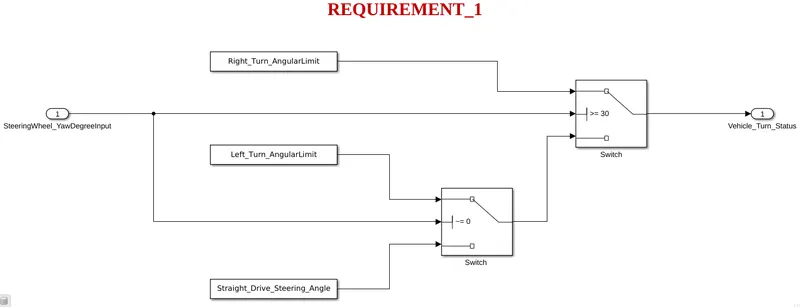
Requirement - 1:
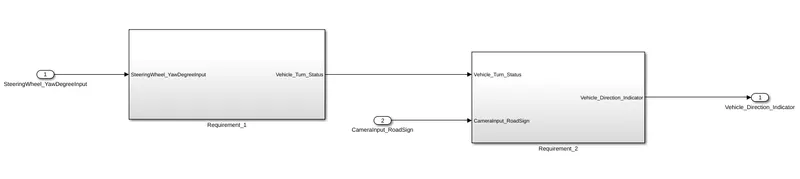
- Steering wheel input as yaw rate (Signal name: SteeringWheel_YawDegreeInput) is the input for this system.
- This is compared against 3 angular values, one each for left turn, right turn & straight drive (Calibration Values: Right_Turn_AngularLimit, Left_Turn_AngularLimit, Straight_Drive_Steering_Angle) to say which specific direction the steering wheel is turning towards.
- Use switch blocks to compare & develop this requirement. Keep this requirement in a subsystem & output of this requirement is a local signal (Signal Name: Vehicle_Turn_Status).
Requirement – 2:
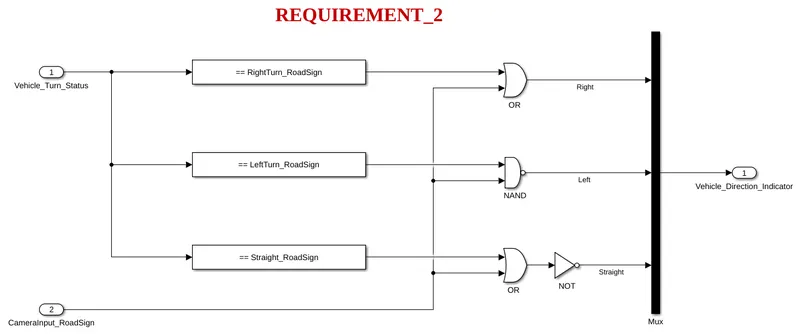
- Keep this requirement as a separate subsystem. Inputs to this requirement are local signal from requirement 1 (Signal Name: Vehicle_Turn_Status) & an input signal from camera (Signal Name: CameraInput_RoadSign), which confirms the occurrence of a road sign.
- Signal Vehicle_Turn_Status is compared against calibration values (Calibration Values: RightTurn_RoadSign, LeftTurn_RoadSign, Straight_RoadSign), if each of them is found equal, then each of the three corresponding output is compared against the camera input signal,
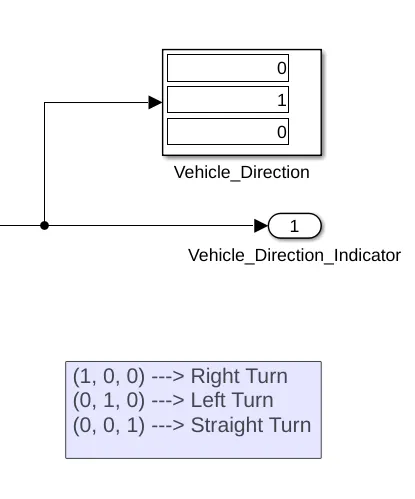
- Using a logical operator block, only one among them is finally given as output signal (Signal Name: Vehicle_Direction_Indicator).
2. Simulink Data Dictionary:
Signals & Calibration Data List:
|
Signal / Calibration Name |
Signal Type |
Data Type |
Dimension |
Min |
Max |
Initial Value |
Units |
|
SteeringWheel_YawDegreeInput |
Input |
Int16 |
1 |
-180 |
180 |
- |
Deg |
|
CameraInput_RoadSign |
Input |
Boolean |
1 |
0 |
1 |
- |
- |
|
Vehicle_Turn_Status |
Local |
Int16 |
1 |
-180 |
180 |
- |
Deg |
|
Right_Turn_AngularLimit |
Calibration |
Int16 |
[1 1] |
-180 |
180 |
30 |
Deg |
|
Left_Turn_AngularLimit |
Calibration |
Int16 |
[1 1] |
-180 |
180 |
-120 |
Deg |
|
Straight_Drive_Steering_Angle |
Calibration |
Int16 |
[1 1] |
-180 |
180 |
0 |
Deg |
|
RightTurn_RoadSign |
Calibration |
Int16 |
[1 1] |
-180 |
180 |
30 |
|
|
LeftTurn_RoadSign |
Calibration |
Int16 |
[1 1] |
-180 |
180 |
-120 |
|
|
Straight_RoadSign |
Calibration |
Int16 |
[1 1] |
-180 |
180 |
0 |
|
|
Vehicle_Direction_Indicator |
Output |
Boolean |
1 |
0 |
1 |
- |
- |
SIMULINK MODEL:
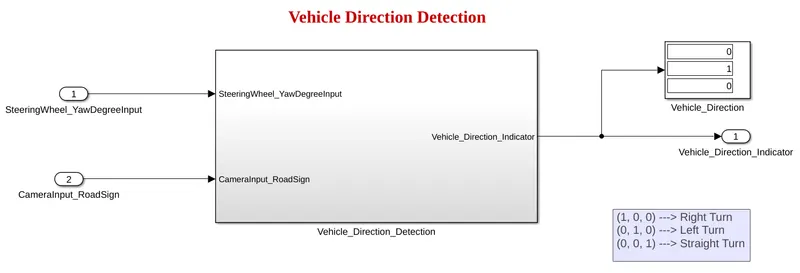
Under Vehicle Direction Detection Subsystem:
RESULTS:
MODEL ADVISOR REPORT:
CODE GENERATION REPORT:
CONCLUSION:
ADAS systems have the potential to improve road safety across the globe. Today, ADAS is nearly mainstream. Not only the high-end models, but even compact economy cars offer a wide array of features focusing on driver safety, ranging from adaptive or glare-free high beams and driver-drowsiness detection to wrong-way driving detection.
Driver distraction and drowsiness are two of the major contributors for road fatalities. With all the upgraded features and entertainment content that are available in a vehicle, the driver must still focus on driving. Sensor technology can help to keep a check on whether the driver is distracted or drowsy.