Mechanical · PG program

Post Graduate Program inHybrid Electric Vehicle Design and Analysis

A comprehensive EV course on Hybrid Electric Vehicle Design, Analysis, and Simulation that gives you exposure to various computational tools for HEV Applications. This EV technology course is highly recommended for beginners.

★ 4.8· 29 reviews

Duration
48 weeks
Content
343 hours
Courses
7
Projects
48
Mode
Online
Overview

What you'll
be able to do.

The Post Graduate Program in Hybrid Electric Vehicle Design and Analysis is an online PG program from Skill-Lync: 48 weeks, 343 hours of content, 7 courses and 48 industry projects.

  • Students will gain a thorough understanding of all the essential engineering concepts and tools used by top OEMs to design future Electric & ICE Vehicles.
  • They will understand the methodologies in developing a model and acquire knowledge of incorporating the manufacturing aspects while designing a vehicle.
  • They will gain hands-on experience in using various software used by top OEMs which aid in the designing and development of a vehicle.
  • Learners can choose to specialize in one of the following four tracks:
    • Track 1 - Computational Fluid Dynamics
    • Track 2 - Finite Element Analysis
    • Track 3 - Design
    • Track 4 - EV/HEV Design
  • Each track is carefully designed with a curated set of courses developed and compiled by leading experts in the industry.

Why this program

  • The students will have a thorough knowledge of Hybrid electric vehicles.
  • They can specialize in any one domain and gain complete in-depth knowledge of it.
  • They are exposed to the modern trends and standard practices followed in the industry right now.
  • After this course, the students will better understand electric vehicles, the aerodynamics of a vehicle, and the strength analysis of materials.
  • The software used in this course MATLAB, CATIA, ANSA, Hypermesh, and Solidworks will help gain the students a better understanding of what is being taught to them and make them industry-ready.
  • Job opportunities:
    • Overall Vehicle Development Engineer
    • Hybrid Powertrain Engineer
    • Design Manager
    • Mobile Hybrid PSV Engineer
    • BMS Frontline Engineer
    • Motor Design Engineer
  • Higher Education can be pursued in the following domains:
    • Power Electronics and Drives
    • Electromechanical Engineering
    • Mobility Engineering
    • Automotive Engineering
    • Automobile Engineering
  • The student will gain a thorough knowledge of Hybrid electric vehicles. They can specialize in any one domain(from CFD, CAE, Design and MBD) and gain complete in-depth knowledge on it.
Curriculum

4 tracks to choose from,
7–8 courses each.

Get the full syllabus ↓
  1. 01Advanced CFD Meshing using ANSA5 modules
    1. Introduction to ANSA GUI and ToolsW01
      • In this module, you will be introduced to the ANSA Software. You will learn the Graphical User Interface(GUI) of the ANSA tool.
      • You will get to know about different solvers and the types of analysis carried out using them.
      • You will be introduced to the basic tools that will help you with geometric cleanups and other deck setups in ANSA.
      • The topics covered in this module are,
        • Introduction to ANSA
        • ANSA GUI
        • Geometric tools and topology cleanup
        • Different tools used in the TOPO deck
    2. 2D (Surface) Meshing to Pressure valveW02
      • In this module, you will be introduced to the pressure valve model. You will learn to perform surface meshing on a pressure valve model.
      • The topics covered in this module are,
        • PID creation and PID assignment
        • Different selection techniques and visibility tools
        • Basic Topology cleanup
        • Basic tools used in surface meshing
    3. 3D (Volume) Meshing to TurbochargerW03
      • In this module, you will be introduced to the turbocharger model.
      • You will get to know, how to perform volumetric meshing to a turbocharger model.
      • The topics covered in this module are,
        • Geometry cleanup to define volumes
        • Various geometry checks
        • Surface meshing as per quality criteria
        • Volumetric meshing as per requirements
    4. CFD meshing to BMW M6 Model inside Wind tunnelW04
      • In this module, you will be introduced to the BMW M6 model.
      • You will learn how to perform CFD meshing on a BMW M6 model.
      • The topics covered in this module are,
        • Advanced topology cleanup to define volumes
        • Variable surface meshing part by part
        • Solving quality failed elements as per quality criteria
        • Symmetry operation for surface and mesh elements
        • Wind tunnel creation
        • CFD meshing for wind tunnel
    5. Surface Wrap to an Automotive AssemblyW05
      • In this module, you will be introduced to three different automotive models: engine, transmission, and gearbox.
      • You will learn how to perform surface wrap on an automotive assembly for CFD analysis of the outer flow.
      • The topics covered in this module are,
        • Geometry cleanups for the surface wrap.
        • Merging of different models into one GUI.
        • Surface wrapping for an assembly.
  2. 02Introduction to GUI based CFD using ANSYS Fluent9 modules
    1. Introduction to CFDW01
      • In this module, you will understand what CFD is and its uses. You will also be introduced to the basic governing equations solved and many schemes and algorithms used to stabilize and improve the accuracy of the solution.
        • Governing Equations of Fluid Motion
        • Numerical Discretization
        • Fluid Solver
        • Boundary Conditions
        • Post-Processing
    2. Simulating Laminar and Turbulent Flows in ANSYS FluentW02
      • In this module, the focus is to simulate basic compressible and incompressible flows using ANSYS Fluent. You will be introduced to the streamlined workflow on the Workbench tool, from geometry creation to the solution post-processing procedure. You will get hands-on experience in
        • Geometry Creation
        • Meshing
        • Boundary and Initial Condition Calculation
        • Setting up solution algorithms
        • Solving and post-processing
    3. Performing Steady State SimulationsW03
      • In this module, the focus is to simulate basic compressible and incompressible steady-state simulations. This provides you with an introduction to the solution setup procedure for a steady-state simulation. You will get hands-on experience in
        • Geometry created using SpaceClaim
        • How to set up Steady-State Simulations?
        • Checking for Convergence and understanding when the simulation converges for different boundary conditions
        • How to create Runtime Animation of Engineering Parameters?
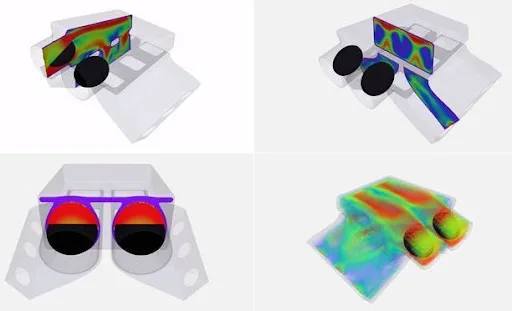
        • Project 1: HVAC Simulation Inside a Mixing TEE
        • Project 2: Performing Parametric Study on Flow Inside a Gate Valve
        • Project 3: Performance Characterization of a Cyclone Separator
    4. Exploring Meshing strategiesW04
      • Meshing is an important component in CFD analysis. Improper meshing can lead to bad results. In this module, you will learn the different meshing techniques that can improve the solution accuracy with a balanced computational cost. More hands-on experience in
        • Methods of providing local refinement like Sphere of Influence, Body Sizing, etc.
        • Concept of Y plus and its importance
        • Inflation Layers and Controls
        • Mesh Dependence Test
    5. External AerodynamicsW05
      • You will learn the fundamentals of performing external flow analysis using ANSYS Fluent. It provides you with knowledge on boundary layer concepts, needs of Y plus, and wall functions. Here, we will focus on the following topics.
        • Setting up Virtual Wind Tunnels using the Enclosure Utility
        • Understand Vortices, calculating Downforce & the drag on a Vehicle
        • Y+ Estimation & Grid Refinement
    6. Conjugate Heat TransferW06
      • In this module, you will learn how to simulate solid-side heat transfer along with the fluid flow. Conjugate Heat Transfer (CHT) refers to simulating multiple modes of heat transfer. For example, in one of the projects, you will simulate the heat transfer in an exhaust manifold when hot exhaust products are flowing through it. When you complete this module, you will be able to do the following:
        • Extracting solid and fluid volumes
        • Creating Shared Topologies for Creating Conformal Meshes
        • Setting up Volumetric Heat Sources
        • Visualizing Heat Transfer Coefficient Distribution
    7. Discrete Phase ModellingW07
      • Discrete Phase Modelling (DPM) is used to model particles, fuel drops, coal, and any other type of suspended phase. You will work on problems like the Cyclone Separator, where you will incorporate the DPM approach to simulate how suspended impurities travel through a Cyclone Separator. You will get hands-on experience in
        • Different types of discrete phase boundary conditions and their effects
        • Methods of tracking the Discrete Phase Particles
        • Turbulence Intensity and Vortex Core Visualisation
    8. Introduction to User Defined FunctionsW08

      You will learn how to write a customized program, create different monitor points, and extract the relevant information you need to form a simulation.

    9. Basic Reacting Flows W09

      In this module, you will learn how to simulate reacting flows using ANSYS Fluent. This includes combustion applications.

  3. 03Fundamentals of Electrical Systems and Electrical Architecture4 modules
    1. Basic Electrical Concepts and TerminologiesW01

      At the core of electrical circuits are voltage and current that relate to the flow of electricity through them. When combined, current and voltage provide power that energizes the circuit. It is important to understand these terminologies and associated concepts to fully understand electrical circuits and advanced systems.

      In this week, you will learn about

      • Terminologies: Circuit, Open Circuit, Closed Circuit, Conductor, Insulator, Voltage, Current, Power, Energy
      • War of the Currents: AC vs DC
      • Power Factor, Load (Resistor, Inductor, Capacitor), Phase, Neutral, and Earth
      • Series and Parallel Connections
    2. Electrical Systems and Power ElectronicsW02

      Electric power grids provide the power needed to charge the battery pack in electric vehicles. Power electronics are needed to control and convert electrical energy from the source to meet the specifications of the power grid that powers electrical systems such as the electric vehicle. It is therefore important to understand how this energy is generated, transferred, distributed, and stored.

      In this week, you will learn about

      • Power Grids: Generation, Transmission, and Distribution
      • Safety Equipment: CBs, Fuses, Relays
      • Role of Power Electronics
      • Vehicle: Storage, Loads, Battery Charging, Power Train
    3. Electrical Power TrainW03

      Electrical power trains are a combination of components such as the battery pack, electric motor, and inverter. These parts work together to develop power required for propulsion of the EV. It is important to understand the components in the powertrain and their associated concepts.

      In this week, you will learn about

      • Motors and their Types: DC Motor, Brushless DC Motor, Permanent Magnet Synchronous Motor, Induction Motor
      • Losses and Efficiency at Different Load Conditions
      • Power Electronics based Control: Key Ideas
    4. Battery SystemW04

      Rechargeable batteries are used to power electric vehicles. As the battery systems have high voltage requirements and operate safely under specific conditions, a battery management system is in place to oversee and regulate its functions.

      In this week, you will learn about

      • Basics of Batteries and the Types of Batteries used in Electric Vehicles
      • Battery-Related Terminologies: Level, Anode, and Cathode
      • Fundamentals of Fast Charging Techniques
      • Battery Management Systems and their Components: Cell, Pack, Fuse, Contactor, Microcontroller, and Sensor
  4. 04Introduction to CFD using MATLAB and OpenFOAM6 modules
    1. What is Computational Fluid Dynamics?W01
      • In this module, you will understand the basics and significance of CFD.
      • You will also learn what the Navier-Stokes equations are and how they are derived.
      • The following topics are covered this week.
        • CFD - An Introduction, Necessity, Advantages, and CFD Modeling Process
        • Deriving and understanding the Navier Stokes equations
          • Substantial Derivative
          • Continuity Equation
          • Momentum Equation
          • Energy Equation
          • Significance of the Reynolds number in the NS equations
    2. Mathemathics and Fluid Dynamics EssentialsW02
      • In this module, you will be writing solvers and introduced to different numerical methods.
      • The following topics are covered this week.
        • Basic Vector Calculus - Divergence, Gradient, and Curl
        • Taylor’s Series
        • Initial and Boundary Conditions
        • Classification of PDEs and their characteristics
        • Learning essential fluid dynamics quantities and their dimensional analysis
    3. Introduction to MATLAB and Basic CFD ConceptsW03
      • It is essential to establish a rigid foundation before plunging into the farther depths of CFD.
      • This is where you get introduced to MATLAB and learn the basic concepts of CFD by writing MATLAB scripts.
      • Here are some topics that we would cover:
        • Getting acclimated to the MATLAB interface
        • Numerical discretization and its types
        • FDM - Understanding different schemes with worked examples in MATLAB
        • Deriving own FD schemes using Taylor’s table
        • Solving ODEs in MATLAB using the ‘ode45’ solver
    4. Exploring CFD by Solving Standard CFD Problems using FDMW04
      • In this module, you will venture into the Finite Difference Approach to discretization and solve various benchmark CFD problems in MATLAB.
        • Solving coupled linear systems using iterative solvers
          • Jacobi
          • Gauss-Seidel
          • SOR
    5. Introduction to FVM and OpenFOAMW05
      • In this module, you will learn how to run a simulation on OpenFOAM and the significance of using an FVM approach.
      • These are the topics you would learn:
        • Finite Volume Method and Gauss Divergence Theorem
        • Understanding the Linux environment
        • OpenFOAM code organisation and case setup
        • Detailed blockMeshDict tutorial
    6. Solving Standard CFD Problems in OpenFOAMW06
      • In this module, you will be using OpenFOAM for exploring and simulating a wide variety of problems.
      • You will also create a platform that will enable you to start any simulation from scratch and establish confidence in your result.
  5. 05Advanced CFD for IC Engine Applications using CONVERGE6 modules
    1. CONVERGE Studio ModuleW01
      • In this module, you will learn how to set up a CFD simulation using CONVERGE CFD. You will be provided with step-by-step instructions on how to do the following:
        • CAD import and cleanup
        • Decomposing the model into boundaries and volumetric regions
        • Inputting valve timing
        • Choosing turbulence and combustion models
        • Running the case in a parallel environment
        • Post-processing
    2. Surface PreparationW02
      • In this module, you will learn surface preparation in complete detail. Specifically,
        • Setting up the piston motion profile
        • Boundary flagging
        • Setting up the intake and exhaust valves
    3. Region Initialization and Valve Motion SetupW03
      • In this module, you will learn the following concepts:
        • Initializing pressure, temperature, and species concentration in the intake, exhaust, and fire deck regions.
        • Disconnect triangles
        • Valve timing and the concept of minimum lift
        • Valve profile input
    4. Turbulence ModellingW04
      • In this module, you will learn how turbulence is modelled and simulated in a state-of-the-art CFD solver. You will learn about the different classes of turbulence models and understand their merits and demerits. In this module, you will also learn about,
        • RANS approach to model turbulence
        • The math involved behind RANS and its derivations
      • Learn the theory behind the various types of turbulence models available (RNG k-, k- SST, and so on) and recognise which model is appropriate for which type of application.
    5. Combustion ModellingW05
      • In this module, you will learn how the SAGE detailed chemical kinetics solver works.
      • In addition to this, you will also learn how to use the Shell CTC combustion model.
    6. Emissions ModellingW06
      • To design efficient engines, one needs to have a firm grasp of emissions modelling.
      • You will learn about the Hiroyasu soot model and the Zeldovich nox model and apply them in engine simulations.
  6. 06Battery Thermal Management using Ansys Fluent and MATLAB6 modules
    1. Concept of Heat Transfer and Fluid FlowW01

      In this week, you will learn about

      • Engineering Heat Transfer
      • Heat and Other Forms of Energy
      • The First Law of Thermodynamics
      • Heat Transfer Mechanisms
      • Conduction
      • Convection
      • Radiation
      • Simultaneous Heat Transfer Mechanism
    2. Introduction to Battery Technology and Electrochemical ModellingW02

      In this week, you will learn about

      • How electrochemical cells work
      • Choosing active materials
      • Lithium-ion cell make-up
      • Availability of Lithium
      • Manufacturing: Making the Electrodes
      • Manufacturing: Assembling the Cell
      • Failure Modes
    3. Equivalent Circuit Modelling of Cell and Thermodynamic of CellW03

      In this week, you will learn about

      • Open Circuit Voltage (OCV)
      • State of Charge
      • Linear Polarization
      • OCV Testing
      • Coulombic Efficiency
      • Thermal Logic and Algorithms
      • Li-ion Aging
      • Butler Volmer Model
    4. Battery Thermal ManagementW04

      In this week, you will learn about

      • Air Cooling and Heating
      • Liquid Cooling and Heating
      • Direct Refrigerant Cooling and Heating
      • PCM
      • Thermoelectric Module
      • Heat Pipe
      • PTC Heater
      • Forced Air System
      • Liquid System
      • PCM System
      • Thermoelectrics
      • Combined Liquid System (CLS)
      • PCM Model (CLS+PCM)
    5. Concepts of CFDW05

      In this week, you will learn about

      • Computational Fluid Dynamics: Why?
      • Computational Fluid Dynamics as a Research Tool
      • Computational Fluid Dynamics as a Design Tool
      • Governing Equations of CFD
      • Type of Boundary Conditions
      • Finite Difference Method
      • Finite Volume Method
      • Introduction to Commercial Software (Fluent/StarCCM+)
    6. Thermal and Flow Modelling of Battery PackW06

      In this week, you will learn about

      • Geometry Cleanup
      • Preprocessing (Meshing strategies)
      • Solution Setup
      • Post-processing
      • Pressure Drop Study
      • Selection of Fan/Pump for Cooling System
      • 3D Modelling of Liquid-cooled Thermal Systems using Fluent
      • 3D Thermal Modelling of an Air-cooled Battery Pack
  7. 07Python for Mechanical Engineers6 modules
    1. Introduction to PythonW01
      • This module provides an introduction to Python using different mathematical operations and performing operations such as,
        • Array manipulations
        • Plotting and understanding the relationship between 2 variables
        • Looping using one or more looping conditions
    2. Plotting and VisualizationW02
      • In this module, you will write programs that plot the p-v line of an air standard cycle and also create animations for a robotic arm with 2 degrees of freedom and simulate the motion of a pendulum.
        • In this module, you will learn the following,
          • Understanding the relationship between 2 variables using plots
          • Saving plots and creating animations using ImageMagick
          • Using tables
    3. Solving Dynamic EquationsW03
      • In this module, you will learn to solve ordinary differential equations using the SciPy module. This is of particular interest since differential equations govern the equations of motion for various mechanical systems and this method can be used to numerically solve initial value problems.
        • Using odeint to solve initial value differential equations
        • Create a pendulum using the available coordinates
        • Plotting and saving images
        • Creating an animation using ImageMagick
    4. Curve Fitting and RegressionW04
      • In this module, you will learn how to perform curve fitting using Python.
      • Curve fitting finds widespread use in predicting the relationship between different variables for which an existing relationship doesn’t exist.
      • Furthermore, curve fitting can also be used as a predictive tool in machine learning and AI to predict what will happen in the future using the trend of the plot.
      • Students will learn about,
        • Curve fitting using the SciPy module
        • Learning how to check how well the data has been fitted
    5. Understanding Iterative SolversW05
      • This module covers iterative solvers, which find widespread use in the solution of polynomial equations, and other aspects like understanding how to obtain the solution in the most optimised manner possible.
      • This module also explains,
        • How to use an iterative solver
        • How to use while loops?
    6. Data AnalysisW06
      • The final module of the coursework deals with data manipulation, which is used in many industries like CAE and CFD to post-process the results from the simulation.
      • This is particularly useful if the same simulation is run multiple times for different configurations, and this code can be used to obtain the data automatically.
      • At the end of this module, you will be able to,
        • Take data from a file and manipulate the data to create meaningful plots.
        • Make the necessary calculations.
        • Automate the post-processing procedure.
Industry projects

48 projects
you'll ship.

Our projects are designed by experts in the industry to reflect industry standards. By working through our projects, Learners will gain a practical understanding of what they will take on at a larger-scale in the industry. In total, there are 48 Projects that are available in this program.

Breaking Ice with Air-Cushion Vehicle
Python for Mechanical Engineers

Breaking Ice with Air-Cushion Vehicle

In this project, you will learn to use the Newton-Raphson method. Here, you'll understand the effects of using a relaxation factor and learn how to use plots and tables to visualiz…

Data Analysis
Python for Mechanical Engineers

Data Analysis

In this project, you will learn how to manipulate the data from a given text file and create plots for different variables based on user input.

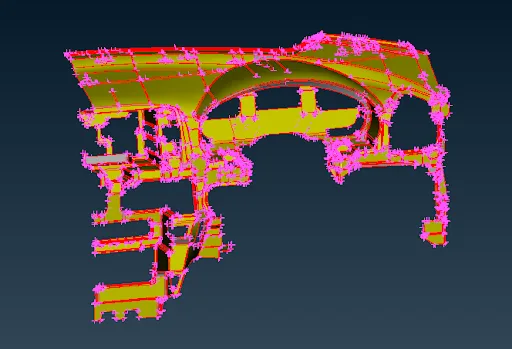
Modeling of an Automotive IP Trim Component
Preprocessor for Structural Analysis using ANSA

Modeling of an Automotive IP Trim Component

In this project, students will be provided with an IP substrate component and asked to model the same.

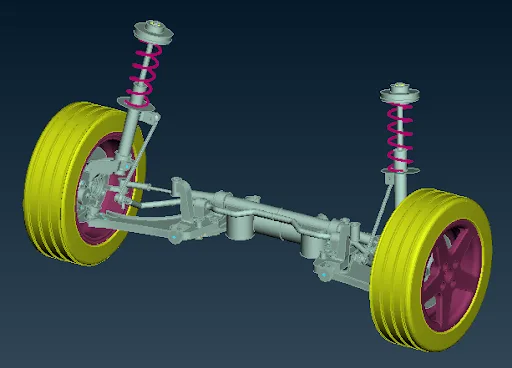
Modeling of an Automotive Suspension Assembly
Preprocessor for Structural Analysis using ANSA

Modeling of an Automotive Suspension Assembly

In this project, the students will model the entire automotive suspension assembly and check for connections.

Steady and Transient Flow over a Throttle Body
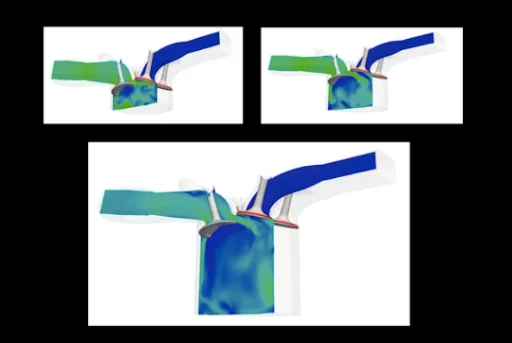
Advanced CFD for IC Engine Applications using CONVERGE

Steady and Transient Flow over a Throttle Body

In this project, the students will simulate airflow through a throttle body under different conditions. They will also study the effect of valve dynamics.

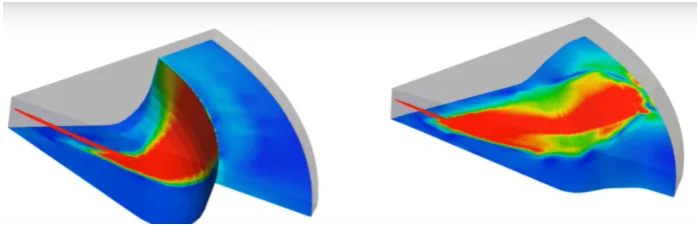
Diesel Engine Characterization
Advanced CFD for IC Engine Applications using CONVERGE

Diesel Engine Characterization

In this project, the students will run simulations of the CAT3410 engine using different piston bowls. They will also understand the effects due to changes in piston bowl shapes.

Port Fuel Injection Simulation
Advanced CFD for IC Engine Applications using CONVERGE

Port Fuel Injection Simulation

In this project, the students will perform the simulations of port fuel injection. They will analyse the data from the plots obtained.

Meshing of Door Panel
HyperMesh for FEA Plastic and Sheet Metal Applications

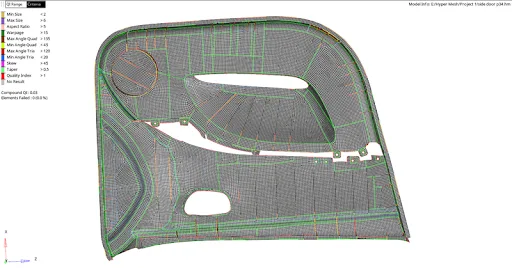
Meshing of Door Panel

In this project, the student will mesh the door panel under the given quality criteria. They should capture all the features perfectly.

Meshing of Car Spare Tyre Floor Panel
HyperMesh for FEA Plastic and Sheet Metal Applications

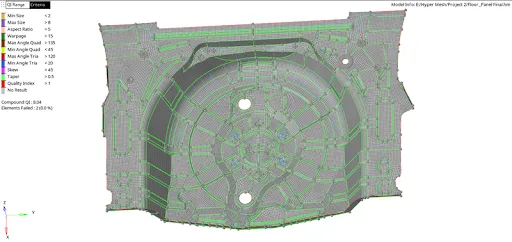
Meshing of Car Spare Tyre Floor Panel

In this project, the student will mesh the floor panel under the given quality criteria. They should mesh the whole component and capture all the features perfectly.

Extracting Data from NASA Thermo.dat File
MATLAB for Mechanical Engineers

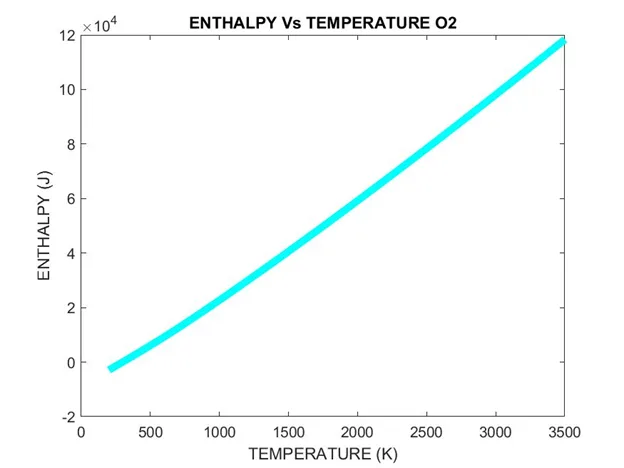
Extracting Data from NASA Thermo.dat File

Learners are required to write a code that can read the NASA-II polynomial file and calculate thermodynamic parameters. They will have to extract the data from the NASA Thermo.dat …

Extracting Steam Properties using Rankine Cycle Simulator
MATLAB for Mechanical Engineers

Extracting Steam Properties using Rankine Cycle Simulator

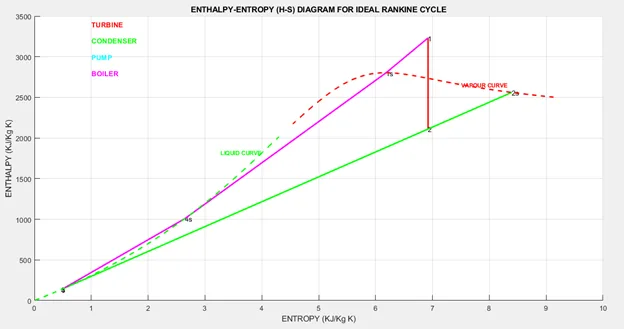
Learners are required to use the XSteam library file to determine the properties of steam under various conditions. They will have to find the Enthalpy and Entropy at various state…

Conjugate Heat Transfer Analysis on a Graphics Card
Introduction to GUI based CFD using ANSYS Fluent

Conjugate Heat Transfer Analysis on a Graphics Card

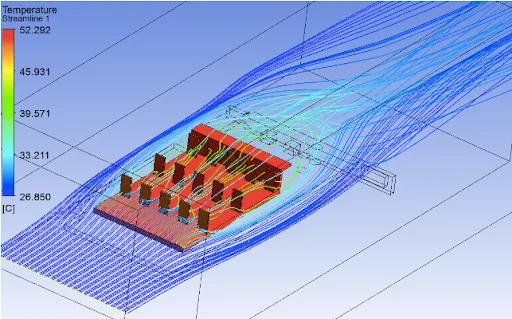
In order to achieve effective cooling of the GPU, you will analyze the heat transfer coefficient and high-temperature concentration zones of the system.

+ 36 more projects in the full syllabus

Placements

746 learners placed
from this program.

Companies
293
Median CTC
3.43 LPA
20264.5 LPA
Expleo
Associate Mechanical

Naresh K.
20265.5 LPA
Capgemini
Design Engineer

Dev S.
20264 LPA
Hyundai Motor India
Design Engineer

Summanth P.
20264.5 LPA
Nexteer
Design Engineer

Amuthan
20266 LPA
Capgemini
Design Engineer

Chakkaravarthy M.
20266 LPA
Capgemini
Design Engineer

Amal R.
Learner stories

Learners from this program.
In their own words.

Videos from Skill-Lync's YouTube channel.

JeganTata TechnologiesPG Program in Hybrid Electric Vehicle Design & Analysis
ShrikantDesign Engineer, Tata TechnologiesPG Program in Hybrid Electric Vehicle Design & Analysis
ShaguftaTata TechnologiesPG Program in Hybrid Electric Vehicle Design & Analysis
BhargavTata TechnologiesPG Program in Hybrid Electric Vehicle Design & Analysis
SubhramanyaTata TechnologiesPG Program in Hybrid Electric Vehicle Design & Analysis
Sandeep RajTata TechnologiesSkill-Lync's Hybrid Electric Vehicle Program
Guide

The PG Program in Hybrid Electric Vehicle Design, explained.

by the Skill-Lync team

What do you actually learn and build in a hybrid electric vehicle course, and in what order?

You pick one of four tracks (CFD, FEA, Design or EV/HEV Design) of 7 or 8 courses each, and only the EV/HEV track teaches hybrid drivetrains, batteries and system modelling. The other three are general automotive CFD, FEA and design tracks with one 4-week electrical fundamentals course added. There is less hybrid content than the name suggests.

Across the four tracks the syllabus lists 22 different courses, because some appear in more than one track. Fundamentals of Electrical Systems and Electrical Architecture (4 weeks: circuits, power electronics, EV motors, batteries and the BMS) is the only course in all four. What each track contains, in syllabus order:

  1. EV/HEV Design (8 courses): the electrical fundamentals; Automotive Wiring Harness in CATIA V5 (routing, flattening, battery-cable routing rules); Automotive Plastic Design in CATIA V5; MATLAB and Simulink Basics (12 weeks, ending with PID speed control of a DC motor); Development of Hybrid Drives using MATLAB and Simulink (12 weeks: road-load equations, drive cycles, hybrid architectures, engine maps and BSFC, transmissions, motors, energy storage, charge-sustaining and charge-depleting strategies); Introduction to Battery Technology (10 weeks: a cell equivalent-circuit model in MATLAB, pack construction, BMS design, charging, thermal management and range estimation over a drive cycle); System Modelling with Simulink and Simscape (6 weeks); Python. This is the track for hybrid powertrain, battery and system-simulation work.
  2. CFD (7 courses): ANSA meshing (a pressure valve, a turbocharger, a BMW M6 in a wind tunnel), ANSYS Fluent (a mixing tee, a gate valve, a cyclone separator, external aero, conjugate heat transfer), CFD in MATLAB and OpenFOAM, CONVERGE for IC engines (a throttle body, Caterpillar 3410 piston bowls, port fuel injection), Battery Thermal Management in Fluent and MATLAB (air- and liquid-cooled packs), Python. It leads to CFD work: aerodynamics, thermal, engine combustion and battery cooling.
  3. FEA (8 courses): ANSA and HyperMesh preprocessing (an IP trim, a suspension assembly, a door panel, a spare-tyre floor panel), MATLAB, crash in HyperMesh and Radioss, LS-DYNA, Ansys Workbench, Python. It leads to CAE/FEA work: meshing, crash and structural analysis. Apart from the electrical course, nothing in it is specific to hybrids.
  4. Design (7 courses): plastic trim design and mould basics in CATIA V5, sheet-metal body-in-white design in Siemens NX or CATIA V5, GD&T, the wiring harness course, MATLAB. It leads to design work on trims, body panels and harnesses. One listed course, Engineering Fundamentals - Design Domain, has no published syllabus.

So if you want to work on hybrid or electric powertrains, choose the EV/HEV track. If you want a CFD, CAE or design job at a vehicle maker or supplier, the other tracks are standard automotive training with an electrical primer. 4 of the CFD track's 7 courses are also in Skill-Lync's PG Program in CFD, and 5 of the FEA track's 8 are in the PG Program in CAE, so compare the course lists before you choose the hybrid title.

How do you calculate the time constant of an RL or RC circuit, and how long does it take to settle?

Divide inductance by resistance for an RL circuit, , or multiply resistance by capacitance for an RC circuit, . After one time constant the current (RL) or the capacitor voltage (RC) has reached 63% of its final value. After five time constants it has reached 99.3%, which engineers treat as settled.

This is the worked circuit in the free lesson of Fundamentals of Electrical Systems and Electrical Architecture, the one course shared by all four tracks of this program. A 12 V DC source, a 1 Ω resistor and a 1 mH inductor are in series, with the switch open.

  • Switch open: no current flows.
  • Final (steady-state) current: the inductor acts as a short circuit, so A.
  • Time constant: ms.

The current does not jump to 12 A when the switch closes, because the inductor opposes any change in current. It rises along

  • At ms: A, which is 63.2% of 12 A.
  • At ms: A, which is 99.3%. The lesson rounds this to 100%.

The RC version uses the same 12 V and 1 Ω with a 1 mF capacitor: ms again. The capacitor voltage reaches 7.6 V after 1 ms and about 12 V after 5 ms. The inductor resists a change in current; the capacitor resists a change in voltage.

On AC the same parts show up as reactance. At India's 50 Hz:

  • The 1 mH inductor: Ω.
  • The 1 mF capacitor: Ω.
  • RMS to peak: the lesson stresses that 230 V and 415 V are RMS values, and that RMS = peak ÷ √2. So 230 V mains peaks at 325 V, and a 10 A RMS current peaks at 14.1 A.
  • A check you can do yourself: line voltage is √3 × phase voltage, so a 230 V phase gives 398 V between phases, and 415 V goes with a 240 V phase.

Why this matters in an EV or a hybrid: the lesson uses an inductor to hold a current steady (4 A that tries to swing between 3.8 and 4.2 A) and a capacitor to flatten a voltage ripple (10 V swinging between 9.8 and 10.2 V). The later weeks of the same course apply these ideas to power electronics, motors, battery packs and the BMS.

How much memory does a variable take in MATLAB, and when should you use single or integer types?

A double, MATLAB's default for every number, takes 8 bytes (64 bits). A single takes 4 bytes, and the integer types take 1 to 8 bytes, from int8 to int64. A variable's size is bytes per element times the number of elements, and whos lists the size, bytes and class of each one.

This is the data-types part of the free lesson of MATLAB and Simulink Basics, the first MATLAB course in this program's EV/HEV track. Its own examples:

  • x = 5 is a 1-by-1 double: 8 bytes. single(5) holds the same value in 4 bytes.
  • 'Bangalore' in single quotes is a 1-by-9 char array taking 18 bytes, so 2 bytes per character.
  • "Bangalore" in double quotes is a 1-by-1 string array that takes 166 bytes. A string carries overhead, so for one short word the char array is far smaller.
  • int8 and int16 are 8-bit and 16-bit signed integers, so 1 and 2 bytes. One bit goes on the sign, so int8 holds −128 to 127 and int16 holds −32,768 to 32,767. The unsigned uint8 holds 0 to 255.

Worked example: logging a drive cycle. Say a hybrid-drive model logs 20 signals (vehicle speed, engine and motor torque, battery current, SOC and so on) at 100 samples a second over a 30-minute drive cycle. These are our numbers, not the lesson's:

  • Samples: 1,800 s × 100 per second = 180,000 per signal, and × 20 signals = 3.6 million values.
  • Stored as double: 3.6 million × 8 bytes = 28.8 MB. As single: 14.4 MB. As scaled int16: 7.2 MB.
  • A sweep of 10 such runs: 288 MB in double, before any copies the code makes.

Size is half the trade; precision is the other half. The lesson raises it with an aircraft climbing to 50,000 ft. Floating-point numbers get coarser as they grow. Between 32,768 and 65,536, a single can only step in units of ft, while a double steps in ft. A single keeps about 7 significant digits (), a double about 16 ().

The rule that follows: keep model states and calculations in double, the default; store long logs as single when 7 digits are enough; and do not spend 8 bytes on a value that is only ever 0 or 1, as the lesson points out. One trap: MATLAB integer types saturate instead of wrapping round, so int8(200) returns 127 without an error. MATLAB's memory is not unlimited, and in the lesson's words, "it becomes critical to use memory sparingly".

Which software do you need for a hybrid electric vehicle course, and is any of it free?

It depends on the track. The EV/HEV track runs mostly on MATLAB, Simulink and Simscape, with CATIA V5 for harness and plastic parts. The CFD track uses ANSA, ANSYS Fluent, OpenFOAM and CONVERGE; FEA uses ANSA, HyperMesh, Radioss, LS-DYNA and Ansys Workbench. Of the program's tools, Python, Octave, OpenFOAM and ParaView are free and open source.

  • MATLAB and Simulink (EV/HEV track; MATLAB also appears in the other three). The free MATLAB and Simulink lesson aims the toolchain at "model-based system engineering, that is, design, analysis, development, and test". Here it carries the hybrid-drive models, drive cycles, the battery cell model and the charging simulation.
  • Simscape: physical modelling on top of Simulink, where "physical elements such as pumps and motors are mapped to Simscape blocks", so electrical and mechanical parts sit in one model.
  • CATIA V5 (EV/HEV and Design): its electrical workbench routes and flattens wiring harnesses. The harness lesson calls it a "very effective tool used in many passenger car development" programmes. Siemens NX is the alternative for sheet metal in the Design track.
  • ANSA and HyperMesh: preprocessors. The ANSA lesson says it "is basically used for doing pre-processing tasks": geometry clean-up, 2D and 3D meshing, quality checks and writing the solver deck. The crash lessons are recorded on HyperWorks 2017 Student Edition, in which only Altair solver profiles could be used.
  • ANSYS Fluent (CFD track and battery thermal management): the lesson warns that an academic licence may not run some of its cases, and that your licence may not allow parallel runs.
  • CONVERGE (CFD track): it builds the mesh automatically while it runs and refines it with adaptive mesh refinement. It is commercial, and the course gives you a server-based licence valid for three months, so activate it only when you can work steadily.
  • Radioss, LS-DYNA and Ansys Workbench (FEA track): explicit crash solvers and a general structural package.

Free with no licence: Python (in every track except Design), GNU Octave (a MATLAB-compatible language listed among the program's tools), and OpenFOAM and ParaView in the CFD track. You can practise scripting in Python or Octave, and CFD in OpenFOAM, before you enrol. For MATLAB, Simulink and the commercial solvers, check what licence your college or the course provides. GT-POWER and Adams appear in older copy about this program, but they are not in its current syllabus.

Do graduates of this hybrid EV program get EV jobs, and at what salary?

Mostly they get design and CAE jobs, not EV jobs, which matches how the program is built. As of 18 Nov 2026, Skill-Lync's placement records list 746 learners from this program, placed at 294 companies. The median salary is ₹3.4 LPA (707 disclosed), and the middle half earned ₹3.0 to 4.0 LPA.

  • Roles: 256 of the 746 job titles are design roles, 154 are FEA or CAE roles and 29 are CFD roles. 81 name EV, electrical, MBD or embedded work. 136 are trainee or GET titles that don't name a domain.
  • Freshers and experienced: 441 were freshers, with a median of ₹3.4 LPA. 75 already had work experience, with a median of ₹3.8 LPA.
  • Top hirers: Cyient (56), Expleo (49), Tata Elxsi (40), Tata Technologies (39), Xitadel (15) and Ola Electric (14).
  • Cities, from the 523 records with a location: Bengaluru 160, Chennai 110, Pune 103 and Hyderabad 81.

Most of these placements (678 of 746) happened from 2021 to 2023. 2024 has 23, 2025 has 7 and 2026 so far has 20, the latest on 7 Nov 2026, so treat recent years as a small sample. If an EV role is the goal, the PG Program in EV Design and Development placed more of its learners in EV and MBD jobs. See design engineer salaries and EV engineer salaries.

Which Skill-Lync hybrid or EV option fits you?

CourseLengthProjectsToolsFee
PG Program in Hybrid Electric Vehicle Design and Analysis (this page)4 tracks: CFD, FEA, design, EV/HEV; you follow one48 weeks, 343 h48MATLAB, LS-DYNA, LS-PREPOST, ANSYS Fluent, SpaceClaim, CFD Post, HyperMesh, Radioss, ANSA, Simulink, CONVERGE, Paraview, OpenFOAM, Octave, CATIA V5, Python, Siemens NX CAD, Simscape, ANSYS Workbench₹2,75,000
PG Program in Electric Vehicle Design & DevelopmentAll-EV program: embedded, MBD, e-drive, EV systems48 weeks, 513 h59MATLAB, Simulink, SocketCAN, LINUX, C++, ANSYS Maxwell, Altium Designer, LTspice, C Programming, STM32CubeIDE, AVR ATmega328, SimulIDE, Microchip Studio, Embedded Linux, Mbed Simulator, Arm Cortex M4 - STM32, CAN Protocol, LRDA Tool Suite, CATIA V5₹2,75,000
Pre-Graduate Program in Hybrid Electric Vehicles3 Simulink courses: system modelling, hybrid drives, battery16 weeks, 64 h6MATLAB, Simulink, Simscape₹1,50,000
Introduction to Hybrid Electric Vehicle using MATLAB and SimulinkTraction power, drive cycles, hybrid architectures and motors4 weeks, 23 h2MATLAB, Simulink₹40,000
Development of Hybrid Drives using MATLAB & SimulinkHybrid powertrain design, architectures and control12 weeks, 21 h2MATLAB, Simulink₹40,000
Introduction to Battery Technology for Electric VehicleCells, battery models, BMS, charging and thermal12 weeks, 22 h3MATLAB, Simulink₹40,000

Lengths, projects and fees are taken from each course page on 18 Nov 2026; fees are the Premium plan in INR, including all charges.

Fee

One fee.
Everything included.

Become job ready with our comprehensive industry focused curriculum for freshers & early career professionals

Premium
₹2,75,000
Inclusive of all chargesEMI from ₹14,375/month
  • Career Service Assurance
  • Personalized Career Services Mentorship
  • 1 Year Access
  • Personalized Page
  • Live Individual & Group Sessions
  • Personalized & Hands-On
  • Job-Oriented Industry Relevant Curriculum
Check eligibility →
FAQ

Questions,
answered.

Why should I enroll in this Post Graduate Program in Hybrid Electric Vehicle Design and Analysis?

Enrol if one of its four tracks matches the job you want. Only the EV/HEV Design track covers hybrid drivetrains, battery technology and system modelling in MATLAB, Simulink and Simscape; the CFD, FEA and Design tracks are general automotive tracks that each include one 4-week electrical fundamentals course.

What is the scope of the online electric vehicle course?

It depends on the track you choose. The EV/HEV Design track builds skills for hybrid powertrain, battery and system-simulation work; the CFD, FEA and Design tracks build skills for CFD engineer, CAE/FEA engineer and automotive design roles.

What software will be used during training in the course?

It depends on the track: EV/HEV Design uses MATLAB, Simulink, Simscape, CATIA V5 and Python; CFD uses ANSA, ANSYS Fluent, MATLAB, OpenFOAM, CONVERGE and Python; FEA uses ANSA, HyperMesh, Radioss, LS-DYNA, Ansys Workbench, MATLAB and Python; Design uses CATIA V5, Siemens NX and MATLAB.

What is the average salary of a hybrid electronic vehicle design engineer?

As of 18 Nov 2026, Skill-Lync's placement records list 746 learners from this program. The median salary is ₹3.4 LPA (707 disclosed), and the middle half earned ₹3.0 to 4.0 LPA. Freshers had a median of ₹3.4 LPA and learners with work experience ₹3.8 LPA. Most of these jobs were design and CAE roles; the guide above breaks them down by role, employer and city.

What is the eligibility criterion for enrolling in the hybrid electric vehicle course?

The program does not publish a formal eligibility rule. Its electrical fundamentals course assumes only basic physics, so mechanical, automotive and electrical backgrounds can follow it; confirm eligibility for your degree with a Skill-Lync counsellor.

What will be the primary mode of study in the course?

This hybrid vehicle training course is 100% online.

What is the duration of the hybrid electric vehicle course?

The program is listed at 48 weeks, about 11 months. Each track has 7 or 8 courses and some courses run 10 to 14 weeks, so ask a counsellor how the courses in your track are scheduled.

What is a Hybrid Electric Vehicle?

A hybrid electric vehicle has a drivetrain with both an internal combustion engine and an electric motor. A control strategy, not the driver, decides how the two share the load; the program's Development of Hybrid Drives course covers the hybrid architectures and charge-sustaining and charge-depleting strategies.

What are the advantages of Hybrid Electric Vehicles?

Hybrid electric cars are eco-friendly and employ a regenerative braking system. This braking system would charge the batteries when the brake is applied.

Next step

Not sure it's
the right fit?

A counsellor will walk you through the syllabus, projects and fee options — and tell you honestly if another course suits you better.

Get the syllabus + a call back

We'll email the full syllabus and call within one working day.

By submitting you agree to our Terms and Privacy Policy.

Call usEnquire
Talk to a career counsellor

Talk to a career counsellor

Free 20-minute call. We'll map the right course to where you want to work.

By submitting you agree to our Terms and Privacy Policy.