Week 8 - Simulation of a backward facing step in OpenFOAM
Objective:
- To simulate an incompressible-laminar-viscous flow through the backward-facing step geometry.
- To perform a transient simulation.
- This will be done for 2 cases
- Case 1 - Simulate the flow without using any grading factor (i.e., GF = 1)
- Case 2 - Simulate the flow with a grading factor of 0.2. The cells should be finer near the walls (including the step wall).
Mesh specification
- Number of cells along the x-direction (longer dimension) = 200
- Number of cells along with the longer y-direction = 20
Boundary condition specification
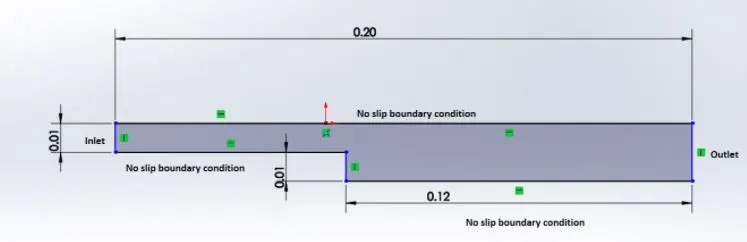
The domain specifications are provided in the following figure.
Incompressible flow
The flow in which there is no change in the density is called the incompressible flow.
Laminar flow
A laminar flow is one where the fluid motion is regular and there is no mixing.
In fluid dynamics, laminar flow is characterized by fluid particles following smooth paths in layers, with each layer moving smoothly past the adjacent layers with little or no mixing.
Mesh grading
Mesh grading is a factor that is,
Grading Factor = (Size of the last cell)/(Size of the first cell)
Procedure
- First, we start the terminal in the Linux Operating system using the ctrl+alt+T buttons on the keyboard.
- We are going to solve our problem using tutorials present in OpenFOAM, so we open the OpenFOAM tutorial directory by typing 'tut', then we type 'ls' to see the different kinds of tutorials present inside this directory.
- We have to solve the incompressible flow simulation for this problem so we select the incompressible directory by typing ‘cd incompressible ’ and then again type ls to explore folders in incompressible folders.
- From different types, we choose ‘icoFoam’. icoFoam is the solver in OpenFOAM which is used as a transient solver for incompressible, laminar flow.
- We open 'cavity' from the lists inside 'icoFoam'. Then again we open the cavity folder from the lists inside the cavity.
- We copy this cavity folder using the ‘cp -r cavity’ command and paste it in OpenFOAM run folder by typing ‘cp -r cavity $FOAM_RUN/cavity_test’, and then open the 'run' folder by typing ‘cd $FOAM_RUN’.
- Now, we provide specifications for our block mesh in the system folder.
- Again, by opening blockMeshDict, we can create a domain and provide the required specifications for block mesh. So, open this file by typing ‘gedit blockMeshDict’.
- Again we provide the required specifications for controlDict, by typing 'gedit controlDict' to open the file to make changes.

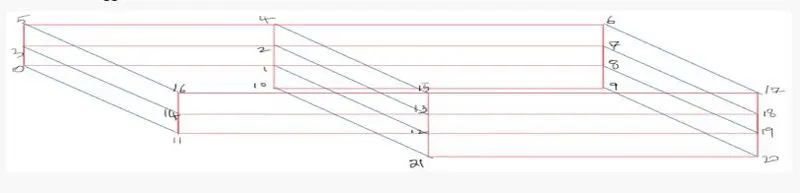
CODE
BLOCKMESHDICT
For grading factor, GF=1
/*--------------------------------*- C++ -*----------------------------------*\
========= |
\\ / F ield | OpenFOAM: The Open Source CFD Toolbox
\\ / O peration | Website: https://openfoam.org
\\ / A nd | Version: 9
\\/ M anipulation |
\*---------------------------------------------------------------------------*/
FoamFile
{
format ascii;
class dictionary;
object blockMeshDict;
}
// * * * * * * * * * * * * * * * * * * * * * * * * * * * * * * * * * * * * * //

convertToMeters 1;

vertices
(
(0 0 0) //0
(0.08 0 0) //1
(0.08 0.005 0) //2
(0 0.005 0) //3
(0.08 0.01 0) //4
(0 0.01 0) //5
(0.20 0.01 0) //6
(0.20 0.005 0) //7
(0.20 0 0) //8
(0.20 -0.01 0) //9
(0.08 -0.01 0) //10
(0 0 0.1) //11
(0.08 0 0.1) //12
(0.08 0.005 0.1) //13
(0 0.005 0.1) //14
(0.08 0.01 0.1) //15
(0 0.01 0.1) //16
(0.20 0.01 0.1) //17
(0.20 0.005 0.1) //18
(0.20 0 0.1) //19
(0.20 -0.01 0.1) //20
(0.08 -0.01 0.1) //21
);

blocks
(
hex (0 1 2 3 11 12 13 14) (80 5 1) simpleGrading (1 1 1)
hex (3 2 4 5 14 13 15 16) (80 5 1) simpleGrading (1 1 1)
hex (2 7 6 4 13 18 17 15) (120 5 1) simpleGrading (1 1 1)
hex (1 8 7 2 12 19 18 13) (120 5 1) simpleGrading (1 1 1)
hex (10 9 8 1 21 20 19 12) (120 10 1) simpleGrading (1 1 1)
);

edges
(
);

boundary
(
Inlet
{
type patch;
faces
(
(0 11 14 3)
(3 14 16 5)
);
}
Outlet
{
type patch;
faces
(
(9 8 19 20)
(8 7 18 19)
(7 6 17 18)
);
}

frontAndBack
{
type empty;
faces
(
(11 12 13 14)
(14 13 15 16)
(13 18 17 15)
(12 19 18 13)
(21 20 19 12)
(0 3 2 1)
(3 5 4 2)
(2 4 6 7)
(1 2 7 8)
(10 1 8 9)
);
}
fixedWalls
{
type wall;
faces
(
(5 16 15 4)
(0 1 12 11)
(4 15 17 6)
(10 9 20 21)
(10 21 12 1)
);
}
);

mergePatchPairs
(
);

// ************************************************************************* //
For grading factor, GF=0.2
/*--------------------------------*- C++ -*----------------------------------*\
========= |
\\ / F ield | OpenFOAM: The Open Source CFD Toolbox
\\ / O peration | Website: https://openfoam.org
\\ / A nd | Version: 9
\\/ M anipulation |
\*---------------------------------------------------------------------------*/
FoamFile
{
format ascii;
class dictionary;
object blockMeshDict;
}
// * * * * * * * * * * * * * * * * * * * * * * * * * * * * * * * * * * * * * //

convertToMeters 1;

vertices
(
(0 0 0) //0
(0.08 0 0) //1
(0.08 0.005 0) //2
(0 0.005 0) //3
(0.08 0.01 0) //4
(0 0.01 0) //5
(0.20 0.01 0) //6
(0.20 0.005 0) //7
(0.20 0 0) //8
(0.20 -0.01 0) //9
(0.08 -0.01 0) //10
(0 0 0.1) //11
(0.08 0 0.1) //12
(0.08 0.005 0.1) //13
(0 0.005 0.1) //14
(0.08 0.01 0.1) //15
(0 0.01 0.1) //16
(0.20 0.01 0.1) //17
(0.20 0.005 0.1) //18
(0.20 0 0.1) //19
(0.20 -0.01 0.1) //20
(0.08 -0.01 0.1) //21
);

blocks
(
hex (0 1 2 3 11 12 13 14) (80 5 1) simpleGrading (0.2 5 1)
hex (3 2 4 5 14 13 15 16) (80 5 1) simpleGrading (0.2 0.2 1)
hex (2 7 6 4 13 18 17 15) (120 5 1) simpleGrading (5 0.2 1)
hex (1 8 7 2 12 19 18 13) (120 5 1) simpleGrading (5 5 1)
hex (10 9 8 1 21 20 19 12) (120 10 1) simpleGrading (5 5 1)
);

edges
(
);

boundary
(
Inlet
{
type patch;
faces
(
(0 11 14 3)
(3 14 16 5)
);
}
Outlet
{
type patch;
faces
(
(9 8 19 20)
(8 7 18 19)
(7 6 17 18)
);
}

frontAndBack
{
type empty;
faces
(
(11 12 13 14)
(14 13 15 16)
(13 18 17 15)
(12 19 18 13)
(21 20 19 12)
(0 3 2 1)
(3 5 4 2)
(2 4 6 7)
(1 2 7 8)
(10 1 8 9)
);
}
fixedWalls
{
type wall;
faces
(
(5 16 15 4)
(0 1 12 11)
(4 15 17 6)
(10 9 20 21)
(10 21 12 1)
);
}
);

mergePatchPairs
(
);

// ************************************************************************* //
ControlDict
/*--------------------------------*- C++ -*----------------------------------*\
========= |
\\ / F ield | OpenFOAM: The Open Source CFD Toolbox
\\ / O peration | Website: https://openfoam.org
\\ / A nd | Version: 9
\\/ M anipulation |
\*---------------------------------------------------------------------------*/
FoamFile
{
format ascii;
class dictionary;
location "system";
object controlDict;
}
// * * * * * * * * * * * * * * * * * * * * * * * * * * * * * * * * * * * * * //

application icoFoam;

startFrom startTime;

startTime 0;

stopAt endTime;

endTime 0.2;

deltaT 0.00001;

writeControl timeStep;

writeInterval 20;

purgeWrite 0;

writeFormat ascii;

writePrecision 6;

writeCompression off;

timeFormat general;

timePrecision 6;

runTimeModifiable true;


// ************************************************************************* //
Pressure File
/*--------------------------------*- C++ -*----------------------------------*\
========= |
\\ / F ield | OpenFOAM: The Open Source CFD Toolbox
\\ / O peration | Website: https://openfoam.org
\\ / A nd | Version: 9
\\/ M anipulation |
\*---------------------------------------------------------------------------*/
FoamFile
{
format ascii;
class volScalarField;
object p;
}
// * * * * * * * * * * * * * * * * * * * * * * * * * * * * * * * * * * * * * //

dimensions [0 2 -2 0 0 0 0];

internalField uniform 0;

boundaryField
{
Inlet
{
type zeroGradient;
}

Outlet
{
type fixedValue;
value uniform 0;
}

fixedWalls
{
type zeroGradient;
}

frontAndBack
{
type empty;
}
}

// ************************************************************************* //
Velocity File
/*--------------------------------*- C++ -*----------------------------------*\
========= |
\\ / F ield | OpenFOAM: The Open Source CFD Toolbox
\\ / O peration | Website: https://openfoam.org
\\ / A nd | Version: 9
\\/ M anipulation |
\*---------------------------------------------------------------------------*/
FoamFile
{
format ascii;
class volVectorField;
object U;
}
// * * * * * * * * * * * * * * * * * * * * * * * * * * * * * * * * * * * * * //

dimensions [0 1 -1 0 0 0 0];

internalField uniform (0 0 0);

boundaryField
{
Inlet
{
type fixedValue;
value uniform (1 0 0);
}

Outlet
{
type zeroGradient;
}

fixedWalls
{
type noSlip;
value uniform (0 0 0);
}

frontAndBack
{
type empty;
}
}

// ************************************************************************* //
Output
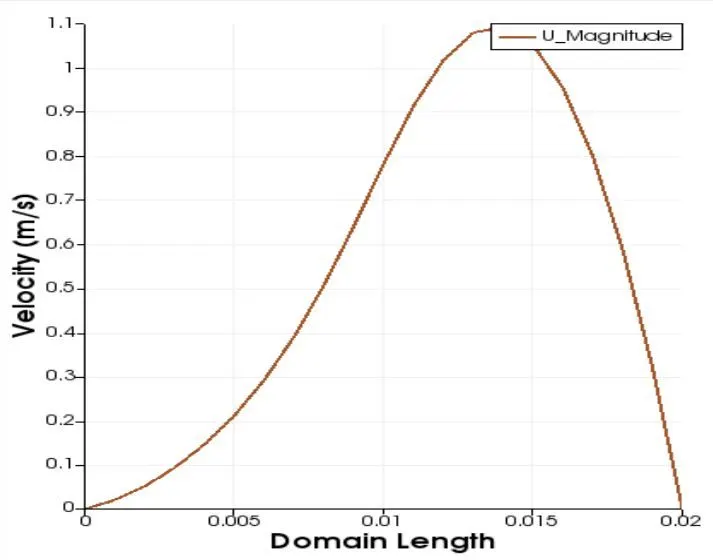
Without grading factor(GF = 1)
The blockMesh

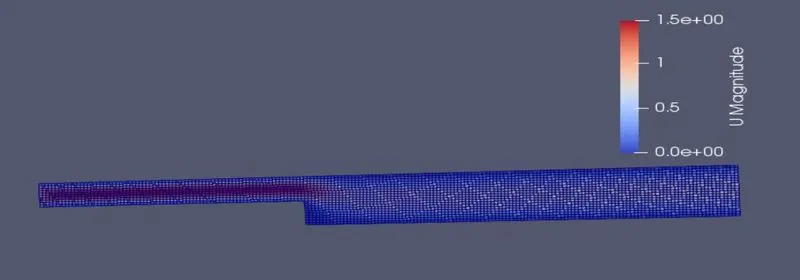
The velocity flow diagram
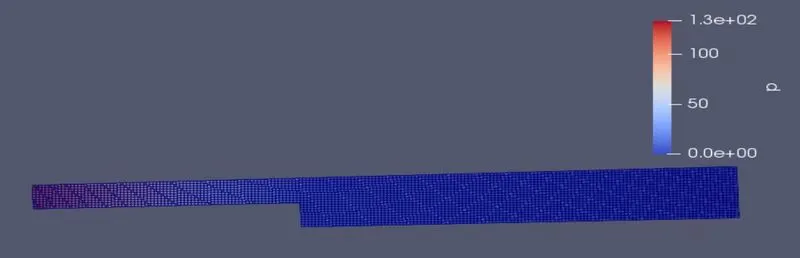
The pressure-flow diagram
The plot for the velocity at 0.085
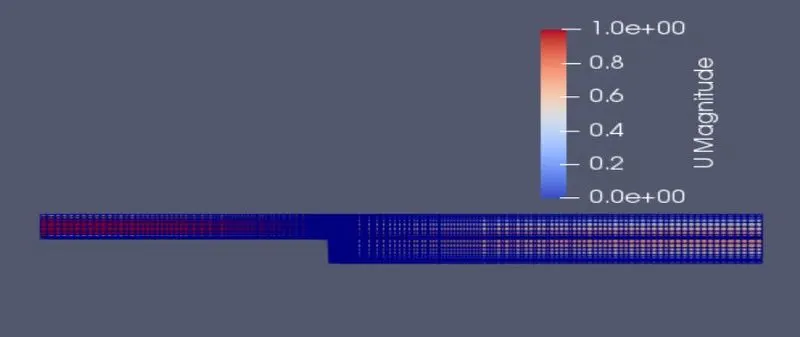
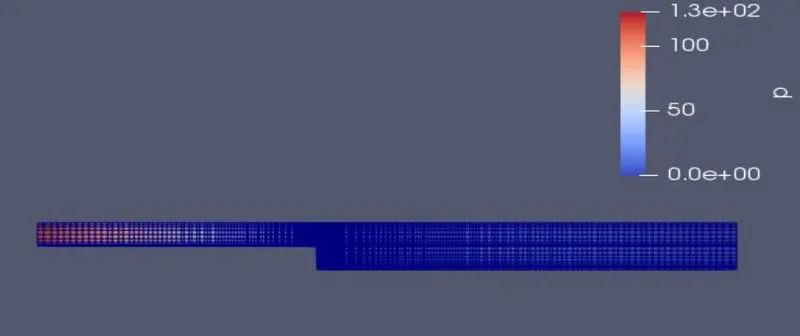
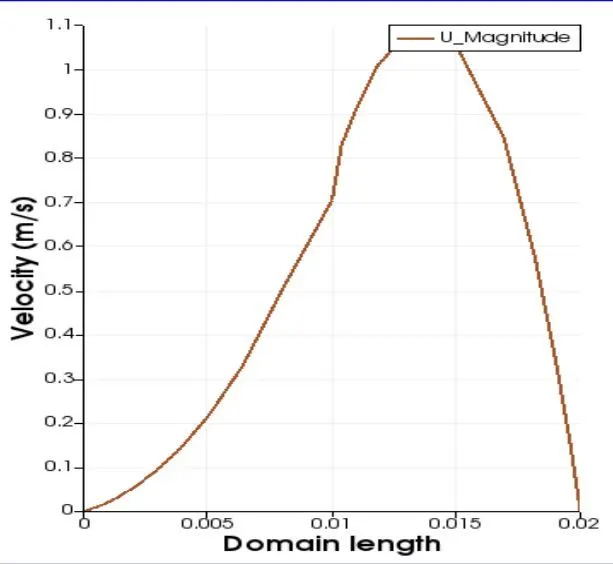
With grading factor(GF = 0.2)
The blockMesh

The velocity flow diagram
The pressure flow diagram
The plot for the velocity at 0.085
Conclusion
- By changing the simple grading factor from the value of 0.2 to 1, the mesh becomes finer and the solution becomes very accurate.
- The execution time is lower for the lower meshing grading factor.