Week 5
VOLUME MESHING OF A REAR-VIEW MIRROR
Aim: To mesh the Rear-view mirror using tetra mesh.
Software used: BETA CAE ANSA.
Steps Involved in meshing a Rear-View mirror:
- Geometry Cleanup.
- Surface Meshing.
- Volume Meshing.
Volume Meshing:
- In volume meshing the entire volume of the model mesh is generated. when compared to shell meshing, the mesh is only generated on the surface of the model. Volume meshing is also known as solid meshing or 3D meshing. volume meshing is performed only when the thickness of model is more than 5mm.
Volume meshing is of two types:
- Structural Meshing: In this type only quad elements are used for meshing. This type of meshing is called as Hexa meshing and the elements are also called as Hexa elements.
- Unstructural Meshing: In this type only tia elements are used for meshing. This type of meshing is called as tetra meshing and the elements are also called as Tetra elements.
Tools used during Geometry Cleanup:
- Topo: It is used to join the single cons.
- New face: It is used to generate new face between cons.
- Fine: It is used to change the resolution of the 3D surfaces.
Quality Criteria:
| S.No | Quality Criteria | Value |
| 1. | Target/Average Length | 1 |
| 2. | Minimum Length | 0.5 |
| 3. | Maximum Length | 2 |
| 4. | Tet collapse | 0.2 |
Procedure:
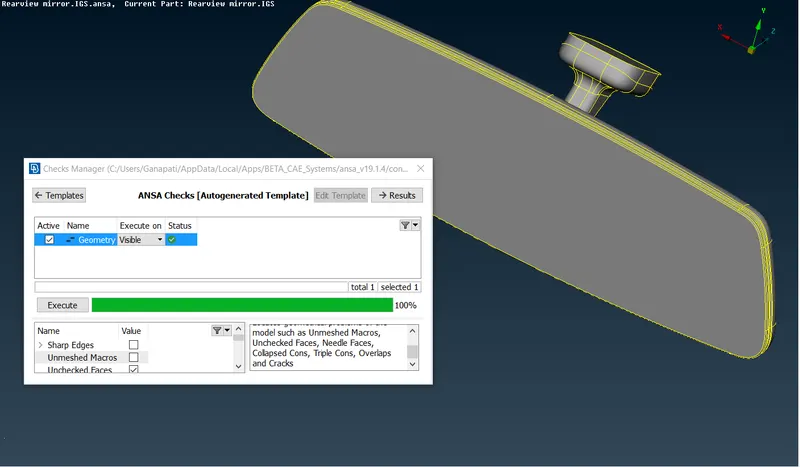
Step1: Geometry Cleanup.
- After importing the geometry, topo should be performed on the geometry.
- Now using the checks manager all the geometrical errors should be identified and errors should be fixed.
- As we are performing volume meshing, there is no need for extracting the mid-surface and can directly proceed for meshing.
Step2: Surface Meshing.
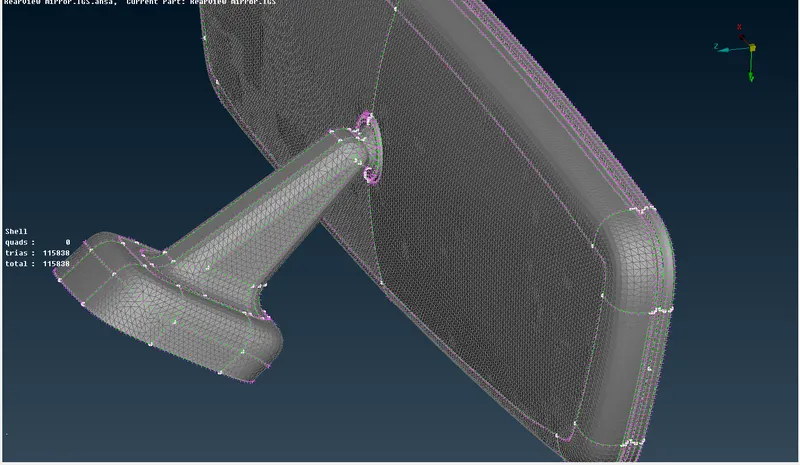
- Before meshing, the quality criteria have to be given and type of mesh is selected.
- Now each macro area is selected and spot meshing is performed. To achieve good mesh flow without any distortions in the meshing use ortho tria for curves and fillets and tria for flat surfaces.
- Make sure that there are no off elements present in the mesh.
Step3: Volume Meshing.
- Before proceeding to volume meshing, one should define all the entities as closed volume.
- To define the entities as closed volume, select define > manual > select all the entities > then assign a new pid as psolid.
- After assigning the pid, the volume mesh can be generated using any of the two algorithms:
- Tetra Rapid: Tetra rapid algorithm meshes the volume by creating tetra elements towards interior of the volume.
- Tetra FEM: Tetra fem algorithm creates a Tetrahedral mesh inside selected Volumes, initially with pyramid elements if the starting surface mesh contains quad elements or else it generates the mesh similar to tetra rapid.
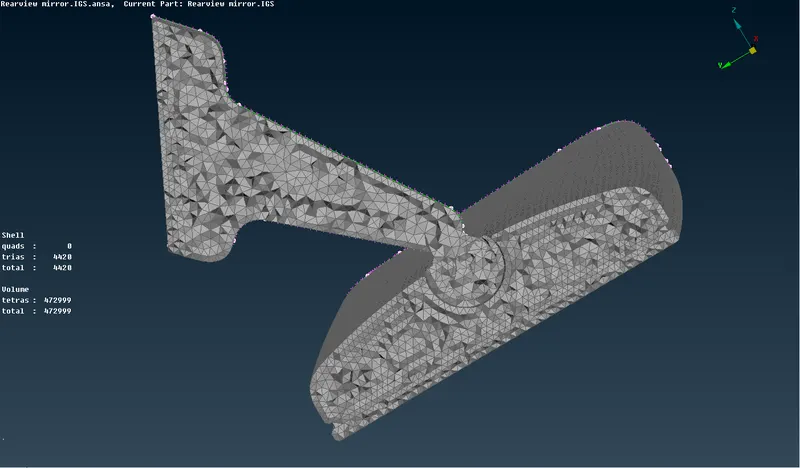
- Once the mesh is generated the volume mesh can be seen by making a cut through the cross section of the model.
Points to be remembered:
- No Min length & Max length error should present in surface meshing.
- No Tet collapse errors, kinks and raised edges should be present after volume meshing.
Learning Outcomes:
- To mesh the geometry using Ortho tria and tria elements.
- To define volume to the entities.
- To perform volume meshing.
Conclusion:
The given model is checked for Geometrical errors and Tetra meshing is performed within given quality criteria without any Tet collapse.