Project 1 (Mini Project on Vehicle Direction Detection
Mini Project - Vehicle Direction Determination
AIM OF THE PROJECT:
To determine the Direction of vehicle based on the Camera Input .
OBJECTIVE OF MINI PROJECT:
Design the vehicle direction Determination
1. Development of MATLAB Simulink model as per requirement.
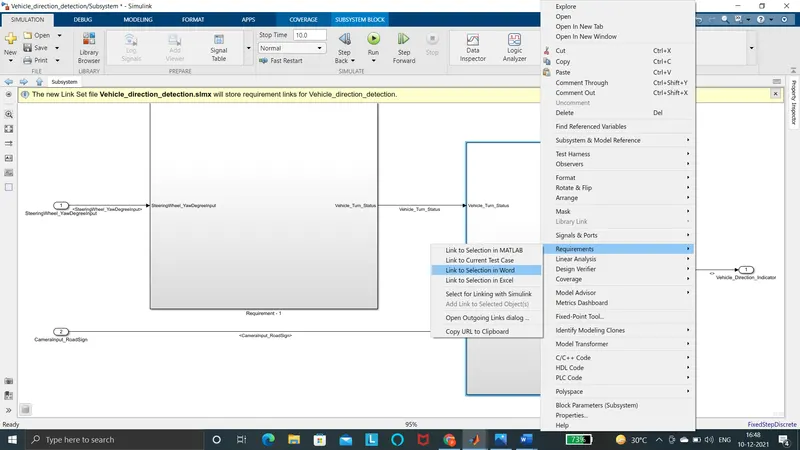
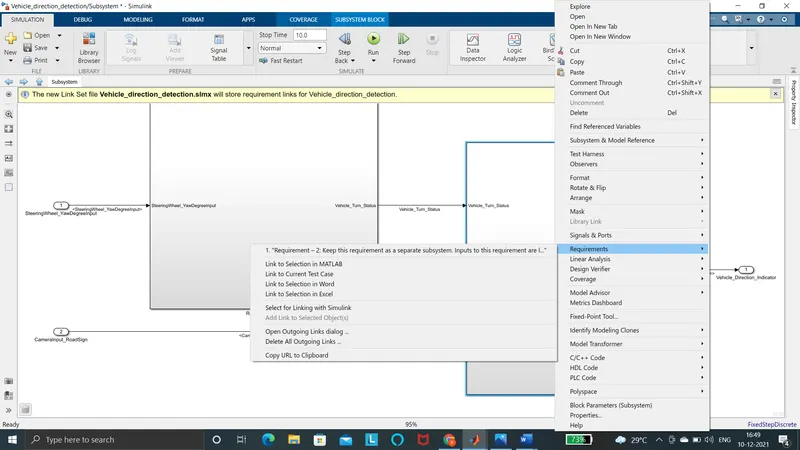
2.Tag the requirements to the simulink model; tagging requirement 1 & requirement 2 to their corresponding subsystems is fine.
3.MBD compliant changes, Data Dictionary creation & code generation is added advantage, and that is not scope of this project.
INTRODUCTION:
Advanced driver assistance systems (ADAS) have received considerable attention in recent decades, because many car accidents are caused mainly by drivers’ lack of awareness or fatigue. Warning the driver of any dangers that may lie ahead on the road is important for improving traffic safety and accident prevention. So a major function of ADAS is the detection of vehicles in front of one’s own by using computer vision technologies, since the cost of an optical sensor is much lower than that of an active sensor (such as laser or radar ones). Furthermore, optical sensors can be used in a wider range of applications, such as in lane departure warning systems and event video recorders. Identifying the direction of the vehicle is one of the important & diverse features in Autonomous driving & Advanced Driver Assistance Features. This particular sub-feature of identifying the direction of vehicle is basically identifying the direction the vehicle is taking based on the camera input.
DEVELOPMENT OF MODEL:
Camera reads the road signs & stores into its memory with unique values for left turn, right turn & straight drive. Depending on the direction it is taking, final indication is given to the driver – as an indication if he is driving in the recommended direction or not.Vehicle Direction Determination can also be coupled along - side features like GPS systems to identify whether the vehicle is reaching its destination in an optimized manner. This sub feature can also be used along with Lane Detection, Highway Warning, Ramp Entry / Exit in Wrong Way Detection etc.
STEP1:
As per the requirement , we develop the Vehicle direction determination
Requirement - 1:
- Steering wheel input as yaw rate (Signal name: SteeringWheel_YawDegreeInput) is the input for this system.
- This is compared against 3 angular values, one each for left turn, right turn & straight drive (Calibration Values: Right_Turn_AngularLimit, Left_Turn_AngularLimit, Straight_Drive_Steering_Angle) to say which specific direction the steering wheel is turning towards.
- Use switch blocks to compare & develop this requirement. Keep this requirement in a subsystem & output of this requirement is a local signal (Signal Name: Vehicle_Turn_Status).
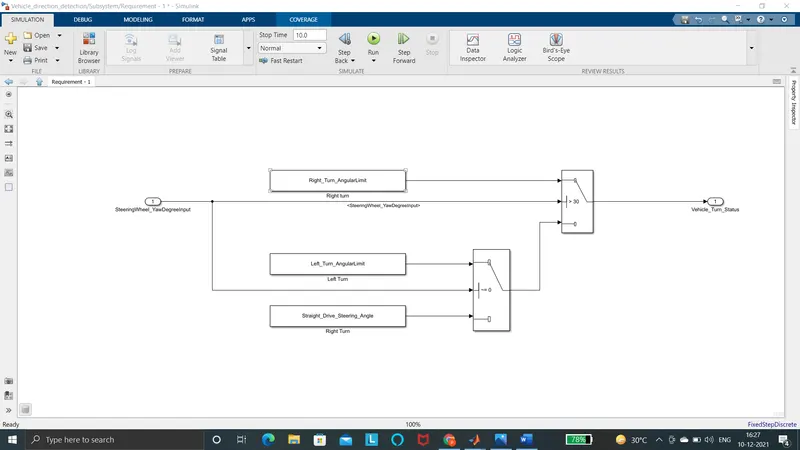
Requirement – 2:
- Keep this requirement as a separate subsystem. Inputs to this requirement are local signal from requirement 1 (Signal Name: Vehicle_Turn_Status) & an input signal from camera (Signal Name: CameraInput_RoadSign), which confirms the occurrence of a road sign.
- Signal Vehicle_Turn_Status is compared against calibration values (Calibration Values: RightTurn_RoadSign, LeftTurn_RoadSign, Straight_RoadSign), if each of them is found equal, then each of the three corresponding output is compared against the camera input signal,
- Using a logical operator block, only one among them is finally given as output signal (Signal Name: Vehicle_Direction_Indicator).
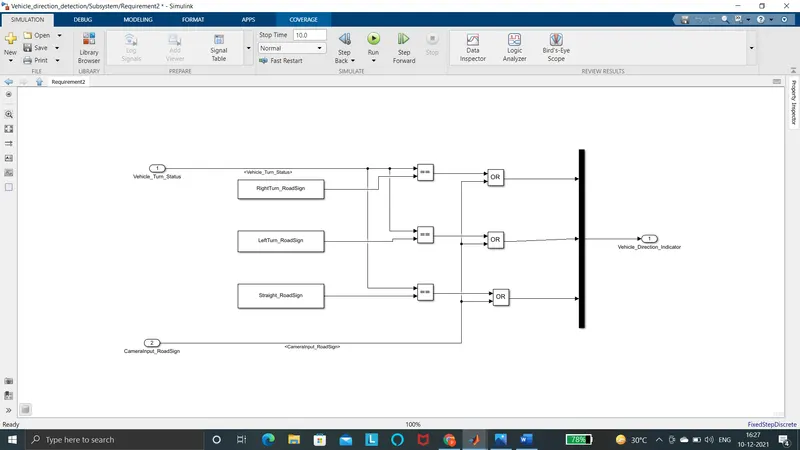
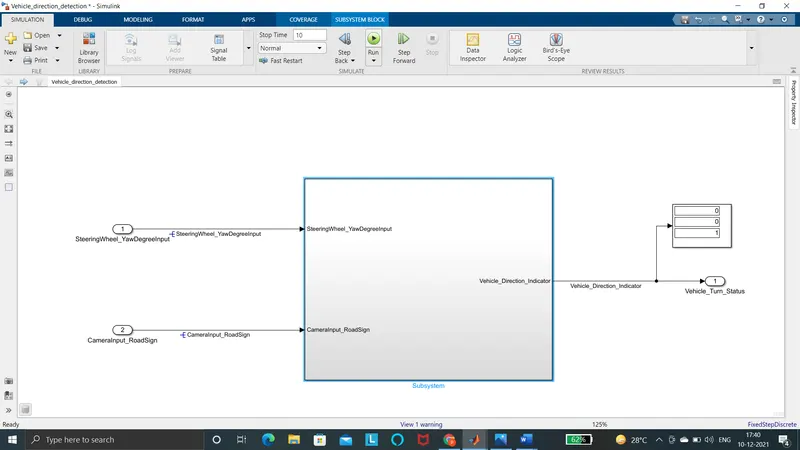
Requirement 1 and Requirement 2 both the block is created into two separate subsystem
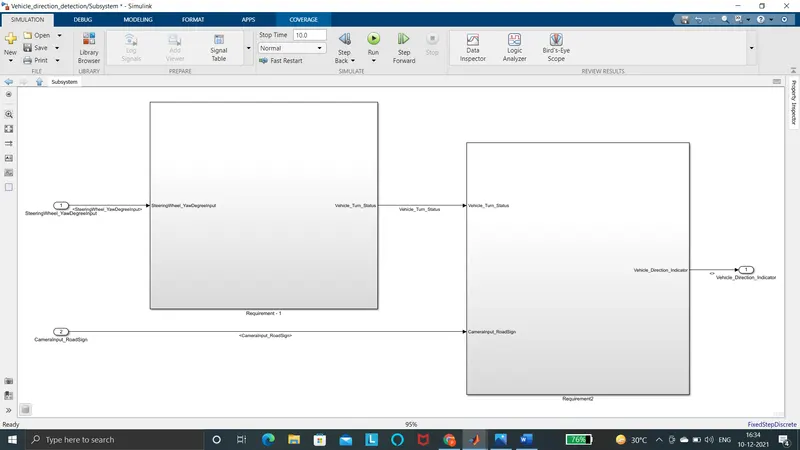
The overall model for the VEHICLE DIRECTION DETERMINATION subsystem
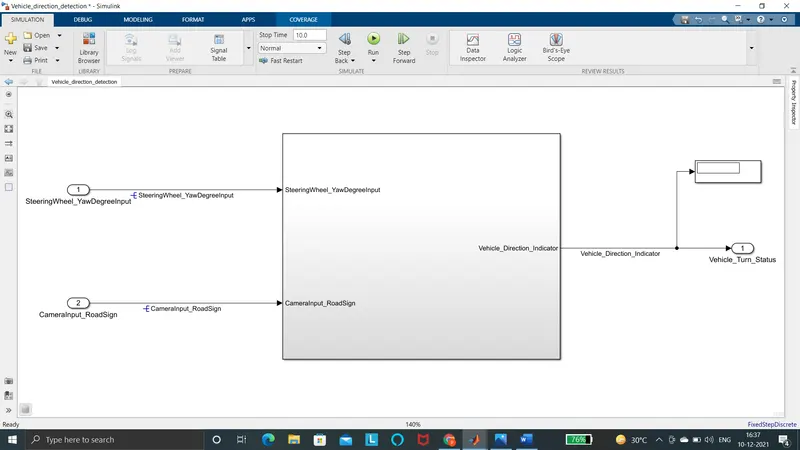
STEP2:
Tagging requirement 1 & requirement 2
STEP3:
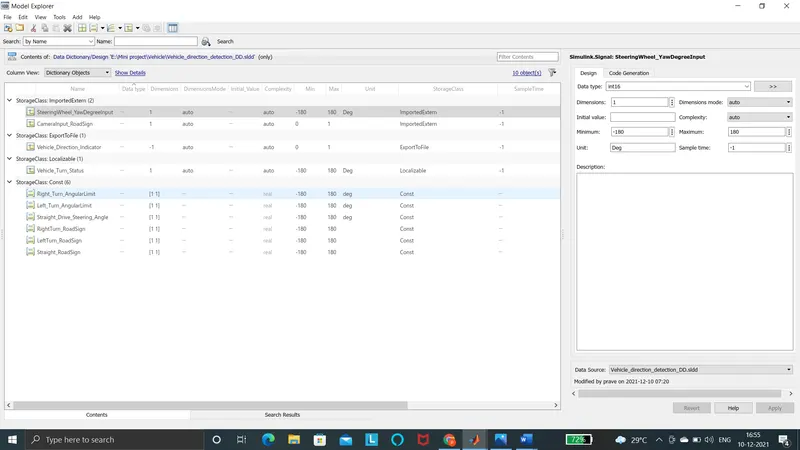
Linking the Model with SLDD file
- Storage class for Input signals: ImportedExtern
- Storage class for Output signal: Export to File
- Storage class for local signals: localizable
- Storage class for calibration signals: Const.
Step4:
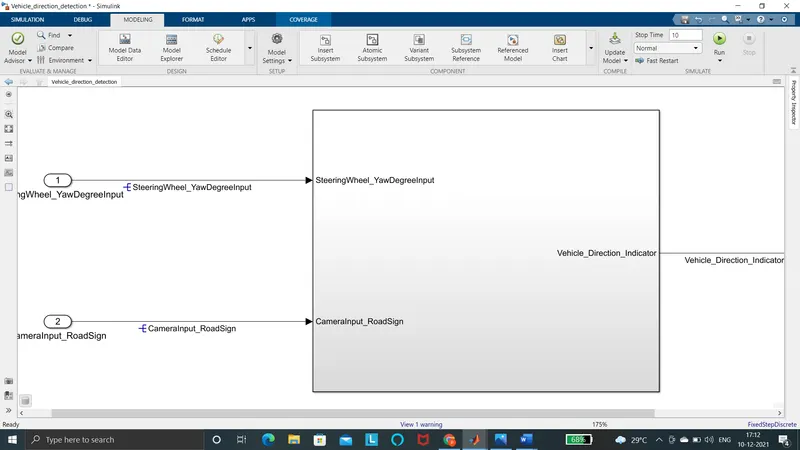
Resolving and propagating the signal
Step5:
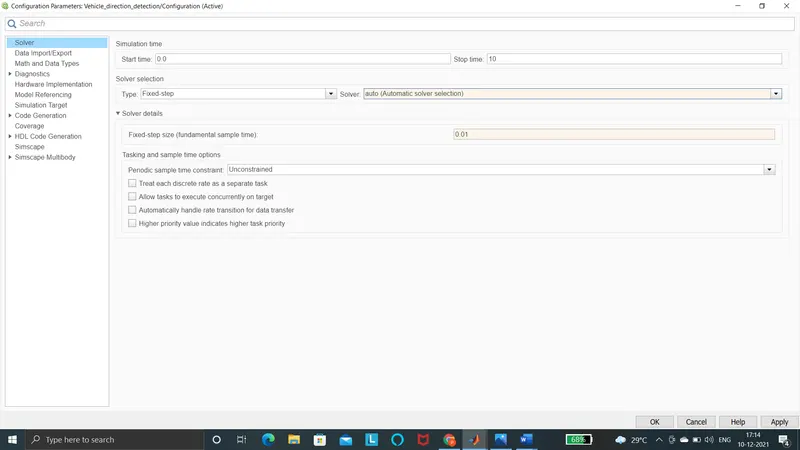
Change the configuration parameter for Simulation
- Changing the solver configuration parameter
- sample time for all signals as 0.01s
Change the system target file into ert.tlc and also change the configuration parameter as per requirements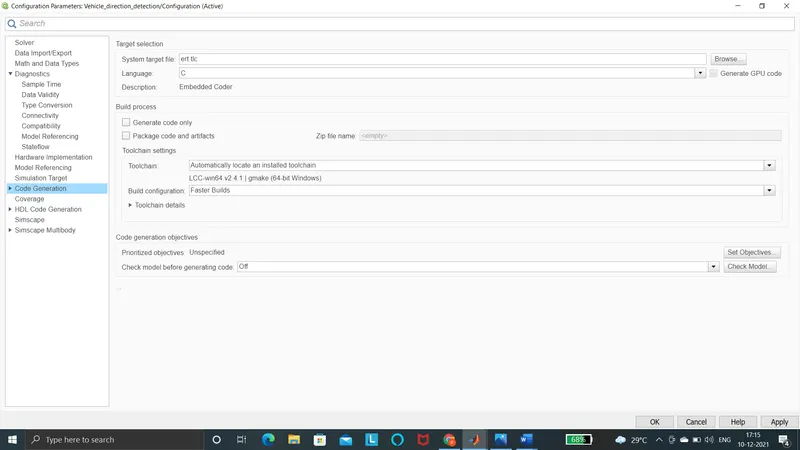
STEP 6:
SIMULATION ANALYSIS AND DISCUSSION
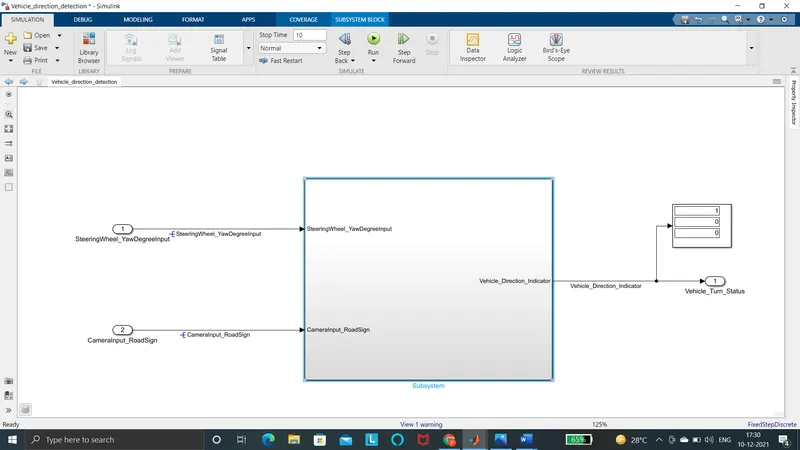
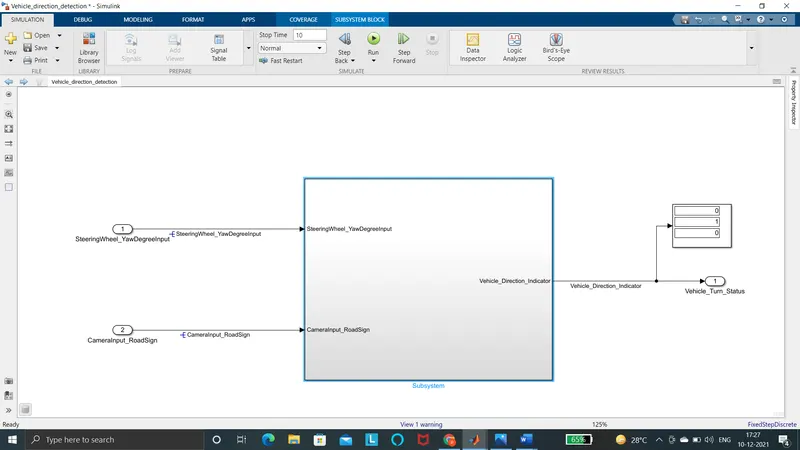
This can be obtained by changing the steering wheel yaw degree input we can obtain
Right turn:
Left Turn:
Straight drive:
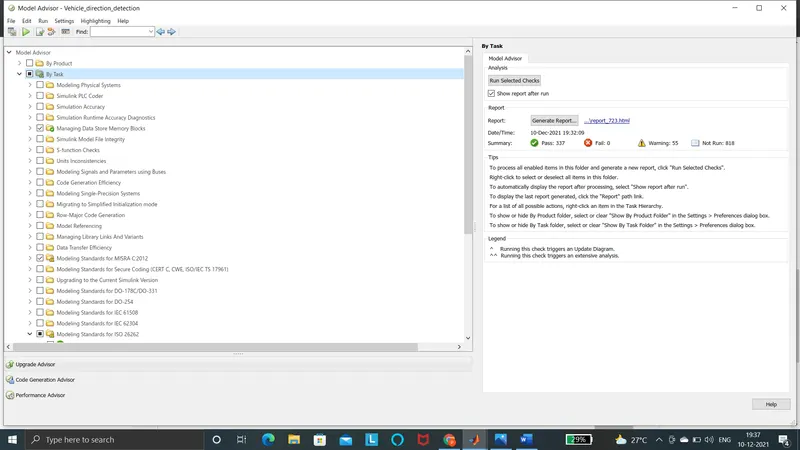
MODEL ADVISOR REPORT:
The model advisor report is shown below
CODE GENERATION:
Code generation report for
Vehicle_direction_detection.c
| 1 | /* |
| 2 | * File: Vehicle_direction_detection.c |
| 3 | * |
| 4 | * Code generated for Simulink model 'Vehicle_direction_detection'. |
| 5 | * |
| 6 | * Model version : 1.4 |
| 7 | * Simulink Coder version : 9.5 (R2021a) 14-Nov-2020 |
| 8 | * C/C++ source code generated on : Fri Dec 10 19:35:35 2021 |
| 9 | * |
| 10 | * Target selection: ert.tlc |
| 11 | * Embedded hardware selection: Intel->x86-64 (Windows64) |
| 12 | * Code generation objectives: Unspecified |
| 13 | * Validation result: Not run |
| 14 | */ |
| 15 | |
| 16 | #include "Vehicle_direction_detection.h" |
| 17 | #include "Vehicle_direction_detection_private.h" |
| 18 | |
| 19 | /* Exported data definition */ |
| 20 | |
| 21 | /* Const memory section */ |
| 22 | /* Definition for custom storage class: Const */ |
| 23 | const int16_T LeftTurn_RoadSign = -120;/* Referenced by: '/Constant1' */ |
| 24 | const int16_T Left_Turn_AngularLimit = -120;/* Referenced by: '/Left Turn' */ |
| 25 | const int16_T RightTurn_RoadSign = 30; /* Referenced by: '/Constant' */ |
| 26 | const int16_T Right_Turn_AngularLimit = 30;/* Referenced by: '/Right turn' */ |
| 27 | const int16_T Straight_Drive_Steering_Angle = 0;/* Referenced by: '/Right Turn' */ |
| 28 | const int16_T Straight_RoadSign = 0; /* Referenced by: '/Constant2' */ |
| 29 | |
| 30 | /* External outputs (root outports fed by signals with default storage) */ |
| 31 | ExtY_Vehicle_direction_detect_T Vehicle_direction_detection_Y; |
| 32 | |
| 33 | /* Real-time model */ |
| 34 | static RT_MODEL_Vehicle_direction_de_T Vehicle_direction_detection_M_; |
| 35 | RT_MODEL_Vehicle_direction_de_T *const Vehicle_direction_detection_M = |
| 36 | &Vehicle_direction_detection_M_; |
| 37 | |
| 38 | /* Model step function */ |
| 39 | void Vehicle_direction_detection_step(void) |
| 40 | { |
| 41 | int16_T rtb_Switch; |
| 42 | |
| 43 | /* Switch: '/Switch' incorporates: |
| 44 | * Constant: '/Right Turn' |
| 45 | * Constant: '/Right turn' |
| 46 | * Inport: '/SteeringWheel_YawDegreeInput' |
| 47 | * Switch: '/Switch1' |
| 48 | */ |
| 49 | if (SteeringWheel_YawDegreeInput > 30) { |
| 50 | rtb_Switch = Right_Turn_AngularLimit; |
| 51 | } else if (SteeringWheel_YawDegreeInput != 0) { |
| 52 | /* Switch: '/Switch1' incorporates: |
| 53 | * Constant: '/Left Turn' |
| 54 | */ |
| 55 | rtb_Switch = Left_Turn_AngularLimit; |
| 56 | } else { |
| 57 | rtb_Switch = Straight_Drive_Steering_Angle; |
| 58 | } |
| 59 | |
| 60 | /* End of Switch: '/Switch' */ |
| 61 | |
| 62 | /* Outport: '/Vehicle_Turn_Status' incorporates: |
| 63 | * Constant: '/Constant' |
| 64 | * Constant: '/Constant1' |
| 65 | * Constant: '/Constant2' |
| 66 | * Inport: '/CameraInput_RoadSign' |
| 67 | * Logic: '/Logical Operator' |
| 68 | * Logic: '/Logical Operator1' |
| 69 | * Logic: '/Logical Operator2' |
| 70 | * RelationalOperator: '/Relational Operator' |
| 71 | * RelationalOperator: '/Relational Operator1' |
| 72 | * RelationalOperator: '/Relational Operator2' |
| 73 | */ |
| 74 | Vehicle_direction_detection_Y.Vehicle_Turn_Status[0] = ((rtb_Switch == |
| 75 | RightTurn_RoadSign) || CameraInput_RoadSign); |
| 76 | Vehicle_direction_detection_Y.Vehicle_Turn_Status[1] = ((rtb_Switch == |
| 77 | LeftTurn_RoadSign) || CameraInput_RoadSign); |
| 78 | Vehicle_direction_detection_Y.Vehicle_Turn_Status[2] = ((rtb_Switch == |
| 79 | Straight_RoadSign) || CameraInput_RoadSign); |
| 80 | } |
| 81 | |
| 82 | /* Model initialize function */ |
| 83 | void Vehicle_direction_detection_initialize(void) |
| 84 | { |
| 85 | /* (no initialization code required) */ |
| 86 | } |
| 87 | |
| 88 | /* Model terminate function */ |
| 89 | void Vehicle_direction_detection_terminate(void) |
| 90 | { |
| 91 | /* (no terminate code required) */ |
| 92 | } |
| 93 | |
| 94 | /* |
| 95 | * File trailer for generated code. |
| 96 | * |
| 97 | * [EOF] |
| 98 | */ |
| 99 |
CONCLUSION:
The model corresponding to vehicle direction detection is Successfully implemented . And also all complaint changes pertaining to the Tagging, MBD compliant changes, Data Dictionary creation ,code generation and also Model Advisor report .