Benchmarking
Condition:
Mr. D.S. Pughazhyendhi is a married man who lives in Bangalore which is a highly crowded city. His Family comprises five members including his wife, five-year-old boy, his father, and his mother. He visits his native place Madurai which is 500kms away from Bangalore once in a month. Also. he will be using his car to commute to his office. His budget falls between 8 to 10 lakhs on road. Please suggest to him with options so that he will buy a good car for his family.
Note: Pughazhyendhil is fond of big cars
Aim: To suggest Mr. D.S. pughazhyendhil with options so that he can buy a good car for his family
Given:
Number of Passenger:- 4 (adults) 1 (child)
Usage:- City and Highway
Budget :- 8-10 Lakhs
What is Benchmarking:
• Benchmarking is the practice of comparing business processes and performance metrics to industry bests and best practices from other companies
The point of benchmarking is to identify internal opportunities for improvement. By studying companies with superior performance, breaking down what makes such superior performance possible, and then comparing those processes to how your business operates, you can implement changes that will yield significant improvements.
Types of cars available in Indian market below 10 lakhs:
- Hatchback
- Sedan
- Sports Utility Vehicle (SUV)
- Multi Utility Vehicle (MUV)
SEDAN
Sedan is more comfortable and creates less noise. Everybody sits better in a sedan.Cheaper to run. A sedan is needed lower fuel and has smaller wheels than an SUV. A set of good 16-inch tires for my sedan costs half as much as a similar set of 18 inches that is suitable for an SUV better active safety Of course, there is more passive safety in an SUV, because it is heavier and taller. Best match for off-roading.In short, there are more advantages in the SUV, but they hardly justify the increase in cost, size and weight. They are also a bit more difficult to maneuver and park, but this might besubjective.
Comfort: sedan gives you a more cozy drive than an SUV. If it is on highways or terrible streets, you won't discover inconvenience in a good sedan
In the barrage area additionally, sedans are considerably more effective and give you a substantially more pleasurable ride. City Driving: Compared to SUVs, city ride in a sedan will be simpler. You needn't bother with heaps of room to turn and because of its luxurious interiors you would feel substantially more comfortable in city traffic.
Mileage: Sedans mileage is good than an SUV. In particular, a car offers you a petroleum variant while the vast majority of the SUVs dont
Performance: The all-around structured of a car will give you better performance. A large portion of the sedans do 0-100 out of 10 seconds.
Most recent innovation: How much you are paying for sedan that much it will give input. A large portion of the sedans come with the most recent technology equipment.
Financial limit: Sedans are less expensive than SUVs. This is the greatest favorable position of a sedan
SPORTS UTILITY VEHICLE (SUV)
Being practical goes without saying really considering the body of an SUV which is typically medium to large in size. The expansive boot and roomy interior makes the SUV model especially ideal for families. A family of five can enjoy more than enough leg room as well as ample space for extra luggage. An SUV's ability to carry more weight than the usual hatchback or estate is also a bonus, particularly if you're adventurous / active and need to transport certain lifestyle equipment.
The generous height given by most SUV models is beneficial for taller/larger adults too, providing an increased level of comfort for all drivers andpassengers.
SAFETY
From the very first stages of manufacture, SUVs are at an advantage safety-wise because of their sturdy frames. Typically, these cars are assembled on a much stronger truck chassis, resulting in a higher level of protection if the car was involved in an accident. The larger, heavier vehicle will take the force of collision much less than the impact of a smaller car and its passengers. SUVs typically have a higher driving position, providing an improved visibility of the road ahead of you. Being able to see ahead of the smaller car in front of you gives you the advantage of knowing if or when to slow down. The SUV's safety conscious reputation provides the perfect family car without a doubt.
Fuel Efficiency
In recent years, the SUV/Crossover segment is booming, commonly due to manufacturers realisation that not everybody wants an SUV for typical off-roading and towing purposes. These days the concept has been flipped on its side, because Crossover vehicles are now available offering all the practical advantages of an SUV without excessive and costly fuel consumption
Particularly on the emerging crossover SUVs manufactured in the past few years, great fuel consumption has been achieved by understanding how the vehicles are commonly used. The usual prevailing all-terrain capability, that's not frequently used has been almost dismissed by the Crossover, enabling an affordable, environmentally-friendly, fuel efficient SUV, providing the perfect family car.
Robustness
SUVs are built according to their size. The foundations of an SUV are built on much sturdier and stronger frames, enabling a more durable and powerful capability
If you do enjoy regular trips into the country or abroad, your SUV is the perfect companion. The strong, sturdy build ensures you'll be covered whatever the weather and the 4x4 (sometimes optional) feature can power thro terrains. Whether it be uphill into the mountains or through mounds of fords, your SUV has got your back. Their robust nature means that your car is able to endure bigger impacts too, again increasing the level of safety to you and your family the instance of a collision
Advantages of owning an SUV
Comfort and cabin space - From head space to boot space and everything in between SUVs are simply much larger than a sedan and offers an element of comfort and luxury in the cabin. More room also makes an SUV extremely child- and pet-friendly, and the extra compartments and storage space keeps bring-alongs like toys and snacks neatly tucked away.
Versatility - An SUV can be used for a wider variety of purposes than a sedan. They can take on different road surfaces easily, are the ultimate vehicle for regular family outdoor adventure activities, and most have powerful engines that will allow you to tow a trailer, boat, and even a caravan rough or uneven ground Basically, it
Grip and handling - Wet and slippery conditions are not an issue for this four-wheel-drive vehicle. Neither is can take you to wherever you want to go
Ruggedness - The sturdier frame of an SUV provides the vehicle with a robust foundation that enables durability and power. If adventure and the great outdoors is your thing and you're sure to indulge regularly, then this vehicle is going to serve you well
Full view ahead - Due to its higher seating position you'll be able to see the road clearly - hazards like potholes or fallen items on the road can be avoided in time. You'll also be able to see over smaller vehicles and ahead of you in heavier traffic, and you'll have the advantage of finding a spot in a crowded parking lot.
Ground clearance - More than the ability to mount pavements, SUVs can drive through deeper waters than sedans without damaging the engine.
Note: If ever caught in a situation like this such as a flooded street or bridge, always heed on the side of caution first
Storage capacity - SUVS are perfect for large families and people who love sports or the outdoors, enabling them to bring along large-sized equipment such as tents, mountain bikes, kayaks, and surfboards
1.FORD ECOSPORT
Ford EcoSport Review
Summary
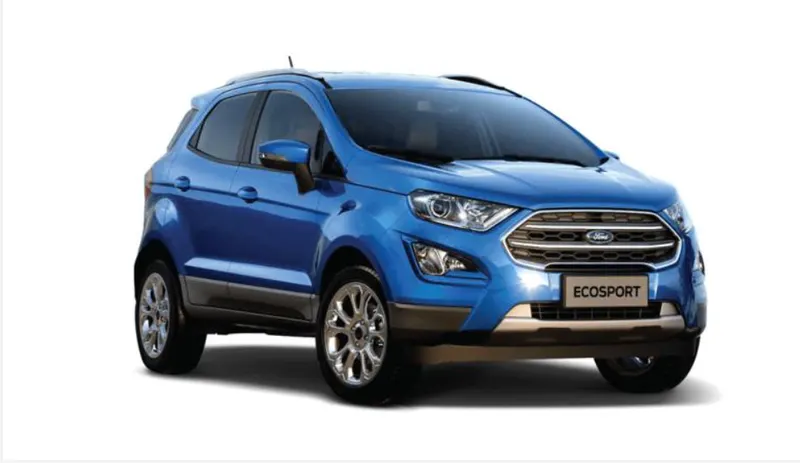
The EcoSport has been one of the highest selling Ford cars in India since its launch in 2014. It kick-started the sub-four metre compact SUV segment which has now turned out to be the highest growing segment in the Indian car market. The EcoSport now got a makeover as a part of its product lifecycle. It now gets a new face, redesigned cabin and a new petrol engine. The updated EcoSport continues its fray with the likes of Maruti Vitara Brezza, Honda WR-V, Mahindra TUV300 and the Tata Nexon. The prices for the facelifted EcoSport remains unchanged over the older model.
Exterior
The facelifted EcoSport brings in a fresh fascia and an updated rear. The hexagonal grille is now reworked, eliminating the thin strip atop the main grille which houses the blue oval on the outgoing model. The front bumper is entirely redesigned with a larger but squared-off fog lamps and LED DRLs. The headlights retain the shape, but they are now bigger than before, lending the car a much-needed refreshment. The 17-inch alloy wheels gets an attractive design with the facelift but is available on the top-spec variant.
Interior
The most prominent change on the inside is the large floating infotainment screen mounted atop the centre console. There is a choice of either a 6.5-inch or an 8-inch touchscreen infotainment system depending on the trim level. The infotainment system integrates Ford’s new SYNC3 connectivity system which features Apple CarPlay and Android Auto integration compatibility with seamless smartphone connectivity. Ford offers automatic climate control, ISOFIX, automatic headlamps, glove box illumination, cruise control, rain sensing wipers and tyre pressure monitoring system on the top-of-the-line Titanium+ variant. Moreover, the top-spec also comes with hill start assist, ESC and traction control as well. Even the base variant of the new EcoSport have two airbags (driver and front passenger) as standard along with ABS and EBD.
Powertrain
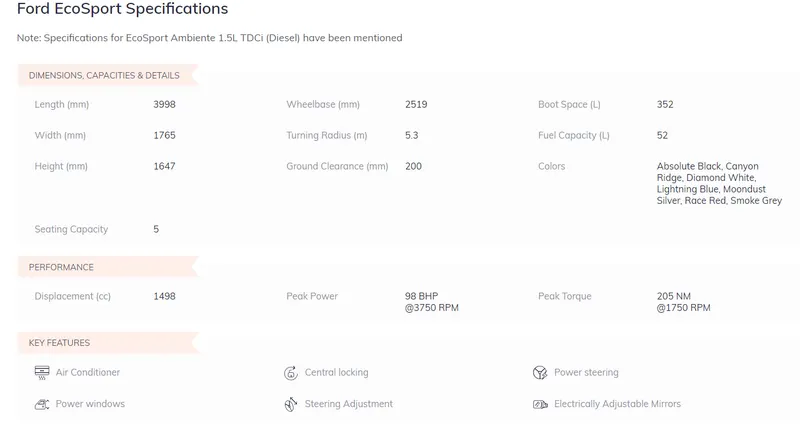
Under the hood of the new EcoSport is a new 1.5-litre three-pot petrol engine of the Dragon family. The naturally aspirated motor produces 120bhp at 6,500rpm and a max torque of 150Nm at 4,500rpm. The engine can be had with either a five-speed manual or a six-speed automatic. The diesel engine, on the other hand, is the same 1.5-litre turbodiesel putting out 99 bhp at 3,750rpm and a max torque of 205Nm at 1,750rpm. The EcoSport is the only compact crossover with a petrol automatic option.
2.HONDA WR-V
Honda WR-V Review
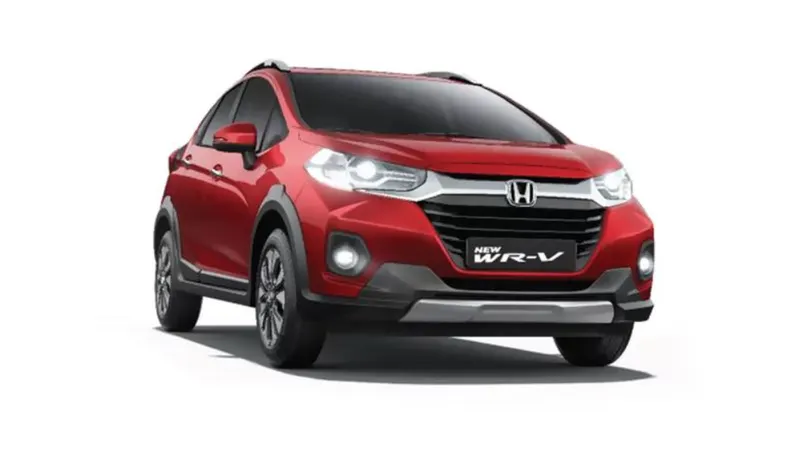
Honda Car India has launched the WR-V facelift in India, which is priced between Rs 8.50 lakh and Rs 11 lakh (all prices, ex-showroom, Delhi). The model is offered in four variants and six colour options. Rivals to the crossover include the Maruti Suzuki Vitara Brezza, Hyundai Venue, Tata Nexon and Ford EcoSport.
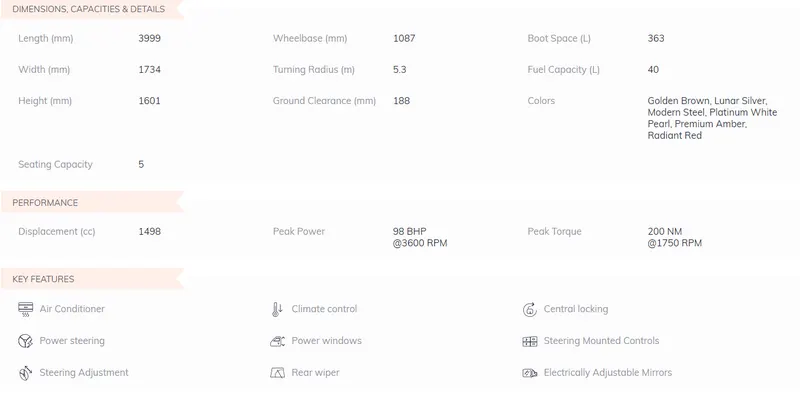
Powertrain options on the Honda WR-V facelift include BS6-compliant versions of the 1.2-litre petrol motor and 1.5-litre diesel mill. These engines produce 88bhp and 110Nm of torque and 98bhp and 200Nm of torque respectively. The petrol unit is paired to a five-speed manual gearbox while the diesel unit is mated to a six-speed manual transmission. The former returns a fuel efficiency of 16.5kmpl while the latter gives a fuel economy of 23.7kmpl.
Changes to the exterior of the Honda WR-V facelift include a revised fascia, featuring new LED projector headlamps with integrated L-shaped DRLs, LED fog lamps, new 16-inch diamond-cut alloy wheels and LED tail lights.
Inside, the Honda WR-V facelift comes equipped with cruise control, height adjustable driver seat, seven-inch touchscreen infotainment system with Apple CarPlay and Android Auto, tilt and telescopic adjustable steering, automatic climate control with touch panel and an engine-start-stop button. The model receives safety features in the form of dual airbags, ABS with EBD, reverse parking camera with guidelines and rear parking sensors.
3.HYUNDAI GRAND I10 NIOS
Hyundai Grand i10 Nios Review
Summary
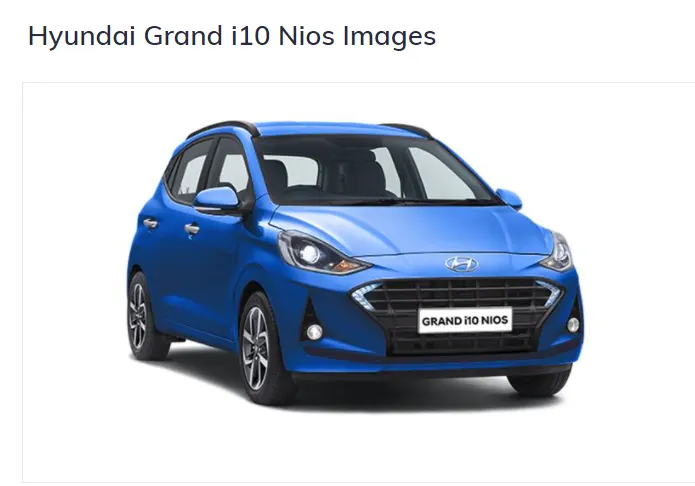
The Hyundai Grand i10 NIOS is the third generation for the South Korean automaker’s mid-size hatchback. The car is being in multiple variants and with both petrol and diesel power of which the latter now gets an AMT.
Further to this, read Hyundai Grand i10 Nios Road Test details by our expert.
Exterior
The new Hyundai Grand i10 is based on an all-new platform that has made the car lighter, flexible, safer and wider than its predecessor. The vehicle gets a new fascia with a redesigned headlamp and tweaked front grille. It also gets redesigned bumpers and a fresh set of rear tail lamp. However, the sides are expected to resemble the current generation model apart from a fresh set of alloy wheels. However, the vehicle will not lose its young and tall-body styling element.
Interior
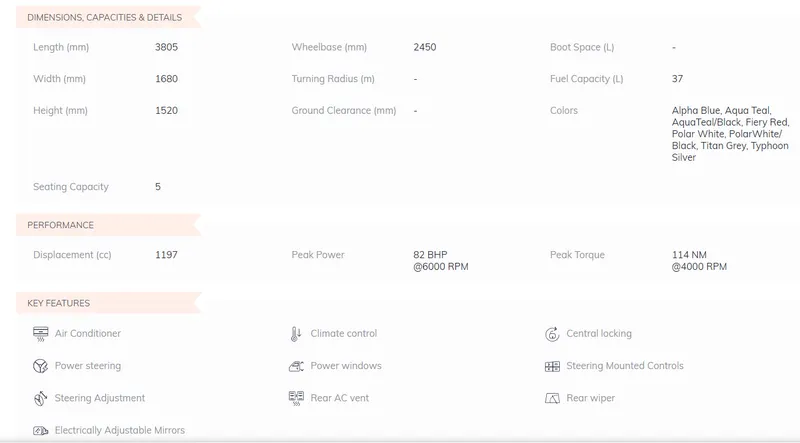
The Grand i10 Nios gets a new dual-tone upholstery for freshness, touchscreen infotainment system, climate control, rear AC vents, driver’s seat height adjustment and dual tone colour schemes. All variants get standard safety features such as dual front airbags and ABS.
Engine & Transmission
Under the hood, the Hyundai Grand i10 Nios gets the existing car’s petrol and diesel engine options. The petrol version continues with the 1.2-litre Kappa engine that develops 81bhp of power and 114Nm and it is BS6 compliant. The diesel version gets the 1.2-litre four-cylinder engine that generates 74bhp of power and 190Nm of torque. Both the variants get the five-speed manual gearbox as well as an AMT as a part of the package
4.NISSAN KICKS
Nissan Kicks Review
Summary
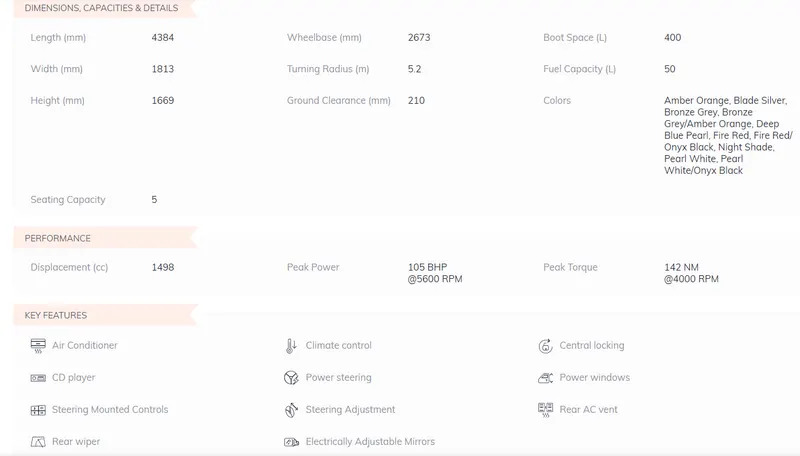
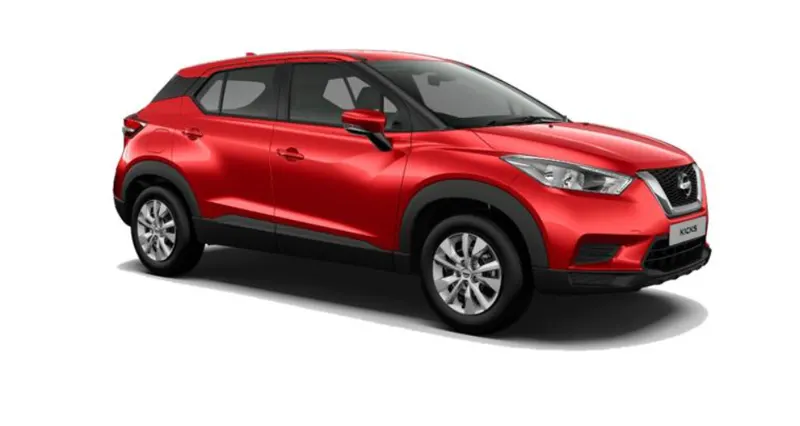
Nissan Kicks, the premium SUV is available in two petrol and four diesel-powered variants. The SUV is available in 11 colour schemes (including dual tone options). The vehicle boasts of offering class leading features such as the least turning radius of 5.2-metres and the Nissan Connect.
Further to this, read Nissan Kicks Road Test details by our expert.
Exterior
As for the exterior, the Nissan Kicks gets LED projector headlights, shark fin antennae, signature V-motion grille and multi-LED set of DRLs incorporated in the headlamp cluster. The vehicle is also available in dual tone body colour option. The top-end variants will also be equipped with fog lamps neatly integrated into the front bumper. The Kicks rides on 17-inch dual tone five-spoke machined alloy wheels. These look proportionate and add to the appeal as well.
Interior
All variants of the Nissan Kicks get dual front airbags, power windows, height adjustable driver’s seat, electrically adjustable mirrors with integrated indicators and climate control with rear AC vents. An 8.0-inch touchscreen system is standard from the XV variant onwards while the top spec XV Pre-Option variant also gets a segment first 360-degree surround camera.
Engine & Transmission
The engine options comprise 1.5-litre petrol and 1.5-litre diesel. The former is good for 105bhp/142Nm and is mated to a five-speed manual. The diesel one, on the other hand, produces 108bhp/240Nm with a six-speed manual. The petrol variants have an ARAI certified efficiency of 14.23kmpl while the diesel one has an ARAI-certified efficiency of 20.4kmpl. The diesel version is available in all variants while the petrol option is limited to the XL and XV variants.