Week 6- Challenge
OBJECTIVE:
The aim of the challenge is to generate the midsurface and geometry cleanup of the given component and create mesh on the component with low tria concentration and proper mesh flow.
procedure:
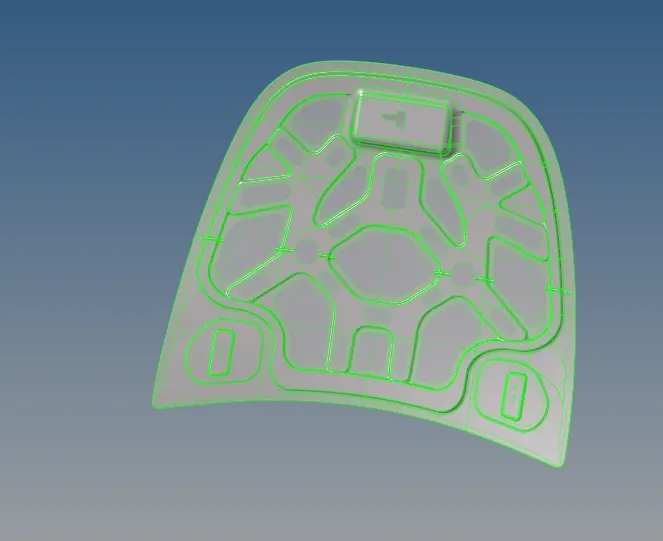
- Import the given cad model in hypermesh by open it in hm files.
- cad model image are attached below.
- Creating the midsurface for the given components by using midsurface option in the geomentry panel.
- Then geomentry cleanup all the component using autocleanup option and with some manual option also.
- After geometry cleanup some lines are in there,that lines are removed by toggle option in the quick edit panel and some other option also.
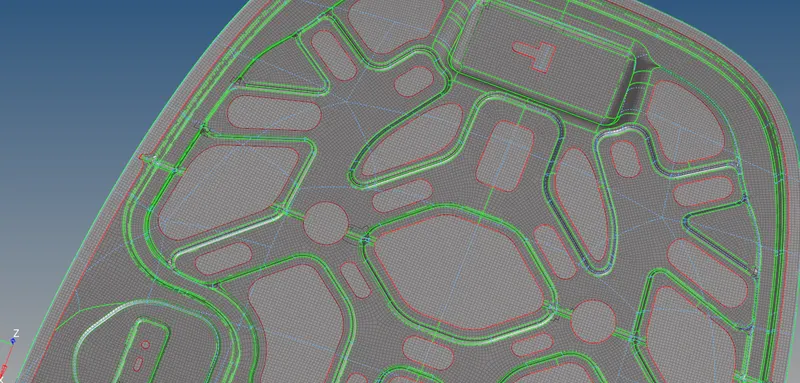
- Meshing all the parts by using automesh option in the 2d panel and some parts are meshesd individually.
- Before meshing, mask the component into half because after completing the mesh in half side reflect the meshing into other side of the part. It will reduce the meshing time.
- In inner extract body, meshing the parts individually by selecting the single surface and meshing it.
- Before meshing the latch surface create the washer plates and all the components which need washer plate create it beacause washer plate is used to capture the hole properly.
- Remove the tria and rotation parts in the meshing of given components by remesh the parts which having more trias by increasing or decreasing the nodes because tria element give excessive stiffness
- check the meshing with the given parameter by using the option check elements in the tool.In this option selecting the parameter individualy that shows how many element should failed.
- optimize the elements by using the cleanup tool and remesh the parts.In this option selecting the node optimize, place node and some other option to optimize the element.
- Final model image are attached below.
 RESULT: Generate midsurface and geometry cleanup of the given component and create mesh on the component with low tria concentration and proper mesh flow is completed.