Air standard Cycle: OTTO CYCLE
AIM: TO PRODUCE PLOTS FOR OTTO CYCLE ON A PV DIAGRAM AND TO PRODUCE THE THERMAL EFFICIENCY OF THE ENGINE
THEORY:USING MATLAB GIVES US AN EDGE OVER DIFFICULT AND TIME CONSUMING PROBLEMS. OTTO CYCLE COMPRISES OF LOTS OF EQUATION TO BE TAKEN INTO CONSIDERATION TO BE SOLVED IN ORDER TO PRODUCE THE DESIRED CURVE. THIS PROJECT ALSO CONTAINS THE PLOT FOR THERMAL EFFICIENCY WHICH IS AN IMPORTENT PARAMETER FOR ENGINE FUNCTION CHECK.
PROCEDURE: First of all we need to understand the steps occuring in otto cycle. Otto cycle is a case of petrol cycle.the different steps comprised in tis cycle are as follows.
1.Isentropic compression process(1 to 2)
2.Constant volume heat addition porocess(2 to 3)
3.Isentropic expansion process(3 to 4)
4.Constant volume heat rejection process(4 to 1)
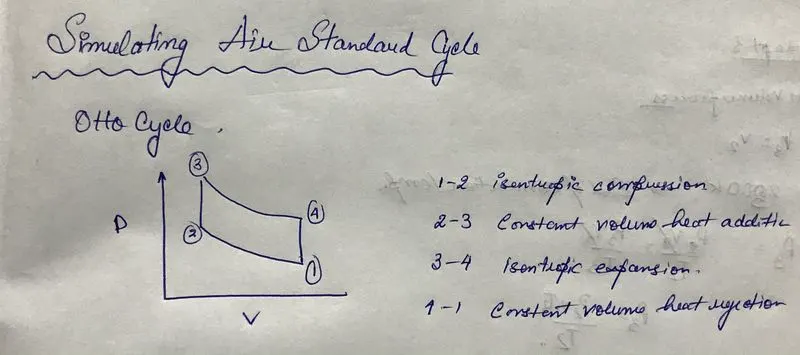
Now let us take into consoideration the various input parameters i.e v1,t1,p1,compression ratio(cr),t3(temp at end of combustion),gamma.
Inputs needed to find out the volume relation between clearence volume and swept volume i.e bore,stroke compression ratio,connecting rod length.
Importent formulaes to be used: Ideal Gas equation=p1v1/t1=p2v2/t2
Isentropic Process equation:=p1v1^gamma=p2v2^gamma
Swept volume and Clearence volume are as follows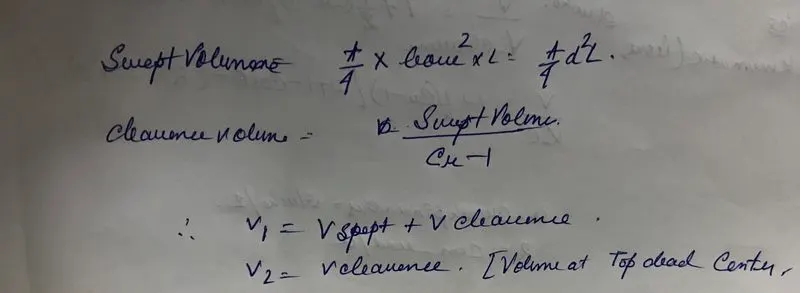
Hence we can now satart off with the programming:
The programming consists of comment(%) to help you understand the code better:
 %SIMULATION OF AIR STANDARD CYCLE:- OTTO CYCLE
 clear all
 close all
 clc

 %input parameter gamma
 gamma=1.45

 %inputs for state point 1
 p1=102325
 t1=611

 %engine parameter for finding v_clearence and v_swept
 bore=0.12
 stroke=0.12
 con_rod=1.83
 cr=14

 v_swept=(pi/4)*bore^2*stroke
 v_clearence=v_swept/(cr-1)

 %statepoint 1 volume v1
 v1=v_swept+v_clearence
 v2=v_clearence
 %calculations for state point 2 which is a case of ISENTROPIC COMPRESSION
 %p1*v1^gamma=p1*v2^gamma
 %hence
 p2=p1*(v1/v2)^gamma
 %calcualtion of state point 2 temperature by ideal gas
 %equation p1v1/t1=p2v2/t2
 t2=(p2*v2*t1)/(p1*v1)

 constant_d=p1*v1^gamma
  v_compression=engine_kinematics_2(bore,stroke,con_rod,cr,180,0)
  p_compression=constant_d./v_compression.^gamma


% temperature at the end of constant volume combustion/heat addition process
 t3=2600
 v3=v2
 %finding out the pressure at state point 3 by ideal gas equation
 %p3v3/t3=p2v2/t2
 %v2 & v3 are equal hence gets cancelled
 %p3/t3=p2/t2
 p3=(p2*t3)/t2

 %calculations for state point 4 which is a case of ISENTROPIC EXPANSION
 %FORMULAE IS P3V3^GAMMA=P4V4^GAMMA
 v4=v1   %constant volume process form 4 to 1
 p4=(p3*v3^gamma)/v4^gamma


 constant_d=p3*v3^gamma
  v_expansion=engine_kinematics_2(bore,stroke,con_rod,cr,0,180)%governing equation of the curve
  p_expansion=constant_d./v_expansion.^gamma


 figure(1)
 hold on
 plot(v1,p1,'*','color','b')
 plot(v_compression,p_compression)
 plot(v2,p2,'*','color','b')
 plot([v2 v3],[p2 p3],'color','g')
 plot(v3,p3,'*','color','b')
 plot(v_expansion,p_expansion)
 plot(v4,p4,'*','color','b')
 plot([v4 v1],[p4 p1],'color','g')
 grid on
 xlabel('VOLUME')
 ylabel('PRESSURE')

%THERMAL EFFICIENCY
%GRAPH VARIES BETWEEN COMPRESSION RATIO AND EFFICIENCY
%FORMULAE FOR THERMAL EFFICIENCY IS Eta=(1-(1./comp_ratio.^(gamma-1)))*100

 comp_ratio=linspace(0,18,19)
 eta=(1-(1./comp_ratio.^(gamma-1)))*100

 figure(2)
 hold on
 plot(comp_ratio,eta,'linewidth',3,'color','b')
 grid on
 xlabel('COMPRESSION RATIO')
 ylabel('THERMAL EFFICIENCY ETA IN %')
 axis([0 20 0 100])


 %END
FIGURE 1
EXPLAINS THE CURVE BY WHICH THE 4 POINTS A MENTIONED PREVIOUSLY ARE CONNECTED AND NOT BY A STRAIGHT LINE.THE PHYSICS BEHIND THIS IS EXPLAINED BELOW AT FUNCTION=engine_kinematics_2.
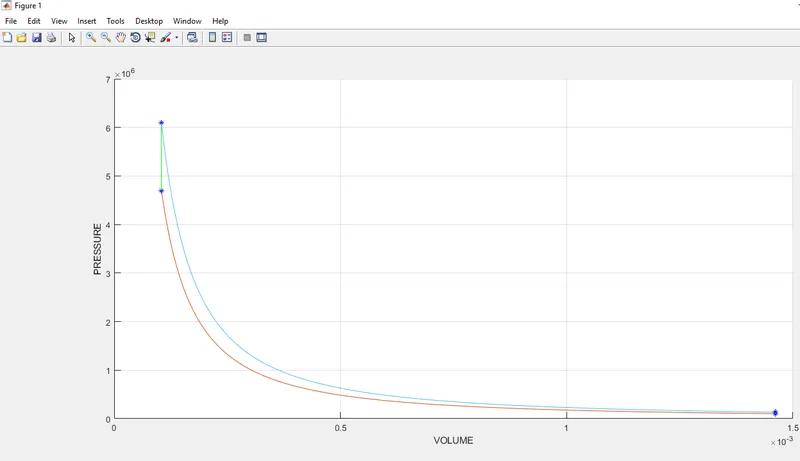
FIGURE 2
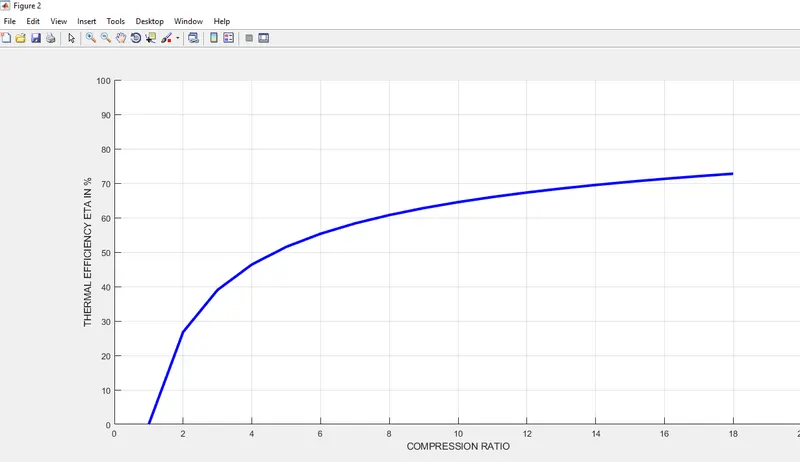
The thermal efficiency can be computed by plotting the graph between thermal efficiency and compression ratio.
Thermal efficiency eta can be calculated by the formulae eta=(1-1/(cr^(gamma-1)))*100 whre cr is compression ratio. Here I have used 19 values between 0 and 18 and plotted the same on a graph below.
.
engine_kinematics_2
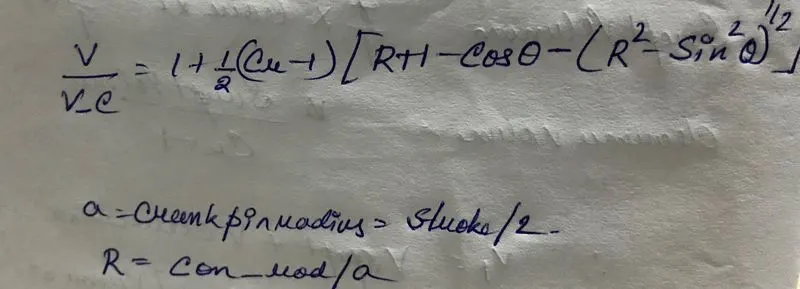
I have created a function called engine_kinematics_2 which is not a built in command but takes into consideration of the values of bore stroke con rod and other parameters to calculate the v_swept and v_clearence to find out the total volume at crank angel 180 degree through a special formulae as follows:
The codes for the Function is provided below with coment for better understanding:
The above governing equation has been broken down into small terms such as b,c,d to ease the calculation and program management.
function [V]=engine_kinematics_2(bore,stroke,con_rod,cr,start_crank,end_crank)


%crank pin radius 'a'
a=stroke/2
R=con_rod/a

v_s=(pi/4)*bore^2*stroke
v_c=v_s/(cr-1)

theta=linspace(start_crank,end_crank,100)
%breaking the bigger equation in smaller terms b,c,d
b=0.5*(cr-1);
c=R+1-cosd(theta);
d=(R^2-sind(theta).^2).^0.5;

V=(1+b*(c-d)).*v_c


end
EXPLANATION OF THE CURVE BETWEEN POINT 1-2 AND 3-4
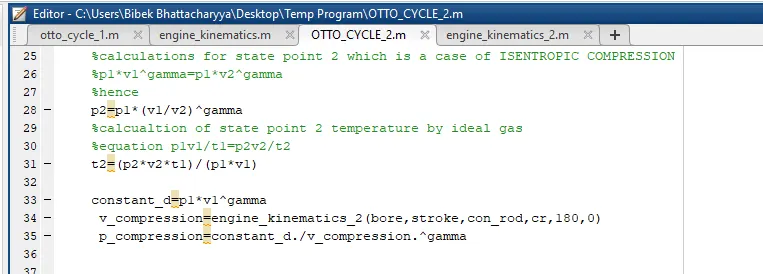
This above function engine_kinematics_2 is used to call this function into our main program to make it neat and easy.below is attached where the code is used in line 33,34,35. This is used to calculate a 'constant d' which in turn can compute the 'p_compression' wrt the output of function i.e 'V_compression'.
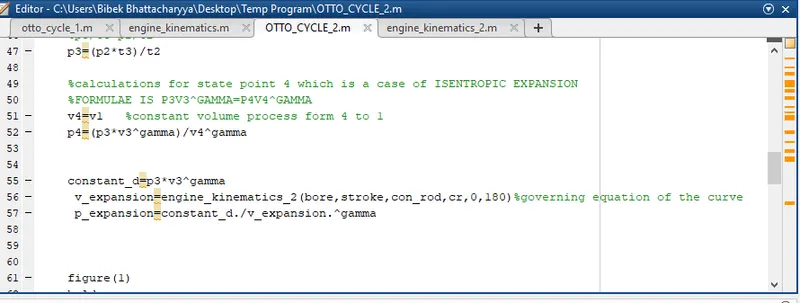
Similarly the expansion process is conducted in same manner to in line 55,56,57 to compute points 3&4. The screenshot is attache below.
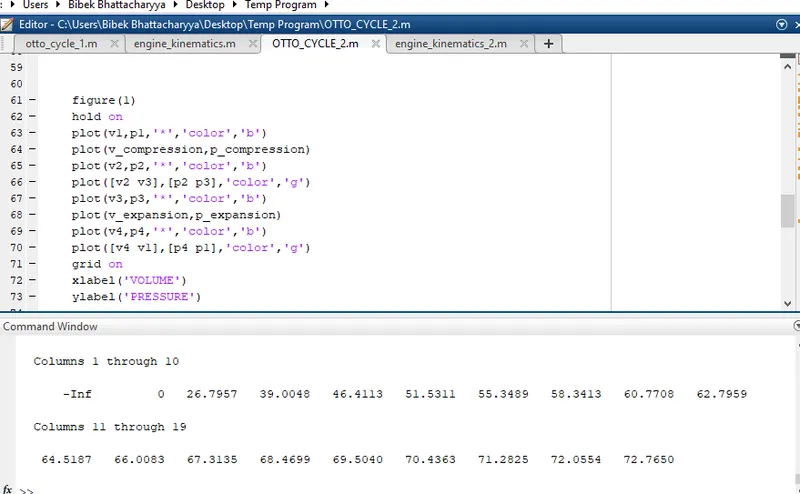
PLOTTING THE POINTS ON THE CURVE AT 1 2 3 4 TO CREATE THE PV DIAGRAM.
THE POINTS 2,3 AND 4,1 ARE STRAIGHT LINES being a constant volume process AND CAN BE JOINED SIMPLY BY CALLING THE PLOT COMMAND AND INPUTING THE X X AND Y Y COORDINATES.
The main difficulty is in plotting 1 2 and 3 4 and hene we created the function and made values for v,p expansion and compression. The v_compression and p_compression and v_expansion and p_epansion are plotted to generate a curve between 1 2 and 3 4 respectively. The demo is attached below.
CONCLUSION: HENCE AFTER ALL THESE LONG STEPS I CAN CONFER THAT THE PV AND THERMAL EFFICIENCY CURVE HAVE BEEN EXECUTED SUCCESSFULLY.