All About The Ellipse
Ellipse is a fundamental component of a conic section and shares many characteristics with a circle. An ellipse is oval in shape as opposed to a circle. An ellipse is a shape with an eccentricity less than one that symbolises a group of points whose distances from its two foci are added up to a fixed value. Everyday examples of the ellipse include the shape of an egg as well as the race track in a sports field.
 Navin Baskar·16 Aug 2022·3 min read
All About The Ellipse
Ellipse is a fundamental component of a conic section and shares many characteristics with a circle. An ellipse is oval in shape as opposed to a circle. An ellipse is a shape with an eccentricity less than one that symbolises a group of points whose distances from its two foci are added up to a fixed value. Everyday examples of the ellipse include the shape of an egg as well as the race track in a sports field.
What is an Ellipse?
The location of points in a plane whose sum of separations from two fixed points is a constant value is known as an ellipse. The ellipse's two fixed points are referred to as its foci. Simply put, an arc around the two focal points is known as an ellipse. The length and width of the ellipse are controlled by two of its axes.
Ellipse Tool in AutoCAD
The Ellipse command on the AutoCAD display allows you to construct ellipses in general. By putting the start and end points on two different axes, we could make an ellipse. Depending on the specification, the first and second axes of the ellipse might be classified as either minor or major axes.
The Main Features of an Ellipse Drawing
Below are the main features of an ellipse:
- Ellipses have two focal points.
- The ellipse's eccentricity ranges from 0 to 1.
- Each distance between a point on the ellipse and the two foci is constant when added together.
- Ellipses have two axes: a major axis and a minor axis.
- The ellipse's centre lies at the point where the major and minor axes intersect.
- A circle is a particular ellipse type with both foci in its middle.
Ellipse Drawing in Engineering and Other Fields
The ellipse is a universal shape and finds its application in various industries. In architecture, ellipses are used to design buildings and rooms that need resonance. In woodworking, ellipses are often used to design and build tables and shelf components. In astronomy, even the Kepler satellite and planet orbits use ellipses to describe their motion.
A Stepwise Guide to Ellipse Drawing
Below are the commands to follow during ellipse drawing
- The command used here is ELLIPSE

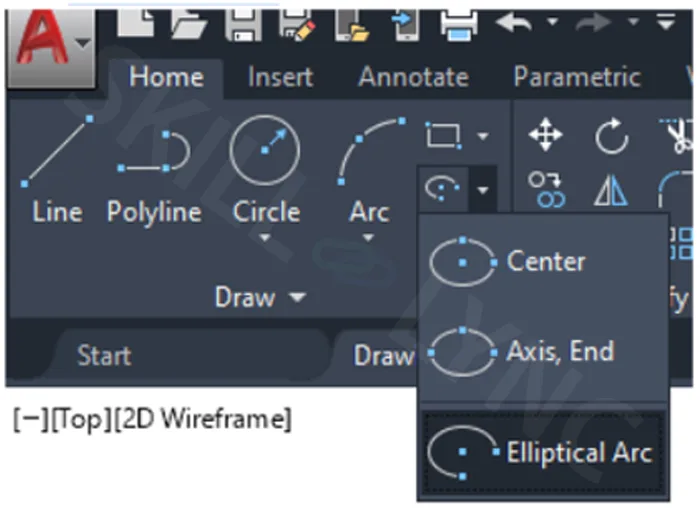
- It can also be selected from the ribbon bar it is located below the rectangular option
- They are three options to draw the ellipse
1) Centre
2) Axis, End
3) Elliptical Arc
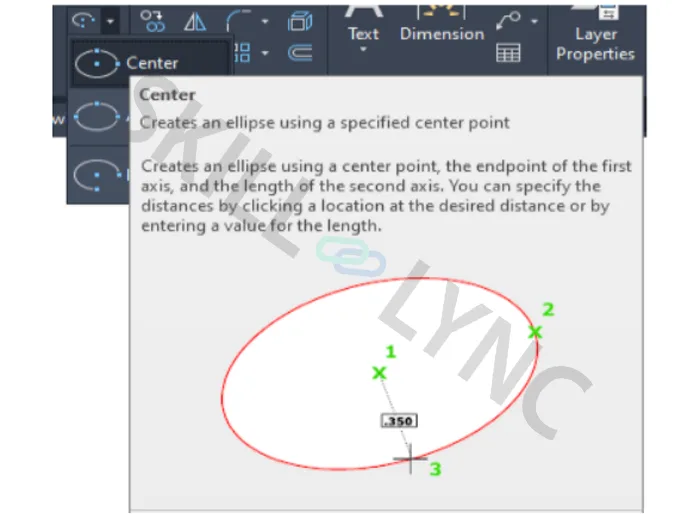
Center
- It is created by specifying the center point, Endpoint of the first axis, and length of the second axis
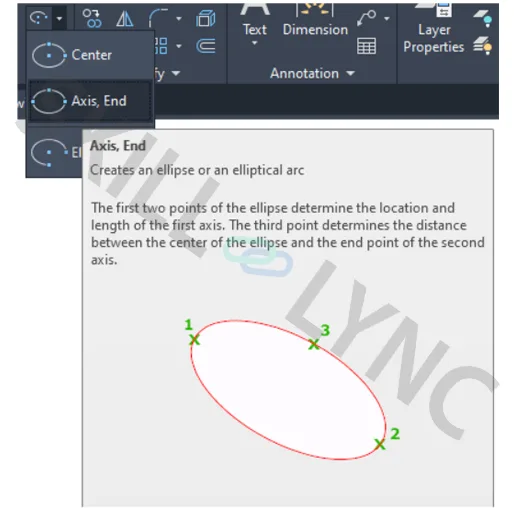
Axis, End
- It is created by specifying the first and the second point which determines the location and length of the first axis. And the third point determines the center of the ellipse as well as the endpoint of the second axis
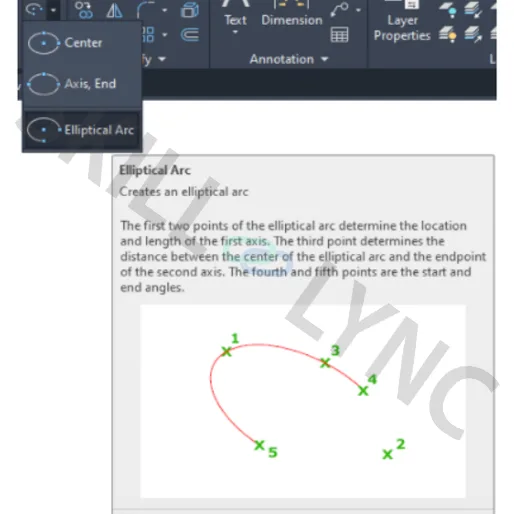
Elliptical Arc
- It is created by specifying the first and the second point, which determines the location and length of the first axis, and the third point determines the centre of the ellipse and also the endpoint of the second axis. The fourth and fifth are start and endpoints, respectively.